|

-
Mar 27th, 2014, 03:11 AM
#1
Thread Starter
Member

BackgroundWorker problem
Odd question and hopefully easy answer
I am trying to loop through a collection and download a set of files but because
each download is using the same backgroundworker I am running into a problem with collisions and
other stuff 
When I click the button I get this error
An unhandled exception of type 'System.InvalidOperationException' occurred in System.dll
Additional information: This BackgroundWorker is currently busy and cannot run multiple tasks concurrently.
If only one file is missing it seems to download it ok. But if more than one file is missing it errors.
I need help figuring out how to delay the next download until the one before it is done and still update the progress bar.
I'm guessing [with my SO limited knowledge of VB] that because I am running a backgroundworker and it's set to async that I
somekind of way to run the worker then end it before starting the next. But how is totally eluding me.
I have a form called DLForm
5 Labels
1 RichTextBox
1 ProgressBar
1 Button
1 BackgroundWorker
1 Timer
Code:
Imports System.Net
Imports System.IO
'Imports Ionic.Zip
Imports System.Runtime.InteropServices
Public Class DLForm
#Region " Functions and Constants "
    <DllImport("user32.dll")> _
    Public Shared Function ReleaseCapture() As Boolean
    End Function
    <DllImport("user32.dll")> _
    Public Shared Function SendMessage(ByVal hWnd As IntPtr, ByVal Msg As Integer, ByVal wParam As Integer, ByVal lParam As Integer) As Integer
    End Function
    Public Const WM_NCLBUTTONDOWN As Integer = &HA1
    Public Const HTBORDER As Integer = 18
    Public Const HTBOTTOM As Integer = 15
    Public Const HTBOTTOMLEFT As Integer = 16
    Public Const HTBOTTOMRIGHT As Integer = 17
    Public Const HTCAPTION As Integer = 2
    Public Const HTLEFT As Integer = 10
    Public Const HTRIGHT As Integer = 11
    Public Const HTTOP As Integer = 12
    Public Const HTTOPLEFT As Integer = 13
    Public Const HTTOPRIGHT As Integer = 14
#End Region
#Region " Moving & Resizing methods "
    Public Sub MoveForm()
        ReleaseCapture()
        SendMessage(Me.Handle, WM_NCLBUTTONDOWN, HTCAPTION, 0)
    End Sub
#End Region
    Private Sub SavePosition(ByVal frm As Form, ByVal app_name As String)
        SaveSetting(app_name, "Geometry", "WindowState", frm.WindowState)
        If frm.WindowState = FormWindowState.Normal Then
            SaveSetting(app_name, "Geometry", "Left", frm.Left)
            SaveSetting(app_name, "Geometry", "Top", frm.Top)
            SaveSetting(app_name, "Geometry", "Width", frm.Width)
            SaveSetting(app_name, "Geometry", "Height", frm.Height)
        Else
            SaveSetting(app_name, "Geometry", "Left", frm.RestoreBounds.Left)
            SaveSetting(app_name, "Geometry", "Top", frm.RestoreBounds.Top)
            SaveSetting(app_name, "Geometry", "Width", frm.RestoreBounds.Width)
            SaveSetting(app_name, "Geometry", "Height", frm.RestoreBounds.Height)
        End If
    End Sub
    Private Sub RestorePosition(ByVal frm As Form, ByVal app_name As String)
        frm.SetBounds( _
            GetSetting(app_name, "Geometry", "Left", Me.RestoreBounds.Left), _
            GetSetting(app_name, "Geometry", "Top", Me.RestoreBounds.Top), _
            GetSetting(app_name, "Geometry", "Width", Me.RestoreBounds.Width), _
            GetSetting(app_name, "Geometry", "Height", Me.RestoreBounds.Height) _
        )
        Me.WindowState = GetSetting(app_name, "Geometry", "WindowState", Me.WindowState)
    End Sub
    Public link As String
    Public Filename As String
    Public FilenameGP As String
    Public FilenameIDE As String
    Public FilenameMHV As String
    Private Sub DLForm_Load(ByVal sender As System.Object, ByVal e As System.EventArgs) Handles MyBase.Load
        RestorePosition(Me, "DL4")
        Label5.Visible = False
    End Sub
    Private Sub DLForm_Closing(sender As Object, e As System.ComponentModel.CancelEventArgs) Handles MyBase.Closing
        SavePosition(Me, "DL4")
    End Sub
    Private Sub Downloader_DoWork(ByVal sender As System.Object, ByVal e As System.ComponentModel.DoWorkEventArgs) Handles BackgroundWorker.DoWork
        'mod this
        Filename = Label5.Text
        File.Delete("C:\Windows\Temp\MPNGTemp\" & Filename)
        If Filename = "GitPortable.zip" Then
            link = "http://www.sshcs.com/MPNG/ArduPilot-Arduino-1.0.3-windows.zip"
        End If
        If Filename = "ArduPilot-Arduino-1.0.3-windows.zip" Then
            link = "http://www.sshcs.com/MPNG/GitPortable.zip"
        End If
        If Filename = "MHV_AVR_Tools_20121007.exe" Then
            link = "http://firmware.diydrones.com/Tools/Arduino/MHV_AVR_Tools_20121007.exe"
        End If
        Try
            Dim size As Integer
            Dim wr As WebRequest
            wr = WebRequest.Create(link)
            Dim webr As WebResponse = wr.GetResponse
            size = webr.ContentLength
            size = size / 1024
            ProgressBar1.Maximum = size
            Label2.Text = size
            Dim wc As New WebClient
            wc.DownloadFile(link, "C:\Windows\Temp\MPNGTemp\" & Filename)
            RichTextBox1.AppendText("Finished downloading " & Filename & vbCrLf)
        Catch ex As Exception
        End Try
        Exit Sub
    End Sub
    Private Sub Timer1_Tick(ByVal sender As System.Object, ByVal e As System.EventArgs) Handles Timer1.Tick
        Filename = Label5.Text
        Dim amount As Integer
        Try
            If System.IO.File.Exists("C:\Windows\Temp\MPNGTemp\" & Filename) Then
                Dim o As New System.IO.FileInfo("C:\Windows\Temp\MPNGTemp\" & Filename)
                amount = o.Length
                amount = amount / 1024
                Label3.Text = amount
                ProgressBar1.Value = amount
            End If
        Catch ex As Exception
        End Try
    End Sub
    Private Sub Downloader_RunWorkerCompleted(ByVal sender As Object, ByVal e As System.ComponentModel.RunWorkerCompletedEventArgs) Handles BackgroundWorker.RunWorkerCompleted
        RichTextBox1.AppendText("Finished Downloading" & vbCrLf)
    End Sub

    Private Sub Button1_Click(sender As Object, e As EventArgs) Handles Button1.Click
        Dim colFiles As New Collection
        Dim intCtr As Integer
        colFiles.Add("GitPortable.zip")
        colFiles.Add("ArduPilot-Arduino-1.0.3-windows.zip")
        colFiles.Add("MHV_AVR_Tools_20121007.exe")

        For intCtr = 1 To colFiles.Count
				Label5.Text = colFiles(intCtr)
            If System.IO.File.Exists("C:\Windows\Temp\MPNGTemp\" & colFiles(intCtr)) Then
                'already there so skip download
                RichTextBox1.AppendText(colFiles(intCtr) & " Already exists so skipping" & vbCrLf)
            Else
                Label5.Text = colFiles(intCtr)
                RichTextBox1.AppendText(colFiles(intCtr) & " does not exist so downloading" & vbCrLf)
                Control.CheckForIllegalCrossThreadCalls = False
                Timer1.Start()
                BackgroundWorker.RunWorkerAsync()
            End If
        Next intCtr
    End Sub
End Class
-
Mar 27th, 2014, 03:38 AM
#2
Re: BackgroundWorker problem
For future reference, please only post RELEVANT code because everything else just clouds the issue. You ask a question about downloading files using a BackgroundWorker and we have to wade through irrelevant stuff about resizing and persisting size information and unmanaged that we don't care about. If you make it harder for us to help then it's a waste of our time and makes it less likely that you'll get the help you want, so everybody loses.
Anyway, a BackgroundWorker can only run once at a time. Either check the IsBusy property first to make sure that you don't try to run it more than once at a time or else find another way to implement your multi-threading so that you can perform multiple background tasks at the same time, e.g. Task or ThreadPool.
Also, get rid of that line that sets CheckForIllegalCrossThreadCalls to False and NEVER do that again. That defeats the purpose of the BackgroundWorker in the first place. Follow the CodeBank link in my signature below and check out my thread on Using The BackgroundWorker to learn how to use it properly. DO NOT do anything related to the UI in the DoWork event handler. Anything that touches the UI gets done in the ProgressChanged or RunWorkerCompleted event handler. That's why the BackgroundWorker exists.
-
Mar 27th, 2014, 06:56 AM
#3
Addicted Member
Re: BackgroundWorker problem
VS 2012 has new features to make what you are trying to do as simple as apple pie
Async and Await
I just posted code that is fully asynchronous and downloads multiple files while looping through a regular expression match collection and updates the UI all without using a bacgroundworker or using mutli-threading.
I think you could accomplish what you want to do by replacing the BacgroundWorker.RunWorkerAsync and calling the code below instead. .
I haven't tested it but I only changed 2 things from your original code.
vb.net Code:
Private Async Sub NoMoreBlastedBackgroundWorker()
        'mod this
        FileName = Label5.Text
        File.Delete("C:\Windows\Temp\MPNGTemp\" & FileName)
        If FileName = "GitPortable.zip" Then
            link = "http://www.sshcs.com/MPNG/ArduPilot-Arduino-1.0.3-windows.zip"
        End If
        If FileName = "ArduPilot-Arduino-1.0.3-windows.zip" Then
            link = "http://www.sshcs.com/MPNG/GitPortable.zip"
        End If
        If FileName = "MHV_AVR_Tools_20121007.exe" Then
            link = "http://firmware.diydrones.com/Tools/Arduino/MHV_AVR_Tools_20121007.exe"
        End If
        Try
            Dim size As Integer
            Dim wr As WebRequest
            wr = WebRequest.Create(link)
            ' Async response.
            Dim webr As WebResponse = Await wr.GetResponseAsync
            size = webr.ContentLength
            size = size / 1024
            ProgressBar1.Maximum = size
            Label2.Text = size
            Dim wc As New WebClient
            'Async downloading file.  Simple as pie!
            Await wc.DownloadFileTaskAsync(link, "C:\Windows\Temp\MPNGTemp\" & FileName)
            RichTextBox1.AppendText("Finished downloading " & FileName & vbCrLf)
        Catch ex As Exception
        End Try
     End Sub
-
Mar 27th, 2014, 05:29 PM
#4
Thread Starter
Member
Re: BackgroundWorker problem
 Originally Posted by jmcilhinney

For future reference, please only post RELEVANT code because everything else just clouds the issue. You ask a question about downloading files using a BackgroundWorker and we have to wade through irrelevant stuff about resizing and persisting size information and unmanaged that we don't care about. If you make it harder for us to help then it's a waste of our time and makes it less likely that you'll get the help you want, so everybody loses.
Anyway, a BackgroundWorker can only run once at a time. Either check the IsBusy property first to make sure that you don't try to run it more than once at a time or else find another way to implement your multi-threading so that you can perform multiple background tasks at the same time, e.g. Task or ThreadPool.
Also, get rid of that line that sets CheckForIllegalCrossThreadCalls to False and NEVER do that again. That defeats the purpose of the BackgroundWorker in the first place. Follow the CodeBank link in my signature below and check out my thread on Using The BackgroundWorker to learn how to use it properly. DO NOT do anything related to the UI in the DoWork event handler. Anything that touches the UI gets done in the ProgressChanged or RunWorkerCompleted event handler. That's why the BackgroundWorker exists.
Sorry
The problem [for me at least] is I don't WANT it to run all 3 at once. I want it to run one, and when it's complete then run the next, and when that is completed run the final one.
I will look into the IsBusy event and see if that will do what I need.
thanks for taking the time to set me straight on a few key aspects of the question.
-
Mar 27th, 2014, 05:38 PM
#5
Thread Starter
Member
Re: BackgroundWorker problem
Originally Posted by OICU812
VS 2012 has new features to make what you are trying to do as simple as apple pie
Async and Await
I just posted code that is fully asynchronous and downloads multiple files while looping through a regular expression match collection and updates the UI all without using a bacgroundworker or using mutli-threading.
I think you could accomplish what you want to do by replacing the BacgroundWorker.RunWorkerAsync and calling the code below instead. .
I haven't tested it but I only changed 2 things from your original code.
vb.net Code:
Private Async Sub NoMoreBlastedBackgroundWorker() 'mod this FileName = Label5.Text File.Delete("C:\Windows\Temp\MPNGTemp\" & FileName) If FileName = "GitPortable.zip" Then link = "http://www.sshcs.com/MPNG/ArduPilot-Arduino-1.0.3-windows.zip" End If If FileName = "ArduPilot-Arduino-1.0.3-windows.zip" Then link = "http://www.sshcs.com/MPNG/GitPortable.zip" End If If FileName = "MHV_AVR_Tools_20121007.exe" Then link = "http://firmware.diydrones.com/Tools/Arduino/MHV_AVR_Tools_20121007.exe" End If Try Dim size As Integer Dim wr As WebRequest wr = WebRequest.Create(link) ' Async response. Dim webr As WebResponse = Await wr.GetResponseAsync size = webr.ContentLength size = size / 1024 ProgressBar1.Maximum = size Label2.Text = size Dim wc As New WebClient 'Async downloading file. Simple as pie! Await wc.DownloadFileTaskAsync(link, "C:\Windows\Temp\MPNGTemp\" & FileName) RichTextBox1.AppendText("Finished downloading " & FileName & vbCrLf) Catch ex As Exception End Try End Sub
I'm guessing you are doing this against a different version of .NET
I need to target this for 3.5 or lower, because as sucky as it is, quite a few peeps still run XP.
When I added that I get a ton of errors I read your other post and if it wasn't for the need to support XP it looks EXACTLY like what I need 
sigh. Back to seeing if IsBusy can do what I need.
Thanks for taking the time to respond.
-
Mar 27th, 2014, 05:49 PM
#6
Re: BackgroundWorker problem
Originally Posted by thequestor
Sorry
The problem [for me at least] is I don't WANT it to run all 3 at once. I want it to run one, and when it's complete then run the next, and when that is completed run the final one.
I will look into the IsBusy event and see if that will do what I need.
thanks for taking the time to set me straight on a few key aspects of the question.
Are you saying that you want the first download done on the first click, the second on the second and the third on the third, or that you want all three done on the one click, one after the other?
-
Mar 27th, 2014, 05:56 PM
#7
Thread Starter
Member
Re: BackgroundWorker problem
Originally Posted by jmcilhinney
Are you saying that you want the first download done on the first click, the second on the second and the third on the third, or that you want all three done on the one click, one after the other?
all 3 one after the other on a single click. I don't have an issue with it if I do it one by one [ie a click for each].
-
Mar 27th, 2014, 06:23 PM
#8
Re: BackgroundWorker problem
Originally Posted by thequestor
all 3 one after the other on a single click. I don't have an issue with it if I do it one by one [ie a click for each].
Then write a method that downloads a file and call it three times from the DoWork event handler. It's that simple. Download one file, then download the second and then download the third.
-
Mar 27th, 2014, 07:41 PM
#9
Thread Starter
Member
Re: BackgroundWorker problem
Originally Posted by jmcilhinney
Then write a method that downloads a file and call it three times from the DoWork event handler. It's that simple. Download one file, then download the second and then download the third.
That's what I thought I already did which is the reason I came here asking.
-
Mar 27th, 2014, 07:54 PM
#10
Re: BackgroundWorker problem
Originally Posted by thequestor
That's what I thought I already did which is the reason I came here asking.
Look at this from your DoWork event handler:
Code:
        If Filename = "GitPortable.zip" Then
            link = "http://www.sshcs.com/MPNG/ArduPilot-Arduino-1.0.3-windows.zip"
        End If
        If Filename = "ArduPilot-Arduino-1.0.3-windows.zip" Then
            link = "http://www.sshcs.com/MPNG/GitPortable.zip"
        End If
        If Filename = "MHV_AVR_Tools_20121007.exe" Then
            link = "http://firmware.diydrones.com/Tools/Arduino/MHV_AVR_Tools_20121007.exe"
        End If
Filename can't be all three of those values can it? It can only have one value at a time so your code is only going to download one file at a time.
-
Mar 27th, 2014, 08:24 PM
#11
Thread Starter
Member
Re: BackgroundWorker problem
I "thought" I could just make a collection and just loop through them, like I do with arrays, one at a time, but because, I guess, they are running async it is running all 3 without waiting for the 1st loop to finish. I haven't found a way to do it synchronous.
I pretty much was hoping it would be able to run the 1st loop and finish then run the 2nd loop and finish and finally the last loop.
I mean I guess I could somehow chain them but I was trying out just using one bit of code to do all 3 things
-
Mar 27th, 2014, 08:37 PM
#12
Re: BackgroundWorker problem
You can use a loop. There is only one secondary thread so only one file can be downloaded at a time. Do exactly what you just said and it will work.
-
Mar 27th, 2014, 08:58 PM
#13
Thread Starter
Member
Re: BackgroundWorker problem
Originally Posted by jmcilhinney
You can use a loop. There is only one secondary thread so only one file can be downloaded at a time. Do exactly what you just said and it will work.
How would I go about doing so with this sub?
Code:
Public Sub CallWorker()
        Dim colFiles As New Collection
        Dim intCtr As Integer
'the collection
        colFiles.Add("GitPortable.zip")
        colFiles.Add("ArduPilot-Arduino-1.0.3-windows.zip")
        colFiles.Add("MHV_AVR_Tools_20121007.exe")
'the loop
        For intCtr = 1 To colFiles.Count

            If System.IO.File.Exists("C:\Windows\Temp\MPNGTemp\" & colFiles(intCtr)) Then
                RichTextBox1.AppendText(colFiles(intCtr) & " Already exists so skipping" & vbCrLf)
            Else
                Label5.Text = colFiles(intCtr)
                RichTextBox1.AppendText(colFiles(intCtr) & " does not exist so downloading" & vbCrLf)
                'Control.CheckForIllegalCrossThreadCalls = False
'starts the progress bar
                Timer1.Start()
'starts the download sub
                BackgroundWorker.RunWorkerAsync()
            End If
'end of loop
        Next intCtr
    End Sub
That is the loop I am using to call the backgroundworker.
And it is calling this as the background worker
Code:
Private Sub Downloader_DoWork(ByVal sender As System.Object, ByVal e As System.ComponentModel.DoWorkEventArgs) Handles BackgroundWorker.DoWork
        'mod this
        Filename = Label5.Text
        File.Delete("C:\Windows\Temp\MPNGTemp\" & Filename)
        If Filename = "ArduPilot-Arduino-1.0.3-windows.zip" Then
            link = "http://www.sshcs.com/MPNG/ArduPilot-Arduino-1.0.3-windows.zip"
        ElseIf Filename = "GitPortable.zip" Then
            link = "http://www.sshcs.com/MPNG/GitPortable.zip"
        ElseIf Filename = "MHV_AVR_Tools_20121007.exe" Then
            link = "http://firmware.diydrones.com/Tools/Arduino/MHV_AVR_Tools_20121007.exe"
        ElseIf Filename = "" Then
            MsgBox("Error No File Passed")
        End If

        Try
            Dim size As Integer
            Dim wr As WebRequest
            wr = WebRequest.Create(link)
            Dim webr As WebResponse = wr.GetResponse
            size = webr.ContentLength
            size = size / 1024
            ProgressBar1.Maximum = size
            Label2.Text = size
            Dim wc As New WebClient
            wc.DownloadFile(link, "C:\Windows\Temp\MPNGTemp\" & Filename)
            RichTextBox1.AppendText("Finished downloading " & Filename & vbCrLf)
        Catch ex As Exception
        End Try
        Exit Sub
Each by themselves work fine and both work fine together if say 2 of the files are already there [it doesn't matter which 2]
How do I call a backgroundworker and halt any further execution of the sub until the initial loop finishes running and then running the 2nd loop and when it's done run the last loop?
-
Mar 27th, 2014, 09:07 PM
#14
Thread Starter
Member
Re: BackgroundWorker problem
I thought I was onto something
Code:
Public Sub CallWorker()
        Dim colFiles As New Collection
        Dim intCtr As Integer
        colFiles.Add("GitPortable.zip")
        colFiles.Add("ArduPilot-Arduino-1.0.3-windows.zip")
        colFiles.Add("MHV_AVR_Tools_20121007.exe")

        For intCtr = 1 To colFiles.Count

            If System.IO.File.Exists("C:\Windows\Temp\MPNGTemp\" & colFiles(intCtr)) Then
                RichTextBox1.AppendText(colFiles(intCtr) & " Already exists so skipping" & vbCrLf)
            Else
                Label5.Text = colFiles(intCtr)
                RichTextBox1.AppendText(colFiles(intCtr) & " does not exist so downloading" & vbCrLf)
                'Control.CheckForIllegalCrossThreadCalls = False
                Timer1.Start()
                'BackgroundWorker.RunWorkerAsync()
                Try
                    'Start background worker
                    BackgroundWorker.RunWorkerAsync()
                    While BackgroundWorker.IsBusy()
                        Windows.Forms.Application.DoEvents()
                    End While

                    'Voila, we are back in sync
                    RichTextBox1.AppendText("Success!" & vbCrLf)
                Catch ex As Exception
                    'MsgBox("Oops!" & vbCrLf & ex.Message)
                End Try
            End If
        Next intCtr
and while it does seem to do "something" it doesn't actually download anything lol
-
Mar 27th, 2014, 09:12 PM
#15
Re: BackgroundWorker problem
Get rid of that CallWorker method entirely. When the user clicks the Button, just call RunWorkerAsync and that's it. Now, in the DoWork event handler, create your list of URLs and loop through it. Done!
As I have already said, DO NOT touch any controls in the DoWork event handler. If you want to update the UI then do so ONLY in the ProgressChanged and/or RunWorkerCompleted event handler.
-
Mar 27th, 2014, 09:31 PM
#16
Thread Starter
Member
Re: BackgroundWorker problem
Originally Posted by jmcilhinney
Get rid of that CallWorker method entirely. When the user clicks the Button, just call RunWorkerAsync and that's it. Now, in the DoWork event handler, create your list of URLs and loop through it. Done!
As I have already said, DO NOT touch any controls in the DoWork event handler. If you want to update the UI then do so ONLY in the ProgressChanged and/or RunWorkerCompleted event handler.
I kind of get what you're saying, but in doing that I lose my working progress bar and bytes and size on my form no?
-
Mar 27th, 2014, 09:35 PM
#17
Re: BackgroundWorker problem
Originally Posted by thequestor
I kind of get what you're saying, but in doing that I lose my working progress bar and bytes and size on my form no?
Um, no.
-
Mar 27th, 2014, 11:15 PM
#18
Thread Starter
Member
Re: BackgroundWorker problem
I'm giving up
I removed callworker
I moved my loop into downloader_dowork
but as I thought I had to remove everything that would update my progressbar and labels [like you said remove gui stuff] else it errors like mad
I ended up with this
Code:
Private Sub Downloader_DoWork(ByVal sender As System.Object, ByVal e As System.ComponentModel.DoWorkEventArgs) Handles BackgroundWorker.DoWork

        Dim colFiles As New Collection
        Dim intCtr As Integer
        colFiles.Add("GitPortable.zip")
        colFiles.Add("ArduPilot-Arduino-1.0.3-windows.zip")
        colFiles.Add("MHV_AVR_Tools_20121007.exe")

        For intCtr = 1 To colFiles.Count

            If System.IO.File.Exists("C:\Windows\Temp\MPNGTemp\" & colFiles(intCtr)) Then
                'RichTextBox1.AppendText(colFiles(intCtr) & " Already exists so skipping" & vbCrLf)
            Else
                'Label5.Text = colFiles(intCtr)
                'RichTextBox1.AppendText(colFiles(intCtr) & " does not exist so downloading" & vbCrLf)
                'Timer1.Start()
                Filename = colFiles(intCtr)


                If Filename = "ArduPilot-Arduino-1.0.3-windows.zip" Then
                    link = "http://www.sshcs.com/MPNG/ArduPilot-Arduino-1.0.3-windows.zip"
                ElseIf Filename = "GitPortable.zip" Then
                    link = "http://www.sshcs.com/MPNG/GitPortable.zip"
                ElseIf Filename = "MHV_AVR_Tools_20121007.exe" Then
                    link = "http://firmware.diydrones.com/Tools/Arduino/MHV_AVR_Tools_20121007.exe"
                ElseIf Filename = "" Then
                    MsgBox("Error No File Passed")
                End If
                File.Delete("C:\Windows\Temp\MPNGTemp\" & Filename)
                Try
                    Dim size As Integer
                    Dim wr As WebRequest
                    wr = WebRequest.Create(link)
                    Dim webr As WebResponse = wr.GetResponse
                    size = webr.ContentLength
                    size = size / 1024
                    'ProgressBar1.Maximum = size
                    'Label2.Text = size
                    Dim wc As New WebClient
                    wc.DownloadFile(link, "C:\Windows\Temp\MPNGTemp\" & Filename)
                    'RichTextBox1.AppendText("Finished downloading " & Filename & vbCrLf)
                Catch ex As Exception

                End Try
            End If
        Next intCtr
        Exit Sub
    End Sub
and it "does" download each file and skips any that are already there but like I said above I lose my progress bar and labels updating and
at the end it tosses an error that says I have to remove my just in time debugger to see the error but what I seem to see is it is a crossthreading issue.
sigh.
I'm just going to run 3 routines to do this.
-
Mar 28th, 2014, 01:09 AM
#19
Addicted Member
Re: BackgroundWorker problem
Sorry my other suggestion didn't work for you since you're trying to support XP
I wrote a little test code that runs a loop and calls a method that creates a new Backgroundworker each time.
All of the event handlers for the BackgroundWorker are self contained in the DoWorkAsync method.
Try it and see if it might help you create what you want.
Add a Form to the project and 1 Button and a RichTextBox to the form

vb.net Code:
Imports System.ComponentModel
Public Class Form1
     Private _cancelToken As Boolean
     Private Sub Button1_Click(sender As Object, e As EventArgs) Handles Button1.Click
        Me.RichTextBox1.Clear()
        _cancelToken = False
        For i = 1 To 10
            Dim name = "Thread " & i.ToString
            DoWorkAsync(name)
        Next
    End Sub
     ' Create any parameters needed to download your file.
    Private Sub DoWorkAsync(threadName As String)
         ' fresh new BackgroundWorker is created each time.
        Dim worker As New BackgroundWorker
        worker.WorkerReportsProgress = True
         AddHandler worker.DoWork,
            Sub(s, e)
                        ' do not access UI controls or update UI
                        ' controls from within worker.DoWork
                        Dim w = DirectCast(s, BackgroundWorker)
                         'Dim wc As New System.Net.WebClient
                        'wc.DownloadFile("someinternetaddress", "someFileName")
                         For i = 1 To 10
                            'If _cancelToken = true Then
                            '    Exit For
                            'Else
                            Threading.Thread.Sleep(500) 'simulate long running task.
                            w.ReportProgress(i * 10)
                            'End If
                        Next
                    End Sub
         AddHandler worker.ProgressChanged,
            Sub(s, e)
                        ' Safe to update UI from here.
                        Me.RichTextBox1.AppendText(threadName & " is at " & e.ProgressPercentage & "%." & Environment.NewLine)
                    End Sub
         AddHandler worker.RunWorkerCompleted,
            Sub(s, e)
                        ' Safe to update UI from here.
                        Me.RichTextBox1.AppendText(threadName & " RunWorkercompleted!" & Environment.NewLine)
                    End Sub
         ' Start the asynchrouous operation.
        worker.RunWorkerAsync()
      End Sub
 End Class
Sigh... I just read that you dont want the downloads to run concurrent.
Edit:
Ok I just reconfigured the code to use an Queue to fire each BackgroundWorker successive order.
Edited and removed the use of the Tuple
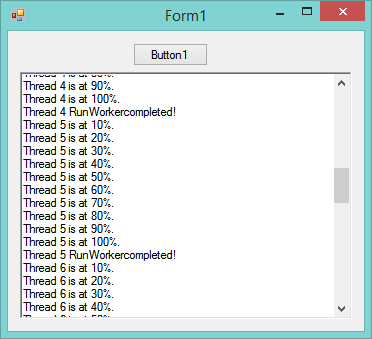
vb.net Code:
Imports System.ComponentModel
Public Class Form1
     Private _cancelToken As Boolean
    Private _actionQueue As New Queue(Of Action)
    Private Sub Button1_Click(sender As Object, e As EventArgs) Handles Button1.Click
        If Me._actionQueue.Count > 0 Then Exit Sub
        Me.RichTextBox1.Clear()
        Me._actionQueue.Clear()
        _cancelToken = False
        For i = 1 To 10
            Dim name = "Thread " & i.ToString
            ' Create an action and place it in the queue
            _actionQueue.Enqueue(CreateWorkerItem(name))
        Next
        ' Dequeue the Action and invoke it.
        _actionQueue.Dequeue().Invoke()
    End Sub
     ' Create any parameters needed to download your file.
    Private Function CreateWorkerItem(threadName As String) As Action
         Dim myAction = New Action(
            Sub()
                 ' fresh new BackgroundWorker is created each time.
                Dim worker As New BackgroundWorker
                worker.WorkerReportsProgress = True
                worker.WorkerSupportsCancellation = True
                AddHandler worker.DoWork,
                    Sub(s, e)
                        ' do not access UI controls or update UI
                        ' controls from within worker.DoWork
                        Dim w = DirectCast(s, BackgroundWorker)
                         'Dim wc As New System.Net.WebClient
                        'wc.DownloadFile("someinternetaddress", "someFileName")
                         For i = 1 To 10
                            'If _cancelToken = True Then
                            '    w.CancelAsync()
                            'Else
                            Threading.Thread.Sleep(100) 'simulate long running task.
                            'If _cancelToken = True Then w.CancelAsync()
                            w.ReportProgress(i * 10)
                            'End If
                        Next
                    End Sub
                 AddHandler worker.ProgressChanged,
                    Sub(s, e)
                        ' Safe to update UI from here.
                        Me.RichTextBox1.AppendText(threadName & " is at " & e.ProgressPercentage & "%." & Environment.NewLine)
                        Me.RichTextBox1.ScrollToCaret()
                    End Sub
                 AddHandler worker.RunWorkerCompleted,
                    Sub(s, e)
                        ' Safe to update UI from here.
                         Me.RichTextBox1.AppendText(threadName & " RunWorkercompleted!" & Environment.NewLine)
                        Me.RichTextBox1.ScrollToCaret()
                        ' Dequeue the next item in the queue.
                        If _actionQueue.Count > 0 Then
                            _actionQueue.Dequeue().Invoke()
                        Else
                            _actionQueue.Clear()
                        End If
                     End Sub
                 ' Start the asynchrouous operation.
                worker.RunWorkerAsync()
             End Sub)
         ' Return a tuple to hold the Action and the ThreadName parameter.
        Return myAction
     End Function
 End Class
Last edited by OICU812; Mar 28th, 2014 at 04:50 PM.
-
Mar 28th, 2014, 10:16 AM
#20
Addicted Member
Re: BackgroundWorker problem
I see in your last code where you did like jmcilhinney suggested and loop inside the DoWork event that you would never be able to update your labels until the very end when the BackGroundWorker fires the RunWorkerCompleted event. However, you probably could pass whatever information between each loop to the reportProgress UserState object and work out the messages for the labels in the ProgressChanged event.
My Last post above here could be simplified and not have to used the Tuple or have to carry the arguments with the Queue. All it needs to be is a Queue(of Action). It works pretty slick, I never messed with programming this way but I learned something new in the process.
-
Mar 28th, 2014, 01:50 PM
#21
Re: BackgroundWorker problem
A more simpler if thats to confusing
vb Code:
Imports System.Net
 Public Class MainForm
     Private ReadOnly temp As String = "http://download.piriform.com/ccsetup327.exe"
    Private m_dictionary As New Dictionary(Of WebClient, String)
     Private Sub Download(ByVal Path As String, ByVal FileName As String)
        Dim client As New WebClient
        Dim file As String = IO.Path.Combine(Path, FileName)
         AddHandler client.DownloadProgressChanged, AddressOf DownloadProgressChanged
        AddHandler client.DownloadFileCompleted, AddressOf DownloadFileCompleted
         client.DownloadFileAsync(New Uri(temp), file)
        Me.m_dictionary.Add(client, file)
    End Sub
     Private Sub DownloadProgressChanged(ByVal sender As Object, ByVal e As DownloadProgressChangedEventArgs)
        Dim file As String = m_dictionary.Item(CType(sender, WebClient))
        Me.RichTextBox1.AppendText(String.Format("File {0} {1}{2}", file, e.ProgressPercentage & "%", vbNewLine))
        Me.RichTextBox1.ScrollToCaret()
    End Sub
     Private Sub DownloadFileCompleted(ByVal sender As Object, _
                                                       ByVal e As System.ComponentModel.AsyncCompletedEventArgs)
        Dim client As WebClient = DirectCast(sender, WebClient)
        client.Dispose()
        m_dictionary.Remove(client)
    End Sub
 End Class
-
Mar 28th, 2014, 03:47 PM
#22
Addicted Member
Re: BackgroundWorker problem
Originally Posted by ident
A more simpler if thats to confusing
vb Code:
Imports System.Net
Public Class MainForm
Private ReadOnly temp As String = "http://download.piriform.com/ccsetup327.exe"
Private m_dictionary As New Dictionary(Of WebClient, String)
Private Sub Download(ByVal Path As String, ByVal FileName As String)
Dim client As New WebClient
Dim file As String = IO.Path.Combine(Path, FileName)
AddHandler client.DownloadProgressChanged, AddressOf DownloadProgressChanged
AddHandler client.DownloadFileCompleted, AddressOf DownloadFileCompleted
client.DownloadFileAsync(New Uri(temp), file)
Me.m_dictionary.Add(client, file)
End Sub
Private Sub DownloadProgressChanged(ByVal sender As Object, ByVal e As DownloadProgressChangedEventArgs)
Dim file As String = m_dictionary.Item(CType(sender, WebClient))
Me.RichTextBox1.AppendText(String.Format("File {0} {1}{2}", file, e.ProgressPercentage & "%", vbNewLine))
Me.RichTextBox1.ScrollToCaret()
End Sub
Private Sub DownloadFileCompleted(ByVal sender As Object, _
ByVal e As System.ComponentModel.AsyncCompletedEventArgs)
Dim client As WebClient = DirectCast(sender, WebClient)
client.Dispose()
m_dictionary.Remove(client)
End Sub
End Class
Don't forget to call RemoveHandler for each WebClient or otherwise they will not get G.C.'d
-
Mar 28th, 2014, 03:50 PM
#23
Re: BackgroundWorker problem
Of course, but also i should be using the "using statement". I can't write the whole project for them. I also never include try catch in my examples.
Tags for this Thread
 Posting Permissions
- You may not post new threads
- You may not post replies
- You may not post attachments
- You may not edit your posts
-
Forum Rules
|
Click Here to Expand Forum to Full Width
|



 Reply With Quote


