|

-
Mar 22nd, 2014, 05:02 PM
#1
Thread Starter
Lively Member

Need help retrieving info from website
Hey
So here's the thing. Im a newbie at visual basic, and i need help retrieving info from a website via webbrowser1.
So this is the website: http://www.finn.no/finn/car/used/result?periode=1
Here's a picture that pretty much sums up what i need help with:
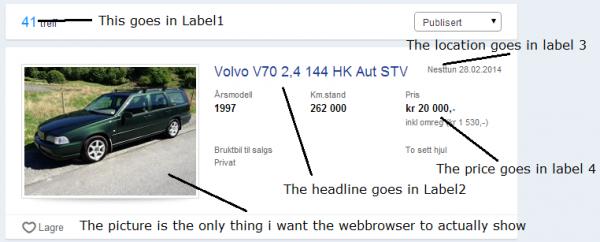
Normaly i would manage this myself, but since the coding of the site isn't as simple as i am used to, i am unable to do this.
I've tried the normal "WebBrowser1.getElementById("ID OF ELEMENT").getAttribute("value")", but ofcorse it doesn't work.
Would anyone please code it for me, and try to explain the code? (Explain it so i can learn how to do it myself, instead of just having you guys code it for me).
Thanks in advance
-
Mar 22nd, 2014, 11:45 PM
#2
Fanatic Member
Re: Need help retrieving info from website
Hi,
the page does have tags on each of these points for eg <div data-automation-id="field3" class="strong sharp"> is just before the price.
there are many ways to go about this, you can either read the whole document into a string and then search for the bits you want in code or you can put all the elements into a HTMLElementCollection and then go through each one to see if it has the field and is a div tag
the other way would be to get a HTMLElementCollection from document.gettagbyname and use the div option.
My CodeBank Submissions
- Listbox with transparency and picture support - Click Here
- Check for a true internet connection - Click Here
- Open Cash drawer connected to receipt printer - Click Here
- Custom color and size border around form - Click Here
- Upload file to website without user logins, includes PHP - Click Here
- List All Removable USB Storage Devices - Click Here
- Custom On/Off Slide Control - Click Here
- Insert multiple rows of data into one database table using parameters - Click Here
- Trigger USB/Serial Cash Drawer - Click Here
-
Mar 22nd, 2014, 11:52 PM
#3
Fanatic Member
Re: Need help retrieving info from website
here is a sample i put together just now that will get you started
Code:
  Dim url As String
        'set url
        url = "http://www.finn.no/finn/car/used/result?periode=1"
        WebBrowser1.Navigate(url)
        'wait for browser to be ready
        Do Until WebBrowser1.ReadyState = WebBrowserReadyState.Complete
            Application.DoEvents()
        Loop
        'pull all div tags
        Dim ee As HtmlElementCollection
        ee = WebBrowser1.Document.GetElementsByTagName("div")
        'look for the custom attribute
        For Each ss As HtmlElement In ee
            If ss.GetAttribute("data-automation-id").ToString = "field3" Then
                MsgBox(ss.InnerHtml)
                Exit For ' this is here so you dont get a heap of msgbox's
            End If
        Next
My CodeBank Submissions
- Listbox with transparency and picture support - Click Here
- Check for a true internet connection - Click Here
- Open Cash drawer connected to receipt printer - Click Here
- Custom color and size border around form - Click Here
- Upload file to website without user logins, includes PHP - Click Here
- List All Removable USB Storage Devices - Click Here
- Custom On/Off Slide Control - Click Here
- Insert multiple rows of data into one database table using parameters - Click Here
- Trigger USB/Serial Cash Drawer - Click Here
Tags for this Thread
 Posting Permissions
- You may not post new threads
- You may not post replies
- You may not post attachments
- You may not edit your posts
-
Forum Rules
|
Click Here to Expand Forum to Full Width
|



 Reply With Quote