|

-
Mar 6th, 2014, 04:13 PM
#1
Thread Starter
Lively Member

Excel VBA Code to Create New Sheets Upon New Entry In Field
Okay, so I need a macro that will add new sheets to a workbook when new names are added to the specified field.
The code below is one which I found online and it works for the purposes of creating sheets per entry in the field (column A), however, whenever I add more names to the list in column A, and try to run the code again, I get an error message (see below)

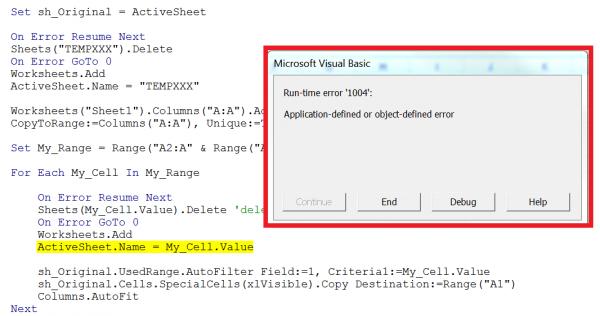
Code:
Public Sub Extraction_to_new_sheets()

    Dim My_Range As Range
    Dim My_Cell As Variant
    Dim sh_Original As Worksheet

    Application.DisplayAlerts = False
    Application.Calculation = xlCalculationManual
    Application.ScreenUpdating = False

    Set sh_Original = ActiveSheet

    On Error Resume Next
    Sheets("TEMPXXX").Delete
    On Error GoTo 0
    Worksheets.Add
    ActiveSheet.Name = "TEMPXXX"

    Worksheets("Sheet1").Columns("A:A").AdvancedFilter Action:=xlFilterCopy, _
    CopyToRange:=Columns("A:A"), Unique:=True

    Set My_Range = Range("A2:A" & Range("A65536").End(xlUp).Row)

    For Each My_Cell In My_Range

        On Error Resume Next
        Sheets(My_Cell.Value).Delete 'delete if already exists
        On Error GoTo 0
        Worksheets.Add
        ActiveSheet.Name = My_Cell.Value

        sh_Original.UsedRange.AutoFilter Field:=1, Criteria1:=My_Cell.Value
        sh_Original.Cells.SpecialCells(xlVisible).Copy Destination:=Range("A1")
        Columns.AutoFit
    Next

    Worksheets("TEMPXXX").Delete
    sh_Original.AutoFilterMode = False
    Set sh_Original = Nothing

    Application.DisplayAlerts = True
    Application.Calculation = xlAutomatic
    Application.ScreenUpdating = True

End Sub
-
Mar 7th, 2014, 06:44 AM
#2
Re: Excel VBA Code to Create New Sheets Upon New Entry In Field
the error probably indicates that you are again trying to add a sheet then giving the name of an existing sheet
you are first removing all sheets, but have no idea if they are all removed, as that code is masked by on error resume next
first REMOVE OERN, then if errors may occur, use proper methods to handle or eliminate errors
stop relying on the correct sheet being the active sheet
try like
Code:
set newsht = worksheets.add
newsht.name = my_cell.value
        sh_Original.UsedRange.AutoFilter Field:=1, Criteria1:=My_Cell.Value
        sh_Original.Cells.SpecialCells(xlVisible).Copy Destination:=newsht.Range("A1")
        newsht.Columns.AutoFit
i do my best to test code works before i post it, but sometimes am unable to do so for some reason, and usually say so if this is the case.
Note code snippets posted are just that and do not include error handling that is required in real world applications, but avoid On Error Resume Next
dim all variables as required as often i have done so elsewhere in my code but only posted the relevant part
come back and mark your original post as resolved if your problem is fixed 
pete
-
Mar 7th, 2014, 06:49 AM
#3
Lively Member
Re: Excel VBA Code to Create New Sheets Upon New Entry In Field
Maybe this, would stop you having to re-run the code.
THis code will not delete/re-create the sheet if it already exists. Unless you want it to do that?
Code:
Private Sub Worksheet_Change(ByVal Target As Range)
Dim ws As Worksheet
    If Target.Column = 1 Then
        For Each ws In ActiveWorkbook.Worksheets
            If LCase(ws.Name) = LCase(Target.Cells.Value) Then Exit Sub
        Next ws
            Worksheets.Add(after:=Worksheets(Worksheets.Count)).Name = Target.Cells.Value
    End If
End Sub
Last edited by wrightyrx7; Mar 7th, 2014 at 06:55 AM.
Tags for this Thread
 Posting Permissions
- You may not post new threads
- You may not post replies
- You may not post attachments
- You may not edit your posts
-
Forum Rules
|
Click Here to Expand Forum to Full Width
|



 Reply With Quote
