|

-
Mar 3rd, 2014, 03:12 PM
#1
Thread Starter
Junior Member

Inserting name in AxCalendar and displaying in textbox
I have added a AxCalendar in my Form1 and I placed beside it a textbox (textbox1). I also have a Form2 that has a textbox to input a name and a DateTimePicker box and an ok button at the bottom. What I am trying to figure out is how to when a name is typed in and a date has been selected, on the AxCalendar on Form1 when the date is clicked it displays that person's name in the textbox1 beside the calendar. Is this possible? I am using vb.net in Visual Studio 2010. Thanks!
-
Mar 3rd, 2014, 06:40 PM
#2
Re: Inserting name in AxCalendar and displaying in textbox
 Originally Posted by frontier6444

What I am trying to figure out is how to when a name is typed in and a date has been selected, on the AxCalendar on Form1 when the date is clicked it displays that person's name in the textbox1 beside the calendar.
This is a bit confusing. Do you want to pull the name from Form2's textbox every time a date is clicked on the AXCalendar and put that value into Form1's textbox? This is certainly doable. Since you are using an activeX calendar, it will be necessary for you to specify the DLL source for that calendar so that we can help select the correct event to use. Any reason not to use the .Net Calendar control?
-
Mar 3rd, 2014, 07:09 PM
#3
Thread Starter
Junior Member
Re: Inserting name in AxCalendar and displaying in textbox
I am trying to figure out how when a name typed in textbox1 on Form2 and a date is selected in the DateTimePicker box on Form2 that the name will show in textbox1 on Form1 when the date in AxCalendar is pressed. I.E. Form2 opens and I enter the name David and below it I select the date March 10, 2014 and click ok. On Form1 I click March 10, 2014 on the AxCalendar and in the textbox1 on Form1 will show David and every 10 business days his name will display on that date. So his name will show on March 10th and then again on March 24th and so on. Needing this to be able to add multiple names like in a list. Not sure how to see what dll source I am using or what I would need. Can you help me figure it out? I am new to trying to use a calendar and not sure what to look for and not sure what the .Net Calendar control is. Also....and this may not be able to happen....I have another form3 so can input days that need to be omitted. So if David's name shows on the 10th and I need the 12th omitted then instead of David showing on the 24th he will show on the 25th. Sorry for confusion on this and any help is greatly appreciated.
-
Mar 3rd, 2014, 07:23 PM
#4
Re: Inserting name in AxCalendar and displaying in textbox
Originally Posted by frontier6444
I am new to trying to use a calendar and not sure what to look for and not sure what the .Net Calendar control is.
The .Net calendar would be the default calendar in your toolbox.

I am beginning to suspect that you may be using VB6. Does your toolbox look similar to the one pictured?
Please specify which version of VB you are working in.
-
Mar 4th, 2014, 07:12 AM
#5
Thread Starter
Junior Member
Re: Inserting name in AxCalendar and displaying in textbox
I believe I am using VB10 and I did find the .Net Calendar and added it instead of the AxCalendar. How will it work in comparison to AxCalendar and can it do what I am looking for it to do?
-
Mar 4th, 2014, 08:41 AM
#6
Thread Starter
Junior Member
Re: Inserting name in AxCalendar and displaying in textbox
Here is what my Toolbox looks like:

-
Mar 4th, 2014, 11:12 AM
#7
Re: Inserting name in AxCalendar and displaying in textbox
Ok, at least we are now on the same page. Use the MonthCalendar from your toolbox instead of the AXCalendar.
I am not going to write all your logic for because that is not how this works. What I will do is give you an example Form2 that could be used to enter the information and then show you how to extract that information and which event to use for detecting the date selection on the MonthCalendar (if you have not figured that one out as it is quite obvious).
Form2:
Code:
Public Class Form2
   Inherits Form
    Friend WithEvents tbName As New System.Windows.Forms.TextBox
    Friend WithEvents dtpKeyDate As New System.Windows.Forms.DateTimePicker
    Friend WithEvents btnOk As New System.Windows.Forms.Button
    Friend WithEvents btnCancel As New System.Windows.Forms.Button

   Private Sub Form2_Load(ByVal sender As System.Object, ByVal e As System.EventArgs) Handles MyBase.Load
      SuspendLayout()
      ControlBox = False

      With tbName
         .Location = New System.Drawing.Point(41, 22)
         .Name = "tbName"
         .Size = New System.Drawing.Size(100, 20)
         .TabIndex = 0
      End With

      With dtpKeyDate
         .Location = New System.Drawing.Point(193, 22)
         .Name = "dtpKeyDate"
         .Size = New System.Drawing.Size(200, 20)
         .TabIndex = 1
      End With

      With btnOk
         .Location = New System.Drawing.Point(48, 114)
         .Name = "btnOk"
         .TabIndex = 2
         .Text = "OK"
      End With

      With btnCancel
         .Location = New System.Drawing.Point(237, 113)
         .Name = "btnCancel"
         .TabIndex = 3
         .Text = "Cancel"
      End With

      ClientSize = New System.Drawing.Size(400, 200)
      ControlBox = False
      Controls.Add(btnCancel)
      Controls.Add(btnOk)
      Controls.Add(dtpKeyDate)
      Controls.Add(tbName)
      Name = "Form2"
      Text = "Form2"
      ResumeLayout(False)
      PerformLayout()
   End Sub

   Friend Status As System.Windows.Forms.DialogResult = Windows.Forms.DialogResult.Cancel

   Private Sub btnOk_Click(ByVal sender As Object, ByVal e As System.EventArgs) Handles btnOk.Click
      Status = Windows.Forms.DialogResult.OK
      Me.Hide()
   End Sub

   Private Sub btnCancel_Click(ByVal sender As Object, ByVal e As System.EventArgs) Handles btnCancel.Click
      Me.Hide()
   End Sub
End Class
Now on Form1:
Code:
Public Class Form1
   Private Sub btnAddName_Click(ByVal sender As System.Object, ByVal e As System.EventArgs) Handles btnAddName.Click
      ' display the data entry form and check if the OK button was press using the Status field
      Using f As New Form2
         f.ShowDialog(Me)
         ' only extract the data if the OK button was pushed
         If f.Status = Windows.Forms.DialogResult.OK Then
            ' retrieve the values from Form2
            Dim name As String = f.tbName.Text.Trim()
            Dim dateEntered As DateTime = f.dtpKeyDate.Value.Date ' get rid of time component
            ' add these values to whatever data storage variable you are using
         End If
      End Using
   End Sub

   Private Sub MonthCalendar1_DateSelected(ByVal sender As Object, ByVal e As System.Windows.Forms.DateRangeEventArgs) Handles MonthCalendar1.DateSelected
      ' this code within this method will run each time a date in MonthCalendar1 is selected
       ' put your lookup logic here
   End Sub
End Class
-
Mar 4th, 2014, 12:35 PM
#8
Thread Starter
Junior Member
Re: Inserting name in AxCalendar and displaying in textbox
I think I was able to figure it out. I got where when I click the date the name does populate in the textbox1 on Form1 but if I click on other dates after the one I initially set is keeps putting the name in the textbox over and over. Is there a way to (1) Clear the list when clicking on a different date instead of it keep listing one right after another and (2) set it up where the person's name will automatically go in say every 10 days?
-
Mar 4th, 2014, 01:50 PM
#9
Thread Starter
Junior Member
Re: Inserting name in AxCalendar and displaying in textbox
Here is the code I have
Code:
    Private Sub TextBox3_TextChanged(ByVal sender As System.Object, ByVal e As System.EventArgs) Handles TextBox3.TextChanged
        If Form2.Status = Windows.Forms.DialogResult.OK Then
            Dim name As String = Form2.TextBox1.Text.Trim()
            Dim dateEntered As Date = Form2.DateTimePicker1.Value.Date
        End If

    End Sub


    Private Sub MonthCalendar1_DateSelected(ByVal sender As Object, ByVal e As System.Windows.Forms.DateRangeEventArgs) Handles MonthCalendar1.DateSelected
        TextBox3.AppendText(TextBox1.Text & TextBox2.Text & Environment.NewLine)

    End Sub

End Class
Last edited by frontier6444; Mar 4th, 2014 at 02:04 PM.
-
Mar 4th, 2014, 08:33 PM
#10
Re: Inserting name in AxCalendar and displaying in textbox
To be honest I do not understand what you are doing because in my opinion the code you posted is complete nonsense when I compare it to the sequence of events that you stated in post #3. I think I leave this to someone else who can hopefully understand what it is that you are trying to do.
-
Mar 4th, 2014, 09:58 PM
#11
Thread Starter
Junior Member
Re: Inserting name in AxCalendar and displaying in textbox
Going to see if it lets me post everything:
When program opens, it opens Form1:

When click on Edit> click on Schedule:
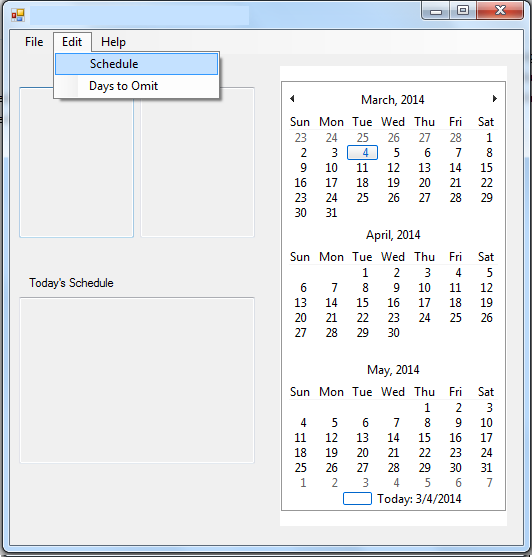
Opens Form2:

Input Name and select color either Red or Yellow, select a Test Type, and Start Date. Depending on the color determines the days that needs till next recurrence. Red means every 10 days they need to be tested and yellow means every 20 days. Then click ok
Form2 closes and on Form1, depending on the color chosen it puts the name with the test beside it in the corresponding column.
When clicking on the date that was selected as the start date it should populate into textbox3 labeled Today’s Schedule.
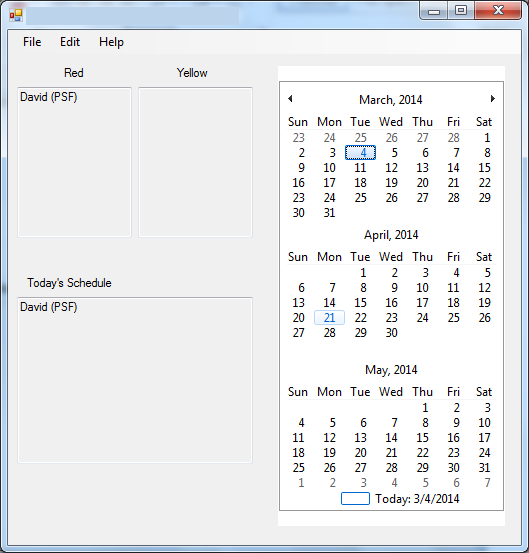
This all works fine but when I click on dates after the start date (IE 3/5, 3/6, etc) it keeps listing the names which is not what I am needing. I am needing for the names in the red column to show up once every 10 days and yellow every 20 days and to only show up on the date that is clicked.
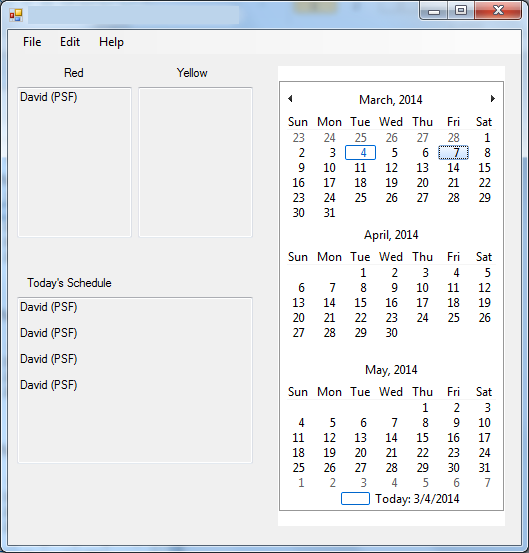
Here is the full code for Form1:
Code:
Public Class Form1
    Dim FP As String
    Private Sub ExitToolStripMenuItem_Click(ByVal sender As System.Object, ByVal e As System.EventArgs) Handles ExitToolStripMenuItem.Click
        Me.Close()

    End Sub

    Private Sub StudentScheduleToolStripMenuItem_Click(ByVal sender As System.Object, ByVal e As System.EventArgs) Handles StudentScheduleToolStripMenuItem.Click

        If Form2.ShowDialog = Windows.Forms.DialogResult.OK Then
            If Form2.ComboBox2.SelectedItem = "Select Test Type" Then
                MessageBox.Show("Please select a test type!")
            ElseIf Form2.ComboBox2.SelectedItem = "FSF" Then
                Form2.TextBox1.Text += " (FSF)"
            ElseIf Form2.ComboBox2.SelectedItem = "LNF" Then
                Form2.TextBox1.Text += " (LNF)"
            ElseIf Form2.ComboBox2.SelectedItem = "PSF" Then
                Form2.TextBox1.Text += " (PSF)"
            ElseIf Form2.ComboBox2.SelectedItem = "NWF" Then
                Form2.TextBox1.Text += " (NWF)"
            ElseIf Form2.ComboBox2.SelectedItem = "DORF" Then
                Form2.TextBox1.Text += " (DORF)"
            ElseIf Form2.ComboBox2.SelectedItem = "DAZE" Then
                Form2.TextBox1.Text += " (DAZE)"
            ElseIf Form2.ComboBox2.SelectedItem = "WR" Then
                Form2.TextBox1.Text += " (WR)"
            ElseIf Form2.ComboBox2.SelectedItem = "TRC" Then
                Form2.TextBox1.Text += " (TRC)"

            End If

            Select Case Form2.ComboBox1.SelectedItem.ToString.ToLower
                Case "red"
                    TextBox1.AppendText(Form2.TextBox1.Text & Environment.NewLine)

                Case "yellow"
                    TextBox2.AppendText(Form2.TextBox1.Text & Environment.NewLine)
                Case Else
                    MessageBox.Show("Please select a color!")
            End Select
        End If
    End Sub

    Private Sub DaysToOmitToolStripMenuItem_Click(ByVal sender As System.Object, ByVal e As System.EventArgs) Handles DaysToOmitToolStripMenuItem.Click
        Dim daysomit As New Form3
        daysomit.Show()
    End Sub

    Private Sub AboutToolStripMenuItem_Click(ByVal sender As System.Object, ByVal e As System.EventArgs) Handles AboutToolStripMenuItem.Click
        Dim About As New AboutBox2
        About.Show()
    End Sub

    Private Sub SaveToolStripMenuItem_Click(ByVal sender As System.Object, ByVal e As System.EventArgs) Handles SaveToolStripMenuItem.Click

        My.Computer.FileSystem.WriteAllText("Log.spms", TextBox1.Text, False)

    End Sub

    Private Sub OpenToolStripMenuItem_Click(ByVal sender As System.Object, ByVal e As System.EventArgs) Handles OpenToolStripMenuItem.Click
        Dim Open As New OpenFileDialog()

        Open.Filter = "Student Progress Monitoring Schedule (*.spms)|*.spms|All Files(*.*)|*.*"
        Open.Title = "Open"
        Try
            If Open.ShowDialog() = Windows.Forms.DialogResult.OK Then
                TextBox1.Text = My.Computer.FileSystem.ReadAllText("Log.spms")
                Me.Text = "Text Editor" + Open.FileName
                FP = Open.FileName
            End If
        Catch ex As Exception

        End Try

    End Sub

    Private Sub TextBox3_TextChanged(ByVal sender As System.Object, ByVal e As System.EventArgs) Handles TextBox3.TextChanged
        If Form2.Status = Windows.Forms.DialogResult.OK Then
            Dim name As String = Form2.TextBox1.Text.Trim()
            Dim dateEntered As Date = Form2.DateTimePicker1.Value.Date
        End If

    End Sub

    Private Sub Form1_Load(ByVal sender As System.Object, ByVal e As System.EventArgs) Handles MyBase.Load
        TextBox1.Text = My.Computer.FileSystem.ReadAllText("Log.spms")

    End Sub

    Private Sub MonthCalendar1_DateSelected(ByVal sender As Object, ByVal e As System.Windows.Forms.DateRangeEventArgs) Handles MonthCalendar1.DateSelected
        TextBox3.AppendText(TextBox1.Text & TextBox2.Text & Environment.NewLine)

    End Sub

    Private Sub NewToolStripMenuItem_Click(ByVal sender As System.Object, ByVal e As System.EventArgs) Handles NewToolStripMenuItem.Click
        TextBox1.Text = My.Computer.FileSystem.ReadAllText("New.spms")
    End Sub
End Class
And here is the full code for Form2:
Code:
Public Class Form2
    Inherits Form
    Friend WithEvents tbName As New System.Windows.Forms.TextBox
    Friend WithEvents dtpKeyDate As New System.Windows.Forms.DateTimePicker
    Friend WithEvents btnOk As New System.Windows.Forms.Button
    Friend WithEvents btnCancel As New System.Windows.Forms.Button
    Private Sub Button2_Click(ByVal sender As System.Object, ByVal e As System.EventArgs) Handles Button2.Click
        Me.DialogResult = Windows.Forms.DialogResult.Cancel

    End Sub

    Private Sub Button1_Click(ByVal sender As System.Object, ByVal e As System.EventArgs) Handles Button1.Click
        If TextBox1.TextLength > 0 AndAlso ComboBox1.SelectedIndex <> -1 Then
            Me.DialogResult = Windows.Forms.DialogResult.OK
        End If

    End Sub

    Private Sub DateTimePicker1_ValueChanged(ByVal sender As System.Object, ByVal e As System.EventArgs) Handles DateTimePicker1.ValueChanged

    End Sub

    Private Sub TextBox1_TextChanged(ByVal sender As System.Object, ByVal e As System.EventArgs) Handles TextBox1.TextChanged

    End Sub

    Private Sub Form2_Load(ByVal sender As System.Object, ByVal e As System.EventArgs) Handles MyBase.Load
        TextBox1.Clear()
        ComboBox1.SelectedIndex = 0
        ComboBox2.SelectedIndex = 0
        DateTimePicker1.Value = Now

    End Sub

    Friend Status As System.Windows.Forms.DialogResult = Windows.Forms.DialogResult.Cancel

End Class
Again everything is working fine except the 10 and 20 day recurrence and names are not clearing on each date clicked. Hope this makes more sense. Thanks for all your help!
-
Mar 5th, 2014, 02:02 PM
#12
Re: Inserting name in AxCalendar and displaying in textbox
Ok, it is making a bit of sense now. The pictures helped. 
The problem as I see it that you do not implement proper data typing and storage. You are trying to use textboxes to store your information. You really need to define your data requirements before you begin coding.
Right now I envision two data tables, but this may change based on the answers to the questions I pose below.
Table 1: Student- IDNo
- FirstName
- LastName
Table 2: Tests- Student.IDNo
- TestType
- StartDate
- RecurrenceCode - Your Yellow/Red
As you can see, Table 2 is has a Student.IDNo that links it back to the Student. This will allow for multiple tests to be defined for each student.
You also probably have list of tests that needs to be loaded.
Does this make sense to you? Review it and make any changes to these definitions. Once this is done, then we can proceed with defining how this will be coded.
I also noticed that you have "Days to Omit"; that makes sense, but it will complicate the recurrence interval computations. Also what happens if test needs to be rescheduled? How do you intend to handle that if the schedule is based off an original StartDate? Do the future dates offset from the rescheduled data?
You need to determine all the possible permutations and criteria before you begin coding.
-
Mar 5th, 2014, 02:13 PM
#13
Thread Starter
Junior Member
Re: Inserting name in AxCalendar and displaying in textbox
Hey TnTinMN,
I am glad the pics helped. It definitely is hard to describe what I was trying to accomplish. The tables definitely look like it would work out better and yeah I was afraid the Days to Omit would complicate things. I have thought about if they need rescheduling and wondered if it is possible if the Student ID was already listed and they went in and typed the name or ID again it would recognize it already in the list and over-right the pre-existing one and start on the start date they select again...not sure if that makes sense....or would it be best to make a button in form2 called Rescheduled and it open another form and allow them to select the student ID in a drop down and select the new date?
-
Mar 10th, 2014, 10:18 AM
#14
Thread Starter
Junior Member
Re: Inserting name in AxCalendar and displaying in textbox
Would it be easier if stored the information (students and IDs) and when omitting holidays in xml files and implementing them? Not sure how but heard that might work as well.
Tags for this Thread
 Posting Permissions
- You may not post new threads
- You may not post replies
- You may not post attachments
- You may not edit your posts
-
Forum Rules
|
Click Here to Expand Forum to Full Width
|



 Reply With Quote
