|

-
Feb 25th, 2014, 04:39 PM
#1
Thread Starter
Lively Member

 [RESOLVED] Fun One Here! Exporting Information from Excel to Word [RESOLVED] Fun One Here! Exporting Information from Excel to Word
Okay... I have predefined content that I need to insert into an excel macro which will auto populate a word document.
Description:
I have about 96 mail-outs that I have to put together, each with a different contractor's name, address, contract number etc.
Most of the content is static, but I need to create a macro that will take the information from my spreadsheet and create a custom letter to the contractors.
Request:
If you could identify where I can place my static content in the code as: "[PLACE STATIC CONTENT HERE]" it would be much appreciated.
One more thing:
To simplify I need this format:
Reference: [Contract Number]
[Contractor Name]
[Street Address]
[City], [State] [Zip]
Dear Mr./Mrs. [Contractor Name]
[Static Content]
EACH OF THE ABOVE IN BRACKETS HAS IT'S OWN CELL REFERENCE.
Thank you in advance, I know someone can do this.
Last edited by IGPOD; Feb 25th, 2014 at 04:43 PM.
Reason: Additional Information
-
Feb 25th, 2014, 04:41 PM
#2
Re: Fun One Here! Exporting Information from Excel to Word
I know a lot of people can...have you tried anything yet? Can we see?
-
Feb 25th, 2014, 05:20 PM
#3
Thread Starter
Lively Member
Re: Fun One Here! Exporting Information from Excel to Word
I'm not familiar with VBA code from excel to word... I'm working on something now, I'll post soon. You know these things can be puzzles.
I'm reworking some code I created for an automatic emailer, but I don't know enough about VBA to formulate correct code; very frustrating, but understandable.
-
Feb 25th, 2014, 05:50 PM
#4
Thread Starter
Lively Member
Re: Fun One Here! Exporting Information from Excel to Word
This is the best I can come up with for now, but it's not working...
Sub PopWordDoc()
Dim WordApp As word.Application
Dim Msg As String
Dim cell As Range
'Populates Word Document
Set WordApp = New word.Application
Msg = ""
Msg = Msg & "Reference Contract Number:"
Msg = Msg & Range("E22").Text & vbCrLf & vbCrLf
Msg = Msg & Range("E3").Text & vbCrLf
Msg = Msg & Range("E6").Text & vbCrLf
Msg = Msg & Range("E9").Text("E12").Text("E15").Text & vbCrLf & vbCrLf
Msg = Msg & "Dear Mr./Mrs. "
Msg = Msg & Range("E3").Text
Msg = Msg & [Static Content Here]
-
Feb 25th, 2014, 06:00 PM
#5
Re: Fun One Here! Exporting Information from Excel to Word
OK, will take a look shortly
-
Feb 26th, 2014, 12:55 AM
#6
Re: Fun One Here! Exporting Information from Excel to Word
I recommend that you create and use Named Ranges in your spreadsheet for this as it will make your code easier to maintain.
Here is one possible way to do this.
Code:
    Dim app As New Word.Application
    app.Visible = True

    Dim doc As Word.Document
    Set doc = app.Documents.Add()

    With doc.Styles(Word.wdStyleNormal)
        .Font.Name = "Arial"
        .Font.Size = 12
        .ParagraphFormat.Alignment = Word.wdAlignParagraphJustify
        Dim tabs As Single
        For tabs = 0.5 To 4 Step 0.5
            .ParagraphFormat.TabStops.Add Position:=app.InchesToPoints(tabs), Alignment:=Word.wdAlignTabLeft
        Next tabs
    End With

    Dim para As Word.Paragraph
    Set para = doc.Paragraphs(1) ' select 1st paragraph

    para.LineSpacing = doc.Styles(Word.wdStyleNormal).Font.Size
    para.SpaceAfter = 0
    para.SpaceBefore = 0

    Dim text As String

    text = "Reference Contract Number:  " & Range("Contract_No").text & vbCrLf & vbCrLf & _
           Range("Contractor_Name").text & vbCrLf & _
           Range("Address").text & vbCrLf & _
           Range("City").text & ", " & Range("State").text & vbTab & Format(Range("Zip").Value, "0####") _
           & vbCrLf & vbCrLf & "Dear Mr./Mrs. " & Range("Contractor_Name").text & ":" & vbCrLf & vbCrLf

    para.Range.text = text

    ' each vbcrlf starts a new paragraph that inherits from the previous format

    Set para = doc.Paragraphs(doc.Paragraphs.Count) ' get last paragraph

    para.Range.text = "static content"

'    doc.SaveAs Filename:="filename.docx", FileFormat:=Word.WdSaveFormat.wdFormatXMLDocument
'    doc.Close (Word.wdDoNotSaveChanges)
'    app.Quit

    Set para = Nothing
    Set doc = Nothing
    Set app = Nothing
-
Feb 26th, 2014, 11:32 AM
#7
Thread Starter
Lively Member
Re: Fun One Here! Exporting Information from Excel to Word
TnTinMN,
Thanks for the code, however, It's not working despite defining the named ranges as suggested. GREAT TIP BY THE WAY, THANK YOU!
I'm getting a "Compile Error: User-defined type not defined" message; the name of the Macro: "PopWordDoc()" is highlighted yellow and the first line of your code after Dim: "...app As New Word.Application" is highlighted blue.
I don't really know how to trouble shoot this, but for some reason -- even in other code that I've used -- that line isn't accepted. I don't know why? Any suggestions?
Thanks.
-
Feb 26th, 2014, 11:45 AM
#8
Re: Fun One Here! Exporting Information from Excel to Word
You need to add a reference to the Microsoft Word Object Library. In the VBA window, click on Tools, then References. Scroll down until you find it, and check it.
-
Feb 26th, 2014, 11:47 AM
#9
Re: Fun One Here! Exporting Information from Excel to Word
 Originally Posted by IGPOD

TnTinMN,
Thanks for the code, however, It's not working despite defining the named ranges as suggested. GREAT TIP BY THE WAY, THANK YOU!
I'm getting a "Compile Error: User-defined type not defined" message; the name of the Macro: "PopWordDoc()" is highlighted yellow and the first line of your code after Dim: "...app As New Word.Application" is highlighted blue.
I don't really know how to trouble shoot this, but for some reason -- even in other code that I've used -- that line isn't accepted. I don't know why? Any suggestions?
Thanks.
I had assumed that since you had used the "Word" namespace in your posted code that you had added a reference to "Microsoft Word XX.Y Object Library" (XX.Y depends on your installed version). 
Go to the menu and click on Tools->References and add that library and all should be good.
-
Feb 26th, 2014, 11:57 AM
#10
Thread Starter
Lively Member
Re: Fun One Here! Exporting Information from Excel to Word
VbfBryce, TnTinMN,
I did not have that selected, I just did, but it's still not working.
Code:
Sub DCH_Pop_Doc()

Dim app As New Word.Application
    app.Visible = True

    Dim doc As Word.Document
    Set doc = app.Documents.Add()

    With doc.Styles(Word.wdStyleNormal)
        .Font.Name = "Arial"
        .Font.Size = 12
        .ParagraphFormat.Alignment = Word.wdAlignParagraphJustify
        Dim tabs As Single
        For tabs = 0.5 To 4 Step 0.5
            .ParagraphFormat.TabStops.Add Position:=app.InchesToPoints(tabs), Alignment:=Word.wdAlignTabLeft
        Next tabs
    End With

    Dim para As Word.Paragraph
    Set para = doc.Paragraphs(1) ' select 1st paragraph

    para.LineSpacing = doc.Styles(Word.wdStyleNormal).Font.Size
    para.SpaceAfter = 0
    para.SpaceBefore = 0

    Dim text As String

    text = "Reference Contract Number:  " & Range("Contract_Number").text & vbCrLf & vbCrLf & _
           Range("Contractor_mngr").text & vbCrLf & _
           Range("Address").text & vbCrLf & _
           Range("City").text & ", " & Range("State").text & vbTab & Format(Range("Zip").Value, "0####") _
           & vbCrLf & vbCrLf & "Dear Mr./Mrs. " & Range("Contractor_Name").text & ":" & vbCrLf & vbCrLf

    para.Range.text = text

    ' each vbcrlf starts a new paragraph that inherits from the previous format

    Set para = doc.Paragraphs(doc.Paragraphs.Count) ' get last paragraph

    para.Range.text = "static content"

'    doc.SaveAs Filename:="filename.docx", FileFormat:=Word.WdSaveFormat.wdFormatXMLDocument
'    doc.Close (Word.wdDoNotSaveChanges)
'    app.Quit

    Set para = Nothing
    Set doc = Nothing
    Set app = Nothing
    End Sub
I really do appreciate your help in this, it's obviously above my knowledge level, but I'm learning a lot from you two.
-
Feb 26th, 2014, 12:01 PM
#11
Re: Fun One Here! Exporting Information from Excel to Word
you're getting the same error? or something else?
-
Feb 26th, 2014, 12:10 PM
#12
Thread Starter
Lively Member
Re: Fun One Here! Exporting Information from Excel to Word
vbfbryce,
I went back in, I had selected "Microsoft Office" instead of "Microsoft Word"...
Now that I have that reference, I ran the macro that TnTinMN posted (with my named ranges inserted) and I get this:
Microsoft Visual Basic "400":
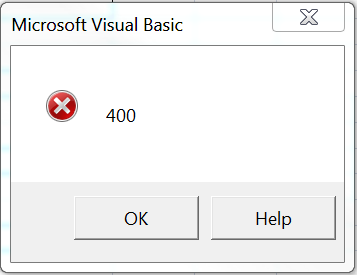
I looked it up, it seems that something in the code isn't compatible with my version of Microsoft Office (I may be mistaken) ... I'm running '07.
-
Feb 26th, 2014, 12:26 PM
#13
Re: Fun One Here! Exporting Information from Excel to Word
How are you creating your "named ranges?" Do they refer to only 1 cell, or multiple cells?
That code worked for me.
-
Feb 26th, 2014, 01:10 PM
#14
Re: Fun One Here! Exporting Information from Excel to Word
Originally Posted by IGPOD
I looked it up, it seems that something in the code isn't compatible with my version of Microsoft Office (I may be mistaken) ... I'm running '07.
The example I provided was written using 2007.
I suspect that you may have a named range typo. Try changing this:
Code:
    text = "Reference Contract Number:  " & Range("Contract_Number").text & vbCrLf & vbCrLf & _
           Range("Contractor_mngr").text & vbCrLf & _
           Range("Address").text & vbCrLf & _
           Range("City").text & ", " & Range("State").text & vbTab & Format(Range("Zip").Value, "0####") _
           & vbCrLf & vbCrLf & "Dear Mr./Mrs. " & Range("Contractor_Name").text & ":" & vbCrLf & vbCrLf

    para.Range.text = text
to this:
Code:
'    text = "Reference Contract Number:  " & Range("Contract_Number").text & vbCrLf & vbCrLf & _
         '  Range("Contractor_mngr").text & vbCrLf & _
         '  Range("Address").text & vbCrLf & _
         '  Range("City").text & ", " & Range("State").text & vbTab & Format(Range("Zip").Value, "0####") _
         '  & vbCrLf & vbCrLf & "Dear Mr./Mrs. " & Range("Contractor_Name").text & ":" & vbCrLf & vbCrLf

    para.Range.text = "I got a Word Document" & VbCrLf 'text
If that works then verify the named ranges names. (Try saying that 10 times real fast!).
-
Feb 26th, 2014, 01:27 PM
#15
Thread Starter
Lively Member
Re: Fun One Here! Exporting Information from Excel to Word
TnTinMN,
The problem with the code I was using was what you suspected, a named range issue. I had "Contract_Mngr" you had "Contractor_Name" which to me is synonymous to one another, so my bad.
The Error 400 disappeared, and now I have this fella showing up.
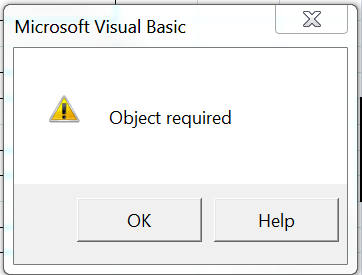
Here is the code I have which is yielding me this message:
Code:
Sub DCH_Pop_Doc()

Dim app As New Word.Application
    app.Visible = True

    Dim doc As Word.Document
    Set doc = app.Documents.Add()


    text = "Reference Contract Number:  " & Range("Contract_Number").text & vbCrLf & vbCrLf & _
           Range("Contract_mngr").text & vbCrLf & _
           Range("Address").text & vbCrLf & _
           Range("City").text & ", " & Range("State").text & vbTab & Format(Range("Zip").Value, "0####") _
           & vbCrLf & vbCrLf & "Dear Mr./Mrs. " & Range("Contract_mngr").text & ":" & vbCrLf & vbCrLf

    para.Range.text = "I got a Word Document" & vbCrLf 'text

End Sub
-
Feb 26th, 2014, 01:40 PM
#16
Re: Fun One Here! Exporting Information from Excel to Word
do you get the error on the "text =..." line?
-
Feb 26th, 2014, 01:41 PM
#17
Re: Fun One Here! Exporting Information from Excel to Word
If you did not abbreviate the last code you posted, you have deleted the "para" definition. Add "Option Explicit" to the top of your module and set Require Variable Declaration to checked on from the menu Tools->Options->Editor Tab. This setting will not change any existing Modules, but will automatically insert "Option Explicit" on all new modules.
-
Feb 26th, 2014, 01:44 PM
#18
Thread Starter
Lively Member
Re: Fun One Here! Exporting Information from Excel to Word
No, the word document pops up, but there is nothing inserted into the document, it's completely blank.
-
Feb 26th, 2014, 01:53 PM
#19
Re: Fun One Here! Exporting Information from Excel to Word
show us your entire code one more time, please
-
Feb 26th, 2014, 02:37 PM
#20
Thread Starter
Lively Member
Re: Fun One Here! Exporting Information from Excel to Word
vbfbryce, TnTinMN,
Here is the New Error Message:
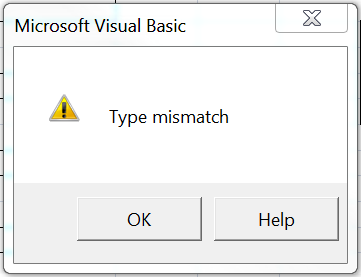
Here (below) is the code I'm using; I defined the para and the text... the word doc is popping up, but there is no content.
Code:
Option Explicit
Sub DCH_Pop_Doc()

Dim app As New Word.Application
    app.Visible = True

    Dim TEXT As String
    Dim PARA As Word.Paragraph
    Dim doc As Word.Document
    Set doc = app.Documents.Add()
    Set PARA = doc.Paragraphs


    TEXT = "Reference Contract Number:  " & Range("Contract_Number").TEXT & vbCrLf & vbCrLf & _
           Range("Contract_mngr").TEXT & vbCrLf & _
           Range("Address").TEXT & vbCrLf & _
           Range("City").TEXT & ", " & Range("State").TEXT & vbTab & Format(Range("Zip").Value, "0####") _
           & vbCrLf & vbCrLf & "Dear Mr./Mrs. " & Range("Contract_mngr").TEXT & ":" & vbCrLf & vbCrLf

    PARA.Range.TEXT = "I got a Word Document" & vbCrLf 'text

End Sub
-
Feb 26th, 2014, 02:46 PM
#21
Re: Fun One Here! Exporting Information from Excel to Word
Set PARA = doc.Paragraphs
should be : Set PARA = doc.Paragraphs(1)
-
Feb 26th, 2014, 05:49 PM
#22
Thread Starter
Lively Member
Re: Fun One Here! Exporting Information from Excel to Word
TntinMN,
Thanks... there is however one more issue... this is all I have when I run the Macro:
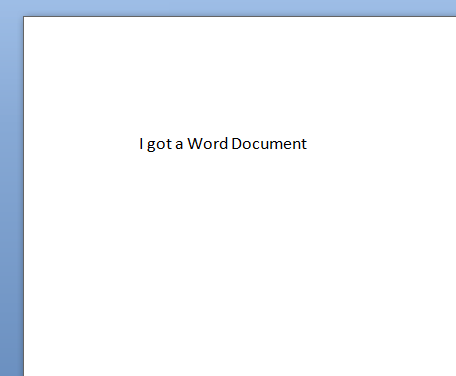
All the other stuff
[Contract Manager]
[Address]
[City]...
All missing
-
Feb 26th, 2014, 05:53 PM
#23
Re: Fun One Here! Exporting Information from Excel to Word
because of this:
Code:
para.Range.text = "I got a Word Document" & vbCrLf 'text
-
Feb 26th, 2014, 05:54 PM
#24
Thread Starter
Lively Member
 Re: Fun One Here! Exporting Information from Excel to Word Re: Fun One Here! Exporting Information from Excel to Word
-
Feb 26th, 2014, 05:55 PM
#25
Re: Fun One Here! Exporting Information from Excel to Word
I don't see how that can work. Don't you want:
Code:
para.Range.text = "I got a Word Document" & vbCrLf & text
-
Feb 26th, 2014, 11:12 PM
#26
Fanatic Member
Re: Fun One Here! Exporting Information from Excel to Word
Hi, sorry to jump in here, but i thought i would add some ideas 
I havent done this using VBA as its a pain in the butt, but i recently did something similar using VB.NET with an Excel Addin.
my first step was extracting all data using the array you get with a ranges.value2 property, if speed isnt an issue just use ranges
so basically if you have a sheet with data somewhere just extract if and put it somewhere, i used dictionaries, you will use arrays if your using vba
next is create a word template and use bookmarks to set points of insertion for your data so for example a field for names might have <NAME> as temporary data you set that whole range as a bookmark named "Name".......
in the end you will have a list of bookmarks representing ranges with descriptive or coded names
then you tie up the data you extracted in excel with the names of the bookmarks, id recommend a user defined type for the excel array holding the data so each array element has 2 variables, a name and the data, the name should be the same as the word bookmark for simplicity.
then loop through the word bookmarks, test each one with the array names, if its matched then replace the bookmark range with the data.
easy then save the document and be sure to use templates for your template, so it isn't edited by mistake.
the code is straight forward just simple loops.
Yes!!!
Working from home is so much better than working in an office...
Nothing can beat the combined stress of getting your work done on time whilst
1. one toddler keeps pressing your AVR's power button
2. one baby keeps crying for milk
3. one child keeps running in and out of the house screaming and shouting
4. one wife keeps nagging you to stop playing on the pc and do some real work.. house chores
5. working at 1 O'clock in the morning because nobody is awake at that time
6. being grossly underpaid for all your hard work

-
Feb 27th, 2014, 11:14 AM
#27
Thread Starter
Lively Member
Re: Fun One Here! Exporting Information from Excel to Word
vbfbryce,
the " 'text " is an explanation of what is in "" ... you can remove that; but I'm sure you're already aware. That code above is a working copy, I just repeated the "para.range.text = "*****" coupled with " & vbcrlf " to shape the paragraphs and additional content.
Thanks Everybody!
-
Feb 27th, 2014, 11:19 AM
#28
Re: Fun One Here! Exporting Information from Excel to Word
my bad...I only looked at the last line; missed the previous ones!
Tags for this Thread
 Posting Permissions
- You may not post new threads
- You may not post replies
- You may not post attachments
- You may not edit your posts
-
Forum Rules
|
Click Here to Expand Forum to Full Width
|



 Reply With Quote


