|

-
Jan 5th, 2014, 05:25 PM
#1
Thread Starter
Frenzied Member


 24DB Low Pass Filtering - SOUND / AUDIO Processing 24DB Low Pass Filtering - SOUND / AUDIO Processing
Hello chaps,
I'm looking for a Low Pass Filter to apply to a .WAV Audio Buffer.
I've come across this here: LPF 24dB/Oct
But I'm having trouble converting it and getting it to work in VB.
Can anyone shed any light in to this?
Thanks
_____________________________________________________________________
 ----If this post has helped you. Please take time to Rate it.
----If you've solved your problem, then please mark it as RESOLVED from Thread Tools.

-
Jan 7th, 2014, 03:35 PM
#2
Thread Starter
Frenzied Member
Re: 24DB Low Pass Filtering - SOUND / AUDIO Processing
_____________________________________________________________________
----If this post has helped you. Please take time to Rate it.
----If you've solved your problem, then please mark it as RESOLVED from Thread Tools.
-
Jan 29th, 2014, 07:53 AM
#3
Thread Starter
Frenzied Member
Re: 24DB Low Pass Filtering - SOUND / AUDIO Processing
_____________________________________________________________________
----If this post has helped you. Please take time to Rate it.
----If you've solved your problem, then please mark it as RESOLVED from Thread Tools.
-
Jan 29th, 2014, 08:39 AM
#4
Re: 24DB Low Pass Filtering - SOUND / AUDIO Processing
Maybe provide some extra information? Because "shed a light on this" is a kind of meta question.
What you have you tried so far, is there a specific part you got stuck at?
-
Jan 29th, 2014, 09:13 AM
#5
Thread Starter
Frenzied Member
Re: 24DB Low Pass Filtering - SOUND / AUDIO Processing
 Originally Posted by Arnoutdv

Maybe provide some extra information? Because "shed a light on this" is a kind of meta question.
What you have you tried so far, is there a specific part you got stuck at?
I've tried so many methods, but non work the way they should :/
There are a few examples but all in C# or C++. I'm trying to convert, but problems happen :/
For E.g:
Code:
public class Filter {
   // Moog 24 dB/oct resonant lowpass VCF
   // References: CSound source code, Stilson/Smith CCRMA paper.
   // Modified by [email protected] July 2000

   public Filter(){
      b0=b1=b2=b3=b4=0.0f;
      f=1.0f;
      q=p=0.0f;
   }


// Set coefficients given frequency & resonance [0.0...1.0]
   public void setFrequency(float frequency){
      q = 1.0f - frequency;
      p = frequency + 0.8f * frequency * q;
      f = p + p - 1.0f;
      q = resonance * (1.0f + 0.5f * q * (1.0f - q + 5.6f * q * q));
   }
   public void setResonance(float q){
      q = 1.0f - frequency;
      p = frequency + 0.8f * frequency * q;
      f = p + p - 1.0f;
      q = resonance * (1.0f + 0.5f * q * (1.0f - q + 5.6f * q * q));
   }

   public float[] processLopass(float[] input){
      float[] output = new float[input.Length];
      for (int i=0; i < input.Length; i++){
         input[i] -= q * b4;                          //feedback
         t1 = b1;  b1 = (in + b0) * p - b1 * f;
         t2 = b2;  b2 = (b1 + t1) * p - b2 * f;
         t1 = b3;  b3 = (b2 + t2) * p - b3 * f;
            b4 = (b3 + t1) * p - b4 * f;
         b4 = b4 - b4 * b4 * b4 * 0.166667f;    //clipping
         b0 = in;
         output[i] =  b4;
      }
      return output;
   }
   public float[] processHipass(float[] input){
      float[] output = new float[input.Length];
      for (int i=0; i < input.Length; i++){
         input[i] -= q * b4;                          //feedback
         t1 = b1;  b1 = (in + b0) * p - b1 * f;
         t2 = b2;  b2 = (b1 + t1) * p - b2 * f;
         t1 = b3;  b3 = (b2 + t2) * p - b3 * f;
            b4 = (b3 + t1) * p - b4 * f;
         b4 = b4 - b4 * b4 * b4 * 0.166667f;    //clipping
         b0 = in;
         output[i] =  input[i] - b4;
      }
      return output;
   }


  private float f, p, q;             //filter coefficients
  private float b0, b1, b2, b3, b4;  //filter buffers (beware denormals!)
  private float t1, t2;              //temporary buffers
}
My VB Interpolation:
Code:
Public Function LP(wavBuff() As Integer, ByVal theFrequency As Long, ByVal theSampleRate As Long, ByVal Resonance As Double)
       Dim k As Long
       Dim n As Long
       Dim result As Long
       Const Pi As Double = 3.14159265358979

       Dim b(4) As Double
       Dim f As Double
       Dim q As Double
       Dim p As Double

       Dim t1 As Double
       Dim t2 As Double
       Dim outBuff() As Integer
       Dim inputBuff() As Integer

       ReDim outBuff(UBound(wavBuff))
       ReDim inputBuff(UBound(wavBuff))

 k = Tan(Pi * theFrequency / theSampleRate)     'Not used


      q = 1# - theFrequency
      p = theFrequency + 0.8 * theFrequency * q
      f = p + p - 1#
      q = Resonance * (1# + 0.5 * q * (1# - q + 5.6 * q * q))


           For n = 0 To UBound(wavBuff)
                inputBuff(n) = q * b(4)              '            //feedback
                t1 = b(1)
                b(1) = (wavBuff(n) + b(0)) * p - b(1) * f
                t2 = b(2)
                b(2) = (b(1) + t1) * p - b(2) * f
                t1 = b(3)
                b(3) = (b(2) + t2) * p - b(3) * f
                b(4) = (b(3) + t1) * p - b(4) * f
                b(4) = b(4) - b(4) * b(4) * b(4) * 0.166667    '    //clipping
                b(0) = wavBuff(n)

               If b(4) < -32768 Then b(4) = -32768
               If b(4) > 32767 Then b(4) = 32767

                outBuff(n) = b(4)
           Next
wavBuff = outBuff

 End Function

But i keep getting OVERFLOW msg :/
Last edited by some1uk03; Jan 29th, 2014 at 09:23 AM.
_____________________________________________________________________
----If this post has helped you. Please take time to Rate it.
----If you've solved your problem, then please mark it as RESOLVED from Thread Tools.
-
Jan 29th, 2014, 09:37 AM
#6
Re: 24DB Low Pass Filtering - SOUND / AUDIO Processing
If you can live with a somewhat "dusty" project I wrote about 10 years ago
(non-beautified, very sparsely commented, short-typing of variables) -
the Zip file here: http://vbRichClient.com/Downloads/ButterworthFilter.zip
...contains what you want IMO - wrote the small cButterWorth Class, to get "better sounding, higher-quality" filters,
compared with what was floating around at that time in "cheap-sounding" FFT-based equalizers.
You can read about Butterworth-filters here: http://en.wikipedia.org/wiki/Butterworth_filter
(no ripple in the pass-band, and a pretty linear phase-response).
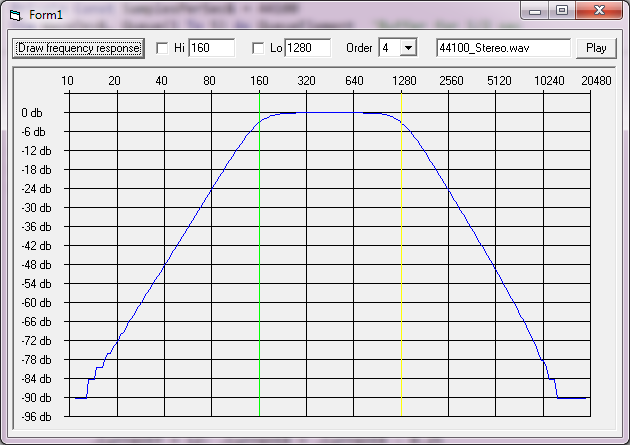
For 24dB/Oct you will need a BW-filter-setting of the 4th-Order - but the Demo-App has
this as the default.
It is currently set up with two filter-instances "in cascade", to realize a band-pass - but you can
deactivate filters entirely (though only for the "listening-in mode" over the Play-Button, which
wants to "see" your own replacement for the currently empty File "44100_Stereo.wav" in the
App.Path of the project.
The rendering of the current curve will not respect the On/Off-switches for both filter-instances,
though it will respect the current frequency values in the two TextBoxes.
Also - before using the Play-Button you should always render the Curve again over the
"Draw Frequency-Response" Button (since the new frequencies are currently only transported
into the Filter-Instances in this Event)... as said, it's old and was only thought as a cheap test-app.
Here's a Screenshot:
Let me know, how you come along with that stuff - or when you need more info about some things.
Olaf
-
Jan 29th, 2014, 11:23 AM
#7
Thread Starter
Frenzied Member
-
Jan 29th, 2014, 12:40 PM
#8
Re: 24DB Low Pass Filtering - SOUND / AUDIO Processing
Looks like it worked to exactly half of the max-frequency (as if it was somehow "folding back on itself").
What's important to check on your end is, that you feed the Filter-method a 16Bit-Stereo-Buffer with alternating
entries (left channel at even, right channel at the odd indexes).
If you feed the method a Mono-Buffer, then only every second sample is considered in the filter-loops -
and that could explain the behaviour and the images you postet.
If you only have Mono-Sources, then you can help the issue at the moment (without
changing the algo itself), by just "blowing the Mono-Source-up" to pseudo-stereo
(just doubling the channels and writing the same single Mono-Value at the even and
Odd indexes in a twice as large target-array).
Olaf
-
Jan 29th, 2014, 12:54 PM
#9
Thread Starter
Frenzied Member
Re: 24DB Low Pass Filtering - SOUND / AUDIO Processing
yes, im only using Mono Waves. Ill give your suggestion a go. and see what i get.
_____________________________________________________________________
----If this post has helped you. Please take time to Rate it.
----If you've solved your problem, then please mark it as RESOLVED from Thread Tools.
-
Jan 29th, 2014, 04:37 PM
#10
Thread Starter
Frenzied Member
Re: 24DB Low Pass Filtering - SOUND / AUDIO Processing
Ok, I gave it a go and I seem to be doing something wrong... :/
In the FILTER function I've modified it as follows....
Code:
Public Function Filter(Buf() As Integer, Optional isMono As Boolean = True, Optional ByVal FirstBuf As Boolean) As Integer

If isMono = True Then
   Dim xLoop As Long
   Dim StereoBuff() As Integer
   Dim xLoop As Long
   Dim StereoBuff() As Integer

   ReDim StereoBuff(UBound(Buf) * 2)               'ReDim a NEW Stereo Buffer *2

   For xLoop = 0 To UBound(Buf) Step 2             'Start the Loop
       StereoBuff(xLoop) = Buf(xLoop)              'Fill L Side
       If xLoop >= UBound(Buf) Then Exit For       'Check for overspill @ END
       StereoBuff(xLoop + 1) = Buf(xLoop + 1)      'Fill R Side
   Next

   Buf = StereoBuff                                 'Update our Buffer
End If

'Rest of your code here.......................

   ReDim Buf(UBound(StereoBuff) / 2)               'Now Redim/Split the Buffer in to Half Size = Mono
   For xLoop = 0 To UBound(StereoBuff) Step 2      'Start Loop
   If xLoop >= UBound(Buf) Then Exit For           'Check for overspill @ END
       Buf(xLoop) = StereoBuff(xLoop)              'Update Buffer
   Next

End Function
Any ideas on what I'm doing wrong?
_____________________________________________________________________
----If this post has helped you. Please take time to Rate it.
----If you've solved your problem, then please mark it as RESOLVED from Thread Tools.
-
Jan 29th, 2014, 06:32 PM
#11
Re: 24DB Low Pass Filtering - SOUND / AUDIO Processing
I've just adjusted the code, to accept and handle true Mono-Buffers directly now (so no "blowing-up" or back and forward copying is needed) -
the Zip-Download contains the enhanced Sources ...
And it was easy enough actually - only had to suppress the toggling of the LR-Variable between 0 and 1, when the optional Param
was set -> note that I've put the Optional isMono-Param at the end of the function-signature, to not break that many stuff in
my Demo - this differs from the Pos (and also the Default-Value) of the isMono-Argument in your function above.
For those who don't want to download again, here the enhanced and now "MonoBuf-capable" function from cButterworth:
Code:
Public Function Filter(Buf() As Integer, Optional ByVal FirstBuf As Boolean, Optional isMono As Boolean) As Integer
Dim n&, UB&, Max%, i&, x#, y#, r#, LR&, N2&, NOdd As Boolean
  Max = 1
  If FirstBuf Then InitDataBuf Buf(0), Buf(1)
  N2 = (mOrder + 1) \ 2
  NOdd = (mOrder Mod 2)

  For n = 0 To UBound(Buf)
    If Not isMono Then
      If LR = 1 Then LR = 0 Else LR = 1
    End If
    x = Buf(n) * mVolume
    For i = 1 To N2
      If (i = N2) And NOdd Then
        r = x + C(1, i) * D1(LR, i)
        y = C(5, i) * (r + C(3, i) * D1(LR, i))
      Else
        r = x + C(1, i) * D1(LR, i) + C(2, i) * D2(LR, i)
        y = C(5, i) * (r + C(3, i) * D1(LR, i) + D2(LR, i))
      End If
      D2(LR, i) = D1(LR, i): D1(LR, i) = r: x = y
    Next i
    If x < -32768 Then x = -32768 Else If x > 32767 Then x = 32767
    Buf(n) = x
    If n > 5000 Then If Buf(n) > Max Then Max = Buf(n)
  Next n
  Filter = Max
End Function
Olaf
Last edited by Schmidt; Jan 29th, 2014 at 06:35 PM.
-
Jan 29th, 2014, 07:00 PM
#12
Re: 24DB Low Pass Filtering - SOUND / AUDIO Processing
Ok - and for the sake of completeness - the "blowing-up" of a Mono-Buffer to Pseudo-Stereo could have been done this way:
Code:
'a very short 16Bit Mono-Buffer with only two entries
Dim Mono(0 To 1) As Integer
    Mono(0) = 1
    Mono(1) = 2

'now we blow up and copy-over the Mono-Source to PseudoStereo
Dim Stereo() As Integer
  ReDim Stereo(0 To 2 * UBound(Mono) + 1)

Dim i As Long
  For i = 0 To UBound(Mono)
    Stereo(i + i) = Mono(i)     'fill the even entries
    Stereo(i + i + 1) = Mono(i) 'and the odd ones too
  Next i

'a controlling-output will show the correct sequence 1,1,2,2 now
For i = 0 To UBound(Stereo): Debug.Print Stereo(i): Next
Olaf
-
Jan 29th, 2014, 07:20 PM
#13
Thread Starter
Frenzied Member
Re: 24DB Low Pass Filtering - SOUND / AUDIO Processing
Hi Schmidt/Olaf,
Thanks for the update, but I'm still getting same results ? Still have a black notch in my spectrum and noise on the wav ? just like the images I posted before?
I'm only using the ButterWorth class, so I'm using it by:
Code:
Dim kk As New cButterWorth
kk.FilterType = FilterLowPass
kk.Freq = 1000     'EditWAV.SamplingFreq / 4
kk.SampleRate = EditWAV.SamplingFreq
kk.Order = 4

kk.Filter EditWAV.WavData, True

refreshData True
_____________________________________________________________________
----If this post has helped you. Please take time to Rate it.
----If you've solved your problem, then please mark it as RESOLVED from Thread Tools.
-
Jan 29th, 2014, 07:53 PM
#14
Re: 24DB Low Pass Filtering - SOUND / AUDIO Processing
Originally Posted by some1uk03
I'm only using the ButterWorth class, so I'm using it by:
Code:
kk.Filter EditWAV.WavData, True
In case you are using the updated cButterworth-Class now, the IsMono-Param is
the last argument, Optional - and by default *False* (meaning Stereo-Mode).
As I wrote in the other post - I changed that in comparison to your own variant,
to not break that much stuff in my older Demo-App.
So, the above line which finally calls the new Filter-method should explicitely pass a True in the last param:
Code:
kk.Filter EditWAV.WavData, True, True
Olaf
-
Jan 29th, 2014, 08:35 PM
#15
Thread Starter
Frenzied Member
Re: 24DB Low Pass Filtering - SOUND / AUDIO Processing
I'm not infront of my PC now to confirm %100 but i do remember well that i changed your updated function to...
Code:
Optional isMono As Boolean = True
..so by default its True, without me having to pass it here:
Code:
kk.Filter EditWAV.WavData, True, True
EDIT:
Just realised that in my original kk.Filter call the True goes out to the FIRSTbuff... what does that do exactly ? Splits the audio to few buffers ? havent really analysed properly...
_____________________________________________________________________
----If this post has helped you. Please take time to Rate it.
----If you've solved your problem, then please mark it as RESOLVED from Thread Tools.
-
Jan 29th, 2014, 09:16 PM
#16
Re: 24DB Low Pass Filtering - SOUND / AUDIO Processing
Originally Posted by some1uk03
Just realised that in my original kk.Filter call the True goes out to the FIRSTbuff... what does that do exactly ? Splits the audio to few buffers ? havent really analysed properly...
The FirstBuff-param is needed, to properly initialize the surrounding Helper-Arrays, which store the current filter-states.
If you want to play e.g. a song from a 25MB-Wav-File, then you have to do it in chunks -
now when you have the BW-Filter in place, you have to signalize when a new "streaming begins" -
and on your very first buffer you're sending to the Class, you can tell the Filter-method about that -
... and all following buffers shall have to "connect seamlessly" to the last values in the previous
buffers (and use the derived coefficients from those last buffer-values), so with Firstbuff = False
you can signalize "continuation of the current state of calculations".
If your MonoBuffers come in complete chunks, containing the whole sound - then FirstBuff should be
always True (so, False is only thought for following Buffers after the first one in a streaming-scenario).
Olaf
-
Jan 30th, 2014, 05:59 PM
#17
Thread Starter
Frenzied Member
Re: 24DB Low Pass Filtering - SOUND / AUDIO Processing
Ok, After further testing today... the LP / Mono is working, BUT I still get NOISE depending on the Freq / Hertz...
The spectrum this time only show a black boundary not in the MIDDLE, but TOP area only... what ever the Freq limit is set to... i.e upto 11000
as in there is No Falloff...
As far as I can calculate, there needs to be a loop which decreases the SET Freq depending on TIME...to get a side slope just like in the GREEN Mid graph i posted earlier..
Does that seem to make any sense?
_____________________________________________________________________
----If this post has helped you. Please take time to Rate it.
----If you've solved your problem, then please mark it as RESOLVED from Thread Tools.
-
Feb 11th, 2014, 05:29 AM
#18
Re: 24DB Low Pass Filtering - SOUND / AUDIO Processing
Originally Posted by some1uk03
Ok, After further testing today... the LP / Mono is working, BUT I still get NOISE depending on the Freq / Hertz...
Now (and from what you wrote in a PM) I begin to understand that you're looking for a Noise-Cancelling solution.
Originally Posted by some1uk03
The spectrum this time only show a black boundary not in the MIDDLE, but TOP area only... what ever the Freq limit is set to... i.e upto 11000
That's as it should be with a "normal" Filter (a LowPass in this case).
A LowPass is letting (by definition) the frequencies below a certain "cut-off-frequency" through...
The frequencies above the cut-off will be "dampened" (in case of a Butterworth-Filter of the 4th order with 24dB per Octave)...
And the latter (increased) dampening is, what's causing the "blacked out area" in your frequency-spectrum-visualization.
So, there's nothing wrong with the Butterworth-Filter - its one of the better suited algorithms for audio-processing - and it behaves as it is designed to do in your case.
Noise (White Noise to be precise) spreads by definition: http://en.wikipedia.org/wiki/White_noise
its energy across the whole spectrum, so cutting-off above a certain frequency is not a sufficient
"noise-cancelling-approach", since the lower-frequency-bands (below the cut-off) will still contain
a lot of "noise-energy" - it just doesn't sound all that "aggressive" anymore, when at least the
higher frequency-bands are dampened.
What you need is a better suited algorithm which works across the whole frequency-spectrum,
cleaning up (or flattening) "the ripple" in each of the frequency-bands - a single Low-Pass
(no matter how strong its dampening is adjusted) will not work as good as such a specialized algo.
Not sure, what you need this for - if this is e.g. for a de-noising of radio-transmitted audio-signals, then maybe this link here
is helpful for a general overview: http://digitalcommons.calpoly.edu/cg...context=theses
Olaf
-
Feb 11th, 2014, 08:46 AM
#19
Thread Starter
Frenzied Member
Re: 24DB Low Pass Filtering - SOUND / AUDIO Processing
Thanks for coming back to this Olaf.
The butterworth-Filter in itself, is fine no problem. But yes, it seems I need some form of a Noise Cancelling solution.
From what I can figure out, is that some type of a GRADUAL Frequency Cut off ? That's what I'm evaluating from the Spectrum Graphs I posted before, but been researching and have No idea how to implement this.
Not sure, what you need this for..
I have Audio Sample Wavs that require some of this Noise Removal treatment.
_____________________________________________________________________
----If this post has helped you. Please take time to Rate it.
----If you've solved your problem, then please mark it as RESOLVED from Thread Tools.
-
Feb 12th, 2014, 04:09 AM
#20
Re: 24DB Low Pass Filtering - SOUND / AUDIO Processing
Originally Posted by some1uk03
... yes, it seems I need some form of a Noise Cancelling solution.
From what I can figure out, is that some type of a GRADUAL Frequency Cut off ? That's what I'm evaluating from the Spectrum Graphs I posted before, but been researching and have No idea how to implement this.
The PDF-link I gave in my previous post describes an advanced algorithm which
performs a noise-reduction over several bands (in a non-overlapping, sliding window
of 8192 samples, which are 'FFTed' first). It does it in a way, that "frequency-slots"
which contain a significant "harmonic energy percentage" are left alone - and those
bands which contain more noise than harmonics are filtered - after that an attempt is
made, to reconstruct and restore possibly too much reduced harmonics in the filtered bands.
That's described in chapter 4.
And in chapter 9 there's (I think mathlab-)code - which requires already primitive
functions for FFT and inverse FFT at the language-level - but it should give a good
start - and should be translatable when replacements for the mathlab- FFT-primitives
are written and tested first.
Originally Posted by some1uk03
I have Audio Sample Wavs that require some of this Noise Removal treatment.
In that case (if this is more like a "one time job"), I would try to find an already
existing filter-app, which contains higher-quality noise-reduction-functionality.
(And IMO there should be some programs available in the "OpenSource-Audio-Corner",
which support an appropriate commandline-interface and thus would allow also
a ShellAndWait-solution).
Olaf
-
Feb 13th, 2014, 08:10 PM
#21
Thread Starter
Frenzied Member
Re: 24DB Low Pass Filtering - SOUND / AUDIO Processing
Hi,
I've been researching and reading many articles/publications over the last few days. They all provide why & how the theory works. But I need CODE.
I cant interpret the theory. It talks about DBSignals, Freqs, Bands, Poles etc... It all sounds #French to me! I need some code to process & understand the info.
In that case (if this is more like a "one time job"), I would try to find an already
existing filter-app....
I can have a list of 50+ .Wavs. I want to select and apply the filter etc...
It is not a 'one time job'. The App has to do it and not other external apps.
_____________________________________________________________________
----If this post has helped you. Please take time to Rate it.
----If you've solved your problem, then please mark it as RESOLVED from Thread Tools.
-
Feb 14th, 2014, 04:57 AM
#22
Re: 24DB Low Pass Filtering - SOUND / AUDIO Processing
Originally Posted by some1uk03
I've been researching and reading many articles/publications over the last few days. They all provide why & how the theory works. But I need CODE.
I'm not aware of any VB-Code (and also didn't found any snippets in a short google-session)
for "noise-filter-algos, which work across a whole spectrum" ... what can be found is code
for different languages as C/C++ or the mathlab-code in the PDF I linked to.
So in either case there seems to be at least "porting-efforts from another language" -
or alternatively developing the whole thing entirely from published theories.
Currently have not much time, otherwise I'd perhaps would make an attempt to port the
mathlab-code in the PDF-document to VB...
Maybe try that on your own - not sure if you ever ported code-snippets from C to VB,
but this usually goes faster than one might expect "from only the first look".
Even if you have no C-background, "one ported function per day" (1-3h of concentrated work)
should be doable - and that would mean, that you have the mathlab-stuff "basically ported"
after a week or so.
If you're willing to make an attempt - please post the result of this "rough port" here -
would take a look then, and see if we can place the last remaining puzzle pieces and
make it work finally.
Olaf
-
Feb 22nd, 2014, 12:15 PM
#23
Thread Starter
Frenzied Member
Re: 24DB Low Pass Filtering - SOUND / AUDIO Processing
Would anything from here help ?
_____________________________________________________________________
----If this post has helped you. Please take time to Rate it.
----If you've solved your problem, then please mark it as RESOLVED from Thread Tools.
-
Feb 22nd, 2014, 04:43 PM
#24
Re: 24DB Low Pass Filtering - SOUND / AUDIO Processing
Originally Posted by some1uk03
Would anything from here help ?
Not really (the pink-noise-filters there are only to allow "levelling out" to white noise - there's no "universal noise filter approach" to be found in there, which is comparable or better than in the PDF, I already posted a link to...
It is a difficult topic since there's such a large amount of "audio-noise-types" - and so there's no magic bullet with regards to removal.
This also becomes clear, when you look at how concrete audio-software handles those issues...
E.g. the OpenSource-Tool 'Audacity' tries to tackle the problem with different approaches, the most popular one a diff-like approach which seems to work well in practise, but requires that you feed the filter-algo a bit of "pure noise from places which contain silence" (as at the beginning or the end of a track), so that it is able to have something to compare against with regards to what does belong into the audio-signal and what does not.
http://wiki.audacityteam.org/index.p...=Noise_Removal
Though as said, I currently have no time to port something myself from either C- or mathlab-code, though would be willing to look over already ported VB6-code, which is already working to 80% or so...
Olaf
-
Mar 1st, 2014, 01:17 AM
#25
Addicted Member
Re: 24DB Low Pass Filtering - SOUND / AUDIO Processing
Try our BASS lib. It is probably commercial but has many features for sound processing and correction. It is plugin based so you can add the plugins as needed for the exact features.
http://www.un4seen.com/
HTH
Yogi Yang
-
Mar 2nd, 2014, 08:24 AM
#26
Thread Starter
Frenzied Member
Re: 24DB Low Pass Filtering - SOUND / AUDIO Processing
interesting... but commearcial... :/
_____________________________________________________________________
----If this post has helped you. Please take time to Rate it.
----If you've solved your problem, then please mark it as RESOLVED from Thread Tools.
Tags for this Thread
 Posting Permissions
- You may not post new threads
- You may not post replies
- You may not post attachments
- You may not edit your posts
-
Forum Rules
|
Click Here to Expand Forum to Full Width
|



 Reply With Quote


