|

-
Jan 12th, 2014, 03:58 PM
#1
An Azure learning app - "Task Bazaar"
Hi
My new years resolution is to become Azure proficient and, because I believe the best way to learn is to do, I have set myself a task of creating an Azure hosted application. This is not a financially lucrative idea but rather a project that has elements of all the things I think I need to learn or practice.
I have bought myself an MSDN license and this comes with $150/month Azure credit that could be used. I also have the source code up on VisualStudio.com under the project name "TaskBazaar".
Currently I am putting together an underlying architecture (based on CQRS) and once I have that done will start on the UI side - will probably need a lot of guidance on that as I have not done much web stuff in earnest.
If anyone is interested in contributing or even getting read-only access for the source code let me know. If sufficient interest I will set up a project communications thread and post all the details there.
Overview
========
The TaskBazaar is an application that allows companies and organisations to set up internal task pools whereby anyone who has a need can set up a task and have that task undertaken by any available fellow employees or organisation members who have the required skills.
The completion of tasks is recorded and this, in turn, allows the company or organisation to build a searchable and verifiable database of employees and skillsets.
Anyone seeking a particular skill can look up tasks performed that required that skill and get referral information from the task owner as to which employees demonstrated aptitudes in these tasks.
-
Jan 13th, 2014, 07:48 AM
#2
Re: An Azure learning app - "Task Bazaar"
First code for the CQRS pattern is to define an interface for a generic query definition and a generic command definition. These will be implemented by specific concrete classes for each distinct type of query or command the application can support.
Code:
''' <summary>
''' Interface to be implemented by all query definitions
''' </summary>
''' <remarks>
''' This allows for a separation of concerns between the definition of the query and any parameters it requires,
''' the validation(s) of that query and the execution of the query
''' </remarks>
Public Interface IQueryDefinition(Of TResult)

    ''' <summary>
    ''' Unique identifier of this query instance
    ''' </summary>
    ''' <remarks>
    ''' This allows queries to be queued and the response to a given query definition to be identified
    ''' </remarks>
    ReadOnly Property InstanceIdentifier As Guid

    ''' <summary>
    ''' The unique name of the query being requested
    ''' </summary>
    ReadOnly Property QueryName As String

    ''' <summary>
    ''' Add a paremeter to this query
    ''' </summary>
    ''' <param name="parameter">
    ''' The parameter to add to the query
    ''' </param>
    ''' <remarks>
    ''' This will throw an argumwent exception if this query already has a parameter with teh same name and index.  Use TryAddParameter to avoid this exception
    ''' </remarks>
    Sub AddParameter(ByVal parameter As QueryParameter)

    ''' <summary>
    ''' Add a paremeter to this query
    ''' </summary>
    ''' <param name="parameter">
    ''' The parameter to add to the query
    ''' </param>
    ''' <remarks>
    ''' This will return true if the parameter was successfully added
    ''' </remarks>
    Function TryAddParameter(ByVal parameter As QueryParameter) As Boolean

    ''' <summary>
    ''' True if this query has the parameter defined for it
    ''' </summary>
    ''' <param name="parameterName">
    ''' The name of the parameter to look for
    ''' </param>
    ''' <param name="parameterIndex">
    ''' The zero-based index of the parameter
    ''' </param>
    Function ParameterExists(ByVal parameterName As String, ByVal parameterIndex As Integer) As Boolean

    ''' <summary>
    ''' Get the parameter value for the named parameter
    ''' </summary>
    ''' <param name="parameterName">
    ''' The name of the parameter to look for
    ''' </param>
    ''' <param name="parameterIndex">
    ''' The zero-based index of the parameter
    ''' </param>
    ''' <remarks>
    ''' This will throw an error if the parameter does not exists.  Use TryGetParameter instead if that is not desired
    ''' </remarks>
    Function GetParameter(ByVal parameterName As String, ByVal parameterIndex As Integer) As Object

    ''' <summary>
    ''' Get the parameter value for the named parameter
    ''' </summary>
    ''' <param name="parameterName">
    ''' The name of the parameter to look for
    ''' </param>
    ''' <param name="parameterIndex">
    ''' The zero-based index of the parameter
    ''' </param>
    ''' <param name="value">
    ''' The variable to hold the parameter value if found
    ''' </param>
    ''' <remarks>
    ''' This will return true if the parameter was retrieved
    ''' </remarks>
    Function TryGetParameter(ByVal parameterName As String, ByVal parameterIndex As Integer, ByRef value As Object) As Boolean

End Interface
Where the query parameter is defined thus:-
Code:
Imports System.Runtime.Serialization

''' <summary>
''' A single parameter that is used to restrict the results returned for a given query definition
''' </summary>
''' <remarks>
''' This is an immutable class to allow for safe parallel/asynchronous processing
''' </remarks>
<DataContract>
Public NotInheritable Class QueryParameter

    <DataMember(Name:="ParameterName")>
    ReadOnly m_name As String
    <DataMember(Name:="ParameterIndex")>
    ReadOnly m_index As Integer
    <DataMember(Name:="ParameterValue")>
    ReadOnly m_value As Object

    ''' <summary>
    ''' The name of the parameter
    ''' </summary>
    ''' <remarks>
    ''' This should be unique in any given query definition, unless there are multuiple indexed properties with the same name
    ''' </remarks>
    Public ReadOnly Property Name
        Get
            Return m_name
        End Get
    End Property

    ''' <summary>
    ''' The index (zero based) of the parameter
    ''' </summary>
    ''' <remarks>
    ''' For a non-indexed parameter, this wuill always be zero
    ''' </remarks>
    Public ReadOnly Property Index As Integer
        Get
            Return m_index
        End Get
    End Property

    ''' <summary>
    ''' The value of the parameter
    ''' </summary>
    Public ReadOnly Property Value As Object
        Get
            Return m_value
        End Get
    End Property

    ''' <summary>
    ''' Creatre a new parameter instance with the given properties
    ''' </summary>
    ''' <param name="nameInit">
    ''' The name of the parameter
    ''' </param>
    ''' <param name="indexInit">
    ''' The zero-based index of the parameter
    ''' </param>
    ''' <param name="valInit">
    ''' The starting value of the parameter - this can be Nothing (null) to indicate that the parameter is not set
    ''' </param>
    ''' <remarks></remarks>
    Public Sub New(ByVal nameInit As String, ByVal indexInit As Integer, ByVal valInit As Object)
        m_name = nameInit
        m_index = indexInit
        m_value = valInit
    End Sub

    ''' <summary>
    ''' Create a new parameter for the given properties
    ''' </summary>
    ''' <param name="name">
    ''' The name of the parameter
    ''' </param>
    ''' <param name="index">
    ''' The zero-based index of the parameter
    ''' </param>
    ''' <param name="value">
    ''' The value to use for this parameter
    ''' </param>
    Public Shared Function Create(ByVal name As String, ByVal index As Integer, ByVal value As Object) As QueryParameter
        Return New QueryParameter(name, index, value)
    End Function

    Public Shared Function GetParameterKey(ByVal parameter As QueryParameter) As String
        Return GetParameterKey(parameter.Name, parameter.Index)
    End Function

    Public Shared Function GetParameterKey(ByVal parameterName As String, ByVal parameterIndex As Integer) As String
        Return parameterName & " [" & parameterIndex.ToString() & "]"
    End Function

End Class
The first design question: does it make sense to turn QueryParameter into a generic class rather than have value as object?
-
Jan 13th, 2014, 11:37 AM
#3
Re: An Azure learning app - "Task Bazaar"
The demo application will use three different Azure storage methods/concepts:-
System wide data will be stored in an SQL Azure database
Client / Bazaar / Task structured data will be held in Table storage
Task related documents and unstructured data will be held in Blob storage
(and - to complete the coverage of Azure concepts, the command side of the CQRS architecture will use Queue based storage)
Last edited by Merrion; Jan 14th, 2014 at 09:30 AM.
-
Jan 14th, 2014, 08:28 AM
#4
Re: An Azure learning app - "Task Bazaar"
It is just a shell at the moment but the putative web front end for the application is at taskbazaar.azurewebsites.net...
-
Jan 15th, 2014, 06:04 AM
#5
Re: An Azure learning app - "Task Bazaar"
Commands are to be passed to the command handlers (worker processes) using an Azure queue. However, as the queue storage restricts the message size (and has other restrictions) what I am thinking is a two-step process whereby the command parameters are written to a WATS (Table storage) and the key to that store is then passed in the message queue. This allows command parameters to be quite large - for example if the command is something like "process this file" then the file can be a parameter.
The command parameter class is defined thus:
Code:
Imports System.Runtime.Serialization
Imports System.Text

''' <summary>
''' A single parameter that is used to restrict the results returned for a given query definition
''' </summary>
''' <remarks>
''' This is an immutable class to allow for safe parallel/asynchronous processing
''' </remarks>
<DataContract>
Public NotInheritable Class CommandParameter

    <DataMember(Name:="ParameterName")>
    ReadOnly m_name As String
    <DataMember(Name:="ParameterIndex")>
    ReadOnly m_index As Integer
    <DataMember(Name:="ParameterValue")>
    ReadOnly m_value As Object

    ''' <summary>
    ''' The name of the parameter
    ''' </summary>
    ''' <remarks>
    ''' This should be unique in any given query definition, unless there are multuiple indexed properties with the same name
    ''' </remarks>
    Public ReadOnly Property Name As String
        Get
            Return m_name
        End Get
    End Property

    ''' <summary>
    ''' The index (zero based) of the parameter
    ''' </summary>
    ''' <remarks>
    ''' For a non-indexed parameter, this wuill always be zero
    ''' </remarks>
    Public ReadOnly Property Index As Integer
        Get
            Return m_index
        End Get
    End Property

    ''' <summary>
    ''' The value of the parameter
    ''' </summary>
    Public ReadOnly Property Value As Object
        Get
            Return m_value
        End Get
    End Property

    ''' <summary>
    ''' Creatre a new command parameter instance with the given properties
    ''' </summary>
    ''' <param name="nameInit">
    ''' The name of the parameter
    ''' </param>
    ''' <param name="indexInit">
    ''' The zero-based index of the parameter
    ''' </param>
    ''' <param name="valInit">
    ''' The starting value of the parameter - this can be Nothing (null) to indicate that the parameter is not set
    ''' </param>
    ''' <remarks></remarks>
    Public Sub New(ByVal nameInit As String, ByVal indexInit As Integer, ByVal valInit As Object)
        m_name = nameInit
        m_index = indexInit
        m_value = valInit
    End Sub


    ''' <summary>
    ''' Turn the parameter into a string describing it
    ''' </summary>
    ''' <remarks>
    ''' This will be an XMl node with the parameter value also as XML
    ''' </remarks>
    Public Overrides Function ToString() As String

        Dim serialiser As New System.Runtime.Serialization.DataContractSerializer(GetType(CommandParameter))
        If (serialiser IsNot Nothing) Then
            Dim serialXML As StringBuilder = New StringBuilder()
            Using xmlWrite As System.Xml.XmlWriter = System.Xml.XmlWriter.Create(serialXML)
                serialiser.WriteObject(xmlWrite, Me)
                xmlWrite.Flush()
            End Using
            Return serialXML.ToString()
        Else
            Return ""
        End If

    End Function

    ''' <summary>
    ''' Create a new parameter for the given properties
    ''' </summary>
    ''' <param name="name">
    ''' The name of the parameter
    ''' </param>
    ''' <param name="index">
    ''' The zero-based index of the parameter
    ''' </param>
    ''' <param name="value">
    ''' The value to use for this parameter
    ''' </param>
    Public Shared Function Create(ByVal name As String, ByVal index As Integer, ByVal value As Object) As CommandParameter
        Return New CommandParameter(name, index, value)
    End Function

    Public Shared Function Create(ByVal xml As String) As CommandParameter
        If (String.IsNullOrWhiteSpace(xml)) Then
            Throw New ArgumentException("XML does not hold valid command parameter", "xml")
        Else
            Dim serialiser As New System.Runtime.Serialization.DataContractSerializer(GetType(CommandParameter))
            If (serialiser IsNot Nothing) Then
                Using xmlRead As System.Xml.XmlReader = System.Xml.XmlReader.Create(New System.IO.StringReader(xml))
                    Return CType(serialiser.ReadObject(xmlRead), CommandParameter)
                End Using
            Else
                Throw New InvalidOperationException("Unable to create serialiser for CommandParameter")
            End If

        End If
    End Function

    Public Shared Function GetParameterKey(ByVal parameter As CommandParameter) As String
        Return GetParameterKey(parameter.Name, parameter.Index)
    End Function

    Public Shared Function GetParameterKey(ByVal parameterName As String, ByVal parameterIndex As Integer) As String
        Return parameterName & " [" & parameterIndex.ToString() & "]"
    End Function

End Class
and the class to allow persisting these ICommandDefinition classes with all their parameters to a windows azure table storage uses a class derived from ITableEntity thus:-
Code:
    ''' <summary>
    ''' A class for storing a command and its parameters in an azure table store
    ''' </summary>
    ''' <remarks>
    ''' The command type and the instance identifier are the partition and row keys to allow any
    ''' command handler easily to find its command parameter data
    ''' </remarks>
    Public Class CommandTableEntity
        Implements ITableEntity

        Private m_parameters As Dictionary(Of String, CommandParameter) = New Dictionary(Of String, CommandParameter)

        ''' <summary>
        ''' Gets or sets the entity's current Entity Tag.
        ''' </summary>
        ''' <remarks>
        ''' Set this value to '*' in order to blindly overwrite an entity as part of an update operation.
        ''' </remarks>
        Public Property ETag As String Implements ITableEntity.ETag

        ''' <summary>
        ''' The property that defines what table partition this command will be stored in
        ''' </summary>
        ''' <remarks>
        ''' In this implementation this is the command class name
        ''' </remarks>
        Public Property PartitionKey As String Implements ITableEntity.PartitionKey

        ''' <summary>
        ''' The property that defines what row this command record will be stored in
        ''' </summary>
        Public Property RowKey As String Implements ITableEntity.RowKey

        Public Property Timestamp As DateTimeOffset Implements ITableEntity.Timestamp

        ''' <summary>
        ''' Has this command been marked as processed
        ''' </summary>
        Public Property Processed As Boolean

        ''' <summary>
        ''' Has this command been marked as in error
        ''' </summary>
        Public Property InError As Boolean

        ''' <summary>
        ''' What handler processed this command
        ''' </summary>
        Public Property ProcessedBy As String

#Region "Public constructors"
        ''' <summary>
        ''' Parameter-less constructor for serialisation
        ''' </summary>
        ''' <remarks>
        ''' This is mandatory for WATS to persist the object
        ''' </remarks>
        Public Sub New()

        End Sub

        ''' <summary>
        ''' Create a new record with in the commands table
        ''' </summary>
        ''' <param name="commandType">
        ''' The type of command to process
        ''' </param>
        ''' <param name="instanceIdentifier">
        ''' Unique identifier of the command to process
        ''' </param>
        ''' <remarks>
        ''' This can be used if a command has no parameters
        ''' </remarks>
        Public Sub New(ByVal commandType As String, ByVal instanceIdentifier As Guid)
            Me.PartitionKey = commandType
            Me.RowKey = instanceIdentifier.ToString
        End Sub


        Public Sub New(ByVal command As ICommandDefinition)
            Me.New(command.GetType().Name, command.InstanceIdentifier)
            'save the parameters too...
            If (m_parameters Is Nothing) Then
                m_parameters = New Dictionary(Of String, CommandParameter)()
            End If
            For Each param As CommandParameter In command.GetParameters()
                m_parameters.Add(CommandParameter.GetParameterKey(param), param)
            Next
        End Sub

#End Region

        Public Sub ReadEntity(properties As IDictionary(Of String, EntityProperty), operationContext As OperationContext) Implements ITableEntity.ReadEntity

            For Each propertyPair In properties
                If (propertyPair.Key.Contains("[")) AndAlso (propertyPair.Key.Contains("]")) Then
                    'This is a property in the form name[index]...
                    Dim parameterName As String = CommandParameter.GetParameterName(propertyPair.Key)
                    Dim parameterIndex As Integer = CommandParameter.GetParameterIndex(propertyPair.Key)
                    'Get the command payload from the string
                    Dim parameterPayload As String = propertyPair.Value.StringValue
                    If (Not String.IsNullOrWhiteSpace(parameterPayload)) Then
                        m_parameters.Add(propertyPair.Key, CommandParameter.Create(parameterPayload))
                    Else
                        '\\ Add a parameter that has no payload/value
                        m_parameters.Add(propertyPair.Key, CommandParameter.Create(parameterName, parameterIndex, Nothing))
                    End If
                Else
                    'Named property only...do not persist "ETag", "Timestamp", "Rowkey" or "PartitionKey"

                    ' Additional properties for a command
                    If propertyPair.Key.Equals("Processed", StringComparison.OrdinalIgnoreCase) Then
                        If (propertyPair.Value.BooleanValue.HasValue) Then
                            Me.Processed = propertyPair.Value.BooleanValue.Value
                        End If
                    End If

                    If propertyPair.Key.Equals("InError", StringComparison.OrdinalIgnoreCase) Then
                        If (propertyPair.Value.BooleanValue.HasValue) Then
                            Me.InError = propertyPair.Value.BooleanValue.Value
                        End If
                    End If

                    If propertyPair.Key.Equals("ProcessedBy", StringComparison.OrdinalIgnoreCase) Then
                        Me.ProcessedBy = propertyPair.Value.StringValue
                    End If

                End If
            Next

        End Sub

        Public Function WriteEntity(operationContext As OperationContext) As IDictionary(Of String, EntityProperty) Implements ITableEntity.WriteEntity

            Dim properties As New Dictionary(Of String, EntityProperty)
            'Skip the ITableEntity properties "ETag", "Timestamp", "Rowkey" or "PartitionKey"

            'Add all the command parameters...
            For Each param As CommandParameter In m_parameters.Values
                properties.Add(CommandParameter.GetParameterKey(param), New EntityProperty(param.ToString))
            Next

            'Add the other properties
            properties.Add("Processed", New EntityProperty(Me.Processed))
            properties.Add("InError", New EntityProperty(Me.InError))
            properties.Add("ProcessedBy", New EntityProperty(Me.ProcessedBy))

            Return properties

        End Function
    End Class
Last edited by Merrion; Jan 15th, 2014 at 10:58 AM.
Reason: adding command parameter class definition....
-
Jan 15th, 2014, 12:56 PM
#6
Re: An Azure learning app - "Task Bazaar"
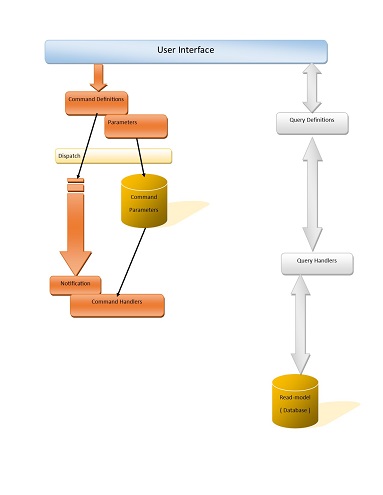
The dispatcher that puts these commands on the table and then sends a message on the queue is:-
Code:
   ''' <summary>
    ''' Command dispatcher that put scommands on an Azure queue
    ''' </summary>
    ''' <remarks>
    ''' For Azure:-
    ''' 1. A queue name must start with a letter or number, and can only contain letters, numbers, and the dash (-) character.
    ''' 2. The first and last letters in the queue name must be alphanumeric. The dash (-) character cannot be the first or last character. Consecutive dash characters are not permitted in the queue name.
    ''' 3. All letters in a queue name must be lowercase.
    ''' 4. A queue name must be from 3 through 63 characters long.
    ''' </remarks>
    Public Class AzureQueueBackedCommandDispacther
        Implements ICommandDispatcher


        'The prefix for the queue name that contains commands
        Public Const COMMAND_QUEUE_PREFIX = "cmd-"
        Public Const CLIENT_QUEUE_PREFIX = "cli-"

        Public Const COMMAND_TABLE_PREFIX = "cmd"
        Public Const CLIENT_TABLE_PREFIX = "cli"

        Dim applicationStorageAccount As CloudStorageAccount
        Dim applicationQueueClient As CloudQueueClient
        Dim applicationTableClient As CloudTableClient

        ''' <summary>
        ''' Gets the name of the appropriate queue to put this command on
        ''' </summary>
        ''' <param name="command">
        ''' The command definition to dispatch
        ''' </param>
        ''' <returns>
        ''' e.g. "cmd-global" or "cmd-cli-23"
        ''' </returns>
        ''' <remarks>
        ''' At present there are only distinct command queues per client.  If this application is a higher usage type then
        ''' queues at a lower level should be considered
        ''' </remarks>
        Public Function GetQueueReference(command As ICommandDefinition) As String Implements ICommandDispatcher.GetQueueReference

            Dim clientCommand As IClientSpecificCommand = Nothing
            If (GetType(IClientSpecificCommand).IsAssignableFrom(command.GetType())) Then
                clientCommand = CType(command, IClientSpecificCommand)
            End If

            If (clientCommand IsNot Nothing) Then
                Return COMMAND_QUEUE_PREFIX & CLIENT_QUEUE_PREFIX & clientCommand.ClientIdentifier.ToString()
            End If

            'If no specific command queue level exists, use the global commands queue
            Return COMMAND_QUEUE_PREFIX & "global"

        End Function

        ''' <summary>
        ''' Gets the name of the appropriate queue to put this command on
        ''' </summary>
        ''' <param name="command">
        ''' The command definition to dispatch
        ''' </param>
        ''' <returns>
        ''' e.g. "cmdglobal" or "cmdcli123"
        ''' </returns>
        ''' <remarks>
        ''' At present there are only distinct command queues per client.  If this application is a higher usage type then
        ''' queues at a lower level should be considered
        ''' </remarks>
        Public Function GetTablename(command As ICommandDefinition) As String

            Dim clientCommand As IClientSpecificCommand = Nothing
            If (GetType(IClientSpecificCommand).IsAssignableFrom(command.GetType())) Then
                clientCommand = CType(command, IClientSpecificCommand)
            End If

            If (clientCommand IsNot Nothing) Then
                Return COMMAND_TABLE_PREFIX & CLIENT_TABLE_PREFIX & clientCommand.ClientIdentifier.ToString()
            End If

            'If no specific command queue level exists, use the global commands queue
            Return COMMAND_TABLE_PREFIX & "global"

        End Function

        Public Sub Send(command As ICommandDefinition) Implements ICommandDispatcher.Send

            ' 1) Save the command data in a commands table for the handler to use
            If (applicationTableClient IsNot Nothing) Then
                Dim commandTable As CloudTable = applicationTableClient.GetTableReference(GetTablename(command))
                'Table may not exists yet, so create it if it doesn't
                commandTable.CreateIfNotExists()
                Dim cmdRecord As New CommandTableEntity(command)
                '\\ Insert or update the record
                Dim insertOperation As TableOperation = TableOperation.InsertOrReplace(cmdRecord)
                Dim insertResult = commandTable.Execute(insertOperation)
            End If

            ' 2) Queue the command to execute
            If (applicationQueueClient IsNot Nothing) Then
                Dim queue As CloudQueue = applicationQueueClient.GetQueueReference(GetQueueReference(command))
                ' Queue may not yet exist so create it is it doesn't
                queue.CreateIfNotExists()
                Dim msg As CloudQueueMessage = New CloudQueueMessage(command.GetType.Name & "::" & command.InstanceIdentifier.ToString())
                If (msg IsNot Nothing) Then
                    queue.AddMessage(msg)
                End If
            End If

        End Sub

        Public Sub Send(commands As IEnumerable(Of ICommandDefinition)) Implements ICommandDispatcher.Send

            If (applicationQueueClient IsNot Nothing) AndAlso (applicationTableClient IsNot Nothing) Then
                For Each Command As ICommandDefinition In commands
                    Send(Command)
                Next
            End If

        End Sub

        Public Sub New(ByVal connectionString As String)
            'Hook up the clound storage account
            If (CloudStorageAccount.TryParse(connectionString, applicationStorageAccount)) Then
                If (applicationStorageAccount IsNot Nothing) Then
                    applicationQueueClient = applicationStorageAccount.CreateCloudQueueClient()
                    applicationTableClient = applicationStorageAccount.CreateCloudTableClient()
                End If
            End If
        End Sub

    End Class
And the record that inherits ITableEntity to allow this to be written to/from table storage is thus:
Code:
    ''' <summary>
    ''' A class for storing a command and its parameters in an azure table store
    ''' </summary>
    ''' <remarks>
    ''' The command type and the instance identifier are the partition and row keys to allow any
    ''' command handler easily to find its command parameter data
    ''' </remarks>
    Public Class CommandTableEntity
        Implements ITableEntity

        Private m_parameters As Dictionary(Of String, CommandParameter) = New Dictionary(Of String, CommandParameter)

        ''' <summary>
        ''' Gets or sets the entity's current Entity Tag.
        ''' </summary>
        ''' <remarks>
        ''' Set this value to '*' in order to blindly overwrite an entity as part of an update operation.
        ''' </remarks>
        Public Property ETag As String Implements ITableEntity.ETag

        ''' <summary>
        ''' The property that defines what table partition this command will be stored in
        ''' </summary>
        ''' <remarks>
        ''' In this implementation this is the command class name
        ''' </remarks>
        Public Property PartitionKey As String Implements ITableEntity.PartitionKey

        ''' <summary>
        ''' The property that defines what row this command record will be stored in
        ''' </summary>
        Public Property RowKey As String Implements ITableEntity.RowKey

        Public Property Timestamp As DateTimeOffset Implements ITableEntity.Timestamp

        ''' <summary>
        ''' Has this command been marked as processed
        ''' </summary>
        Public Property Processed As Boolean

        ''' <summary>
        ''' Has this command been marked as in error
        ''' </summary>
        Public Property InError As Boolean

        ''' <summary>
        ''' What handler processed this command
        ''' </summary>
        Public Property ProcessedBy As String

#Region "Public constructors"
        ''' <summary>
        ''' Parameter-less constructor for serialisation
        ''' </summary>
        ''' <remarks>
        ''' This is mandatory for WATS to persist the object
        ''' </remarks>
        Public Sub New()

        End Sub

        ''' <summary>
        ''' Create a new record with in the commands table
        ''' </summary>
        ''' <param name="commandType">
        ''' The type of command to process
        ''' </param>
        ''' <param name="instanceIdentifier">
        ''' Unique identifier of the command to process
        ''' </param>
        ''' <remarks>
        ''' This can be used if a command has no parameters
        ''' </remarks>
        Public Sub New(ByVal commandType As String, ByVal instanceIdentifier As Guid)
            Me.PartitionKey = commandType
            Me.RowKey = instanceIdentifier.ToString
        End Sub


        Public Sub New(ByVal command As ICommandDefinition)
            Me.New(command.GetType().Name, command.InstanceIdentifier)
            'save the parameters too...
            If (m_parameters Is Nothing) Then
                m_parameters = New Dictionary(Of String, CommandParameter)()
            End If
            For Each param As CommandParameter In command.GetParameters()
                m_parameters.Add(CommandParameter.GetParameterKey(param), param)
            Next
        End Sub

#End Region

        Public Sub ReadEntity(properties As IDictionary(Of String, EntityProperty), operationContext As OperationContext) Implements ITableEntity.ReadEntity

            For Each propertyPair In properties
                If (propertyPair.Key.Contains("__")) Then
                    'This is a property in the form name[index]...
                    Dim fixedPropertyName As String = propertyPair.Key.Replace("__", "[").Trim() & "]"
                    Dim parameterName As String = CommandParameter.GetParameterName(fixedPropertyName)
                    Dim parameterIndex As Integer = CommandParameter.GetParameterIndex(fixedPropertyName)
                    'Get the command payload from the string
                    Dim parameterPayload As String = propertyPair.Value.StringValue
                    If (Not String.IsNullOrWhiteSpace(parameterPayload)) Then
                        m_parameters.Add(propertyPair.Key, CommandParameter.Create(parameterPayload))
                    Else
                        '\\ Add a parameter that has no payload/value
                        m_parameters.Add(propertyPair.Key, CommandParameter.Create(parameterName, parameterIndex))
                    End If
                Else
                    'Named property only...do not persist "ETag", "Timestamp", "Rowkey" or "PartitionKey"

                    ' Additional properties for a command
                    If propertyPair.Key.Equals("Processed", StringComparison.OrdinalIgnoreCase) Then
                        If (propertyPair.Value.BooleanValue.HasValue) Then
                            Me.Processed = propertyPair.Value.BooleanValue.Value
                        End If
                    End If

                    If propertyPair.Key.Equals("InError", StringComparison.OrdinalIgnoreCase) Then
                        If (propertyPair.Value.BooleanValue.HasValue) Then
                            Me.InError = propertyPair.Value.BooleanValue.Value
                        End If
                    End If

                    If propertyPair.Key.Equals("ProcessedBy", StringComparison.OrdinalIgnoreCase) Then
                        Me.ProcessedBy = propertyPair.Value.StringValue
                    End If

                End If
            Next

        End Sub

        Public Function WriteEntity(operationContext As OperationContext) As IDictionary(Of String, EntityProperty) Implements ITableEntity.WriteEntity

            Dim properties As New Dictionary(Of String, EntityProperty)
            'Skip the ITableEntity properties "ETag", "Timestamp", "Rowkey" or "PartitionKey"

            'Add all the command parameters...
            For Each param As CommandParameter In m_parameters.Values
                Dim fixedPropertyName As String = CommandParameter.GetParameterKey(param).Replace("[", "__").Replace("]", "")
                properties.Add(fixedPropertyName, New EntityProperty(param.ToString))
            Next

            'Add the other properties
            properties.Add("Processed", New EntityProperty(Me.Processed))
            properties.Add("InError", New EntityProperty(Me.InError))
            properties.Add("ProcessedBy", New EntityProperty(Me.ProcessedBy))

            Return properties

        End Function
    End Class
Last edited by Merrion; Jan 20th, 2014 at 05:30 AM.
Reason: fixed queue naming code and table naming
-
Jan 19th, 2014, 08:16 AM
#7
Re: An Azure learning app - "Task Bazaar"
Tips I have learnt so far:-
1) When storing data in windows azure table storage, put extra care into deciding what the partition key property is - I started out with too high level an object (client) which meant my tables only had a small number of partitions which makes data access slower.... combining client # and bazaar # proved better in most cases.
2) It costs a (very small) amount of money to poll a windows storage queue even if it is empty therefore a way of throttling the polling rate up or down depending on demand is a very good idea
3) Use a tool like Azure storage explorer to see what is being saved in your blobs/queues/tables
4) Even though you can use the same name for databases and storage accounts it is best not to as you then can't link them to your website as a linked resource
Last edited by Merrion; Jan 20th, 2014 at 09:59 AM.
-
Jan 19th, 2014, 08:57 PM
#8
Re: An Azure learning app - "Task Bazaar"
Have you looked at push notification instead of polling?
Push notifications are meant to do three things: (1.) save on cloud costs, (2.) save on network costs, and (3.) save on CPU cycles in the client device.
Sadly, Microsoft has never implemented such a thing for Windows. You do have it in WinPhone (I think) and WinRT (if you count that) but not generally in Windows that I can find.
Finding out anything about Azure seems like pulling teeth. As far as I can tell Azure Push does support WinPhone, WinRT, iOS, and Android. The last two relay to the vendors' native platform push services acting as a proxy. But for a real Windows desktop application Azure appears to leave you standing, hat in hand.
On the other hand Amazon SNS appears to offer a far wider range of options (though it currently does not support the minority WinPhone and WinRT platforms). One of the useful options in SNS is "push to HTTP/HTTPS" which could be used in a Windows desktop application. The downside here is that you have to be able to open a port through all firewalls between you and the Amazon servers so SNS can connect to your application.
The mobile platforms seem to use a situation where a local service on the device sits between apps and the push service in the cloud. When the device starts, or gets network connectivity, it opens a persistent TCP port to the push service. Since this is an outbound connection the firewall issues are smaller.
Too bad we don't have a discussion area for these sorts of topics. General Developer Discussions seems to be given over to VB.Net questions lately and any thread there not based on Win9x-level technologies seems to get trashed by the regular trolls from the peanut gallery.
-
Jan 20th, 2014, 04:27 AM
#9
Re: An Azure learning app - "Task Bazaar"
I expect my command handler itself to be implemented as a worker role (or many) on azure anyway so don't anticipate problems on the firewall side. I have put together two distinct interfaces - one for pull notifications and one for push notifications so if I (more likely you/we) discover how to do this I can swap it out pretty quickly.
Since I'm in learning mode I'm going to take a look at the Azure notifications system but doubt that there is much help there.
On the other point, maybe we should petition for an "Azure" section ... although we need to know there are enough people interested to prevent it becoming a ghost (like architecture is).
-
Jan 20th, 2014, 12:23 PM
#10
Re: An Azure learning app - "Task Bazaar"
You might find sympathy for an Azure section with the top-tier moderators here but I agree it might end up as a ghost town like others. "If you build it they will come" has been tried and failed before.
-
Jan 20th, 2014, 01:06 PM
#11
Re: An Azure learning app - "Task Bazaar"
Going to see if I can add a "get latest code" function to the app itself so anyone wants the code can get it and just post any questions as arise into the general VB.NET area...
Also - if anyone is interested, there's a deep-dive going on Micrsofot Virtual Academy next week that is probably worth a look.
Last edited by Merrion; Jan 20th, 2014 at 05:02 PM.
-
Jan 24th, 2014, 10:57 AM
#12
Re: An Azure learning app - "Task Bazaar"
Another thing that goes hand-in-hand with the CQRS architecture is Event Sourcing (See this article)
To facilitate this I have a class that saves events to an azure table using the PartitionKey as the aggregate identifier (like the record unique identifier in relational systems) and the RowKey as the version number (the event order):
vb.net Code:
Imports Microsoft.WindowsAzure.Storage Imports Microsoft.WindowsAzure.Storage.Auth Imports Microsoft.WindowsAzure.Storage.Table Imports System.Text.RegularExpressions Public Class AzureEventEntity Private Const VERSION_FORMAT As String = "0000000000000000000" Private Const PROPERTYNAME_EVENTTYPE As String = "EventType" Private Const PROPERTYNAME_SEQUENCE As String = "SequenceNumber" ''' <summary> ''' Turn the version into a consistently ordered string ''' </summary> ''' <param name="version"> ''' The incremental number that represents the row version ''' </param> ''' <returns> ''' The version number formatted with leading zeros so the string order matches ''' the number order ''' </returns> ''' <remarks> ''' If version is less than 0, assume it to be zero. ''' </remarks> Public Shared Function VersionToRowkey(ByVal version As Long) As String If (version <= 0) Then Return VERSION_FORMAT Else Return version.ToString(VERSION_FORMAT) End If End Function ''' <summary> ''' Turn the row key into a version number ''' </summary> ''' <param name="rowkey"> ''' The row unique identifier ''' </param> ''' <returns> ''' The version number formatted with leading zeros so the string order matches ''' the number order ''' </returns> ''' <remarks> ''' If version is less than 0, assume it to be zero. ''' </remarks> Public Shared Function RowKeyToVersion(ByVal rowkey As String) As Long If (String.IsNullOrWhiteSpace(rowkey)) Then Return 0 Else Dim ret As Long If (Long.TryParse(rowkey, ret)) Then Return ret Else Return 0 End If End If End Function Public Shared Function MakeDynamicTableEntity(ByVal eventToSave As IEventContext) As DynamicTableEntity Dim ret As New DynamicTableEntity ret.PartitionKey = eventToSave.GetAggregateIdentifier() ret.RowKey = VersionToRowkey(eventToSave.Version) 'Add the event type - currently this is the ret.Properties.Add(PROPERTYNAME_EVENTTYPE, New EntityProperty(eventToSave.EventInstance.GetType().Name)) 'Add the context If (eventToSave.SequenceNumber <= 0) Then 'Default sequence number is the current UTC date ret.Properties.Add(PROPERTYNAME_SEQUENCE, New EntityProperty(DateTime.UtcNow.Ticks)) Else ret.Properties.Add(PROPERTYNAME_SEQUENCE, New EntityProperty(eventToSave.SequenceNumber)) End If If (Not String.IsNullOrWhiteSpace(eventToSave.Commentary)) Then ret.Properties.Add("Commentary", New EntityProperty(eventToSave.Commentary)) End If If (Not String.IsNullOrWhiteSpace(eventToSave.Who)) Then ret.Properties.Add("Who", New EntityProperty(eventToSave.Who)) End If If (Not String.IsNullOrWhiteSpace(eventToSave.Source)) Then ret.Properties.Add("Source", New EntityProperty(eventToSave.Source)) End If 'Now add in the different properties of the payload For Each pi As System.Reflection.PropertyInfo In eventToSave.EventInstance.GetType().GetProperties() If (pi.CanRead) Then ret.Properties.Add(pi.Name, MakeEntityProperty(pi, eventToSave.EventInstance)) End If Next pi Return ret End Function Public Shared Function MakeEventFromTableEntity(ByVal tableEntityRow As DynamicTableEntity) As IEventContext 'get the event type 'get the context parts If (tableEntityRow.Properties.ContainsKey(PROPERTYNAME_SEQUENCE)) Then End If End Function Private Const TABLE_ILLEGAL_CHAR_REGEX As String = "[\W_]" Public Shared Function MakeValidTableName(strIn As String) As String ' Replace invalid characters with empty strings. Try Return Regex.Replace(strIn, TABLE_ILLEGAL_CHAR_REGEX, "").ToLower() ' If we timeout when replacing invalid characters, ' we should return String.Empty. Catch e As RegexMatchTimeoutException Return String.Empty End Try End Function End Class
-
Jan 24th, 2014, 01:01 PM
#13
Re: An Azure learning app - "Task Bazaar"
and I use another table "EventTracker" to store the current max sequence number of each aggregate - it turns out that this is faster and more parallelizable than querying in the event table itself (another RDBMS hangup to leave behind?)
vb.net Code:
Imports Microsoft.WindowsAzure.Storage Imports Microsoft.WindowsAzure.Storage.Auth Imports Microsoft.WindowsAzure.Storage.Table Class AzureSequenceTrackerEntity Inherits TableEntity ''' <summary> ''' The sequence # currently heading this given event history ''' </summary> Public Property Sequence As Long Public Sub New() End Sub Public Sub New(ByVal eventTableName As String, ByVal aggregateidentifier As String) Me.PartitionKey = eventTableName Me.RowKey = aggregateidentifier End Sub End Class Public Class AzureSequenceTracker Dim applicationStorageAccount As CloudStorageAccount Dim applicationTableClient As CloudTableClient Dim eventTrackerTable As CloudTable Private Const TRACKER_TABLE_NAME As String = "EventTracker" Private Sub CreateTableIfNotExists() If (applicationTableClient IsNot Nothing) Then If (eventTrackerTable Is Nothing) Then eventTrackerTable = applicationTableClient.GetTableReference(TRACKER_TABLE_NAME) 'if the table does not exist, create it eventTrackerTable.CreateIfNotExists() End If End If End Sub Public Sub New(ByVal connectionString As String) 'Hook up the clound storage account If (CloudStorageAccount.TryParse(connectionString, applicationStorageAccount)) Then If (applicationStorageAccount IsNot Nothing) Then applicationTableClient = applicationStorageAccount.CreateCloudTableClient() CreateTableIfNotExists() End If End If End Sub Public Function GetCurrentSequence(ByVal eventTableName As String, ByVal aggregateidentifier As String) As Long CreateTableIfNotExists() Dim query As TableOperation = TableOperation.Retrieve(eventTableName, aggregateidentifier) Dim retreivedResult = eventTrackerTable.Execute(query) If (retreivedResult.Result IsNot Nothing) Then Return DirectCast(retreivedResult.Result, DynamicTableEntity).Properties("Sequence").Int64Value Else Return 0L End If End Function Public Sub SetCurrentSequence(ByVal eventTableName As String, ByVal aggregateidentifier As String, ByVal currentSequence As Long) CreateTableIfNotExists() Dim newSeq As New AzureSequenceTrackerEntity(eventTableName, aggregateidentifier) newSeq.Sequence = currentSequence Dim insertOperation As TableOperation = TableOperation.InsertOrReplace(newSeq) eventTrackerTable.Execute(insertOperation) End Sub End Class
-
Jan 24th, 2014, 03:41 PM
#14
Re: An Azure learning app - "Task Bazaar"
The full source code thus far is up on the Azure storage area if anyone fancies a look?
-
Mar 24th, 2014, 05:19 PM
#15
Re: An Azure learning app - "Task Bazaar"
Still more - the query handlers and the repositories they depend on are hooked up by Unity dependency injection:-
vb.net Code:
Imports Microsoft.Practices.Unity Imports TaskBazaar.Query Imports TaskBazaar.Repository ''' <summary> ''' The concrete class that hooks up the query definition ''' with the class that is its handler ''' </summary> ''' <remarks> ''' This class performs the dependency injection so is ''' made "not inheritable" for sanity ''' </remarks> Public NotInheritable Class QueryHandler Implements IDisposable Private Shared container As New Lazy(Of IUnityContainer) (Function() Dim container = New UnityContainer() RegisterTypes(container) Return container End Function) ''' <summary> ''' Register all of the types which implement the IQueryHandler interface ''' or IRepositoryRead in the given unity container ''' </summary> ''' <param name="container"> ''' The unity container that will return concrete instances of these query handler classes ''' </param> ''' <remarks> ''' The handlers are instantiated as per-thread singletons so that any data connections etc. ''' they use are only ''' disposed when the container is disposed but if required we can ''' have multiple independent threads handling ''' queries ''' </remarks> Public Shared Sub RegisterTypes(container As IUnityContainer) Dim interfaceType As Type = Nothing 'Get the interface definition for the generic query handler interface interfaceType = GetType(IQueryHandler(Of ,)) container.RegisterTypes(AllClasses.FromAssembliesInBasePath(), Function(i) WithName.Default(i), Function(i) WithLifetime.PerThread(i)) 'and any repository handlers... ' we use the namespace to differentiate between back end technologies interfaceType = GetType(IRepositoryRead(Of ,)) container.RegisterTypes(AllClasses.FromAssembliesInBasePath(). Where(Function(z) z.Namespace.Contains("Azure")), Function(i) WithName.Default(i), Function(i) WithLifetime.PerThread(i)) End Sub
Last edited by Merrion; Apr 14th, 2014 at 07:53 AM.
Reason: formatting...
-
Mar 2nd, 2015, 03:34 PM
#16
Re: An Azure learning app - "Task Bazaar"
..and the events that are held in the EventStore all inherit from a base class:-
VB Code:
''' <summary> ''' Base class for all events - allows for a common synchronising property ''' </summary> Public MustInherit Class EventBase ''' <summary> ''' The creation timestamp of this event ''' </summary> ''' <remarks> ''' This allows event streams to be combined in a synchronised fashion for ''' multi-aggregate snapshots ''' </remarks> Public Property SynchronisationStamp As Long Public Sub New() 'Default the synchronisation stamp to now SynchronisationStamp = DateTime.UtcNow.Ticks End Sub ''' <summary> ''' Force derived classes to override ToString ''' </summary> Public MustOverride Overrides Function ToString() As String End Class
In my application there is no need at all to synchronise below milliseconds but if there were then some more elaborate method would be needed.
An example of an event that derives from this can then look like:
VB Code:
''' <summary> ''' A new client was created ''' </summary> ''' <remarks> ''' This event has a client code and a client name ''' </remarks> Public Class CreatedEvent Inherits EventBase Implements IEvent(Of AggregateIdentifiers.ClientAggregateIdentity) ''' <summary> ''' The unique identifier of the client that was created ''' </summary> <EventVersion(1)> Public Property ClientCode As String ''' <summary> ''' The display name of the client ''' </summary> <EventVersion(1)> Public Property ClientName As String Public Overrides Function ToString() As String Return "Client was created - " & ClientName & " with the assigned code - " & ClientCode End Function End Class
Tags for this Thread
 Posting Permissions
- You may not post new threads
- You may not post replies
- You may not post attachments
- You may not edit your posts
-
Forum Rules
|
Click Here to Expand Forum to Full Width
|



 Reply With Quote

