|

-
Jan 8th, 2014, 01:58 AM
#1
Thread Starter
Junior Member

 redacted redacted
Last edited by Reboh79; Jun 13th, 2015 at 06:08 AM.
Reason: Redacting content
-
Jan 8th, 2014, 03:28 AM
#2
Addicted Member
Re: Show image inside of textbox
Just make a borderless textbox with a picture box beside it. If you highlight https:// you'll notice that your cursor stops just after the image and I assume that the image is not inside the textbox
Last edited by Zelot; Jan 8th, 2014 at 03:32 AM.
-
Jan 8th, 2014, 03:31 AM
#3
Re: Show image inside of textbox
Dock a small PictureBox and your TextBox side by side in a Panel and make both child controls BorderStyle=None. BB
-
Jan 13th, 2014, 02:40 AM
#4
Fanatic Member
Re: Show image inside of textbox
just place a picturebox "inside" the textbox with transparent background and borders 
My CodeBank Submissions
- Listbox with transparency and picture support - Click Here
- Check for a true internet connection - Click Here
- Open Cash drawer connected to receipt printer - Click Here
- Custom color and size border around form - Click Here
- Upload file to website without user logins, includes PHP - Click Here
- List All Removable USB Storage Devices - Click Here
- Custom On/Off Slide Control - Click Here
- Insert multiple rows of data into one database table using parameters - Click Here
- Trigger USB/Serial Cash Drawer - Click Here
-
Jan 13th, 2014, 12:00 PM
#5
Re: Show image inside of textbox
You can change the left margin of the text box with this code:
Code:
  Private Declare Function SendMessage Lib "User32.dll" Alias "SendMessageW" ( _
   hwnd As IntPtr, _
   wMsg As Integer, _
   wParam As Integer, _
   lParam As Integer) As Integer

  Private Sub SetTextBoxLeftMargin(textBox As TextBox, margin As Integer)
    Const EM_SETMARGINS As Integer = &HD3
    Const EC_LEFTMARGIN As Integer = &H1
    SendMessage(textBox.Handle, EM_SETMARGINS, EC_LEFTMARGIN, margin)
  End Sub

  Private Sub Form1_Load(sender As Object, e As EventArgs) Handles MyBase.Load
    SetTextBoxLeftMargin(TextBox1, 18)
  End Sub
Above I changed the left margin to be 18 pixels which gives me enough room to place a small picturebox inside the textbox.
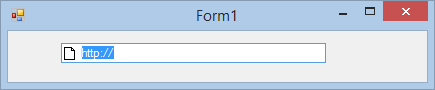
Last edited by Joacim Andersson; Jan 13th, 2014 at 12:08 PM.
Reason: Added line continuation characters just in case the OP uses an earlier version of VS
Tags for this Thread
 Posting Permissions
- You may not post new threads
- You may not post replies
- You may not post attachments
- You may not edit your posts
-
Forum Rules
|
Click Here to Expand Forum to Full Width
|



 Reply With Quote


