I'm using a floating textbox to edit the cells of a flexgrid, as the cells in it don't not have the SelStart and SelLength capabilities. Whenever the arrowkeys are pushed the textbox moves accordingly to place itself on the target cell.
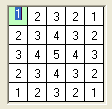
The textbox is adjusted to the size of the flexgrid cells -the border widths are taken into account so that it fits exactly inside. However, it turns out the vertical alignment is different, in the textbox text is always printed at the same vertical offset from the top so it becomes vertically misaligned with the text in the flexgrid cells as in the attached figure.
It's just an ugly aesthetic effect, but if it has an easy solution I'd like to fix it.
Lottery is a tax on people who are bad at maths
If only mosquitoes sucked fat instead of blood...
To do is to be (Descartes). To be is to do (Sartre). To be do be do (Sinatra)
Hmm, not sure what we might be doing differently, but it doesn't seem to be an issue in a sample I wrote a little while back.
You may have to post a small example that reproduces the problem.
Looking at your code I realized the difference was I was using a flat bordeless textbox. As soon as I made it 3D and restored the border all was ok.
Thanks.
Lottery is a tax on people who are bad at maths
If only mosquitoes sucked fat instead of blood...
To do is to be (Descartes). To be is to do (Sartre). To be do be do (Sinatra)



 [RESOLVED] How to align text vetically?

 Reply With Quote

 Originally Posted by dilettante

