|

-
Jan 4th, 2014, 05:34 AM
#1
Thread Starter
Addicted Member


 [RESOLVED] How do I put a background image behind a Aero glass Form! [RESOLVED] How do I put a background image behind a Aero glass Form!
Can someone please help me on this!
I want to know how to load an image and an aero form simultaneously when a button is clicked.
I want the aero form front and image at the back so that the aero form's buttons and labels can be seen clearly.
I hope you all get this
Thank You!
-
Jan 4th, 2014, 09:22 AM
#2
Re: How do I put a background image behind a Aero glass Form!
Er ... umm ... what? Where do you imagine this image existing exactly? Everything has to be drawn on something! And what exactly do you mean by an aero form? All forms are aero forms unless you've deactivated themes. Do you have an example of what you're trying to achieve?
As the 6-dimensional mathematics professor said to the brain surgeon, "It ain't Rocket Science!"
Reviews: "dunfiddlin likes his DataTables" - jmcilhinney
Please be aware that whilst I will read private messages (one day!) I am unlikely to reply to anything that does not contain offers of cash, fame or marriage!
-
Jan 4th, 2014, 10:03 AM
#3
Thread Starter
Addicted Member
Re: How do I put a background image behind a Aero glass Form!
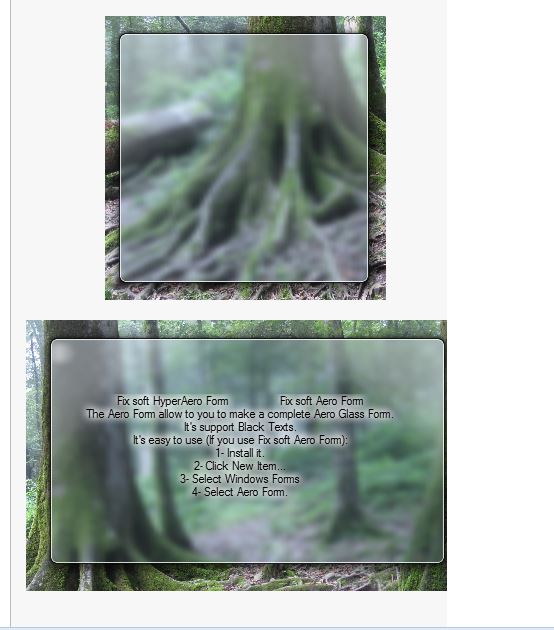
I used the Fix soft HyperAero.dll to create my forms. And when I open (run) them I cannot clearly see the buttons,labels and status strip etc because of the transparency of the form.
In order to make it more perfect and visible, I would like to know how to put a image form behind the Aero (transparent)form.
Thank you!
Like this
-
Jan 4th, 2014, 10:53 AM
#4
Re: How do I put a background image behind a Aero glass Form!
So, you want to have an Aero transparent form that's not actually transparent, ie. sees through to whatever happens to be behind it, but looks through instead onto an image the exact size of the Aero form and remains with the Aero form wherever it travels, is resized with it and so on? Well it's not the daftest idea I've seen here but it comes pretty close. Might one enquire why you don't/can't simply leave the buttons and toolstrip opaque so they can be seen whatever the circumstances? Labels, I appreciate can be a little tricky but it still seems a little against the whole point of Aero transparency to provide a background image by whatever means it's achieved.
I dare say it could be done. I'd have to have a look at the dll first but with the somewhat ramshackle state of affairs at FixSoft currently I can't say I'm greatly motivated to do so if you need a fast answer I'm probably not going to be able to oblige.
As the 6-dimensional mathematics professor said to the brain surgeon, "It ain't Rocket Science!"
Reviews: "dunfiddlin likes his DataTables" - jmcilhinney
Please be aware that whilst I will read private messages (one day!) I am unlikely to reply to anything that does not contain offers of cash, fame or marriage!
-
Jan 4th, 2014, 01:25 PM
#5
Re: How do I put a background image behind a Aero glass Form!
You can probably do it by using a separate form to show the image. This will work for a normal form, so I guess it will work for an Aero form too.
Make the background form FormBorderStyle = None and set your image as its BackgroundImage. If the Aero form can be resized or repositioned, code its SizeChanged and Move event handlers to keep the bounds of the image aligned. And make the background form the Owner of the Aero form, so that the Owned form will stay locked in front of its owner in all conditions. There are several ways to set the ownership, e.g.
Code:
BackgroundForm.AddOwnedForm(Me)
'or
Me.Owner = BackgroundForm
where Me is the Aero form.
To prevent both forms showing in the TaskBar, set the Background form's Text to the same as the Aero Form, and set ShowInTaskbar = False for the Aero form.
BB
-
Jan 5th, 2014, 02:25 AM
#6
Thread Starter
Addicted Member
Re: How do I put a background image behind a Aero glass Form!
 Originally Posted by dunfiddlin

So, you want to have an Aero transparent form that's not actually transparent, ie. sees through to whatever happens to be behind it, but looks through instead onto an image the exact size of the Aero form and remains with the Aero form wherever it travels, is resized with it and so on? Well it's not the daftest idea I've seen here but it comes pretty close. Might one enquire why you don't/can't simply leave the buttons and toolstrip opaque so they can be seen whatever the circumstances? Labels, I appreciate can be a little tricky but it still seems a little against the whole point of Aero transparency to provide a background image by whatever means it's achieved.
I dare say it could be done. I'd have to have a look at the dll first but with the somewhat ramshackle state of affairs at FixSoft currently I can't say I'm greatly motivated to do so if you need a fast answer I'm probably not going to be able to oblige.
Yes that is what I wanted. Can you please have a look into it and tell me what I have to do?
Thanks a lot! waiting for an answer...
-
Jan 5th, 2014, 02:32 AM
#7
Thread Starter
Addicted Member
Re: How do I put a background image behind a Aero glass Form!
Originally Posted by boops boops
You can probably do it by using a separate form to show the image. This will work for a normal form, so I guess it will work for an Aero form too.
Make the background form FormBorderStyle = None and set your image as its BackgroundImage. If the Aero form can be resized or repositioned, code its SizeChanged and Move event handlers to keep the bounds of the image aligned. And make the background form the Owner of the Aero form, so that the Owned form will stay locked in front of its owner in all conditions. There are several ways to set the ownership, e.g.
Code:
BackgroundForm.AddOwnedForm(Me)
'or
Me.Owner = BackgroundForm
where Me is the Aero form.
To prevent both forms showing in the TaskBar, set the Background form's Text to the same as the Aero Form, and set ShowInTaskbar = False for the Aero form.
BB
thanks a lot boops boops .
But I didnt understand what you meant by this line "If the Aero form can be resized or repositioned, code its SizeChanged and Move event handlers to keep the bounds of the image aligned."
Can you please explain it to me by an example or so?
-
Jan 5th, 2014, 05:40 AM
#8
Re: How do I put a background image behind a Aero glass Form!
Originally Posted by ashveen
thanks a lot boops boops .
But I didnt understand what you meant by this line "If the Aero form can be resized or repositioned, code its SizeChanged and Move event handlers to keep the bounds of the image aligned."
Can you please explain it to me by an example or so?
I'm talking about the user repositioning or resizing the form at run time. The Aero form in the images you posted doesn't have a border, so I maybe you aren't going to allow that. Or does your Aero form provide some other way for the user to move or resize the form? If so, let's assume your background form is called BackgroundForm and you want it to show a margin of 35 pixels all round the Aero form. You could code it like this:
Code:
Private Sub Form1_Move(sender As Object, e As System.EventArgs) Handles Me.Move, Me.SizeChanged, Me.Shown
      Dim r As Rectangle = Me.Bounds
      r.Inflate(35, 35)
      BackgroundForm.Bounds = r
End Sub
BB
-
Jan 5th, 2014, 06:18 AM
#9
Thread Starter
Addicted Member
Re: How do I put a background image behind a Aero glass Form!
Originally Posted by boops boops
I'm talking about the user repositioning or resizing the form at run time. The Aero form in the images you posted doesn't have a border, so I maybe you aren't going to allow that. Or does your Aero form provide some other way for the user to move or resize the form? If so, let's assume your background form is called BackgroundForm and you want it to show a margin of 35 pixels all round the Aero form. You could code it like this:
Code:
Private Sub Form1_Move(sender As Object, e As System.EventArgs) Handles Me.Move, Me.SizeChanged, Me.Shown
      Dim r As Rectangle = Me.Bounds
      r.Inflate(35, 35)
      BackgroundForm.Bounds = r
End Sub
BB
Thank you very much boops boops it worked great as I expected. 
Tags for this Thread
 Posting Permissions
- You may not post new threads
- You may not post replies
- You may not post attachments
- You may not edit your posts
-
Forum Rules
|
Click Here to Expand Forum to Full Width
|



 Reply With Quote


