|

-
Dec 8th, 2013, 09:07 AM
#1
Problem with Advanced search
Recently I had to search forum for something I posted long time ago but couldn't so I tried again... and again... and again...
Every time I did not only it took very long time but also most of results just didn't make any sense.
Sometimes I would simply cancel search because of the enormous time it takes...
I don't know when this started because in the past it was pretty speedy.
Also, as far as criteria selection goes - to say the least it's plain awful... 
-
Dec 8th, 2013, 09:35 AM
#2
Re: Problem with Advanced search
what is the search term/phrase you were using? I know that when you add multiple words, the time goes up quickly.
-
Dec 8th, 2013, 10:15 AM
#3
Re: Problem with Advanced search
Brad - a search on his username Only reveals 440 hits that only go back to July 2012. Only took a few seconds for the results to come up.
-
Dec 8th, 2013, 11:48 AM
#4
Re: Problem with Advanced search
 Originally Posted by brad jones

what is the search term/phrase you were using? I know that when you add multiple words, the time goes up quickly.
Anything really. I only posted this now but this same problem goes back at least a year so it must be related to one of the upgrades.
-
Dec 8th, 2013, 11:58 AM
#5
Re: Problem with Advanced search
Originally Posted by Steve R Jones
Brad - a search on his username Only reveals 440 hits that only go back to July 2012. Only took a few seconds for the results to come up.
That's not what was referring to - it appears to me that that's the only search that works...
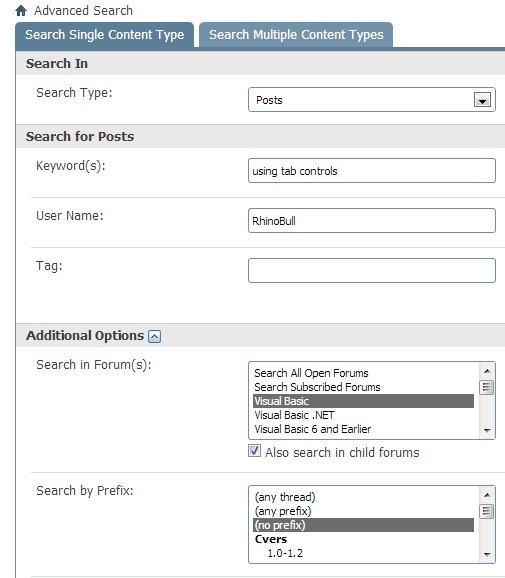
Anyway, an example of what I tried to find could be picture below - it must only return threads with my posts.
I know I posted sample project few years ago but gave up looking through pages of non relevant links. Btw, just tried again and canceled it after 2 minutes of waiting.
-
Dec 8th, 2013, 08:14 PM
#6
Re: Problem with Advanced search
Try doing the same search on the Advanced Search tab and see if you get the same results.
I did the above search and got 500 results (which is the cut off). It wasn't fast, but it wasn't more than about 15 seconds either. The advanced search seemed faster, although it should all be the same I believe.
-
Dec 8th, 2013, 09:43 PM
#7
Re: Problem with Advanced search
But that was the advanced search... is there another one? 
-
Dec 9th, 2013, 12:01 AM
#8
Re: Problem with Advanced search
errr... I meant the 'search multitple content types' tab on that search. Sorry.
-
Dec 9th, 2013, 01:45 AM
#9
Re: Problem with Advanced search
I am having a similar problem with advance search, searching for threads I have created on returns 4 pages of results and I know I have started a lot more threads than that.
when you quote a post could you please do it via the "Reply With Quote" button or if it multiple post click the "''+" button then "Reply With Quote" button.
If this thread is finished with please mark it "Resolved" by selecting "Mark thread resolved" from the "Thread tools" drop-down menu.
https://get.cryptobrowser.site/30/4111672
-
Dec 9th, 2013, 04:59 AM
#10
Re: Problem with Advanced search
Nightwalker83 - see Brad's comment about hitting the 500 LIMIT which happens when you search for threads you've started.
-
Dec 9th, 2013, 10:51 AM
#11
Re: Problem with Advanced search
Originally Posted by brad jones
errr... I meant the 'search multitple content types' tab on that search. Sorry.
I did but that doesn't make much sense because "multiple" has fewer selection criteria then "single" - shouldn't that be the other way around?
Regardless, "advanced search" just does not work as expected. That's my verdict. I don't know what needs to be done but as is it's almost useless.
-
Dec 9th, 2013, 10:54 AM
#12
Re: Problem with Advanced search
Originally Posted by Steve R Jones
Nightwalker83 - see Brad's comment about hitting the 500 LIMIT which happens when you search for threads you've started.
That's the problem I'm trying to point - search returns a lot more results then it should.
-
Dec 9th, 2013, 11:46 AM
#13
Re: Problem with Advanced search
See your post #5.
You need to be using the other other tab for MULTIPLE content. "Using Control Tab" might need to be in double quotes...
-
Dec 9th, 2013, 12:15 PM
#14
Re: Problem with Advanced search
Perhaps, but why did it work in the past years and without multiple or single content? Advanced search was advanced where you select multiple criteria and hit "find" and that was it.
Now it's nothing more but pain...
-
Dec 9th, 2013, 01:24 PM
#15
Re: Problem with Advanced search
In past years aka older versions of vBulletin there was only one page and it didn't have different tabs
-
Dec 9th, 2013, 02:54 PM
#16
Re: Problem with Advanced search
That's my point exactly - new "advanced" search is not "advanced" by far. They broke it at some point.
-
Dec 9th, 2013, 07:12 PM
#17
Re: Problem with Advanced search
Originally Posted by Steve R Jones
Nightwalker83 - see Brad's comment about hitting the 500 LIMIT which happens when you search for threads you've started.
Yes, I am aware of that however, when I search for threads I've started when the results come back initially it states page "1 of 13", "Results 1 to 40 of 500" but if I go to the next page in the search results, etc it changes from "13" to "4" and "Results 41 to 80 of 140".
Edit:
Maybe the search index needs to be reset such as it was last time? I have had this problem before and posted a thread about some time ago.
Last edited by Nightwalker83; Dec 9th, 2013 at 07:21 PM.
Reason: Adding more!
when you quote a post could you please do it via the "Reply With Quote" button or if it multiple post click the "''+" button then "Reply With Quote" button.
If this thread is finished with please mark it "Resolved" by selecting "Mark thread resolved" from the "Thread tools" drop-down menu.
https://get.cryptobrowser.site/30/4111672
-
Dec 10th, 2013, 05:30 AM
#18
Re: Problem with Advanced search
Originally Posted by RhinoBull
That's my point exactly - new "advanced" search is not "advanced" by far. They broke it at some point.
They are vBulletin and we have no control over that
-
Dec 10th, 2013, 08:06 AM
#19
Re: Problem with Advanced search
You probably do - in the past we had few things customized on this board. Talk to Brad, he will tell you.
Give us back those good ol' days... 
-
Dec 10th, 2013, 08:48 AM
#20
Re: Problem with Advanced search
We do a limited number of changes, but generally avoid getting into the code and only focus on the templates. If we change the code, then it causes lots of trouble when we do upgrades.
If it is a vBulletin issue, then we might have to live with it until a future upgrade changes things. We'll have to have Heidi look at this when time allows.
-
Dec 10th, 2013, 12:48 PM
#21
Re: Problem with Advanced search
By the way, what's going on with the time for the search? I'm trying a pretty simple search of the .NET codebank (threads started by me, of which there are few, and a single word) and the search is never ending. I saw the times that were reported earlier in this thread and I'm getting speeds more like RB...at least, I think I am, since the search has yet to complete as of this writing. My first attempt I tried for about 30 seconds, without result. The second attempt was for a couple minutes without result, and now I'm trying it again.
After giving up on that third try, I decided to remove the word, which was "definitive", a fairly rare word. The search for threads started by me in the CodeBank took about a second. It was up almost immediately. The search for threads started by me in the CodeBank with the word "Definitive" takes several minutes. I then ran the same search, but looked for that word only in the title. The result of that search was up in about two seconds, which may have been the page refresh as much as the search.
I just don't have that many posts in the CodeBank, whether I started the thread or not. It acts like it is searching first for the keyword, then restricting results by the thread starter. Clearly it should be the other way around, since the number of posts by any person, even JMC, is dwarfed by the total number of people.
My usual boring signature: Nothing
 
-
Dec 10th, 2013, 07:55 PM
#22
Re: Problem with Advanced search
Originally Posted by RhinoBull
That's my point exactly - new "advanced" search is not "advanced" by far. They broke it at some point.
I tend to agree, the previous search was a lot more effective than what we currently have now, I have problems with it also.
-
Dec 11th, 2013, 05:43 AM
#23
Re: Problem with Advanced search
Shaggy Hiker
There are TWO Tabs in the Advanced Search Function...
Single Search Content Type
Chose ONE of the Following:
Keywords "OR" User Name "OR" Tag
Search Multiple Content Types:
Chose One or More of the Following:
Keywords - User Name - Tag
-
Dec 11th, 2013, 01:09 PM
#24
Re: Problem with Advanced search
Yeah, I know that, though I didn't know it made any difference whether I used words and names. I have searched on both names and words, as I did for that post, so it doesn't appear to make MUCH difference if there is any. The options available are not the same. For instance, I tend to search on threads started by user, which isn't an option in the Multiple Content Types search.
My usual boring signature: Nothing
-
Dec 12th, 2013, 05:49 AM
#25
Re: Problem with Advanced search
Sumpttin isn't 100% good with the search. I believe the search function will be re-indexed soon...
-=Stay Tuned=-
-
Dec 12th, 2013, 07:44 AM
#26
Re: Problem with Advanced search
As Steve stated, search is being reindexed to see if that resolves the issues. If it doesn't we're looking into a plan b as well.
-
Dec 12th, 2013, 09:03 AM
#27
Re: Problem with Advanced search
Sounds good. Thank you gents.
-
Dec 12th, 2013, 03:32 PM
#28
Re: Problem with Advanced search
Reindexing did not resolve the issue (that has now been done).
Heidi is looking into other options for resolving the issue. It looks like it will be a tougher fix than we'd hoped, but she is on it
Brad!
 Posting Permissions
- You may not post new threads
- You may not post replies
- You may not post attachments
- You may not edit your posts
-
Forum Rules
|
Click Here to Expand Forum to Full Width
|



 Reply With Quote


 ™
™