|

-
Nov 26th, 2013, 12:25 PM
#1
Thread Starter
Fanatic Member


 [RESOLVED] Trouble with Excel Userform with ComboBox [RESOLVED] Trouble with Excel Userform with ComboBox
I have a Userform with a single ComboBox control that displays when a certain cell is clicked. Everything works fine except I want the first value in the list to be displayed in the box (as opposed to blank). If I try setting the Value or Text or ListIndex before Show I get a run-time error. What am I doing wrong?
Code:
Private Sub TestComboBox()
    Const strList As String = "one,two,three,four,five,six,other"

    With UserForm1
        .Caption = "Choose Item from List"
        .ComboBox1.List = Split(strList, ",")
'        .ComboBox1.ListIndex = 0   'Run-time error.  Automation error.  The callee ... is not available...
        .Show vbModeless
    End With
End Sub
-
Nov 27th, 2013, 11:28 AM
#2
Addicted Member

Re: Trouble with Excel Userform with ComboBox
The problem is not this line: .ComboBox1.ListIndex = 0, but this one: .Show vbModeless.
You can not use the Show method to display a visible form as modal. This error has the following cause:
Tried to use Show, with the style argument set to 1 - vbModal in an already visible form.
Commented/delete this line and set this value, directly in the properties windows.
Code:
Private Sub TestComboBox()
    Const strList As String = "one,two,three,four,five,six,other"

    With UserForm1
        .Caption = "Choose Item from List"
        .ComboBox1.List = Split(strList, ",")
        .ComboBox1.ListIndex = 0
        '.Show vbModeless
    End With
End Sub
Result:

HTH
-
Nov 27th, 2013, 01:09 PM
#3
Thread Starter
Fanatic Member
Re: Trouble with Excel Userform with ComboBox
Sorry, I don't follow. If I comment out the .Show line, the Userform never appears. I only want the form to be visible when the user clicks on a certain cell, hidden otherwise. Once the form appears and user selects the item from the list, the value is placed in the cell that was selected and the form disappears. Here are the steps.
1. User clicks worksheet cell, triggering Worksheet_SelectionChange event
2. If the cell address is the right one, set the Userform caption and fill the combo box
3. Display the User form using Show method
4. User selects an item from the dropdown list
5. Value of selected item is written to the worksheet cell
6. Unload the Userform
Everything works fine except I don't like that when the Userform is displayed, the visible item in the combo box is blank (clicking the arrow will display the list). Not fatal but looks goofy. I'd like the first item in the list to be showing in the combo box when it is initially displayed if there is a way to accomplish that.
-
Nov 27th, 2013, 04:06 PM
#4
Addicted Member
Re: Trouble with Excel Userform with ComboBox
Well, I mean.. see pic below
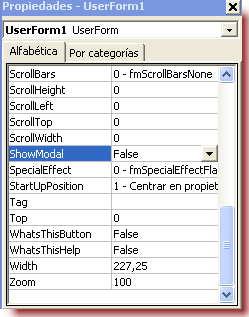
and code...
Code:
Private Sub TestComboBox()
    Const strList As String = "one,two,three,four,five,six,other"

    With UserForm1
        .Caption = "Choose Item from List"
        .ComboBox1.List = Split(strList, ",")
        .ComboBox1.ListIndex = 0
        .Show vbModeless
    End With
End Sub

Private Sub ComboBox1_Change()
    ActiveCell.Value = Me.ComboBox1.Value
End Sub

Private Sub UserForm_Initialize()
    TestComboBox
End Sub
HTH.
-
Dec 2nd, 2013, 02:53 PM
#5
Thread Starter
Fanatic Member
Re: Trouble with Excel Userform with ComboBox
Thanks for your reply. Finally figured it out. I didn't realize setting the ListIndex causes ComboBox1_Change() to fire. The issue was I was using Unload UserForm1 at the end of ComboBox1_Change(), which caused an error when ComboBox1_Change() fired the second time. Changing the line to Userform1.Hide fixed the problem.
 Posting Permissions
- You may not post new threads
- You may not post replies
- You may not post attachments
- You may not edit your posts
-
Forum Rules
|
Click Here to Expand Forum to Full Width
|



 Reply With Quote