|

-
Sep 27th, 2013, 01:00 PM
#1
Thread Starter
Lively Member

 [RESOLVED] VB6, ADO, Oracle, and Win7-64: Automation Error - cannot connect to Oracle [RESOLVED] VB6, ADO, Oracle, and Win7-64: Automation Error - cannot connect to Oracle
We have an application that was written by one of our developers that is not able to work on it at the moment. It was written in VB6 and compiled on WinXP SP3. It works fine on our WinXP machines. We have recently upgraded many workstations to Win7-64 and the application is not connecting to Oracle and pops up an "Automation Error". That is all that is displayed and is a message created by the application for error handling, it's not very descriptive. I've been googling all day and all I really see is people saying they have problems running VB6 ADO applications compiled on Win7 to a lower Windows version. That is not our problem.
Is there something magical that needs to be done? Would simply installing VB6 on Win7 and recompiling there make it run? Would the connection string need changed? I don't know what it is, the developer is unavailable for a couple weeks and we're really hoping to get the application working before that. I have several VB6 apps that connect to access databases without trouble, but this one is connecting to Oracle. I've done a mock ODBC32 connection using the oracle driver and it works fine so I feel it has to be something in the app itself.
Thanks for any insight you may have
-
Sep 27th, 2013, 01:14 PM
#2
Re: VB6, ADO, Oracle, and Win7-64: Automation Error - cannot connect to Oracle
Thnigs to consider:
- Oracle Client must be installed on every workstation
- tnsnames.ora file must be configured
- if Admin folder (it's one of subfolders where client is installed) has sqlnet.ora file rename or delete it
- check connectionstrings.com website for proper connection string
- try not to use odbc to connect, rather oledb provider
Question:
- do you have access to vb code?
- if you do then run project and press ctrl+pause to see what lines generates that error
- what is your program automating (this really sounds strange because there is no automation required to connect to Oracle)
Last edited by RhinoBull; Sep 27th, 2013 at 01:18 PM.
-
Sep 27th, 2013, 01:54 PM
#3
Thread Starter
Lively Member
Re: VB6, ADO, Oracle, and Win7-64: Automation Error - cannot connect to Oracle
Thank you for your response RhinoBull, I've answered all of your questions and points in red.
 Originally Posted by RhinoBull

Thnigs to consider:
- Oracle Client must be installed on every workstation They are installed
- tnsnames.ora file must be configured It is, I've even tried copying from an xp install (same client version) as well - still no luck
- if Admin folder (it's one of subfolders where client is installed) has sqlnet.ora file rename or delete it It was there, deleted it and same result
- check connectionstrings.com website for proper connection string I don't have access to his code
- try not to use odbc to connect, rather oledb provider the program doesn't use ODBC, I just used the ODBC administration to see if the oracle driver was connecting with the test connection and it was successful
Question:
- do you have access to vb code? Not until he gets back in 2 weeks
- if you do then run project and press ctrl+pause to see what lines generates that error
- what is your program automating (this really sounds strange because there is no automation required to connect to Oracle) It's not automating anything, that's just the error handling message he popped up, I've seen "automation error" on many google searches for issues connecting to oracle so I'm assuming it's a build in error code, he just removes all of the information that might be useful and pops up the error description of automation error
Edit:
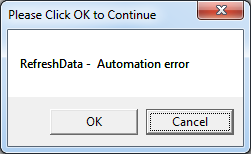
screenshot of the error message he displays (just an error message in a msgbox, probably doesn't mean anything useful to anyone without the code)
Last edited by sdouble; Sep 27th, 2013 at 02:00 PM.
Reason: Attached image file
-
Sep 27th, 2013, 03:18 PM
#4
Frenzied Member
Re: VB6, ADO, Oracle, and Win7-64: Automation Error - cannot connect to Oracle
Connection string is different of 64 bit from 32 bit for Oracle database 10 g client .hope following link will be useful to connect with 64 bit machine on oracle database 10 G client .
http://www.connectionstrings.com/oracle/
-
Sep 27th, 2013, 03:36 PM
#5
Thread Starter
Lively Member
Re: VB6, ADO, Oracle, and Win7-64: Automation Error - cannot connect to Oracle
Originally Posted by firoz.raj
Connection string is different of 64 bit from 32 bit for Oracle database 10 g client .hope following link will be useful to connect with 64 bit machine on oracle database 10 G client .
http://www.connectionstrings.com/oracle/
The oracle client is 32 bit.
Thanks
-
Oct 23rd, 2013, 02:04 PM
#6
Thread Starter
Lively Member
Re: VB6, ADO, Oracle, and Win7-64: Automation Error - cannot connect to Oracle
The guy came back from vacation and finally got his computer updated to Win7 and everything. Turns out, he was using the adodc control and was setting the connection string at runtime, then referencing back to it ( Form2.adodc1.connectionstring = Form1.adodc1.connectionstring type of thing) and it appeared to always drop the password when retrieving the connection string, but does not do that when compiled and run on XP. I tested the win7 part of this in vb.net and it behaves the same (from pulling current connection string from oledbconnection object), but it does not do that with C#, which is what I mainly use myself.
For example:
Code:
adodc1.connectionstring="Provider=OraOLEDB.Oracle;Data Source=someserver;User Id=someuser;Password=somepass;"
debug.print adodc1.connectionstring
would print:
Code:
Provider=OraOLEDB.Oracle.1;Persist Security Info=False;User ID=someuser;Data Source=someserver;
Also, I don't know why it appends the ".1" to the provider. It doesn't do that with vb.net or C#.
Thanks for the input, all.
Last edited by sdouble; Oct 23rd, 2013 at 02:36 PM.
Tags for this Thread
 Posting Permissions
- You may not post new threads
- You may not post replies
- You may not post attachments
- You may not edit your posts
-
Forum Rules
|
Click Here to Expand Forum to Full Width
|



 Reply With Quote

