|

-
Sep 18th, 2013, 04:54 AM
#1
Thread Starter
Hyperactive Member

Aligning controls with docking
Hi folks,
I have a DataRepeater.ItemTemplate I have added some items too as shown in the first image. From the left of the template I have 5 labels then a progress bar, then a button.

The DataRepeater is anchored to all sides of the form so that it grows and shrinks with the form as it is resized.
The button on the ItemTemplate is docked right so that it stays at the right hand side of the template.
The ProgressBar is where my issue lies. If I anchor it it stays where it is in position in relation to the ItemTemplate which is correct - but I also would like it to strech as the ItemTemplate does BUT not collide with the button...
If I dock the ProgressBar to the right it moves right up against the right edge and the button gets pushed to the left of it, if I anchor it to the right as well as its current top and left, it stretches out to have its right edge constantly underneath the button...

How can I get the progress bar to maintain position relative to the top left yet grow to the right - but not grow right to the edge of the containing template, only grow such that it has the same constant standoff from the right?
Thanks
Thanks 
-
Sep 18th, 2013, 12:16 PM
#2
Re: Aligning controls with docking
The X button should be Dock Right but also Anchor Top, Left. The ProgressBar Dock None, Anchor Top, Left, Right.


As the 6-dimensional mathematics professor said to the brain surgeon, "It ain't Rocket Science!"
Reviews: "dunfiddlin likes his DataTables" - jmcilhinney
Please be aware that whilst I will read private messages (one day!) I am unlikely to reply to anything that does not contain offers of cash, fame or marriage!
-
Sep 18th, 2013, 01:32 PM
#3
Thread Starter
Hyperactive Member
Re: Aligning controls with docking
Hey Dunfiddlin,
Thanks for helping out, unfortunately that still gives me the same as the second image in my OP.
Im still playing around with it (in between getting P'd off with it) but so far can only get it to either not stretch or stretch but finish behind the button.
Very annoying because now I know it *should* be working but isn't for some kooky reason....
Should it make a difference that the DataRepeater itself is anchored (top, bottom, left & right)?
EDIT: no, no difference - switched DataRepeater anchoring to top & left but not a lemon 
Thanks
-
Sep 18th, 2013, 02:25 PM
#4
Re: Aligning controls with docking
Are the labels AutoSize? If they are being sized according to content rather than size of the window that could well mess things up.
As the 6-dimensional mathematics professor said to the brain surgeon, "It ain't Rocket Science!"
Reviews: "dunfiddlin likes his DataTables" - jmcilhinney
Please be aware that whilst I will read private messages (one day!) I am unlikely to reply to anything that does not contain offers of cash, fame or marriage!
-
Sep 18th, 2013, 02:35 PM
#5
Re: Aligning controls with docking
Using both docking and anchoring at the same time tends to get confusing. I suggest you try anchoring the X button top right; and the progress bar top, left and right. No docking.
BB
-
Sep 19th, 2013, 12:55 PM
#6
Thread Starter
Hyperactive Member
Re: Aligning controls with docking
OK I've tried setting the labels autosize to false (then had to widen them) then setting the docking and anchoring as boops boops mentioned... still no dice
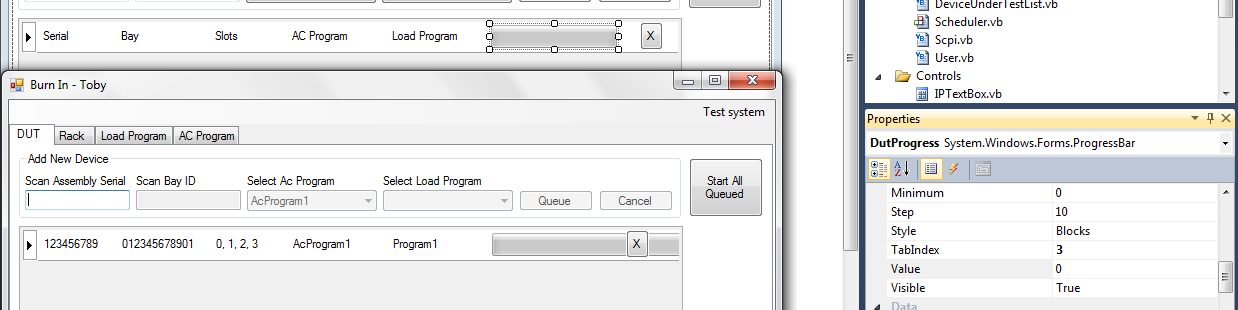
In this image you can see the layout in the design editor in the background and the running application in the foreground with the progress bar looking as if it is actually running off the right hand side of the ItemTemplate altogether 
I tried switching the ItemTemplate Autosize property from True to false, but again, no change.
Thanks
-
Sep 19th, 2013, 02:58 PM
#7
Re: Aligning controls with docking
Yes, well. Boops is a bit off beam. Try with the settings I gave you in post #2 and AutoSize = False
As the 6-dimensional mathematics professor said to the brain surgeon, "It ain't Rocket Science!"
Reviews: "dunfiddlin likes his DataTables" - jmcilhinney
Please be aware that whilst I will read private messages (one day!) I am unlikely to reply to anything that does not contain offers of cash, fame or marriage!
 Posting Permissions
- You may not post new threads
- You may not post replies
- You may not post attachments
- You may not edit your posts
-
Forum Rules
|
Click Here to Expand Forum to Full Width
|



 Reply With Quote

