|

-
Aug 29th, 2013, 01:50 AM
#1
Thread Starter
Junior Member

 [RESOLVED] Do not use GOTO [RESOLVED] Do not use GOTO
Hello, I have some code in VBA that I am converting to VB 2010. The code has several GOTO statements, which this forum tells me are now bad practice. Below is a flow chart of part of the code. I think I can work it out except for decision block 7 which includes the statement "GOTO 7" if the IF THEN statement is false. I would prefer to not use other SUBs to get the result but maybe my approach is wrong. Any assistance will be much appreciated.
Thanks, Peter

-
Aug 29th, 2013, 01:57 AM
#2
Re: Do not use GOTO
I remember One of the top linux bods arguing with Dijkstra about the use of GoTo in the linux kernal having better performance. He won. GoTo is considered evil and it's pretty accurate. It creates spaghetti code. How ever i know some programmers dont see it as to evil.
http://en.wikipedia.org/wiki/Considered_Harmful
Might be a better idea to provide your code.
-
Aug 29th, 2013, 02:09 AM
#3
Re: Do not use GOTO
 Originally Posted by ident

It creates spaghetti code.
That's not exactly true. You can write code that's hard to follow without a GoTo and you can write good, easy to follow code with GoTos. The issue is that the use of GoTo makes it much easier to write spaghetti code and most programmers, particularly beginners, are not disciplined enough to prevent it happening to some degree at least.
There are many constructs in programming that are effectively GoTos because they make execution jump to somewhere other than the next line. The thing is, all but GoTo are highly structured, i.e. it's very easy to predict and see where in the code they jump to. With GoTo, the target is effectively arbitrary so you could end up jumping around all over the place and anyone reading the code would have no idea what was going on.
Your flowchart is not especially difficult. It really just requires a bunch of Do or While loops and some If statements. The part you refer to would be implemented using a Do Until loop in VB.NET, e.g.
Code:
Dim x = 0

Do
    x += 1
Loop Until x = 7
Each time the Loop line is hit, it will "go to" the Do line as long as 'x = 7' is False. Like I said, this is much more structured than a GoTo because you know for a fact that execution can only proceed or go back to the Do line when it hits a Loop line, whereas a GoTo could jump to anywhere.
-
Aug 29th, 2013, 02:13 AM
#4
Re: Do not use GOTO
Here's a rudimentary implementation of that entire flowchart:
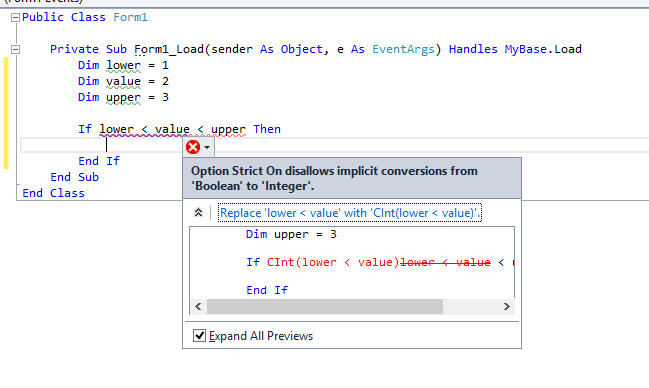
Code:
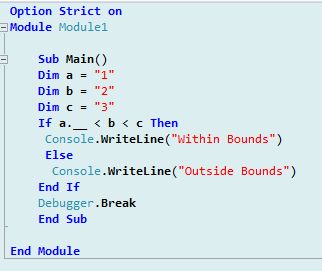
Do While Start
    If _88 Then
        '50
    End If

    '5

    Do Until _7

    Loop

    '77
Loop

'End
-
Aug 29th, 2013, 03:19 AM
#5
Re: Do not use GOTO
Hmm some of my post did not show up, more poor phone writing from me. I completely agree goto is not harmful in the right hands. Both Dijkstra famous arguments about the teaching of basic should be rated a criminal offense, and the use of goto being harmful. I do disagree with articles how ever they can hold some truth. But that's the case with any bad programmer. A good programmer will make good use of the GoTo statement while a bad programmer will not.
Last edited by ident; Aug 29th, 2013 at 04:13 AM.
Reason: sorry about phone typo's
-
Aug 29th, 2013, 03:34 AM
#6
Re: Do not use GOTO
ahhhh stupid phone typing
-
Aug 29th, 2013, 02:43 PM
#7
Re: Do not use GOTO
You visit here on your phone ? You must really love these forums  People usually visit FB on their phones. People usually visit FB on their phones.
-
Aug 29th, 2013, 03:50 PM
#8
Re: Do not use GOTO
I enjoy reading the forums during lunch break. I'm the last person you would expect to enjoy programming if you knew me. I'v spent the last year winding my work mates up talking about regular expressions relentlessly(They don't even know what they are of course). Can you picture many carpenters on a building site covered in crap, pouch wrapped around my waist eating a bacon sarnie reading a "regular expressions cook book" 
-
Aug 29th, 2013, 03:56 PM
#9
Re: Do not use GOTO
lol.....
-
Aug 29th, 2013, 05:06 PM
#10
Thread Starter
Junior Member
Re: Do not use GOTO
Ok, thanks gents. I have 500 odd lines of code to fit into those boxes so give me a few days.
Peter
-
Aug 29th, 2013, 10:41 PM
#11
Thread Starter
Junior Member
Re: Do not use GOTO
Thanks jmcilhinney
The VBA code below is the start block in my diagram. Please convert it to Do While so I can get started. It is the first time I have attempted to use Do. Each of the other blocks contain a mixture of If and For statements. Perhaps if I see how to do this one the others will become clearer.
Code:
For i = 1 To j
        If sQ(i) > 0 Then GoTo 88
    Next i
        GoTo 999
-
Aug 29th, 2013, 11:49 PM
#12
Re: Do not use GOTO
Originally Posted by Peter32
Thanks jmcilhinney
The VBA code below is the start block in my diagram. Please convert it to Do While so I can get started. It is the first time I have attempted to use Do. Each of the other blocks contain a mixture of If and For statements. Perhaps if I see how to do this one the others will become clearer.
Code:
For i = 1 To j
        If sQ(i) > 0 Then GoTo 88
    Next i
        GoTo 999
If you already have a For loop then you would use a For loop. You just need to get rid of the GoTos, e.g.
Code:
Dim flag = False

For i = 0 to j - 1
    If sQ(i) > 0 Then
        flag = True
        Exit For
    End If
Next

If flag Then
    '88
Else
    '999
End If
You've just got to start thinking that you can't just jump anywhere, so you must write your code more sequentially. If you want to skip a section for some reason then you do so with an If block or the like.
-
Sep 1st, 2013, 03:42 AM
#13
New Member
Re: Do not use GOTO
i use GoTo pretty often, which work properLy in my codings.
'i wiLL be posting a Label so we can identify the object in which we are putting the bLocks on
'i wiLL aLso put another String, that wiLL count the steps taken
'exampLe: >88>50>5>7 (4 steps) instead of >88>5>7 (3 steps)
*Please note that you can aLso use If Label1.Text = "88" = Then instead of If Label1.Text.Contains("88") = True Then
*i recommend you using If Label1.Text = "88" Then
Code:
Dim stepz as String = 0

Label1.Text = 0
st4rt:
If Label1.Text =  0 Then
Label1.Text = 88
stepz = stepz + 1
End If

If Label1.Text.Contains("88") = True Then
Label1.Text = 50
stepz = stepz + 1
Else
stepz = stepz + 1
GoTo 5
End If

If Label1.Text.Contains("50") = True Then
Label1.Text = 5
stepz = stepz + 1
End If

5:
If Label1.Text.Contains("5") = True And Label1.TextLength = 1 Then
Label1.Text = "7"
stepz = stepz + 1
End If

repeat7:
If Label1.Text.Contains("7") = True And Label1.TextLength = 1 Then
    If stepz = 4 Then 'in this case it wiLL be True (boolean)
    GoTo 77
    Else
    stepz = stepz + 1
    GoTo repeat7
    End If
End If

77:
If Label1.Text.Contains("77") = True Then
Goto END
Else
Label1.Text = 0
stepz = 0
GoTo st4rt
End If
Last edited by kuri; Sep 1st, 2013 at 03:48 AM.
-
Sep 1st, 2013, 06:45 AM
#14
Re: Do not use GOTO
kuri it's kind of you to offer help but i'm sorry thats just terrible. I strongly suggest you go into options and turn OPTION STRICT ON now. I also suggest you go back and learn the basics on string, Integer, data type values.
You are assigning an Integer value to a string Dim stepz as String = 0. Your example is filled with implicit conversions. Your use of GoTo only backs up why you should not be using it. That's a mess of Jo Mama's World Famous Spaghetti right there.
-
Sep 1st, 2013, 06:47 AM
#15
Re: Do not use GOTO
Originally Posted by kuri
i use GoTo pretty often, which work properLy in my codings.
Code with GoTo can work properly, but that isn't the point... the point is that it is harder to read and maintain.
Here is your code with the GoTo's replaced with the post-1980's structured equivalents:
Code:
Dim stepz as String = 0
Do
    Label1.Text = "0"
    stepz = 0

    If Label1.Text = "0" Then
        Label1.Text = "88"
        stepz = stepz + 1
    End If

    stepz = stepz + 1
    If Label1.Text = "88" Then
      Label1.Text = "50"
      If Label1.Text = "50" Then
        Label1.Text = "5"
        stepz = stepz + 1
      End If
    End If

    If Label1.Text = "5" Then
      Label1.Text = "7"
      stepz = stepz + 1
    End If

    If Label1.Text = "7" Then
        Do While stepz <> 4
          stepz = stepz + 1
        Loop
    End If
Loop Until Label1.Text.Contains("77")
The code is shorter, easier to read (because you don't need to find the labels that are being jumped to), and in some parts it is doing less work (such as your repeat7 'loop').
There are several other significant ways this code could be improved in terms of speed, size, and reliability (such as not using a Label to store numbers), but that is outside the scope of this thread.
Last edited by si_the_geek; Sep 1st, 2013 at 07:02 AM.
Reason: added quote for clarity
-
Sep 1st, 2013, 07:06 AM
#16
Re: Do not use GOTO
Originally Posted by kuri
i use GoTo pretty often, which work properLy in my codings.
The fact that code "works" does not make it good and that's not good code.
-
Sep 1st, 2013, 06:34 PM
#17
Lively Member
Re: Do not use GOTO
GoTo in .net is method local, so the spaghetti is contained.
Combined with good variable naming and well named extension methods, can make the reading and understanding the purpose of the code easier.
Example
Code:
Dim Primes As New List(Of Integer)({2})
For CandiateNumber = 3 To Limit Step 2
  If CandidateNumber.IsMultipleOfAny( Primes ) Then GoTo Next_Candidate
  Primes.Add( CandidateNumber )
  Next_Candidate:
Next
-
Sep 1st, 2013, 07:26 PM
#18
Re: Do not use GOTO
Originally Posted by AdamPanic2013
GoTo in .net is method local, so the spaghetti is contained.
Combined with good variable naming and well named extension methods, can make the reading and understanding the purpose of the code easier.
Example
Code:
Dim Primes As New List(Of Integer)({2})
For CandiateNumber = 3 To Limit Step 2
  If CandidateNumber.IsMultipleOfAny( Primes ) Then GoTo Next_Candidate
  Primes.Add( CandidateNumber )
  Next_Candidate:
Next
I don't agree with this at all. The example you showed is spaghetti. You could have used Continue instead of Goto but that is just a Goto statement with another name but at least it's more structural. However the best solution is simply to change the If statement.
Code:
If Not candidateNumber.IsMultipleOfAny( Primes ) Then
  Primes.Add( CandidateNumber )
End If
-
Sep 1st, 2013, 08:30 PM
#19
Addicted Member

Re: Do not use GOTO
My instructor told the class that any use of GoTo or On Error GoTo on any asignments is an immediate F.
-
Sep 1st, 2013, 08:42 PM
#20
Re: Do not use GOTO
Originally Posted by Joacim Andersson
I don't agree with this at all. The example you showed is spaghetti. You could have used Continue instead of Goto but that is just a Goto statement with another name but at least it's more structural. However the best solution is simply to change the If statement.
Code:
If Not candidateNumber.IsMultipleOfAny( Primes ) Then
  Primes.Add( CandidateNumber )
End If
This is a perfect example of how there's pretty much always a better way to achieve what you might think you need to use GoTo for. As JA says, Continue is something like a GoTo anyway but it's more structural, i.e. if you see a Continue then you know for a fact that you need to go back to the top of the current loop, while a GoTo could jump pretty much anywhere.
-
Sep 1st, 2013, 08:48 PM
#21
Re: Do not use GOTO
The only reason I can think of to use a goto is if it is at the very beginning of a piece of code such as an error handler.
when you quote a post could you please do it via the "Reply With Quote" button or if it multiple post click the "''+" button then "Reply With Quote" button.
If this thread is finished with please mark it "Resolved" by selecting "Mark thread resolved" from the "Thread tools" drop-down menu.
https://get.cryptobrowser.site/30/4111672
-
Sep 1st, 2013, 08:57 PM
#22
Re: Do not use GOTO
Originally Posted by Nightwalker83
The only reason I can think of to use a goto is if it is at the very beginning of a piece of code such as an error handler.
I can't think of why you would do it in that case either.
-
Sep 1st, 2013, 09:41 PM
#23
Re: Do not use GOTO
How else would you check for errors given that you can never ensure your code will be 100% but free? Say handling the error that pops up once in a blue-moon.
when you quote a post could you please do it via the "Reply With Quote" button or if it multiple post click the "''+" button then "Reply With Quote" button.
If this thread is finished with please mark it "Resolved" by selecting "Mark thread resolved" from the "Thread tools" drop-down menu.
https://get.cryptobrowser.site/30/4111672
-
Sep 1st, 2013, 09:49 PM
#24
Re: Do not use GOTO
After looking up articles and forums posts over the internet in support of using GoTo to play devil's advocate, I can now comment......Stop using GoTos. I've not seen a single argument that shows their necessity in a modern language.
-
Sep 1st, 2013, 10:01 PM
#25
Re: Do not use GOTO
Originally Posted by Nightwalker83
How else would you check for errors given that you can never ensure your code will be 100% but free? Say handling the error that pops up once in a blue-moon.
Are you talking about using 'On Error GoTo X' in VB.NET? If so then blluuuurrrrrgh! You handle the exceptions you can anticipate using Try...Catch blocks and, for the rest, you use the UnhandledException event of the application. When that event is raised, the only genuinely safe course of action is to exit the app. If your users demand the ability to continue using the app after an unexpected error then you need to be very clear that they do so at their own risk. Here's one I prepared earlier:
vb.net Code:
Imports Microsoft.VisualBasic.ApplicationServices Namespace My ' The following events are available for MyApplication: ' ' Startup: Raised when the application starts, before the startup form is created. ' Shutdown: Raised after all application forms are closed. This event is not raised if the application terminates abnormally. ' UnhandledException: Raised if the application encounters an unhandled exception. ' StartupNextInstance: Raised when launching a single-instance application and the application is already active. ' NetworkAvailabilityChanged: Raised when the network connection is connected or disconnected. Partial Friend Class MyApplication Private Sub MyApplication_UnhandledException(ByVal sender As Object, ByVal e As UnhandledExceptionEventArgs) Handles Me.UnhandledException Using dialogue As New frmUnhandledException(e.Exception) With {.StartPosition = FormStartPosition.CenterParent} Select Case dialogue.ShowDialog() Case DialogResult.Retry 'Restart e.ExitApplication = False Windows.Forms.Application.Restart() Case DialogResult.Abort 'Exit e.ExitApplication = True Case DialogResult.Ignore 'Continue e.ExitApplication = False End Select End Using End Sub End Class End Namespace
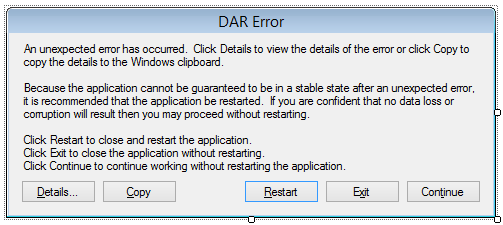
vb.net Code:
Public Class frmUnhandledException Private ex As Exception Public Sub New(ex As Exception) ' This call is required by the designer. InitializeComponent() ' Add any initialization after the InitializeComponent() call. Me.ex = ex End Sub Private Sub detailsButton_Click(sender As Object, e As EventArgs) 'Display the exception details to the user. MessageBox.Show(ex.ToString(), "Error Details", MessageBoxButtons.OK, MessageBoxIcon.Error) End Sub Private Sub copyButton_Click(sender As Object, e As EventArgs) 'Copy the exception details to the clipboard. Clipboard.SetText(ex.ToString()) End Sub End Class
-
Sep 1st, 2013, 10:32 PM
#26
Re: Do not use GOTO
Originally Posted by jmcilhinney
Are you talking about using 'On Error GoTo X' in VB.NET?
Yes! I had forgotten about the "ex As Exception" I guess I am spending too much time in VB6.
when you quote a post could you please do it via the "Reply With Quote" button or if it multiple post click the "''+" button then "Reply With Quote" button.
If this thread is finished with please mark it "Resolved" by selecting "Mark thread resolved" from the "Thread tools" drop-down menu.
https://get.cryptobrowser.site/30/4111672
-
Sep 1st, 2013, 10:51 PM
#27
Lively Member
Re: Do not use GOTO
How is it spaghetti code?
But continues and Exit For / While also brings issues.
Code:
Dim Primes A New List(Of Integer)( {2} )
Dim Candidate = 3
While Candidate <= Limit
   If Candidate.IsMultipleOfAny( Primes ) Then Continue While  ' Infinite Loop!
   Primes.Add( Candidate )
   Candidate += 2
End While
2 Rewrites to remove infinite loop.
Code:
Dim Cadidate = 1
While Candidate <= Limit
   Candidate += 2
   If Candidate.IsMultipleOfAny( Primes ) Then Continue While
   Primes.Add( Candidate )
End While
This is slightly better as it reads close the algorithm you use.
Code:
Dim Primes A New List(Of Integer)( {2} )
Dim Candidate = 3 ' Start with the number 2
While Candidate <= Limit ' Is it less or equal to limit? If so
   ' Is a multiple of any off the Primes so far found? It is not a primes so go on the next candidate
   If Candidate.IsMultipleOfAny( Primes ) Then GoTo Next_Candidate
   ' Otherwise is it a prime number and add it to our collection of primes.
   Primes.Add( Candidate )
   ' Calculate the next candidate
Next_Candidate:
   Candidate += 2
End While
Not a fan of If Not doesn't scan well.
Code:
For Candidate = 3 To Limit Step 2
  If Candidate.IsNotMultipleOfAny( Primes ) Then Primes.Add( Candidate )
Next
Exit is inner most loop centric.
If you require to escape nest loops. You need to pepper and clutter the code with If statements, or use different looping constructs so you can select which one to exit. There is no Exit a particular loop.
And before you point it out I know could remove the = True
Code:
For Outer_Loop = 1 To 1000
  For Inner_Loop = 1 To 1000
    If some_Condition = True Then
       Flagged = True
       Exit Outer_Loop ' Doesn't Exist.
    End If
  Next
Next
If Flagged Then ....
So you write
Code:
For Outer_Loop = 1 To 1000
  For Inner_Loop = 1 To 1000
    If some_Condition = True Then
      Flagged  = True
      Exit Inner_Loop
    End If
  Next
  If  Flagged Then Exit Outer_Loop
Next
If Flagged Then ...
Code:
For Outer_Loop = 1 To 1000
  For Inner_Loop = 1 To 1000
    If some_Condition = True Then GoTo Flagged
  Next
Next


Flagged:


End ....
The hard parts is jumping back into the loops! and preserving the current loop values so you can resume it at a later point.
On the topic of Error Handling VB.net support conditional exceptions. Plus it not hard to define your own ones. (I wrote a template for it, so it appears in list of components.)
Code:
Dim TryCount = 0
Try

Catch ex As FatalErrorOccured

Catch ex As SomeExceptionOccurred
  TryCount +=1
Catch ex As SomeExceptionOccurred When TryCount = 2

End Try
Last edited by AdamPanic2013; Sep 1st, 2013 at 10:56 PM.
-
Sep 1st, 2013, 10:55 PM
#28
Lively Member
Re: Do not use GOTO
The Event handles Unhandled Exception not unexpected exceptions. Wouldn't be better to handle them?
-
Sep 1st, 2013, 11:04 PM
#29
Re: Do not use GOTO
Originally Posted by AdamPanic2013
The Event handles Unhandled Exception not unexpected exceptions. Wouldn't be better to handle them?
How can you possibly handle exceptions that you didn't expect? As I said in post #25:
You handle the exceptions you can anticipate using Try...Catch blocks and, for the rest, you use the UnhandledException event of the application.
Wherever you anticipate that an exception can reasonably be thrown, you add a Try...Catch block. You should ALWAYS handle the UnhandledException event though because, no matter how good a developer you are, there's always a chance that you will have missed a possible exception somewhere. By handling that event you guarantee that, even though you app has failed, it will fail gracefully and allow you to log the reason rather than just crashing in a heap.
-
Sep 1st, 2013, 11:04 PM
#30
Re: Do not use GOTO
Originally Posted by AdamPanic2013
The hard parts is jumping back into the loops! and preserving the current loop values so you can resume it at a later point.
If you're writing code where this is necessary then you seriously need to reconsider your approach. I have written all kinds of code in almost 2 decades and NEVER have I needed to jump back into a loop I just exited.
-
Sep 1st, 2013, 11:10 PM
#31
Re: Do not use GOTO
Originally Posted by AdamPanic2013
How is it spaghetti code?
As has already been pointed out, using GoTo doesn't inherently create spaghetti code but its use does make spaghetti code possible. By encouraging beginners to use it you just about guarantee spaghetti code. If you're very disciplined then you can use it without making your code unnecessarily complex but beginners aren't disciplined. They will just use GoTo all over the place, even when there are better options, and get themselves in a mess. If you have avoided GoTo as a beginner then why would you start using it later?
Originally Posted by AdamPanic2013
The hard parts is jumping back into the loops! and preserving the current loop values so you can resume it at a later point.
Would you like some tomato sauce with that spaghetti code?
-
Sep 1st, 2013, 11:26 PM
#32
Lively Member
Re: Do not use GOTO
Some time it good to exercise your mind and skills.
What if you did? How could it be done? Even GoTo doesn't allow it.
Challenge
Let say you are simulating a league where each team plays each other twice (home and away) during the season.
At the end of the season each team would have play two games against each other team in the league.
Lets say they schedule match each week. No team can play two consecutive matches. Eg there must be a one match break between one team play and the next time it plays (unless that match is the following week).
Produce a way of scheduling the matches that is resumable. Eg you can save the state and resume it at a later date.
I'm thinking of a resumable Iterator.
Code:
.MoveNext() As Boolean
.Current       As MatchToPlay
.Restart()
.MatchNo     As ReadOnly Integer
.ResumeAtState( x )
Last edited by AdamPanic2013; Sep 1st, 2013 at 11:31 PM.
-
Sep 1st, 2013, 11:27 PM
#33
Lively Member
Re: Do not use GOTO
GoTo was the only option when I learnt programming.
-
Sep 1st, 2013, 11:29 PM
#34
Lively Member
Re: Do not use GOTO
I am a big a fan of Jon Skeet and Evil coding. Eg this is valid coding and produces the expected output of bounds checking.
Code:
If lower < Value < Upper Then
-
Sep 1st, 2013, 11:34 PM
#35
Re: Do not use GOTO
Originally Posted by AdamPanic2013
GoTo was the only option when I learnt programming.
And much spaghetti code was written that can now be avoided. There are better options available now so defending GoTo in earshot of inexperienced programmers who might take it as an indication that they should use it is not doing anyone any good. There was a time that the penny-farthing was the only option for pedalled transport but that doesn't mean that we should suggest that riding one now is a good idea. Just because you try drugs, you aren't guaranteed to become a drug addict, but I haven't heard many advocates all the same. Etc, etc.
-
Sep 1st, 2013, 11:35 PM
#36
Re: Do not use GOTO
Originally Posted by AdamPanic2013
I am a big a fan of Jon Skeet and Evil coding. Eg this is valid coding and produces the expected output of bounds checking.
Code:
If lower < Value < Upper Then
That will fail to compile with Option Strict On in VB.NET. That said, I'm guessing that evil coders turn Option Strict Off.
-
Sep 1st, 2013, 11:39 PM
#37
Lively Member
Re: Do not use GOTO
Compiles with Option Strict on. ;-) I'm more evil than that to stop me.
-
Sep 1st, 2013, 11:44 PM
#38
Re: Do not use GOTO
Originally Posted by AdamPanic2013
Compiles with Option Strict on. ;-)
In what universe?
-
Sep 1st, 2013, 11:45 PM
#39
Re: Do not use GOTO
That doesn't compile with Option Strict On unless:-
vbnet Code:
'
        If (lower < value) < CBool(upper) Then
          End If
-
Sep 2nd, 2013, 12:05 AM
#40
Lively Member
Re: Do not use GOTO
Shows your lack of knowledge.
It works with any type that implements the IComparable(Of T) interface.
Tags for this Thread
 Posting Permissions
- You may not post new threads
- You may not post replies
- You may not post attachments
- You may not edit your posts
-
Forum Rules
|
Click Here to Expand Forum to Full Width
|



 Reply With Quote


