|

-
Jul 5th, 2013, 03:00 AM
#1
Thread Starter
New Member

Debug VB6 IIS (WebClass) application on Windows 8?
Hi
I know that it was not possible to run VB6 IIS Application from the IDE on Windows 7 64-bit. Does anyone know if this has changed with Windows 8?
If it has then I will upgrade the OS immediately!
best regards
Peter
-
Jul 5th, 2013, 04:32 AM
#2
Re: Debug VB6 IIS (WebClass) application on Windows 8?
Are you sure you "know" this?
No, nothing would have changed.
-
Jul 5th, 2013, 04:40 AM
#3
Thread Starter
New Member
Re: Debug VB6 IIS (WebClass) application on Windows 8?
thanks for the reply.
yes, I am absolutely sure.
-
Jul 5th, 2013, 05:55 AM
#4
Re: Debug VB6 IIS (WebClass) application on Windows 8?
 Originally Posted by dilettante

No, nothing would have changed.
That is what I thought too but not having used IIS on Windows 8 I would have just been guessing.
when you quote a post could you please do it via the "Reply With Quote" button or if it multiple post click the "''+" button then "Reply With Quote" button.
If this thread is finished with please mark it "Resolved" by selecting "Mark thread resolved" from the "Thread tools" drop-down menu.
https://get.cryptobrowser.site/30/4111672
-
Jul 5th, 2013, 06:18 AM
#5
Re: Debug VB6 IIS (WebClass) application on Windows 8?
I suspect that Session 0 Service Isolation is the largest factor at play here. That did not go away in Windows 8, which is actually Vista R3 (i.e. Windows NT 6.2).
-
Jul 5th, 2013, 11:17 PM
#6
Re: Debug VB6 IIS (WebClass) application on Windows 8?
Originally Posted by Peter Sloth
Hi
I know that it was not possible to run VB6 IIS Application from the IDE on Windows 7 64-bit...
Peter
I can debug my VB6-COM-dlls from the context of an (classic-ASP-enabled) IIS, all running on Win7-64 - and I don't think, that the behaviour will be different in Win8...
Well - it's not exactly your scenario, because I don't use the VB6-IIS-Designer-Templates to debug "WebClasses" - but the "plain VB6-ActiveX-Dll-projects" are not *that* far off...
Meaning, when you use the normal Dll-Project-Play-Button-stuff, which allows OutOfProcess-marshalled Method-call debugging with any VB6-AX-Dll-Project...
Here's a Screenshot:
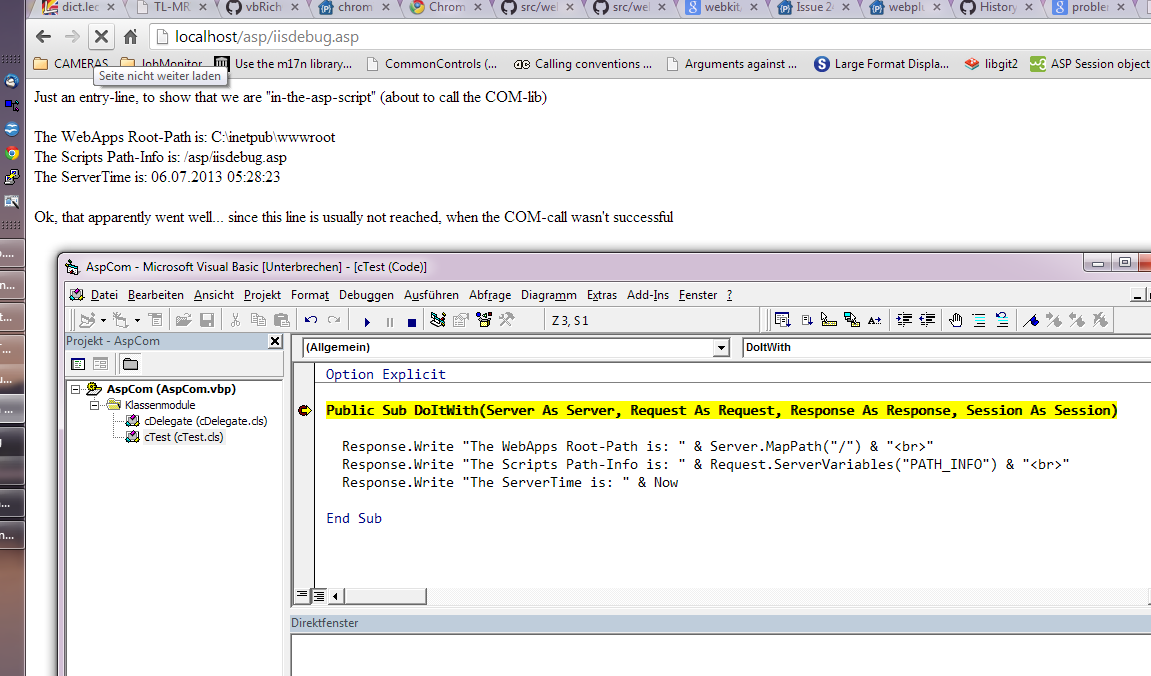
I'm not exactly sure what I did in which order (was about one year ago, when I set this up) - but looking at it again:
- it seems I've forced it, to run the Application-Pool-(ServiceProcess) under my normal User-account (the same one, I use to log into my system)
- and then of course the "Activate 32Bit Apps" was set to True"
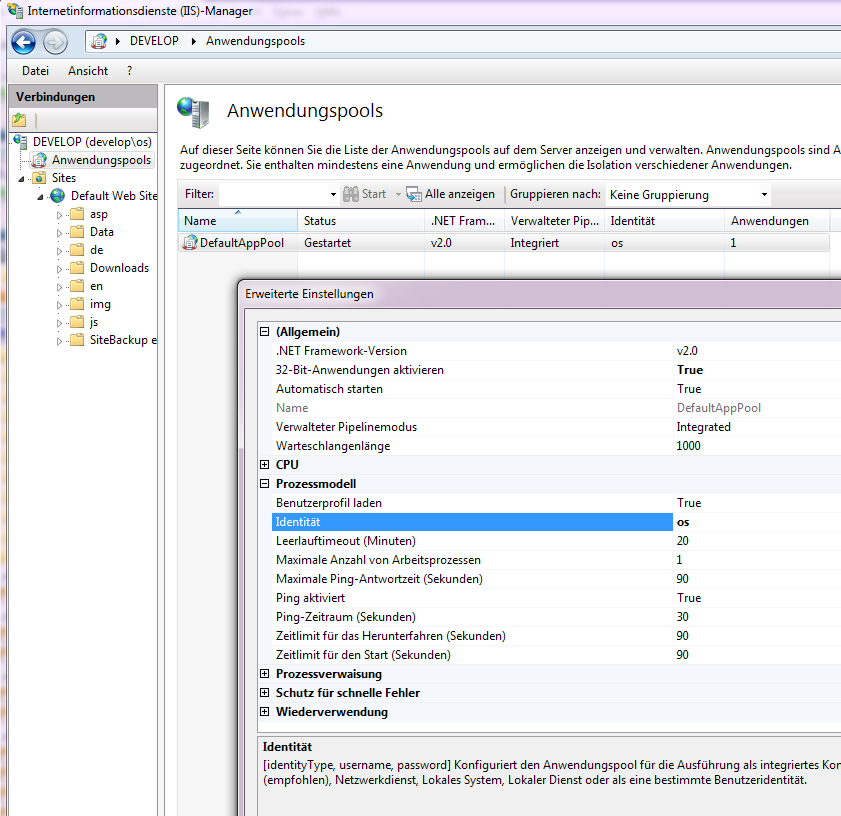
For a bit more comfort in the VB-Dll-Project (when I'm about to enter the Debug-Mode by pressing the Play-Button) -
I've put the IISReset.exe as the "to-be-shelled-on-startup"-entry into the Debug-Tab:

Here's the test-script-content of the small, serverside iisdebug.asp, which I was addressing in the Browser-URL in the Screenshot at the Top of this posting...
(it's just a simple re-delegation --- in a principally similar way, as the VB-WebClasses generate those redirect-handler-scripts too).
Code:
<%
Response.Write "Just an entry-line, to show that we are ""in-the-asp-script"" (about to call the COM-lib)<br></br>"

   Server.CreateObject("AspCom.cTest").DoItWith Server, Request, Response, Session

Response.Write  "<br></br>Ok, that apparently went well... since this line is usually not reached, when the COM-call wasn't successful"
%>
And here's the VB-Code for the small cTest-Class - which is seen in the Top-Screenshot too.
Code:
Option Explicit

Public Sub DoItWith(Server As Server, Request As Request, Response As Response, Session As Session)

  Response.Write "The WebApps Root-Path is: " & Server.MapPath("/") & "<br>"
  Response.Write "The Scripts Path-Info is: " & Request.ServerVariables("PATH_INFO") & "<br>"
  Response.Write "The ServerTime is: " & Now

End Sub
Not sure, if you want to experiment with that, to see if you can make it work with the VB6-WebClass-ProjectType too,
since I can imagine, that a small VB6 and IIS containing XP-VM would not be all that far off as an alternative...
Olaf
-
Jul 9th, 2013, 08:26 AM
#7
Thread Starter
New Member
Re: Debug VB6 IIS (WebClass) application on Windows 8?
Hi Olaf
thanks very much for the reply. I walked through the steps and I am able to debug the code.
Unfortunately since VB6 IIS applications rely so much on web classes and designer templates (with tag-replacement and all) it is not the same.
I think I will have to go for a Hyper-V XP VM instead.
thanks
//Peter
Tags for this Thread
 Posting Permissions
- You may not post new threads
- You may not post replies
- You may not post attachments
- You may not edit your posts
-
Forum Rules
|
Click Here to Expand Forum to Full Width
|



 Reply With Quote


