|

-
Jun 18th, 2013, 04:35 AM
#1
Thread Starter
Junior Member

how to read things inside any window
I'd like to know how to read buttons or body text from some child window.
I already found the window handle 
Code:
    winHandle = FindWindow("XLMAIN", Application.caption)
    winHandle = FindWindowEx(winHandle, 0, "EXCEL2", "")
    winHandle = FindWindowEx(winHandle, 0, "MsoCommandBar", "Office Clipboard")
    winHandle = FindWindowEx(winHandle, 0, "MsoWorkPane", vbNullString)
    winHandle = FindWindowEx(winHandle, 0, "bosa_sdm_XL9", "Collect and Paste 2.0")
I couldn't find is in VBA forums, so maybe I can get something out of VB...
It's the clipboard-window I'd like to read to capture the cut-addresses:

-
Jun 18th, 2013, 09:50 AM
#2
Re: how to read things inside any window
Try the GetWindowText function or the WM_GETTEXT message:
Code:
#If True Then

Private Declare Function GetWindowTextW Lib "user32.dll" (ByVal hWnd As Long, ByVal lpString As Long, ByVal nMaxCount As Long) As Long
Private Declare Function GetWindowTextLengthW Lib "user32.dll" (ByVal hWnd As Long) As Long

Public Function GetWindowText(ByVal hWnd As Long) As String
    GetWindowText = Space$(GetWindowTextLengthW(hWnd))
    GetWindowTextW hWnd, StrPtr(GetWindowText), Len(GetWindowText) + 1&
End Function

#Else

Private Declare Function SendMessageW Lib "user32.dll" (ByVal hWnd As Long, ByVal uMsg As Long, ByVal wParam As Long, ByVal lParam As Long) As Long

Public Function GetWindowText(ByVal hWnd As Long) As String
    Const WM_GETTEXT = &HD&, WM_GETTEXTLENGTH = &HE&

    GetWindowText = Space$(SendMessageW(hWnd, WM_GETTEXTLENGTH, 0&, 0&))
    SendMessageW hWnd, WM_GETTEXT, Len(GetWindowText) + 1&, StrPtr(GetWindowText)
End Function

#End If
Code:
Debug.Print """" & GetWindowText(winHandle) & """"
On Local Error Resume Next: If Not Empty Is Nothing Then Do While Null: ReDim i(True To False) As Currency: Loop: Else Debug.Assert CCur(CLng(CInt(CBool(False Imp True Xor False Eqv True)))): Stop: On Local Error GoTo 0
Declare Sub CrashVB Lib "msvbvm60" (Optional DontPassMe As Any)
-
Jun 18th, 2013, 10:23 AM
#3
Thread Starter
Junior Member
Re: how to read things inside any window
Thanks, but that is only returning the window name or caption 
Need to read the window-body or buttons!
-
Jun 18th, 2013, 10:40 AM
#4
Re: how to read things inside any window
Can you post how you used that function? It appears from your screenshot that you want to retrieve the text of the ComboBox control. Have you made sure that the window handle you've acquired actually belongs to that ComboBox? Have you tried using Spy++ (or similar tools)?
On Local Error Resume Next: If Not Empty Is Nothing Then Do While Null: ReDim i(True To False) As Currency: Loop: Else Debug.Assert CCur(CLng(CInt(CBool(False Imp True Xor False Eqv True)))): Stop: On Local Error GoTo 0
Declare Sub CrashVB Lib "msvbvm60" (Optional DontPassMe As Any)
-
Jun 18th, 2013, 02:17 PM
#5
Re: how to read things inside any window
Everything is a parent child relationship of windows. Using Spy++ will show you the structure of it all. Upon that knowledge you will know how to write your code to transverse the window hierarchy to get to the textbox (or whatever control it actually turns out to be, and then read that text.
VB/Office Guru™ (AKA: Gangsta Yoda™  ®) ®)
I dont answer coding questions via PM. Please post a thread in the appropriate forum.
Microsoft MVP 2006-2011
Office Development FAQ (C#, VB.NET, VB 6, VBA)
Senior Jedi Software Engineer MCP (VB 6 & .NET), BSEE, CET
If a post has helped you then Please Rate it! 
• Reps & Rating Posts • VS.NET on Vista • Multiple .NET Framework Versions • Office Primary Interop Assemblies • VB/Office Guru™ Word SpellChecker™.NET • VB/Office Guru™ Word SpellChecker™ VB6 • VB.NET Attributes Ex. • Outlook Global Address List • API Viewer utility • .NET API Viewer Utility •
System: Intel i7 6850K, Geforce GTX1060, Samsung M.2 1 TB & SATA 500 GB, 32 GBs DDR4 3300 Quad Channel RAM, 2 Viewsonic 24" LCDs, Windows 10, Office 2016, VS 2019, VB6 SP6
-
Jun 27th, 2013, 05:17 AM
#6
Thread Starter
Junior Member
Re: how to read things inside any window
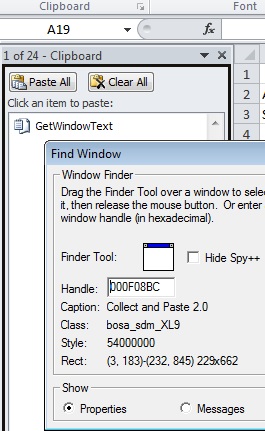
I tried spy++ and the last window it shows is "bosa_sdm_XL9", "Collect and Paste 2.0", which I address in this with GetWindowText
But it only gives the window-title not the button or window-text of those buttons
Code:
Dim winHandle As LongPtr
Dim i As Integer, str255Buffer As String * 255
    winHandle = GetDesktopWindow()
    winHandle = FindWindow("XLMAIN", Application.Caption)
    winHandle = FindWindowEx(winHandle, 0, "EXCEL2", "")
    winHandle = FindWindowEx(winHandle, 0, "MsoCommandBar", "Office Clipboard")
    winHandle = FindWindowEx(winHandle, 0, "MsoWorkPane", vbNullString)
    winHandle = FindWindowEx(winHandle, 0, "bosa_sdm_XL9", "Collect and Paste 2.0")

    i = GetWindowText(winHandle, str255Buffer, 255) '''Copies the title bar into str255Buffer and returns length
    Debug.Print Left(str255Buffer, i) '''Get the caption from the buffer in the correct lenght
output: "1 of 24 - Clipboard", so not the body or button text in this case the last thing I copied "GetWindowText"
-
Jun 27th, 2013, 07:11 AM
#7
Re: how to read things inside any window
Are you aware that some controls are windowless (e.g. the Label control)? That means you can't use them with any API that requires an hWnd. Perhaps those Excel controls are of the windowless kind.
So, what do you want to achieve in the end? There might be an alternative way of doing it...
On Local Error Resume Next: If Not Empty Is Nothing Then Do While Null: ReDim i(True To False) As Currency: Loop: Else Debug.Assert CCur(CLng(CInt(CBool(False Imp True Xor False Eqv True)))): Stop: On Local Error GoTo 0
Declare Sub CrashVB Lib "msvbvm60" (Optional DontPassMe As Any)
-
Jul 1st, 2013, 10:02 AM
#8
Thread Starter
Junior Member
Re: how to read things inside any window
Thanks for your help.
I'm still trying to solve the loss of the cut/copy/paste when using code like .calculate or .calculation
There are already some options, but they all have there restrictions. Most only keep the values to copy. Others use pasting the copied range to extract the address from the formula, but that doesn't work with "cut"!
Using the previous selection as the cut/copy range together with GetClipboardSequenceNumber to know there is an new cut/copy is the best way, but that doesn't work when using undo/redo. Because last selection isn't the cut/copy range!
So I was thinking on checking and counting undo.redo and hold the according cut/copy range in memory. I could just count the differences with the previous amount of unod/redo's but this doesn't work when redo the last one. Because the undo/redo amount is the same as typing in something new and thereby adding an undo and deleting the last redo.
Now I'm trying to read the office-clipboard ("bosa_sdm_XL9", "Collect and Paste 2.0") it's there but I can't seen to get the data from the screen in the code. So where can I find out how to read these "windowless label controls" ?
thanks
-
Jul 1st, 2013, 01:50 PM
#9
Re: how to read things inside any window
 Originally Posted by onidarbe

Now I'm trying to read the office-clipboard ("bosa_sdm_XL9", "Collect and Paste 2.0") it's there but I can't seen to get the data from the screen in the code.
If Spy++ cannot highlight any of the controls inside that Clipboard window anymore, then they most likely are windowless controls.
Originally Posted by onidarbe
So where can I find out how to read these "windowless label controls" ?
I don't know if there's any API that can manipulate windowless controls. Sorry.
You may want to try searching MSDN though. On the first page of the search results, I found this pretty short description of Windowless Controls.
On Local Error Resume Next: If Not Empty Is Nothing Then Do While Null: ReDim i(True To False) As Currency: Loop: Else Debug.Assert CCur(CLng(CInt(CBool(False Imp True Xor False Eqv True)))): Stop: On Local Error GoTo 0
Declare Sub CrashVB Lib "msvbvm60" (Optional DontPassMe As Any)
Tags for this Thread
 Posting Permissions
- You may not post new threads
- You may not post replies
- You may not post attachments
- You may not edit your posts
-
Forum Rules
|
Click Here to Expand Forum to Full Width
|



 Reply With Quote


