|

-
Jun 6th, 2013, 01:34 AM
#1
Thread Starter
New Member


Unable to draw line in cross-tab column in CR2008
At present , my CRYSTAL REPORT 2008 Output given by crosstab is as follows :
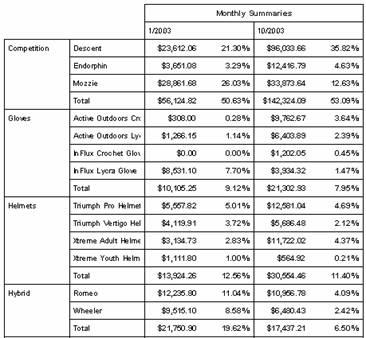
And I want following output, to understand you better , I draw the line manually in paint.
But I want, in crosstab , it should draw the line in between %colum and $column.
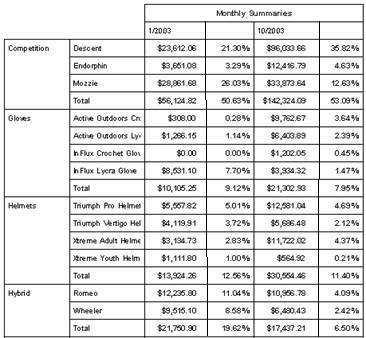
Please let me know any solution to draw the line in between varying column and rows.
Thanks & Regards ,
Swapnil M. Gholap
Application Engineer
[email protected]
-
Jun 6th, 2013, 09:55 PM
#2
Hyperactive Member
Re: Unable to draw line in cross-tab column in CR2008
Is each original column one field or two? If it's two, then the you should be able to use the Format Grid Lines option on Customise Style to change the Cells Verticle Lines.
-
Jun 6th, 2013, 10:52 PM
#3
Thread Starter
New Member
Re: Unable to draw line in cross-tab column in CR2008
Each field is having 2 sub-column but unable to draw the line in between them. I tried customize style also in that the 2 column are displaying their data correctly , but not the line in between them. And my number of column and rows varies as the record increase or decrease. As per using the cross-tab i am getting data correctly but how the varying lines can be drawn for varying column and rows.
Please let me know the step by step to change the cells vertical lines option you are saying.
Waiting for your earliest response.
-
Jun 7th, 2013, 09:31 AM
#4
Hyperactive Member
Re: Unable to draw line in cross-tab column in CR2008
I"m not a cross-tab expert. But I thought I gave you step by step instructions. I just did as I suggested in my last post. I went to the Customise tab of the Crosstab Expert, clicked on the Format Grid Lines button and clicked on the Cells Verticle Lines. Then I adjusted the options for what I wanted. eg. Make sure Show Grid Lines is turned on, Draw is turned on, etc.
 Posting Permissions
- You may not post new threads
- You may not post replies
- You may not post attachments
- You may not edit your posts
-
Forum Rules
|
Click Here to Expand Forum to Full Width
|



 Reply With Quote