|

-
May 20th, 2013, 03:39 PM
#1
Thread Starter
New Member

I need Help in Visual Basic
I'm trying to make a game for my nephew. He is really into basketball and he is only 7. As a 7 year old, he needs to practice with his memorization. I am trying to design this game where you match cards with each other. I am making the cards not visible when they are both clicked, but I can not seem to make them go back when you click one and then click another (being the wrong one). I was wondering If I should use functions as there are many cards that have to do the same thing.
-
May 20th, 2013, 03:55 PM
#2
Re: I need Help in Visual Basic
What you do is store to variables, card1 and card2. In the card's click events, set it to visible and set either card1 or card2. Once card2 has been set, then check if it matches card1. Assuming you're using pictureboxes, I would store the card's value in it's tag property:
Code:
Option Strict On
Option Explicit On
Public Class Form1
    Private card1 As PictureBox = Nothing
    Private card2 As PictureBox = Nothing

    Private Sub Form1_Load(sender As System.Object, e As System.EventArgs) Handles MyBase.Load
        'Click event for each card
        For Each card As PictureBox In Me.Controls.OfType(Of PictureBox)()
            AddHandler card.Click, AddressOf card_Click
        Next
    End Sub

    Private Sub card_Click(sender As Object, e As EventArgs)
        If IsNothing(card1) Then
            'Set card1
            card1 = DirectCast(sender, PictureBox)
        Else
            'Set card2
            card2 = DirectCast(sender, PictureBox)

            'Check if they match
            If CInt(card1.Tag) = CInt(card2.Tag) Then
                'Match!
                MessageBox.Show("Match!")
            Else
                'Not a match
                card1.Visible = False
                card2.Visible = False
            End If

            card1 = Nothing
            card2 = Nothing
        End If
    End Sub

End Class
-
May 20th, 2013, 04:16 PM
#3
Re: I need Help in Visual Basic
- Coding Examples:
- Features:
- Online Games:
- Compiled Games:
-
May 21st, 2013, 04:15 PM
#4
Thread Starter
New Member
Re: I need Help in Visual Basic
Because there are so many cards I was wondering if i should use a array. Also, I tried the code out and couldn't figure out how to work it. Why is it card1 = nothing and card2 = nothing? Also, how would I use this code for more then 2 cards? just keep using this code for ever pair?
-
May 21st, 2013, 04:21 PM
#5
Re: I need Help in Visual Basic
Breaking down my code:
Code:
For Each card As PictureBox In Me.Controls.OfType(Of PictureBox)()
            AddHandler card.Click, AddressOf card_Click
        Next
Will add a click event for every picturebox.
Code:
        If IsNothing(card1) Then
            'Set card1
            card1 = DirectCast(sender, PictureBox)
First we check if card1 is nothing, by default it will be nothing. If card1 is nothing, then we set it to the picturebox that was just clicked.
Code:
        Else
            'Set card2
            card2 = DirectCast(sender, PictureBox)
Next we add the code if card1 is something. The code we add sets card number2.
Code:
            'Check if they match
            If CInt(card1.Tag) = CInt(card2.Tag) Then
                'Match!
                MessageBox.Show("Match!")
Here we check if card1's tag and card2's tag match. The tag property in my example would hold an integer value: 1,2,3,4,5,6, etc.
Code:
            Else
                'Not a match
                card1.Visible = False
                card2.Visible = False
            End If
Now we check if the two card's tags didn't match, if not then we set them to invisible. Or in your case, you may just change the Image to the back of the card.
Code:
            card1 = Nothing
            card2 = Nothing
        End If
Finally we set card1 and card2 to nothing so that the next card that's pressed will be considered card1.
The way I present it doesn't need any arrays. If you wanted to store the pair then declare a dictionary(of picturebox, picturebox) then add the two cards to that dictionary:
Code:
Private pair_dic As New Dictionary(Of PictureBox, PictureBox)
Private Sub card_Click(sender As Object, e As EventArgs)
        If IsNothing(card1) Then
            'Set card1
            card1 = DirectCast(sender, PictureBox)
        Else
            'Set card2
            card2 = DirectCast(sender, PictureBox)

            'Check if they match
            If CInt(card1.Tag) = CInt(card2.Tag) Then
                'Match!
                MessageBox.Show("Match!")
                pair_dic.Items.Add(card1, card2)
            Else
                'Not a match
                card1.Visible = False
                card2.Visible = False
            End If

            card1 = Nothing
            card2 = Nothing
        End If
    End Sub
Last edited by dday9; May 21st, 2013 at 04:26 PM.
Reason: forgot a [/code]
-
May 27th, 2013, 06:12 PM
#6
Thread Starter
New Member
Re: I need Help in Visual Basic
Sorry, but I'm still a bit confused. I attempted this on Visual Basic. Should I change Picturebox1_click to card_click? Also, when I tried it (without changing picturebox1_click to card_click) I clicked the pictureboxes and it came up with Match even though it didn't match. How does it recognize if its a match or not? Also should I anywhere be saying anything like card1 = picturebox1 or card2 = picturebox2? I'm not sure where to place the code..For all the code in card_click would that be the Picturebox? Does this code go into every picturebox?
-
May 29th, 2013, 01:24 AM
#7
Thread Starter
New Member
Re: I need Help in Visual Basic
 Originally Posted by dday9

Breaking down my code:
Code:
For Each card As PictureBox In Me.Controls.OfType(Of PictureBox)()
            AddHandler card.Click, AddressOf card_Click
        Next
Will add a click event for every picturebox.
Code:
        If IsNothing(card1) Then
            'Set card1
            card1 = DirectCast(sender, PictureBox)
First we check if card1 is nothing, by default it will be nothing. If card1 is nothing, then we set it to the picturebox that was just clicked.
Code:
        Else
            'Set card2
            card2 = DirectCast(sender, PictureBox)
Next we add the code if card1 is something. The code we add sets card number2.
Code:
            'Check if they match
            If CInt(card1.Tag) = CInt(card2.Tag) Then
                'Match!
                MessageBox.Show("Match!")
Here we check if card1's tag and card2's tag match. The tag property in my example would hold an integer value: 1,2,3,4,5,6, etc.
Code:
            Else
                'Not a match
                card1.Visible = False
                card2.Visible = False
            End If
Now we check if the two card's tags didn't match, if not then we set them to invisible. Or in your case, you may just change the Image to the back of the card.
Code:
            card1 = Nothing
            card2 = Nothing
        End If
Finally we set card1 and card2 to nothing so that the next card that's pressed will be considered card1.
The way I present it doesn't need any arrays. If you wanted to store the pair then declare a dictionary(of picturebox, picturebox) then add the two cards to that dictionary:
Code:
Private pair_dic As New Dictionary(Of PictureBox, PictureBox)
Private Sub card_Click(sender As Object, e As EventArgs)
        If IsNothing(card1) Then
            'Set card1
            card1 = DirectCast(sender, PictureBox)
        Else
            'Set card2
            card2 = DirectCast(sender, PictureBox)

            'Check if they match
            If CInt(card1.Tag) = CInt(card2.Tag) Then
                'Match!
                MessageBox.Show("Match!")
                pair_dic.Items.Add(card1, card2)
            Else
                'Not a match
                card1.Visible = False
                card2.Visible = False
            End If

            card1 = Nothing
            card2 = Nothing
        End If
    End Sub
For Each card As PictureBox In Me.Controls.OfType(Of PictureBox)()
AddHandler card.Click, AddressOf card_Click
When you use that code, it makes it so all the Pictureboxs are the same, so when I match things together anything will say "Match!"..How do I make it so only certain pictureboxes aren't matches.
-
May 29th, 2013, 08:33 AM
#8
Re: I need Help in Visual Basic
You need to set the tag property of the card. Whether at run time or at design time. If you look at the card's properties, at the very bottom you'll find the tag property. I set the tag as an Integer, but really it could be any object(String, Boolean, etc.). Here is a picture of where to set the tag property at design time:
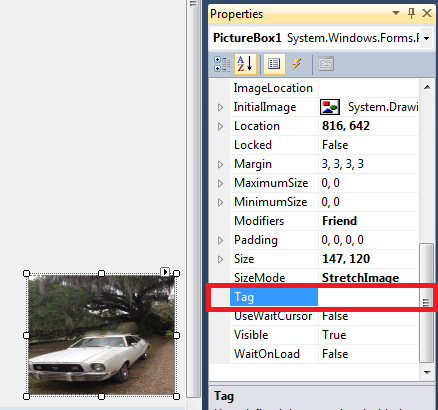
If you wanted to set the tag property at run time, the code would look like this:
Code:
fooPictureBox.Tag = fooObject
-
Jun 3rd, 2013, 04:07 PM
#9
Thread Starter
New Member
Re: I need Help in Visual Basic
Originally Posted by dday9
You need to set the tag property of the card. Whether at run time or at design time. If you look at the card's properties, at the very bottom you'll find the tag property. I set the tag as an Integer, but really it could be any object(String, Boolean, etc.). Here is a picture of where to set the tag property at design time:
If you wanted to set the tag property at run time, the code would look like this:
Code:
fooPictureBox.Tag = fooObject
I figured out the code, but I have a small issue. When it does not match the card2 does not show up because it is supposed to not be visible right away. Is there a way to make card 2 being not visible after 1-2 seconds? Thanks!
-
Jun 3rd, 2013, 04:43 PM
#10
Re: I need Help in Visual Basic
I would use a timer. Set the interval at 1000 for 1 second or 2000 for 2 seconds. In the tick event you'll stop the timer and set the card's visibility to false. So it'd look sort of like this in the timer's tick event:
Code:
Timer.Enabled = False 'Or Timer.Stop()
card.Visibile = False
-
Jun 3rd, 2013, 07:21 PM
#11
Thread Starter
New Member
Re: I need Help in Visual Basic
Originally Posted by dday9
I would use a timer. Set the interval at 1000 for 1 second or 2000 for 2 seconds. In the tick event you'll stop the timer and set the card's visibility to false. So it'd look sort of like this in the timer's tick event:
Code:
Timer.Enabled = False 'Or Timer.Stop()
card.Visibile = False
Alright, but I still have a problem.. Now I need to move the card1 and card2 = nothing somewhere else because it wont recognize it when its in the position that you told me to put it in. Where should I move card1 = nothing and card2 = nothing so that it will recognize it.
Last edited by Tehnewcoder; Jun 3rd, 2013 at 08:00 PM.
-
Jun 4th, 2013, 02:24 AM
#12
Re: I need Help in Visual Basic
You might like to check out the Match Two link in my signature. Given the timing, it may actually have been inspired by this thread in the first place, although I don't recall.
 Posting Permissions
- You may not post new threads
- You may not post replies
- You may not post attachments
- You may not edit your posts
-
Forum Rules
|
Click Here to Expand Forum to Full Width
|



 Reply With Quote


