|

-
May 21st, 2013, 03:00 PM
#1
Thread Starter
Addicted Member

Inconsistency in radio button tab indices
I've got several sets of radio buttons: Some inside a top-level groupbox, some inside lower-level groupboxes, and some on the form. All of them have their tab indices set appropriately and the TabStop property set to true. I want the user to be able to tab through every single radio button (not just the first in the group). The bottom-level groupboxes do this correctly, but the top-level groupboxes and the radio buttons directly on the form don't. The screencap shows which are which.

Is there a property of either the container or the radio buttons that governs whether they're considered a single control or multiple controls for tab index purposes? If not, why else would some of the controls, but not others, behave properly?
-
May 21st, 2013, 03:33 PM
#2
Re: Inconsistency in radio button tab indices
Er ... I don't understand how your getting the 'correct' ones to work to be honest. It's supposed to be Tab to go from control to control (in this case container to container), arrow keys to move between the controls contained within a control/container.
As the 6-dimensional mathematics professor said to the brain surgeon, "It ain't Rocket Science!"
Reviews: "dunfiddlin likes his DataTables" - jmcilhinney
Please be aware that whilst I will read private messages (one day!) I am unlikely to reply to anything that does not contain offers of cash, fame or marriage!
-
May 21st, 2013, 03:39 PM
#3
Thread Starter
Addicted Member
Re: Inconsistency in radio button tab indices
I thought tab index was inherited, ie, it goes to the container, then through all the contents of the container in order, and then on to the next container? Anyway that's how the rest of it is working (eg, I can tab to treatment number, then event number, then photo number).
-
May 21st, 2013, 03:56 PM
#4
Re: Inconsistency in radio button tab indices
Nope. Tab uses the primary Controls array so it should only go from control to control. Panels, group boxes etc. then have their own control arrays and you navigate those with the arrow keys. It's effectively a tree structure with Tab navigating the first level nodes only (or at least that's how it's supposed to be).
As the 6-dimensional mathematics professor said to the brain surgeon, "It ain't Rocket Science!"
Reviews: "dunfiddlin likes his DataTables" - jmcilhinney
Please be aware that whilst I will read private messages (one day!) I am unlikely to reply to anything that does not contain offers of cash, fame or marriage!
-
May 21st, 2013, 04:11 PM
#5
Thread Starter
Addicted Member
Re: Inconsistency in radio button tab indices
Huh, good to know ("tab index" is a somewhat deceptive name then, but that's neither here nor there). Of course that leaves it a total mystery why my controls are behaving the way they are.
In my program, arrow keys change which radio button is checked, not which one has focus. They change the focus of checkboxes and buttons (like they're supposed to); for numericupdowns, listboxes, etc, the up/down keys of course change the value and the left/right keys do nothing.
-
May 21st, 2013, 04:11 PM
#6
Re: Inconsistency in radio button tab indices
There is a visual tab helper, go to the menu View> Tab Order, each control will overlapped with a number, click on these number in the order you want.
-
May 21st, 2013, 04:19 PM
#7
Thread Starter
Addicted Member
Re: Inconsistency in radio button tab indices
That's a really handy tool, but the trouble is that the tab order it displays doesn't match the behavior. The radio buttons at the top are 0.0.0.0, 0.0.0.1, 0.0.0.2, 0.0.0.3, 0.0.0.4, and 0.0.0.5, which is what I want, but when I'm actually tabbing through, it skips all of them except the currently checked one.
-
May 21st, 2013, 04:36 PM
#8
Re: Inconsistency in radio button tab indices
This is standard behavior for RadioButton control, you can see this behavior in all Windows programs, e.g. the Notepad find dialog box.
-
May 21st, 2013, 04:38 PM
#9
Thread Starter
Addicted Member
Re: Inconsistency in radio button tab indices
Yes, but the weird part is it doesn't do it for all of them. The controls circled in green do what I want (tab goes through all of them regardless of checkstate). I'm trying to figure out why those controls are different and how I can replicate that behavior for the others.
-
May 21st, 2013, 04:45 PM
#10
Re: Inconsistency in radio button tab indices
There is no weird because the controls circled in green are in different container (as i see)
Last edited by 4x2y; May 21st, 2013 at 04:56 PM.
Reason: Fix typo
-
May 21st, 2013, 05:03 PM
#11
Thread Starter
Addicted Member
Re: Inconsistency in radio button tab indices
Not sure I follow. When I try to tab through the top (red-circled) container, tabbing does what you say. But when I tab through one of the green-circled containers, tab goes through every radio button (it goes from Yes to No to Any). Why do the different containers have different behaviors? What's different about them?
-
May 21st, 2013, 05:14 PM
#12
Re: Inconsistency in radio button tab indices
tab goes through every radio button (it goes from Yes to No to Any).
Is tab goes to yes, no, any in the same group?
From your screen shoot, you have three group boxes "High Wind", "Direct sun" and "Precipitation"
BTW: if there isn't any radio button checked, the tab goes to everyone until you check one.
-
May 21st, 2013, 11:54 PM
#13
Re: Inconsistency in radio button tab indices
 Originally Posted by dunfiddlin

Nope. Tab uses the primary Controls array so it should only go from control to control. Panels, group boxes etc. then have their own control arrays and you navigate those with the arrow keys. It's effectively a tree structure with Tab navigating the first level nodes only (or at least that's how it's supposed to be).
This is the behavior I'm observing.
I have to concur with 4x2y's conclusion, the correct ones you highlighted are in different containers. I've never observed tab hitting one that wasn't checked. Are you sure that the behavior you described is what you observed ? We can confirm that if you post a screenshot with the focus rectangle around one of the RadioButtons that is unchecked since normal UI behavior would not allow you focus an unchecked RadioButton....at least not where I am.
-
May 26th, 2013, 04:46 PM
#14
Thread Starter
Addicted Member
Re: Inconsistency in radio button tab indices
Behold the impossible!
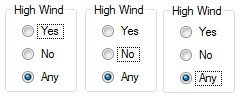
The radio buttons are all in the same container and otherwise behave completely normally. Here's another screenshot highlighting behavior that, if I understand correctly, ought to be impossible: I shouldn't be able to use tab to move focus between these domainupdowns, because tab should move between containers and arrow keys should move between items in the domainupdown.
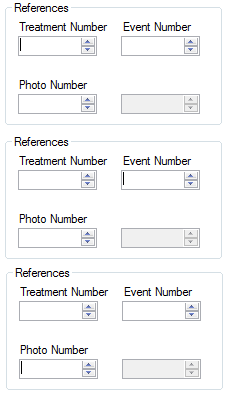
(Edit: never mind about that last bit; they actually are in different containers.)
Last edited by colleen.boye; May 27th, 2013 at 01:46 PM.
-
May 26th, 2013, 04:58 PM
#15
Thread Starter
Addicted Member
Re: Inconsistency in radio button tab indices
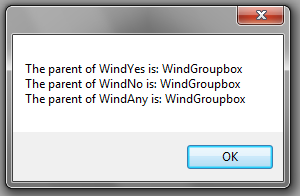
I also did this:
Code:
MessageBox.Show("The parent of WindYes is: " & WindYes.Parent.Name.ToString & vbCrLf & "The parent of WindNo is: " & _
                                     WindNo.Parent.Name.ToString & vbCrLf & "The parent of WindAny is: " & WindAny.Parent.Name.ToString)
Result:
-
May 26th, 2013, 05:05 PM
#16
Re: Inconsistency in radio button tab indices
Not sure what you want to hear at this point. Yes, as far as I know that behaviour is impossible. I cannot reproduce it no matter what properties I play with at any level from form down to individual controls. So either you have something somewhere different about those containers in which this works or the whole thing goes to pot once you have sufficient controls and containers on the form but it should not be doing that and any experienced user of Windows would not expect it to do that.
As the 6-dimensional mathematics professor said to the brain surgeon, "It ain't Rocket Science!"
Reviews: "dunfiddlin likes his DataTables" - jmcilhinney
Please be aware that whilst I will read private messages (one day!) I am unlikely to reply to anything that does not contain offers of cash, fame or marriage!
-
May 26th, 2013, 06:20 PM
#17
Thread Starter
Addicted Member
Re: Inconsistency in radio button tab indices
That's OK, does anyone else have any ideas?
-
May 26th, 2013, 06:40 PM
#18
Re: Inconsistency in radio button tab indices
it seems your red highlighted groups are working correctly + your green highlighted groups are not...
Originally Posted by http://msdn.microsoft.com/en-us/library/windows/desktop/bb545460.aspx
Assign tabs stops to all interactive controls, including read-only edit boxes. Exceptions:
- Group sets of related controls that behave as a single control, such as radio buttons. Such groups have a single tab stop.
- Coding Examples:
- Features:
- Online Games:
- Compiled Games:
-
May 26th, 2013, 06:45 PM
#19
Re: Inconsistency in radio button tab indices
The first screen shoot (attached to the post #14) is impossible using the tab key only, but it is clearly you are using the arrow keys too (which you didn't said before) because once the focus goes to the checked radio button (by the tab key), you can highlight the other buttons by arrow keys, it is useful to know which one will checked by pressing the <Space> key.
I hope everything is clear to you now.
-
May 26th, 2013, 07:00 PM
#20
Thread Starter
Addicted Member
Re: Inconsistency in radio button tab indices
I swear to God, I am using the tab key and the tab key only. Here is a video.
Paul: You're right; so now the question is, why are some of the controls not doing that?
Last edited by colleen.boye; May 26th, 2013 at 07:04 PM.
-
May 26th, 2013, 07:07 PM
#21
Re: Inconsistency in radio button tab indices
 no idea no idea 
-
May 27th, 2013, 04:03 AM
#22
Re: Inconsistency in radio button tab indices
Originally Posted by colleen.boye
I swear to God, I am using the tab key and the tab key only. Here is a video.
Paul: You're right; so now the question is, why are some of the controls not doing that?
Now that is freaky as hell. I cannot reproduce that behavior. If you're not using any custom controls, could you strip out all form code and post the designer file for the Form. The idea is that there may be some condition being met somewhere there that is causing that as an emergent behavior.
Also, I'm starting to wonder if Windows itself can be configured to behave differently.
-
May 27th, 2013, 06:07 AM
#23
Re: Inconsistency in radio button tab indices
Hi,
Jesus, that one took a while to find and I nearly gave up myself once or twice.
The thing that I noticed in your Video was the incorrect behaviour of the GroupBox when it was entered since you had the third option selected and yet it was the first option that got highlighted. The default behaviour when entering a GroupBox is to highlight the Selected option if there is one otherwise the first option is highlighted.
So thinking on the lines that there had to be something that had broken the relationship between the 3 RadioButtons, I finally found the culprit to be setting the AutoCheck property of each RadioButton to False.
So long as the RadioButton's TabStop setting is set to True, this then causes the behaviour within the GroupBox to change so that the first Option is always highlighted when entering the GroupBox and each RadioButton is then highlighted in turn on the pressing of the Tab Key. I do not really understand enough about this behaviour yet so I will not try and explain why this happens at this point.
However, there is one other thing I did notice which you have not mentioned and that is with the RadioButtons AutoCheck property set to False you are NOT actually able to change the Checked status of the RadioButton's? Have you noticed this yourself?
To get the correct behaviour from the GroupBox and RadioButton's you need to set all the RadioButton's AutoCheck property back to True.
Hope that helps.
Cheers,
Ian
-
May 27th, 2013, 08:55 AM
#24
Re: Inconsistency in radio button tab indices
@IanRyder
You have solved the puzzle 
I didn't used or recognized AutoCheck before, i wonder what exactly reason for it! i mean why a programmer disallow a user from check a provided option?
Last edited by 4x2y; May 27th, 2013 at 09:01 AM.
-
May 27th, 2013, 10:22 AM
#25
Re: Inconsistency in radio button tab indices
I didn't used or recognized AutoCheck before, i wonder what exactly reason for it! i mean why a programmer disallow a user from check a provided option?
I have no idea at this point. It could have just been a result of exploring different options to achieve the necessary results, but hopefully the OP will come back and let us know what they were actually trying to achieve so that we may be able to guide them in a better way.
Over to you to respond collen.boye. I can make guess, but what are you actually trying to do here?
Cheers,
Ian
-
May 27th, 2013, 02:30 PM
#26
Thread Starter
Addicted Member
Re: Inconsistency in radio button tab indices
So thinking on the lines that there had to be something that had broken the relationship between the 3 RadioButtons, I finally found the culprit to be setting the AutoCheck property of each RadioButton to False.
This is clever and I totally thought that was going to be it! However...

I can use the arrow keys to change the checked radio button, as normal.
-
May 27th, 2013, 02:33 PM
#27
Thread Starter
Addicted Member
Re: Inconsistency in radio button tab indices
Here's my designer file.
Form7.designer.vb
-
May 27th, 2013, 03:25 PM
#28
Re: Inconsistency in radio button tab indices
-
May 27th, 2013, 03:33 PM
#29
Thread Starter
Addicted Member
Re: Inconsistency in radio button tab indices
-
May 27th, 2013, 04:24 PM
#30
Re: Inconsistency in radio button tab indices
Consistent UI design is something we all strive for. If we change the rules the end-user can get confused. I think we sometimes underestimate the benefits of that consistency.
Last edited by dbasnett; May 28th, 2013 at 06:01 AM.
-
May 27th, 2013, 05:53 PM
#31
Re: Inconsistency in radio button tab indices
Originally Posted by colleen.boye
I tried it and it does reproduce the behavior on my PC. I haven't been able to figure out the cause just yet. I'll have to play around with it some more and get back to you.
-
May 27th, 2013, 11:38 PM
#32
Re: Inconsistency in radio button tab indices
Hi,
I think you have inadvertently come across a bug within VS. Other than using your original Designer file that you posted, I am only able to replicate what is demonstrated in this Designer file by actually copying and pasting one of the offending GroupBox's into a new Form. I also think that you have ended up with multiple offending GroupBox's by doing the same thing as me and copying and pasting the original offending GroupBox within your Form.
After a couple of hours playing I have NOT been able to identify what has caused this strange behaviour and the only thing I have been able to do is identify how to fix this behaviour so that the GroupBox's and the RadioButton's do what they are supposed to do. To fix this you just highlight the 3 RadioButton's in the GroupBox, go to properties and set the AutoCheck property to False and then immediately set the AutoCheck property back to True. This then seems to reset whatever the issue is back to the correct default behaviour of the GroupBox and RadioButton's.
That's about as much as I can say so I hope it helps.
Cheers,
Ian
-
May 28th, 2013, 09:38 AM
#33
Re: Inconsistency in radio button tab indices
I found what is going on, it is TabStop property. When it is True, the tab key highlights the radio button even if there is another one checked in the same group.
At design time when you add some RadioButton to a group box, each button has TabStop = True, once you set Checked = True for a button, the designer auto set TabStop = False for the others, therefore setting the TabStop to True again (manually) will make buttons behave like that.
Anyway, i found another weird thing, the tab key highlights unchecked button until it reach to the checked one and skip all buttons comes after even if their property TabStop is True, that's explain why the buttons inside the group PrimaryKeyBox are not behave the same as button in WindGroupbox because the first button in PrimaryKeyBox is checked.
Last edited by 4x2y; May 28th, 2013 at 09:45 AM.
-
May 28th, 2013, 10:03 AM
#34
Re: Inconsistency in radio button tab indices
Hi,
Well done 4x2y, that can definitely be replicated, and I think that this just confirms that this is a small bug in VS when it comes to using the GroupBox and RadioButton's since I do not think that Microsoft would have wanted the changing of these settings to change the actual behaviour of the GroupBox and the RadioButtons's.
One to remember.
Cheers,
Ian
-
Jun 12th, 2013, 09:05 AM
#35
New Member
Re: Inconsistency in radio button tab indices
-
Jun 12th, 2013, 10:11 AM
#36
Re: Inconsistency in radio button tab indices
Originally Posted by Detector
Rofl...how in God's name did you even find that. Also, didn't 4x2y solve the mystery already ? Why is she still complaining ?
Also, she said she used a female name on the forum. Like what the hell is that about anyway ? I didn't even know colleen.boye was female until she posted the vid showing the tab behavior and it really doesn't make a difference. I'm not here looking for a mate.
-
Jun 12th, 2013, 11:20 AM
#37
Re: Inconsistency in radio button tab indices
Originally Posted by Niya
Also, she said she used a female name on the forum. Like what the hell is that about anyway ? I didn't even know colleen.boye was female until she posted the vid showing the tab behavior and it really doesn't make a difference. I'm not here looking for a mate.
apparently females get more immediate, closer attention
- Coding Examples:
- Features:
- Online Games:
- Compiled Games:
-
Jun 12th, 2013, 11:54 AM
#38
Re: Inconsistency in radio button tab indices
Originally Posted by Detector
On this thread, I see nothing more than dunfiddlin being dunfiddlin and then a group of programmers stumped, trying to find the explanation, then finding it and providing it. Nothing "mansplained" there. Some people are too quick to see themselves as victims I daresay.
-
Jun 12th, 2013, 04:02 PM
#39
Re: Inconsistency in radio button tab indices
Originally Posted by .paul.
apparently females get more immediate, closer attention
Originally Posted by Españolita
Some people are too quick to see themselves as victims I daresay.
Classic female rationalization.
 Posting Permissions
- You may not post new threads
- You may not post replies
- You may not post attachments
- You may not edit your posts
-
Forum Rules
|
Click Here to Expand Forum to Full Width
|



 Reply With Quote


