|

-
May 21st, 2013, 08:26 AM
#1
Thread Starter
New Member


 VB Beginner need help on project VB Beginner need help on project
Hey guys I've just started VB and we have a program to create.
So basically it is a very simple program. It records 3 stats from a soccer match (I've chosen goals, free kicks and fouls).
So we simply click the "add" button when a team has scored and the "minus" button to subtract if a mistake has been made,
anyway that's the simple stuff. I have created the very basic design which records the data and saves it when the save button is clicked.
However that data is only for 'one' match and we have to make a program that caters for 24 matches in total.
I have used a combobox so that I can easily choose which match we'll be adding the stats on.
What my program currently does:
-Choose which half
-Adds or subtracts a tally to a stat
-Save the stats
(However this is only for one match/round and we need 24 matches/rounds in total)
What I want to know:
-how to have a new screen each time a new round/match is chosen from the combobox but also saves the previous data
-save the data that is put into it so that the next time you choose/open the round/match the data will still be there (I know we have to use the streamwriter/streamreader thing)
This may seem complicated...well to me it is anyway, but I would really be thankful if someone could help me out.
Screen Shot of Design:
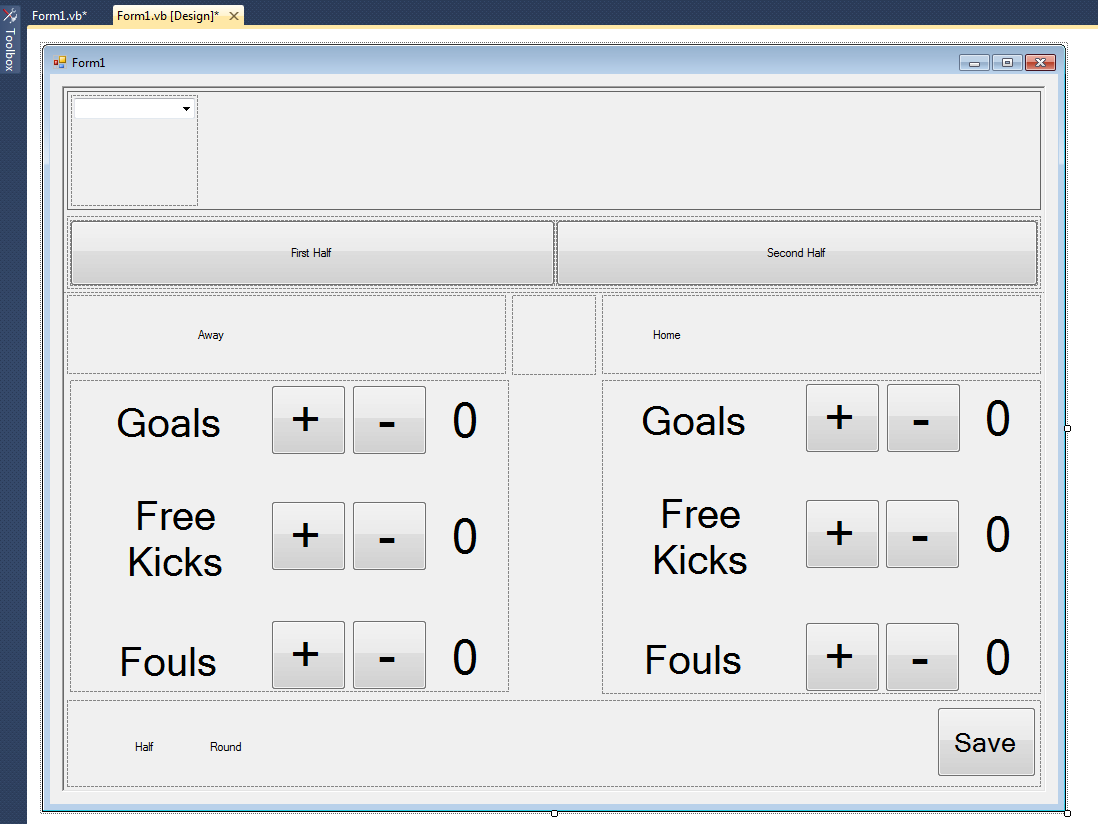
My Code in progress:
Code:
Public Class frmGame

    '******************************************************************************************
    'Author:
    'Date Created:
    'Purpose:
    '******************************************************************************************
    'GLOBAL ARRAYS
    '----------------------
    Dim g_first_half(0 To 5) As Integer 'First Half Stats
    Dim g_second_half(0 To 5) As Integer 'Second Half Stats


    'GLOBAL CONSTANTS
    '----------------------
    'Text to identify which half
    Const G_01 As String = "First Half"
    Const G_02 As String = "Second Half"


    'Text file delimiter
    Const G_COMMA As Char = ","


    Private Sub btnGoals_Plus_Click(sender As System.Object, e As System.EventArgs) Handles btnGoals_Plus.Click
        'Add one to tally
        lblGoals.Text = lblGoals.Text + 1
    End Sub

    Private Sub btnFK_plus_Click(sender As System.Object, e As System.EventArgs) Handles btnFK_plus.Click
        'Add one to tally
        lblFK.Text = lblFK.Text + 1
    End Sub

    Private Sub btnFouls_Plus_Click(sender As System.Object, e As System.EventArgs) Handles btnFouls_Plus.Click
        'Add one to tally
        lblFouls.Text = lblFouls.Text + 1
    End Sub

    Private Sub btnGoals_Minus_Click(sender As System.Object, e As System.EventArgs) Handles btnGoals_Minus.Click
        'Subract one to tally
        If lblGoals.Text <> 0 Then
            lblGoals.Text = lblGoals.Text - 1
        End If
    End Sub

    Private Sub btnFK_Minus_Click(sender As System.Object, e As System.EventArgs) Handles btnFK_Minus.Click
        'Subract one to tally
        If lblFK.Text <> 0 Then
            lblFK.Text = lblFK.Text - 1
        End If
    End Sub

    Private Sub btnFouls_Minus_Click(sender As System.Object, e As System.EventArgs) Handles btnFouls_Minus.Click
        'Subract one to tally
        If lblFouls.Text <> 0 Then
            lblFouls.Text = lblFouls.Text - 1
        End If
    End Sub

    Private Sub btnGoals_PlusA_Click(sender As System.Object, e As System.EventArgs) Handles btnGoals_PlusA.Click
        'Add one to tally
        lblGoalsA.Text = lblGoalsA.Text + 1
    End Sub

    Private Sub btnFK_PlusA_Click(sender As System.Object, e As System.EventArgs) Handles btnFK_PlusA.Click
        'Add one to tally
        lblFKA.Text = lblFKA.Text + 1
    End Sub

    Private Sub btnFouls_PlusA_Click(sender As System.Object, e As System.EventArgs) Handles btnFouls_PlusA.Click
        'Add one to tally
        lblFoulsA.Text = lblFoulsA.Text + 1
    End Sub

    Private Sub btnGoals_MinusA_Click(sender As System.Object, e As System.EventArgs) Handles btnGoals_MinusA.Click
        'Subract one to tally
        If lblGoalsA.Text <> 0 Then
            lblGoalsA.Text = lblGoalsA.Text - 1
        End If
    End Sub

    Private Sub btnFK_MinusA_Click(sender As System.Object, e As System.EventArgs) Handles btnFK_MinusA.Click
        'Subract one to tally
        If lblFKA.Text <> 0 Then
            lblFKA.Text = lblFKA.Text - 1
        End If
    End Sub

    Private Sub btnFouls_MinusA_Click(sender As System.Object, e As System.EventArgs) Handles btnFouls_MinusA.Click
        'Subract one to tally
        If lblFoulsA.Text <> 0 Then
            lblFoulsA.Text = lblFoulsA.Text - 1
        End If
    End Sub

    Private Sub s_set_half(ByRef p_half As String)
        'update screen to show currently selected half
        Select Case p_half
            Case G_01
                lblhalf.text = G_01
            Case G_02
                lblhalf.Text = G_02
        End Select
    End Sub
    Private Sub s_store_current_screen(ByVal p_half As String)
        'Save Statistics for the half
        Select Case p_half
            Case G_01
                'Save screen data for first half
                g_first_half(0) = lblGoals.Text
                g_first_half(1) = lblGoalsA.Text
                g_first_half(2) = lblFK.Text
                g_first_half(3) = lblFKA.Text
                g_first_half(4) = lblFouls.Text
                g_first_half(5) = lblFoulsA.Text
            Case G_02
                'Save Screen data for second half
                g_second_half(0) = lblGoals.Text
                g_second_half(1) = lblGoalsA.Text
                g_second_half(2) = lblFK.Text
                g_second_half(3) = lblFKA.Text
                g_second_half(4) = lblFouls.Text
                g_second_half(5) = lblFoulsA.Text
        End Select
    End Sub
    Private Sub s_display_screen(ByVal p_half As String)
        ' Display the wanted half statistics on screen
        Select Case p_half
            Case G_01
                lblGoals.Text = g_first_half(0)
                lblGoalsA.Text = g_first_half(1)
                lblFK.Text = g_first_half(2)
                lblFKA.Text = g_first_half(3)
                lblFouls.Text = g_first_half(4)
                lblFoulsA.Text = g_first_half(5)
            Case G_02
                lblGoals.Text = g_second_half(0)
                lblGoalsA.Text = g_second_half(1)
                lblFK.Text = g_second_half(2)
                lblFKA.Text = g_second_half(3)
                lblFouls.Text = g_second_half(4)
                lblFoulsA.Text = g_second_half(5)
        End Select

    End Sub

    Private Sub lblFirstHalf_Click(sender As System.Object, e As System.EventArgs) Handles lblFirstHalf.Click
        s_store_current_screen(lblhalf.Text)
        s_set_half(G_01)
        s_display_screen(G_01)
    End Sub

    Private Sub lblSecondhalf_Click(sender As System.Object, e As System.EventArgs) Handles lblSecondhalf.Click
        s_store_current_screen(lblHalf.Text)
        s_set_half(G_02)
        s_display_screen(G_02)
    End Sub

    Private Sub s_read_fixtured_game()
        'Current fixtured game
        Dim objFile_fixture As New System.IO.StreamReader("insert file location here")
        Dim ls_line As String ' line in file
        Dim ls_fixtured_game As String ' hold current fixture

        Dim larr_teams(2) As String
        ls_line = objFile_fixture.ReadLine() 'Prime Reading
        ls_fixtured_game = ls_line

        Do Until ls_line Is Nothing
            ls_fixtured_game = ls_line
            ls_line = objFile_fixture.ReadLine()
        Loop

        'Seperate Home Team from Away Team
        larr_teams = Split(ls_fixtured_game, G_COMMA)

        lblAwayTeam.Text = larr_teams(0)
        lblHomeTeam.Text = larr_teams(1)
        lblRound.Text = larr_teams(2)

        objFile_fixture.Close()
        objFile_fixture.Dispose()
    End Sub

    Private Sub ComboBox1_SelectedIndexChanged(sender As System.Object, e As System.EventArgs) Handles ComboBox1.SelectedIndexChanged
        Dim Round As String = ComboBox1.Text
        s_set_round(R_1)
    End Sub

    Private Sub s_combobox_text(ByVal p_round As String)
        'If ComboBox1.Round1 =
    End Sub

    Private Sub btnSave_Click(sender As System.Object, e As System.EventArgs) Handles btnSave.Click
        Dim objfile_stats As New System.IO.StreamWriter("insert file location here")
        Dim ls_statistics As String

        s_store_current_screen(lblHalf.Text)

        Me.Cursor = Cursors.AppStarting

        'Round Data


        'First Half Data
        ls_statistics = f_get_screen_stats(G_01)
        objfile_stats.WriteLine(ls_statistics)


        'Second Half Data
        ls_statistics = f_get_screen_stats(G_02)
        objfile_stats.WriteLine(ls_statistics)

    End Sub

    Private Sub frmGame_Load(sender As System.Object, e As System.EventArgs) Handles MyBase.Load
        Call s_set_half(G_01)
        s_read_fixtured_game()

    End Sub

    Private Function f_get_screen_stats(ByVal p_half As String) As String

        Dim ls_statistics As String
        Dim li_counter As Integer

        Select Case p_half
            'First Half Data
            Case G_01
                ls_statistics = lblRound.Text & G_COMMA & lblAwayTeam.Text & G_COMMA _
                    & lblHomeTeam.Text & G_COMMA & G_01
                For li_counter = 0 To 5
                    ls_statistics = ls_statistics & G_COMMA & g_first_half(li_counter)
                Next
            Case G_02
                'Second Half Data
                ls_statistics = lblRound.Text & G_COMMA & lblAwayTeam.Text & G_COMMA _
                    & lblHomeTeam.Text & G_COMMA & G_02
                For li_counter = 0 To 5
                    ls_statistics = ls_statistics & G_COMMA & g_second_half(li_counter)
                Next
            Case Else
                ls_statistics = ""
        End Select

        f_get_screen_stats = ls_statistics
    End Function


End Class
Cheers,
AzzaVB
-
May 21st, 2013, 04:34 PM
#2
Re: VB Beginner need help on project
The problem with advising on thuis sort of project is judgung how much you know and, more importantly, how much you're supposed to know. The obvious way to do this in the real world would be to have a datatable underlying so that you could access any match at any time but I guess you're a long way from dealing with databases? The next best approach as all the values are of the same type would be a 2D array to hold the values which are then written to file en masse when permanent records are required. If that's not possible then it does get a bit trickier as you need multiple instances of everything (more tedious than difficult though I suppose).
As the 6-dimensional mathematics professor said to the brain surgeon, "It ain't Rocket Science!"
Reviews: "dunfiddlin likes his DataTables" - jmcilhinney
Please be aware that whilst I will read private messages (one day!) I am unlikely to reply to anything that does not contain offers of cash, fame or marriage!
-
May 21st, 2013, 04:52 PM
#3
New Member
Re: VB Beginner need help on project
Hi guys, I need your help in correcting this code.
Dim counter As Integer
Private Sub CmdGo_Click()
counter = TxtCounter.Text
Timer1.Enabled = True
End Sub
Private Sub Form_Load()
End Sub
Private Sub Timer1_Timer()
counter = counter - 1
LblCounter.Caption = Str$(counter)
If counter < 0 Then
Timer1.Enabled = False
Exit Sub
End If
End Sub
I want to stop decrementing the value to stop at 0 instead of at -1. Please help. I am learning VB.
-
May 21st, 2013, 04:59 PM
#4
Re: VB Beginner need help on project
Ok, i wont go to much into your code right now, Your UI is very off putting. So your application needs to keep track of matches and recall them. XML would be perfect here.
Is this an ok solution?
'******************************************************************************************
'Author:
'Date Created:
'Purpose:
'******************************************************************************************
'GLOBAL ARRAYS
'----------------------
Comments like this are a big NO NO. It's messy and creates noise. Noise is bad.
Code:
        'Add one to tally
        lblGoals.Text = lblGoals.Text + 1
We can clearly see what this is doing. Why add pointless noise y comments? Your constants are strings, can a string ever be a good constant?
 Posting Permissions
- You may not post new threads
- You may not post replies
- You may not post attachments
- You may not edit your posts
-
Forum Rules
|
Click Here to Expand Forum to Full Width
|



 Reply With Quote

