|

-
May 17th, 2013, 01:13 PM
#1
Timing an event from start to stop and showing the time in 10th/second
I have a sound file. I need to click on button1 to start the sound and also start a timer. Then I click on button2 to stop the sound. When the sound has stopped I need to see how many 10th/seconds have elasped. How do I do this?
Anything I post is an example only and is not intended to be the only solution, the total solution nor the final solution to your request nor do I claim that it is. If you find it useful then it is entirely up to you to make whatever changes necessary you feel are adequate for your purposes.
-
May 17th, 2013, 01:48 PM
#2
Re: Timing an event from start to stop and showing the time in 10th/second
In the KB article How To Use QueryPerformanceCounter to Time Code, Microsoft describes how to use several API and intrinsic VB6 timers to benchmark code. It says there:
 Originally Posted by MSDN
Code:
Option Explicit

Private Declare Function QueryPerformanceCounter Lib "kernel32.dll" (ByRef lpPerformanceCount As Currency) As Long
Private Declare Function QueryPerformanceFrequency Lib "kernel32.dll" (ByRef lpFrequency As Currency) As Long

Private curFreq  As Currency
Private curStart As Currency
Private curStop  As Currency

Private Sub cmdStart_Click()
    QueryPerformanceCounter curStart
    Timer1 = True
End Sub

Private Sub cmdStop_Click()
    QueryPerformanceCounter curStop
    Caption = Round((curStop - curStart) / curFreq, 1&) & " secs."
End Sub

Private Sub Form_Load()
    QueryPerformanceFrequency curFreq
End Sub
On Local Error Resume Next: If Not Empty Is Nothing Then Do While Null: ReDim i(True To False) As Currency: Loop: Else Debug.Assert CCur(CLng(CInt(CBool(False Imp True Xor False Eqv True)))): Stop: On Local Error GoTo 0
Declare Sub CrashVB Lib "msvbvm60" (Optional DontPassMe As Any)
-
May 17th, 2013, 02:00 PM
#3
Re: Timing an event from start to stop and showing the time in 10th/second
Anything I post is an example only and is not intended to be the only solution, the total solution nor the final solution to your request nor do I claim that it is. If you find it useful then it is entirely up to you to make whatever changes necessary you feel are adequate for your purposes.
-
May 17th, 2013, 02:05 PM
#4
Re: Timing an event from start to stop and showing the time in 10th/second
It's a placeholder for your Timer. Call the API first before starting the Timer.
On Local Error Resume Next: If Not Empty Is Nothing Then Do While Null: ReDim i(True To False) As Currency: Loop: Else Debug.Assert CCur(CLng(CInt(CBool(False Imp True Xor False Eqv True)))): Stop: On Local Error GoTo 0
Declare Sub CrashVB Lib "msvbvm60" (Optional DontPassMe As Any)
-
May 17th, 2013, 09:32 PM
#5
Re: Timing an event from start to stop and showing the time in 10th/second
OK. I see I don't need a Timer at all. What would I do in a timer event anyway?
Anything I post is an example only and is not intended to be the only solution, the total solution nor the final solution to your request nor do I claim that it is. If you find it useful then it is entirely up to you to make whatever changes necessary you feel are adequate for your purposes.
-
May 18th, 2013, 02:15 AM
#6
Re: Timing an event from start to stop and showing the time in 10th/second
Originally Posted by jmsrickland

What would I do in a timer event anyway?
I don't know; I just included the Timer placeholder because in the OP you said, "and also start a timer".
On Local Error Resume Next: If Not Empty Is Nothing Then Do While Null: ReDim i(True To False) As Currency: Loop: Else Debug.Assert CCur(CLng(CInt(CBool(False Imp True Xor False Eqv True)))): Stop: On Local Error GoTo 0
Declare Sub CrashVB Lib "msvbvm60" (Optional DontPassMe As Any)
-
May 18th, 2013, 10:37 AM
#7
Re: Timing an event from start to stop and showing the time in 10th/second
Oh, yeah, I did, didn't I. Forgot about that, lol. (too many things going on with all the threads I have I'm not remembering what I'm saying form one thread to the next)
Anything I post is an example only and is not intended to be the only solution, the total solution nor the final solution to your request nor do I claim that it is. If you find it useful then it is entirely up to you to make whatever changes necessary you feel are adequate for your purposes.
-
May 18th, 2013, 05:57 PM
#8
Re: Timing an event from start to stop and showing the time in 10th/second
JMS
If you want to use a timer control, then perhaps something like this ,,,
Code:
Public nElapsed As Integer
Public timStart As Date
Public timStop As Date
'--------------------------------
Private Sub Timer1_Timer()
    '
    nElapsed = nElapsed + 1
    '
End Sub
'--------------------------------
Private Sub Tstart_Click()
    '
    With Timer1
        .Interval = 100      ' 1/10 sec
        .Enabled = True
    End With
    timStart = Now
    '
End Sub
'--------------------------------
Private Sub Tstop_Click()
    '
    With Timer1
        .Enabled = False
    End With
    timStop = Now
    '
    txt = "Start = " + Trim(timStart) + vbCrLf _
        + "Stop = " + Trim(timStop) + vbCrLf + vbCrLf _
        + "1/10 th's = " + Trim(nElapsed)
    Text1.Text = txt
    nElapsed = 0    ' reset for next trial
    '
End Sub
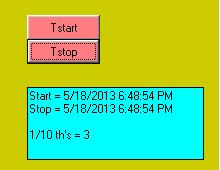
If you click real fast, as I did here, system clock shows same "time"
but the timer measured 3 1/10th's.
Spoo
 Posting Permissions
- You may not post new threads
- You may not post replies
- You may not post attachments
- You may not edit your posts
-
Forum Rules
|
Click Here to Expand Forum to Full Width
|



 Reply With Quote

