|

-
May 13th, 2013, 03:28 PM
#1
Thread Starter
Addicted Member

Multi Item Property
Hi there
Id like to know you create a property Group for forms and user controls. just like you would get for size, margin, padding etc
my aim (for now at least) is to be able have a borders property consisting of left, right, top,bottom. All values would be an Integer.
I could just create 4 single properties but id would much prefer to group them under like borders or something.
Ive had a bit of a look around and i think i have to create a class with the properties set within that class and then set the property on the object as that class.
any way ive tried all that and i can't get it to come out on my form properties at all, worse than that when i just added a new one to the form the properties window was blank and visual studio crashed :/
Even If I'm missing some fundamentally much easier way to achieve my goal of the borders, I'd still like to know how to do the property group as it'll probably come in handy
please note value are currently in boolean as that was the original idea but writing this i decided that integer would give me much more functionality in fact i might even go for palet color and default it to transparent or something who knows
any way here is my class
Code:
Public Class ClsPnlBorders
    Private mRight As Boolean
    Public Property Right As Boolean
        Get
            Return mRight
        End Get
        Set(value As Boolean)
            mRight = value
            RaiseEvent BordersChanged()
        End Set
    End Property
    Private mLeft As Boolean
    Public Property Left As Boolean
        Get
            Return mLeft
        End Get
        Set(value As Boolean)
            mLeft = value
            RaiseEvent BordersChanged()
        End Set
    End Property
    Private mTop As Boolean
    Public Property Top As Boolean
        Get
            Return mTop
        End Get
        Set(value As Boolean)
            mTop = value
            RaiseEvent BordersChanged()
        End Set
    End Property
    Private mBottom As Boolean
    Public Property Bottom As Boolean
        Get
            Return mBottom
        End Get
        Set(value As Boolean)
            mBottom = value
            RaiseEvent BordersChanged()
        End Set
    End Property
    Public Sub New(right As Boolean, left As Boolean, top As Boolean, bottom As Boolean)
        mRight = right
        mLeft = left
        mTop = top
        mBottom = bottom
    End Sub
    Public Event BordersChanged()

End Class
and my usage
Code:
Private mBorders() As ClsPnlBorders
    <TypeConverter(GetType(ExpandableObjectConverter)), DesignerSerializationVisibility(DesignerSerializationVisibility.Content)> _
    Public Property Borders() As ClsPnlBorders
        Get
            Return mBorders(0)
        End Get
        Set(value As ClsPnlBorders)
            mBorders(0) = value
        End Set
End Property
many thanks
Ian
-
May 13th, 2013, 04:38 PM
#2
Re: Multi Item Property
Why you declare as array?
vb Code:
Private mBorders As ClsPnlBorders <TypeConverter(GetType(ExpandableObjectConverter)), DesignerSerializationVisibility(DesignerSerializationVisibility.Content)> _ Public Property Borders() As ClsPnlBorders Get Return mBorders End Get Set(value As ClsPnlBorders) mBorders = value End Set End Property
BTW: .NET has System.Drawing.Rectangle try to use it.
-
May 13th, 2013, 05:23 PM
#3
Thread Starter
Addicted Member
Re: Multi Item Property
hi 4x2y
thanks for the reply,
I Tried using a rectangle but i could get it to only show the sides that i wanted it right, top, bottom or left, it was either on or of
And im not sure why i declared it as an array to be honest, i was trying to follow what someone else had done from in this post
http://www.vbforums.com/showthread.p...oup-Attributes
but i couldn't get it work, its a bit annoying because i can see it as i wold expect it. if i call it in the code but it doesn't appear in the properties window
Ian
-
May 13th, 2013, 06:04 PM
#4
Re: Multi Item Property
There is already a type for specifying borders. The ToolStripStatusLabelBorderSides enumeration type. It also has nice designer support where you can specify them with CheckBoxes in the property grid at design time:-
vbnet Code:
Public Class Test
    Inherits Component
     Public Property Borders As ToolStripStatusLabelBorderSides
 End Class
All you need to do is have the property declared as ToolStripStatusLabelBorderSides and VS does the rest.
-
May 13th, 2013, 06:36 PM
#5
Re: Multi Item Property
As i understood, he wants to add his custom property Borders to a form and see/set it inside the form's properties window at design time.
-
May 13th, 2013, 06:42 PM
#6
Re: Multi Item Property
He can inherit from Form and add the property if he wants.
-
May 13th, 2013, 06:47 PM
#7
Re: Multi Item Property
He can inherit from Form and add the property if he wants.
Can you please post a sample, because i did so but cannot see it in the form's properties window at design time.
-
May 13th, 2013, 06:53 PM
#8
Re: Multi Item Property
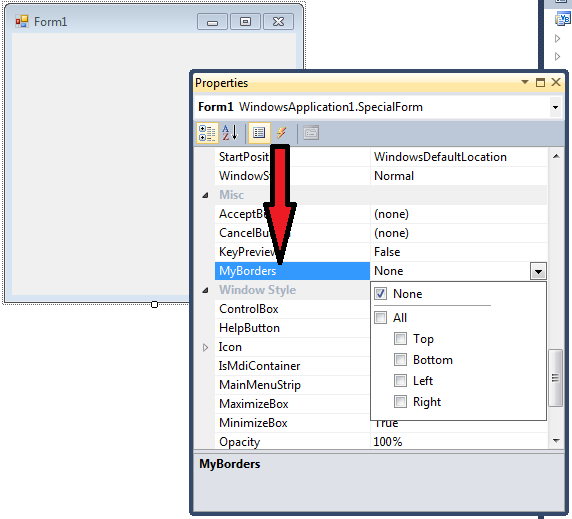
vbnet Code:
Public Class SpecialForm
    Inherits Form
     Public Property MyBorders As ToolStripStatusLabelBorderSides
End Class
-
May 14th, 2013, 07:49 AM
#9
Re: Multi Item Property
When i create a class with this code
Code:
Public Class SpecialForm
    Inherits Form

    Public Property MyBorders As ToolStripStatusLabelBorderSides
End Class
i don't see MyBorders in the properties window.
I see only if i add another class and inherit SpecialForm
Code:
Public Class Class2
    Inherits WindowsApplication1.SpecialForm

End Class
-
May 14th, 2013, 08:00 AM
#10
Re: Multi Item Property
 Originally Posted by 4x2y

I see only if i add another class and inherit SpecialForm
Code:
Public Class Class2
    Inherits WindowsApplication1.SpecialForm

End Class
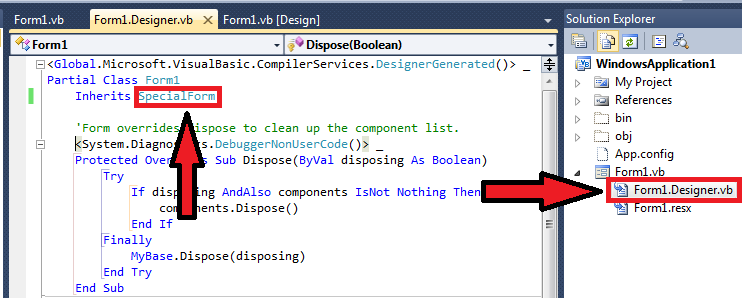
Right, that's exactly what you're supposed to do. You simply edit the designer generated file for your application's forms and have it inherit from your new form class instead of the default System.Windows.Forms.Form.
Last edited by Niya; May 14th, 2013 at 08:43 AM.
Reason: Fixed attachment
-
May 14th, 2013, 08:17 AM
#11
Re: Multi Item Property
You simply edit the designer generated file for your application's forms and have it inherit from your new form class instead of the default System.Windows.Forms.Form.
I think it was important to describe this step, because i knew it only from your properties window screen shoot, as it show the class name Form1 WindowsApllication1.SpecialForm
Attachment 100091 is Invalid Attachment.
-
May 14th, 2013, 08:43 AM
#12
Re: Multi Item Property
Originally Posted by 4x2y
I think it was important to describe this step.
Sorry about that. I assumed it was common knowledge. I use all kinds of inherited forms all the time.
Originally Posted by 4x2y
Attachment 100091 is Invalid Attachment.
Fixed...
-
May 14th, 2013, 10:52 AM
#13
Thread Starter
Addicted Member
Re: Multi Item Property
Wow Thanks alot guys thats brill
the problem is this is more for user controls rather than forms
I want to use this mainly in my version of the Panel, The Idea being that i could choose what sort of a border that wanted in the panel. can i use the Inherits WindowsApplication.SpecialForm When im already inheriting the base class of the Panel?
but i would imagine it would be of use in all sorts of places.
Lastly Whilst the suggestion for the borders is very good, Id still like to know how to create my own Multi Item Properties. it may be that it is more trouble than its worth but if it is possible it would be great to know
Ian
-
May 14th, 2013, 12:59 PM
#14
Re: Multi Item Property
Originally Posted by 12many
Lastly Whilst the suggestion for the borders is very good, Id still like to know how to create my own Multi Item Properties. it may be that it is more trouble than its worth but if it is possible it would be great to know
Ian
vbnet Code:
Imports System.ComponentModel
 Public Class BorderedPanel
    Inherits Panel
     Public Sub New()
        Me.Borders = New BorderSides
    End Sub
     <DesignerSerializationVisibility(DesignerSerializationVisibility.Content)> _
    Public Property Borders As BorderSides
 End Class
  <TypeConverter(GetType(BorderSidesConverter))> _
Public Class BorderSides
    Public Property Left As Boolean
    Public Property Top As Boolean
    Public Property Right As Boolean
    Public Property Bottom As Boolean
End Class
 Public Class BorderSidesConverter
    Inherits ExpandableObjectConverter
     Public Overrides Function CanConvertTo(context As System.ComponentModel.ITypeDescriptorContext, destinationType As System.Type) As Boolean
        If GetType(String) Is destinationType Then Return True
         Return MyBase.CanConvertTo(context, destinationType)
    End Function
     Public Overrides Function ConvertTo(context As System.ComponentModel.ITypeDescriptorContext, culture As System.Globalization.CultureInfo, value As Object, destinationType As System.Type) As Object
        If GetType(String) Is destinationType Then Return ""
         Return MyBase.ConvertTo(context, culture, value, destinationType)
    End Function
 End Class
 Posting Permissions
- You may not post new threads
- You may not post replies
- You may not post attachments
- You may not edit your posts
-
Forum Rules
|
Click Here to Expand Forum to Full Width
|



 Reply With Quote


