|

-
May 10th, 2013, 11:57 PM
#1
Thread Starter
Hyperactive Member

 [RESOLVED] search DB File,show results in LV,edit items in LV, and save back to DBfile..???? [RESOLVED] search DB File,show results in LV,edit items in LV, and save back to DBfile..????
I am So stumped on this..maybe even more stumped than i was when i getting help just accessing the DB file lol
ok here's what i am trying to do start to finish..search the DB for something,Show whatever it finds in a listview, edit a line and save it back to the DB file..
the search part is solved, i can find whatever i need to find and toss the info into the listview..the editing and saving is where I'm banging my head
I thought i could use the update code from the previous Post on this but it isn't working out for me for some reason :-)
Code:
Imports System.IO
Imports System.Data.OleDb

Public Class DBEditor
    Dim App_Path As String = New FileInfo(Application.ExecutablePath).DirectoryName
    Dim UpdateCommand As New OleDbCommand
    Public FileName As String
    Dim CurrentIndex = Form1.ListView1.FocusedItem.Index
    Dim EditItem = Form1.ListView1.Items(CurrentIndex)
    Public ConnectionString As String = "Provider=Microsoft.ACE.OLEDB.12.0;Data Source=" & App_Path & "\RefLib.accdb"


    Private Sub frmMain_Load(ByVal sender As System.Object, ByVal e As System.EventArgs) Handles MyBase.Load

        With EditItem

            txtModel.Text = EditItem.Text
            txtDocument.Text = .SubItems(1).Text
            txtDescription.Text = .SubItems(2).Text
            txtByteSize.Text = .SubItems(3).Text
            txtFileSize.Text = .SubItems(4).Text
            txtStatus.Text = .SubItems(5).Text
            txtLocation.Text = .SubItems(6).Text
            txtCrc32.Text = .SubItems(7).Text
            txtFileName.Text = .SubItems(8).Text
            txtSite.Text = .SubItems(9).Text

        End With
    End Sub

    Private Sub btnClose_Click(ByVal sender As System.Object, ByVal e As System.EventArgs) Handles btnClose.Click
        Me.Close()
    End Sub

    Private Sub btnSave_Click(ByVal sender As System.Object, ByVal e As System.EventArgs) Handles btnSave.Click
        Dim SelectStateMent As String = "SELECT FileName FROM AssistDB WHERE FileName = " & txtFileName.Text

        Dim UpdateStatement = "UPDATE AssistDB SET Model = @Model, Document = @Document, Description = @Description, " & _
                                    "ByteSize = @ByteSize, FileSize = @FileSize, Status = @Status, Location = @Location, Crc32 = @Crc32, " & _
                                    "FileName = @FileName, Site = @Site WHERE FileName = @FileName"

        Dim InsertStatement = "INSERT INTO AssistDB " & _
                              "(Model, Document, Description, ByteSize,FileSize, Status, Location, Crc32, FileName,Site) " & _
                              "VALUES (Model, Document, Description, ByteSize, FileSize, Status, Location, Crc32, FileName, Site)"

        Using Connection As New OleDbConnection(ConnectionString), Adapter As New OleDbDataAdapter(SelectStateMent, Connection), _
            InsertCommand As New OleDbCommand(InsertStatement, Connection), UpdateCommand As New OleDbCommand(UpdateStatement, Connection)

        UpdateCommand.Parameters.AddWithValue("@Model", txtModel.Text)
        UpdateCommand.Parameters.AddWithValue("@Document", txtDocument.Text)
        UpdateCommand.Parameters.AddWithValue("@Description", txtDescription.Text)
        UpdateCommand.Parameters.AddWithValue("@ByteSize", txtByteSize.Text)
        UpdateCommand.Parameters.AddWithValue("@FileSize", txtFileSize.Text)
        UpdateCommand.Parameters.AddWithValue("@Status", txtStatus.Text)
        UpdateCommand.Parameters.AddWithValue("@Location", txtLocation.Text)
        UpdateCommand.Parameters.AddWithValue("@Crc32", txtCrc32.Text)
        UpdateCommand.Parameters.AddWithValue("@FileName", txtFileName.Text)
        UpdateCommand.Parameters.AddWithValue("@Site", txtSite.Text)
        Adapter.UpdateCommand = UpdateCommand

        End Using
    End Sub

End Class
-
May 11th, 2013, 01:06 AM
#2
Re: search DB File,show results in LV,edit items in LV, and save back to DBfile..????
I get so frustrated when I see so many people making there lives unnecessarily difficult. You should NOT be using a ListView and you should NOT be saving anything in that editing dialogue. What you should be doing is using a single data adapter to populate a DataTable on your main form and saving the changes back to the database from that same DataTable using that same data adapter. You should be binding that DataTable to a DataGridView on your main form via a BindingSource.
When you want to edit a record you get the data via the Current property of the BindingSource and pass it to the editing dialogue. If you pass the individual values then the dialogue will have to pass the new values back when it's done and the main form updates the data via that same Current property, which is a DataRowView. If you pass the data as a DataRow or DataRowView then you don't even have to do that, but rather the dialogue simply updates the row and the grid reflects that automatically.
When you're done editing you call Update on the same adapter to save the changes back to the database. You can do that after every edit if you want but normally you would save multiple edits as a batch when the user has finished editing.
I suggest that you follow the CodeBank link in my signature and check out two of my threads there. First, check out the thread on Retrieving & Saving Data to learn how to use one data adapter to retrieve data and save changes. Next, check out the thread on Editing A Grid Row In A Dialogue to learn how to edit each record.
-
May 11th, 2013, 01:32 AM
#3
Thread Starter
Hyperactive Member
Re: search DB File,show results in LV,edit items in LV, and save back to DBfile..????
well not to get into a heated argument over this but ,,,,(1) I don't like the datagridview, i prefer the listview..and 2 i managed to figure it out..you just posted before i did :-)
Just need to change to this and it works fine now.
Code:
        Using Connection As New OleDbConnection(ConnectionString)

            Connection.Open()
            UpdateCommand.Connection = Connection
            UpdateCommand.Parameters.AddWithValue("@Model", txtModel.Text)
            UpdateCommand.Parameters.AddWithValue("@Document", txtDocument.Text)
            UpdateCommand.Parameters.AddWithValue("@Description", txtDescription.Text)
            UpdateCommand.Parameters.AddWithValue("@ByteSize", txtByteSize.Text)
            UpdateCommand.Parameters.AddWithValue("@FileSize", txtFileSize.Text)
            UpdateCommand.Parameters.AddWithValue("@Status", txtStatus.Text)
            UpdateCommand.Parameters.AddWithValue("@Location", txtLocation.Text)
            UpdateCommand.Parameters.AddWithValue("@Crc32", txtCrc32.Text)
            UpdateCommand.Parameters.AddWithValue("@FileName", txtFileName.Text)
            UpdateCommand.Parameters.AddWithValue("@Site", txtSite.Text)

            UpdateCommand.CommandText = UpdateStatement
            UpdateCommand.ExecuteNonQuery()
        End Using
-
May 11th, 2013, 01:51 AM
#4
Re: [RESOLVED] search DB File,show results in LV,edit items in LV, and save back to D
I'd be interested to know what exactly you consider to be the advantages of a ListView over a DataGridView. If you're not using grouping or multiple views then I can't see any.
Furthermore, the fact that you have one form retrieving the data and another editing it is bad practice. The editing form should live only to edit. It shouldn't know anything about the data access. There's nothing in your code to update the ListView with the new values either. Maybe you want to keep the original values displayed in the ListView but, if not, please tell me that you're not then querying the database to get the data that you already had to populate the ListView again.
-
May 11th, 2013, 01:59 AM
#5
Thread Starter
Hyperactive Member
Re: [RESOLVED] search DB File,show results in LV,edit items in LV, and save back to D
I just prefer the listview over datagridview simply because of the look of it and that's about it i guess :-)
I'm lost ..i have a main form with a listview on it..on this main form is also a search box and a search button..all results show in this listview..now if i double click a line a new form opens(the edit form) ..on load it populated the various text boxes with the info from the listview for what ever line was double clicked on..so i can edit only 1 line ata time..when the edits are complete i click the save button and new info gets sent back to the DB and also the listview gets updated with the new info that was just edited(this code isn't shown i just wrote it into my project) and then the edit form closes.
Code:
        Using Connection As New OleDbConnection(ConnectionString)
            Connection.Open()  'open up a connection to the database
            UpdateCommand.Connection = Connection
            UpdateDLine(UpdateCommand)
            UpdateCommand.CommandText = UpdateStatement
            UpdateCommand.ExecuteNonQuery()
        End Using

        With EditItem
            EditItem.Text = txtModel.Text
            .SubItems(1).Text = txtDocument.Text
            .SubItems(2).Text = txtDescription.Text
            .SubItems(3).Text = txtByteSize.Text
            .SubItems(4).Text = txtFileSize.Text
            .SubItems(5).Text = txtStatus.Text
            .SubItems(6).Text = txtLocation.Text
            .SubItems(7).Text = txtCrc32.Text
            .SubItems(8).Text = txtFileName.Text
            .SubItems(9).Text = txtSite.Text
        End With
        Me.Close()
Last edited by M@dH@tter; May 11th, 2013 at 02:05 AM.
-
May 11th, 2013, 02:22 AM
#6
Re: [RESOLVED] search DB File,show results in LV,edit items in LV, and save back to D
This form contains a ListView in default configuration and a DataGridView with just a few properties changed from the default.
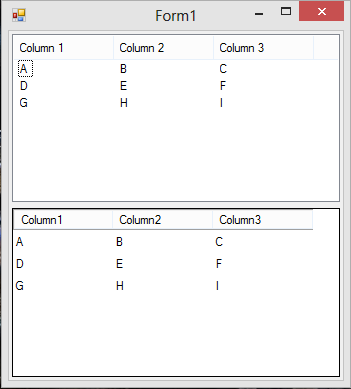
There's no great gulf in appearances between the two.
 Posting Permissions
- You may not post new threads
- You may not post replies
- You may not post attachments
- You may not edit your posts
-
Forum Rules
|
Click Here to Expand Forum to Full Width
|



 Reply With Quote
