|

-
May 8th, 2013, 09:25 AM
#1
Thread Starter
Addicted Member

Automating Programs
Hey,
I am trying to get a hold of another application and simply send the print command. But this seems to be hard than I thought it was.
I know there is the automation name space, but I cant seem to get anything working.
http://msdn.microsoft.com/en-us/libr...utomation.aspx
I am still at the very beginning of my test application, I am only able to open the 3rd party application and I am stuck there.
Any suggestions are appreciated 
-
May 8th, 2013, 11:18 AM
#2
Re: Automating Programs
this is how to start notepad with no window, print the document, then exit:
Code:
Public Class Form1

    Private Sub Button1_Click(ByVal sender As System.Object, ByVal e As System.EventArgs) Handles Button1.Click
        Dim psi As New ProcessStartInfo With { _
        .FileName = "atextfile.txt", _
        .Verb = "Print", _
        .CreateNoWindow = True}
        Process.Start(psi)
    End Sub

End Class
- Coding Examples:
- Features:
- Online Games:
- Compiled Games:
-
May 8th, 2013, 12:50 PM
#3
Thread Starter
Addicted Member
Re: Automating Programs
 Originally Posted by .paul.

this is how to start notepad with no window, print the document, then exit:
Code:
Public Class Form1

    Private Sub Button1_Click(ByVal sender As System.Object, ByVal e As System.EventArgs) Handles Button1.Click
        Dim psi As New ProcessStartInfo With { _
        .FileName = "atextfile.txt", _
        .Verb = "Print", _
        .CreateNoWindow = True}
        Process.Start(psi)
    End Sub


End Class
What if it is not a regular format? It is a 3rd party program with a non standard extension.
How would I specific what program to open?
-
May 8th, 2013, 01:40 PM
#4
Re: Automating Programs
filename can either be the application or the filename. when it's the application you can pass the filename in the arguments property.
the only problem I can foresee is that a 3rd party app might not use verbs
ProcessStartInfo Properties:
http://msdn.microsoft.com/en-us/libr...roperties.aspx
- Coding Examples:
- Features:
- Online Games:
- Compiled Games:
-
May 8th, 2013, 03:18 PM
#5
Thread Starter
Addicted Member
Re: Automating Programs
Originally Posted by .paul.
filename can either be the application or the filename. when it's the application you can pass the filename in the arguments property.
the only problem I can foresee is that a 3rd party app might not use verbs
ProcessStartInfo Properties:
http://msdn.microsoft.com/en-us/libr...roperties.aspx
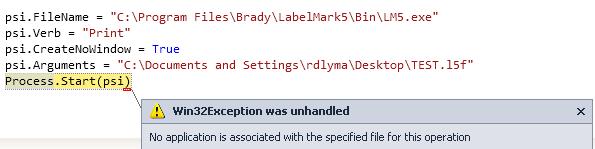
I know this is unconventional but is it at all possible to send a file straight to the printer driver and have it deal with the file?
I need to send this file to the printer but It looks like the only way to do this is through, taking control of the window and the sending key strokes or something?
Last edited by Crzyrio; May 8th, 2013 at 03:24 PM.
-
May 8th, 2013, 03:37 PM
#6
Re: Automating Programs
i'm out of ideas. i'll let someone else answer that...
- Coding Examples:
- Features:
- Online Games:
- Compiled Games:
-
May 8th, 2013, 03:53 PM
#7
Thread Starter
Addicted Member
Re: Automating Programs
Originally Posted by .paul.
i'm out of ideas. i'll let someone else answer that...
Thank for the help!
I am thinking I will have to use something like PostMessage(http://msdn.microsoft.com/en-us/libr...=vs.85%29.aspx) or SendMessage(http://msdn.microsoft.com/en-us/libr...=vs.85%29.aspx).
Never tried them before but they look tricky.
And I found this, which looks interisting ---> http://www.autohotkey.com/docs/misc/SendMessageList.htm
Anyone have any experience with this?
I would have to find the Right Window and just send a 'Crtl' + 'P' key stroke and then 'Enter'.... Sounds fun :P
-
May 8th, 2013, 11:35 PM
#8
Fanatic Member
Re: Automating Programs
im not sure how its done exactly in vb.net
but you will need to try something like this
VB.NET-------------------
start the program anyway you want, if you use process.start() you can put it straight into (<variable> as process) and skip next line
search through the running processes for the program your looking for and grab the Handle
<you can do all that in a few lines of code>
<next>
WIN API--------------------------
<i think you need to loop through using these api to find your menu item>
then you need to use 'GetMenu' 'Getmenuitemid' 'GetMenuCount'
get the handle of the menu item you need then use 'SendMessage' to start the code behind the menu item
its a little vague but its a start hope this helps
Yes!!!
Working from home is so much better than working in an office...
Nothing can beat the combined stress of getting your work done on time whilst
1. one toddler keeps pressing your AVR's power button
2. one baby keeps crying for milk
3. one child keeps running in and out of the house screaming and shouting
4. one wife keeps nagging you to stop playing on the pc and do some real work.. house chores
5. working at 1 O'clock in the morning because nobody is awake at that time
6. being grossly underpaid for all your hard work

-
May 8th, 2013, 11:37 PM
#9
Fanatic Member
Re: Automating Programs
just note your going through the hierarchy of handles to get down to the menu items. use the parent handles to find the child handles
Yes!!!
Working from home is so much better than working in an office...
Nothing can beat the combined stress of getting your work done on time whilst
1. one toddler keeps pressing your AVR's power button
2. one baby keeps crying for milk
3. one child keeps running in and out of the house screaming and shouting
4. one wife keeps nagging you to stop playing on the pc and do some real work.. house chores
5. working at 1 O'clock in the morning because nobody is awake at that time
6. being grossly underpaid for all your hard work
-
May 8th, 2013, 11:42 PM
#10
Fanatic Member
Re: Automating Programs
just to ease your mind a little bit with win API its really not complicated, the worst part is thinking about how many handles are running in windows which could be millions, dont think like that, as long as you have a handle your good to go.
this is a small app that starts a program inside my own program look how easy it is.
dont forget the declarations
Declare Auto Function SetParent Lib "user32.dll" (ByVal hWndChild As IntPtr, ByVal hWndNewParent As IntPtr) As Integer
Declare Auto Function SendMessage Lib "user32.dll" (ByVal hWnd As IntPtr, ByVal Msg As Integer, ByVal wParam As Integer, ByVal lParam As Integer) As Integer
Private Const WM_SYSCOMMAND As Integer = 274
Private Const SC_MAXIMIZE As Integer = 61488
Private Sub Form1_Load(ByVal sender As System.Object, ByVal e As System.EventArgs) Handles MyBase.Load
proc = Process.Start("IExplore.exe", "http:\\www.google.com -new")
System.Threading.Thread.Sleep(1000)
proc.WaitForInputIdle()
SetParent(proc.MainWindowHandle, Me.TableLayoutPanel1..Handle)
SendMessage(proc.MainWindowHandle, WM_SYSCOMMAND, SC_MAXIMIZE, 0)
End Sub
just google sendmessage api to get a list of the commands that you can send
Yes!!!
Working from home is so much better than working in an office...
Nothing can beat the combined stress of getting your work done on time whilst
1. one toddler keeps pressing your AVR's power button
2. one baby keeps crying for milk
3. one child keeps running in and out of the house screaming and shouting
4. one wife keeps nagging you to stop playing on the pc and do some real work.. house chores
5. working at 1 O'clock in the morning because nobody is awake at that time
6. being grossly underpaid for all your hard work
-
May 9th, 2013, 08:28 AM
#11
Thread Starter
Addicted Member
Re: Automating Programs
Originally Posted by GBeats
just to ease your mind a little bit with win API its really not complicated, the worst part is thinking about how many handles are running in windows which could be millions, dont think like that, as long as you have a handle your good to go.
this is a small app that starts a program inside my own program look how easy it is.
dont forget the declarations
Declare Auto Function SetParent Lib "user32.dll" (ByVal hWndChild As IntPtr, ByVal hWndNewParent As IntPtr) As Integer
Declare Auto Function SendMessage Lib "user32.dll" (ByVal hWnd As IntPtr, ByVal Msg As Integer, ByVal wParam As Integer, ByVal lParam As Integer) As Integer
Private Const WM_SYSCOMMAND As Integer = 274
Private Const SC_MAXIMIZE As Integer = 61488
Private Sub Form1_Load(ByVal sender As System.Object, ByVal e As System.EventArgs) Handles MyBase.Load
proc = Process.Start("IExplore.exe", "http:\\ www.google.com -new")
System.Threading.Thread.Sleep(1000)
proc.WaitForInputIdle()
SetParent(proc.MainWindowHandle, Me.TableLayoutPanel1..Handle)
SendMessage(proc.MainWindowHandle, WM_SYSCOMMAND, SC_MAXIMIZE, 0)
End Sub
just google sendmessage api to get a list of the commands that you can send
Hey,
THanks for all the help!
Just a few clarifications. What does this doo --> Me.TableLayoutPanel1.Handle)
-
May 9th, 2013, 08:33 AM
#12
Re: Automating Programs
What does this doo --> Me.TableLayoutPanel1.Handle)
It disnae doo owt! It's a property giving the handle of the control's window. You use it instead of going through the API to find an hWnd value before using it in API functions & subs.
As the 6-dimensional mathematics professor said to the brain surgeon, "It ain't Rocket Science!"
Reviews: "dunfiddlin likes his DataTables" - jmcilhinney
Please be aware that whilst I will read private messages (one day!) I am unlikely to reply to anything that does not contain offers of cash, fame or marriage!
-
May 9th, 2013, 09:44 AM
#13
Thread Starter
Addicted Member
Re: Automating Programs
Originally Posted by dunfiddlin
It disnae doo owt! It's a property giving the handle of the control's window. You use it instead of going through the API to find an hWnd value before using it in API functions & subs.
Did this: and the program shows up in my panel now. Perty cool :P
vb.net Code:
SetParent(psi.MainWindowHandle, Panel1.Handle)
         SendMessage(psi.MainWindowHandle, WM_SYSCOMMAND, SC_MAXIMIZE, 0)
Now in order to get menu items, I have gotten this far as of now.
vb.net Code:
Declare Auto Function GetMenu Lib "user32.dll" (ByVal hWnd As IntPtr) As Integer
as per http://msdn.microsoft.com/en-us/libr...=vs.85%29.aspx
and I assume I would use it like so
vb.net Code:
GetMenu(psi.MainWindowHandle)
So that will give me the menu handle but then what? 
How do I know what is available in the menu to select
EDIT: My Code Right Now, just stepping through stuff figuring out whats going on and looking at examples
vb.net Code:
Imports System.Drawing.Printing
Imports System.Windows.Automation
Imports System.IO
 Public Class Form1
    Dim psi As New Process
    Dim proc As New Process
     Dim ParentWindow As IntPtr
    Dim Menu As IntPtr
     Private Const WM_SYSCOMMAND As Integer = 274
    Private Const SC_MAXIMIZE As Integer = 61488
     Declare Auto Function SetParent Lib "user32.dll" (ByVal hWndChild As IntPtr, ByVal hWndNewParent As IntPtr) As Integer
    Declare Auto Function SendMessage Lib "user32.dll" (ByVal hWnd As IntPtr, ByVal Msg As Integer, ByVal wParam As Integer, ByVal lParam As Integer) As Integer
    Declare Auto Function GetMenu Lib "user32.dll" (ByVal hWnd As IntPtr) As Integer
      Private Sub Button1_Click(sender As System.Object, e As System.EventArgs) Handles Button1.Click
           psi = Process.Start("C:\Documents and Settings\rdlyma\Desktop\TEST.l5f")
        End Sub
      Private Sub Button2_Click(sender As System.Object, e As System.EventArgs) Handles Button2.Click
         ParentWindow = SetParent(psi.MainWindowHandle, Panel1.Handle)
         SendMessage(psi.MainWindowHandle, WM_SYSCOMMAND, SC_MAXIMIZE, 0)
         Menu = GetMenu(ParentWindow)
     End Sub
  End Class
Last edited by Crzyrio; May 9th, 2013 at 10:46 AM.
-
May 9th, 2013, 10:45 AM
#14
Re: Automating Programs
Never do anything API without consulting pinvoke.net (although it's VB declarations do tend to be a bit on the old fashioned side!) Here's there sample for GetMenu
vb.net Code:
Dim hwndMain as IntPtr = FindWindowEx(intptr.Zero,intptr.Zero,vbNullString,"My Window Title") 'Get the Window Handle
Dim hwndMenu As IntPtr = GetMenu(hwndMain) 'Get the MenuHandle
Dim hwndSubmenu as intptr = GetSubMenu(hwndMenu,1) 'Get the SubMenuHandle to the visible MenuItem, in this case the second one (counting from zero)
Dim intMID as Integer = GetMenuitemID(hwndSubmenu,2)) 'Get the MenuItemID of the third SubMenu under the previous Handle (counting from zero)
Sendmessage(hwndMain, WM_COMMAND, intMID,  0) 'Click the MenuItem!
As the 6-dimensional mathematics professor said to the brain surgeon, "It ain't Rocket Science!"
Reviews: "dunfiddlin likes his DataTables" - jmcilhinney
Please be aware that whilst I will read private messages (one day!) I am unlikely to reply to anything that does not contain offers of cash, fame or marriage!
-
May 9th, 2013, 11:30 AM
#15
Fanatic Member
Re: Automating Programs
please note the sample i sent was just a sample, you will be needing different sendmessage values, i think you probably figured out that SC_MAXIMIZE (aka #61488) wont do you much good with a menu,
like the great dunfiddlin says above, use getsubmenu in a loop to go through each menu item until you find the one your looking for, grab the handle then send the message.
in your case you know roughly where it is file->print so that will probably be menu item index(0) then however many down that list the print comes in, but like i said best to loop through and check each name to avoid problems, maybe your notepad one day will put print in item 5 not 6 for some reason (unlikely but you get the point).
Yes!!!
Working from home is so much better than working in an office...
Nothing can beat the combined stress of getting your work done on time whilst
1. one toddler keeps pressing your AVR's power button
2. one baby keeps crying for milk
3. one child keeps running in and out of the house screaming and shouting
4. one wife keeps nagging you to stop playing on the pc and do some real work.. house chores
5. working at 1 O'clock in the morning because nobody is awake at that time
6. being grossly underpaid for all your hard work
-
May 9th, 2013, 11:53 AM
#16
Thread Starter
Addicted Member
Re: Automating Programs
Originally Posted by dunfiddlin
Never do anything API without consulting pinvoke.net (although it's VB declarations do tend to be a bit on the old fashioned side!) Here's there sample for GetMenu
vb.net Code:
Dim hwndMain as IntPtr = FindWindowEx(intptr.Zero,intptr.Zero,vbNullString,"My Window Title") 'Get the Window Handle Dim hwndMenu As IntPtr = GetMenu(hwndMain) 'Get the MenuHandle Dim hwndSubmenu as intptr = GetSubMenu(hwndMenu,1) 'Get the SubMenuHandle to the visible MenuItem, in this case the second one (counting from zero) Dim intMID as Integer = GetMenuitemID(hwndSubmenu,2)) 'Get the MenuItemID of the third SubMenu under the previous Handle (counting from zero) Sendmessage(hwndMain, WM_COMMAND, intMID, 0) 'Click the MenuItem!
Thanks.
I am playing around with it in notepad and it seems to work, it is quiet cool :P
But in the program I want to use it with, both GetMenu and GetMenuitemID return 0, does that mean the program does not have access to it?
Is it possible to send keystrokes to the program instead? so maybe send the equivalent of 'Ctrl + P'
-
May 9th, 2013, 12:40 PM
#17
Re: Automating Programs
You can use the SendKeys function, but it's flaky and you don't really have a guarantee of anything. Honestly, if you really want simplistic automation of programs, you might want to look into AutoIT. I've used it a few times at work and it is able to help with these types of things better than .NET can.
-
May 9th, 2013, 01:06 PM
#18
Fanatic Member
Re: Automating Programs
But in the program I want to use it with, both GetMenu and GetMenuitemID return 0, does that mean the program does not have access to it?
if its got a normal dropdown menu or even right clickmenu, then it should list with the menu API
if its a ribbon or some custom control you may have to search through child windows instead of menus, it may get a little tricky or tedious. but rest assured every single component on every single program has a handle, im not sure if they can be hidden from the win API, or whether theres a stronger api to use.
maybe you could try autoit, but i think ur turning power monger and cant resist the possibilites and temptations of API lol
Yes!!!
Working from home is so much better than working in an office...
Nothing can beat the combined stress of getting your work done on time whilst
1. one toddler keeps pressing your AVR's power button
2. one baby keeps crying for milk
3. one child keeps running in and out of the house screaming and shouting
4. one wife keeps nagging you to stop playing on the pc and do some real work.. house chores
5. working at 1 O'clock in the morning because nobody is awake at that time
6. being grossly underpaid for all your hard work
-
May 9th, 2013, 01:06 PM
#19
Re: Automating Programs
I've always found SendKeys adequate for most situations where the application is on the same machine. It's less reliable with web applications and the like. But there's also the key_event API available if it proves less than trustworthy.
I imagine that the ultimate goal would be to add this program as a context menu choice in Explorer for the filetype. Would AutoIt have that capability?
As the 6-dimensional mathematics professor said to the brain surgeon, "It ain't Rocket Science!"
Reviews: "dunfiddlin likes his DataTables" - jmcilhinney
Please be aware that whilst I will read private messages (one day!) I am unlikely to reply to anything that does not contain offers of cash, fame or marriage!
-
May 9th, 2013, 01:23 PM
#20
Thread Starter
Addicted Member
Re: Automating Programs
Originally Posted by formlesstree4
You can use the SendKeys function, but it's flaky and you don't really have a guarantee of anything. Honestly, if you really want simplistic automation of programs, you might want to look into AutoIT. I've used it a few times at work and it is able to help with these types of things better than .NET can.
Thanks! Just downloaded it will give it a try.
Originally Posted by GBeats
if its got a normal dropdown menu or even right clickmenu, then it should list with the menu API
if its a ribbon or some custom control you may have to search through child windows instead of menus, it may get a little tricky or tedious. but rest assured every single component on every single program has a handle, im not sure if they can be hidden from the win API, or whether theres a stronger api to use.
maybe you could try autoit, but i think ur turning power monger and cant resist the possibilites and temptations of API lol
If that is the case, then I will keep trying. Here is what the main menu looks like, fairly normal. Even in spyxx nothing shows up under this program

In case someone knows what this means, screen from spyxx

Originally Posted by dunfiddlin
I've always found SendKeys adequate for most situations where the application is on the same machine. It's less reliable with web applications and the like. But there's also the key_event API available if it proves less than trustworthy.
I imagine that the ultimate goal would be to add this program as a context menu choice in Explorer for the filetype. Would AutoIt have that capability?
I am just playing around with AutoIt and do not see much need for it. I think SendKeys should be adequate right now, I just have to keep playing with it.
What if I did something like this :P http://www.youtube.com/watch?v=IyzLjMSvmJ0
EDIT: How would I set the inputfocus to another application?
EDIT.EDIT: K figured that out
vb.net Code:
Dim hWnd As Long
        hWnd = FindWindow(vbNullString, "Untitled - Notepad")
        SetForegroundWindow(hWnd)
now the tricky question. Can I send an input using
to another application without bringing it to the front 
Last edited by Crzyrio; May 9th, 2013 at 02:12 PM.
-
May 9th, 2013, 04:02 PM
#21
Re: Automating Programs
To answer your last question: No, not with SendKeys. Last I recall (and confirming with the appropriate MSDN article), SendKeys sends to the active window. Checking the documentation yields us with:
Use SendKeys to send keystrokes and keystroke combinations to the active application.
as the first sentence under remarks. So there you have it.
-
May 13th, 2013, 09:49 AM
#22
Thread Starter
Addicted Member
Re: Automating Programs
Sorry for the late reply but since my start down this road, there was a set of new drivers released for the printer that give me what I need in order to use it.
So no need for automating anything . Still learned a lot from this thread though and I am sure someone will find it useful
 Posting Permissions
- You may not post new threads
- You may not post replies
- You may not post attachments
- You may not edit your posts
-
Forum Rules
|
Click Here to Expand Forum to Full Width
|



 Reply With Quote


