|

-
May 8th, 2013, 08:00 AM
#1
Thread Starter
Addicted Member

DatatGridView Advanced Styling
Hi Need help in styling a DGV that is attached to a Dataset using the database built in to VB,
1)How do i go about changing the color of each row
Example :-
First Row Background Color = #F1F1F1
Next Row Background Color = #FFFFFF
Every Row after that is repeated
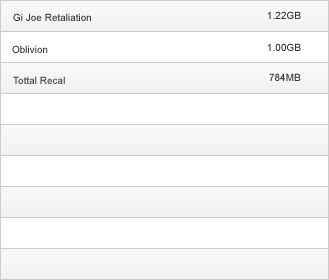
2) How do i Go about having No Border for a column But Border For Rows i.e
Demo Pic also includes the Row color example from question 1

3) How can i have the whole DGV area filled with empty rows when the form loads
Example :-
Say the dataset only has 3 rows of data but the DGV area on the form can contain 9
How can i make the remainding 6 rows show on screen empty.
Sorry if this is all to much but i have honestly been playing in vb around and browsing google for 2 weeks trying to work this out but have had no luck
Thanks in advanced
-
May 8th, 2013, 08:19 AM
#2
Addicted Member
Re: DatatGridView Advanced Styling
EDIT: dunfiddlin's post below is the right way and much more effective than this 
Here is what I would do for the background color
vb.net Code:
Dim yourcolour As New Color yourcolour = ColorTranslator.FromHtml("#FFFFD2") Dim yourcolour2 As New Color yourcolour2 = ColorTranslator.FromHtml("#FFFFFF") For cnt = 0 To (DataGridView1.Rows.Count-1) Step 2 DataGridView1.Rows(cnt).DefaultCellStyle.BackColor = yourcolour DataGridView1.Rows(cnt + 1).DefaultCellStyle.BackColor = yourcolour2 Next
That will go through your entire datagridview changing the background colors to the ones your specified.
Last edited by Crzyrio; May 8th, 2013 at 09:08 AM.
-
May 8th, 2013, 08:31 AM
#3
Re: DatatGridView Advanced Styling
1 & 2: Edit the default cell style and the alternating row default cell style. You can do that in the designer by selecting the appropriate properties in the properties window and clicking on the ... button. Cellborderstyle and Borderstyle likewise. As with all properties you can also code for changes at runtime though in this case it's a bit tedious with a lot of values to keep track of.
3. This one's not possible, especially for a databound DGV, without adding empty rows which would seriously throw off employing the data. If you wanted to do it so that the rows were visible but didn't count, as it were, you would need to customise the control itself and, with some experience in doing just that, I'm really not sure it would be possible even then.
As the 6-dimensional mathematics professor said to the brain surgeon, "It ain't Rocket Science!"
Reviews: "dunfiddlin likes his DataTables" - jmcilhinney
Please be aware that whilst I will read private messages (one day!) I am unlikely to reply to anything that does not contain offers of cash, fame or marriage!
-
May 8th, 2013, 08:34 AM
#4
Re: DatatGridView Advanced Styling
 Originally Posted by Crzyrio

Here is what I would do for the background color
vb.net Code:
Dim yourcolour As New Color yourcolour = ColorTranslator.FromHtml("#FFFFD2") Dim yourcolour2 As New Color yourcolour2 = ColorTranslator.FromHtml("#FFFFFF") For cnt = 0 To (DataGridView1.Rows.Count-1) Step 2 DataGridView1.Rows(cnt).DefaultCellStyle.BackColor = yourcolour DataGridView1.Rows(cnt + 1).DefaultCellStyle.BackColor = yourcolour2 Next
That will go through your entire datagridview changing the background colors to the ones your specified.
Really not necessary. The DGV is the most customisable of controls with design wizards aplenty. Alternate row management is completely automatic!
As the 6-dimensional mathematics professor said to the brain surgeon, "It ain't Rocket Science!"
Reviews: "dunfiddlin likes his DataTables" - jmcilhinney
Please be aware that whilst I will read private messages (one day!) I am unlikely to reply to anything that does not contain offers of cash, fame or marriage!
-
May 8th, 2013, 08:55 AM
#5
Addicted Member
Re: DatatGridView Advanced Styling
Originally Posted by dunfiddlin
Really not necessary. The DGV is the most customisable of controls with design wizards aplenty. Alternate row management is completely automatic!
Fair enough, did not know there was this option -- "alternating row default cell style."
thanks
-
May 8th, 2013, 10:25 PM
#6
Thread Starter
Addicted Member
Re: DatatGridView Advanced Styling
Thanks guys but i still can not find a way to make the column Borders to not exist so i only have row boarders. (ref to demo pic 2)
-
May 8th, 2013, 10:38 PM
#7
Thread Starter
Addicted Member
Re: DatatGridView Advanced Styling
Also How do i have the vertical scroll bar showing on screen but disabled before it is needed
-
May 9th, 2013, 01:35 AM
#8
Thread Starter
Addicted Member
Re: DatatGridView Advanced Styling
WOW got it lol, it was right under my eye the whole time lol just had to have a break to find it lmao
Thanks for all your help guys. Most appreciated 
Just one thing left
How do i have the vertical scroll bar showing on screen but disabled before it is needed
 Posting Permissions
- You may not post new threads
- You may not post replies
- You may not post attachments
- You may not edit your posts
-
Forum Rules
|
Click Here to Expand Forum to Full Width
|



 Reply With Quote
