|

-
May 5th, 2013, 07:39 PM
#1
Thread Starter
New Member

 [RESOLVED] Search for and move a DataRow between two tables in an Access database. [RESOLVED] Search for and move a DataRow between two tables in an Access database.
I'm a beginner, and I'm trying to teach myself vb.net as I undertake an admittedly ambitious project. I've searched the web and found many examples of code, but none that match my exact situation.
I have an MS Access database, containing two tables. The first table contains 6 columns of data labeled "ID", "Threat", "Type", "Span", Length", and "Speed". The table is populated with data for variety of aircraft. Data from the "Type" column is displayed to the user for selection in a Listbox.
The second table is similar, but has one additional checkbox column. Initially, this table is empty, and I want the user to be able to populate this database with no more than 10 rows of data from the first table. Data for all columns except ID is displayed to the user in a DataGridView.
I want the user to select an aircraft from the Listbox, press a button, and cause the associated data for that aircraft appear in the DataGridView.
After much trial and error, I cannot get the DataRow to transfer. Depending on what I mess with, I get varying error messages. Please take a look at my terrible code and tell me where I'm going wrong:
Code:
    Private Sub btnTransferThreat_Click(sender As Object, e As EventArgs) Handles btnTransferThreat.Click

        Dim Threat As String = AaThreatMaster.SelectedValue

        Dim conAAThreats As New OleDb.OleDbConnection
        conAAThreats.ConnectionString = "PROVIDER=Microsoft.jet.OLEDB.4.0;Data Source=C:\Users\NL\My Databases\AaThreats.mdb;"

        'Create the adapters
        Dim adapterAAThreatsFxd As New OleDb.OleDbDataAdapter("SELECT * FROM aaThreatMaster WHERE Threat = Threat", conAAThreats)
        Dim adapterAAThreatsRty As New OleDb.OleDbDataAdapter("SELECT * FROM aaThreatMaster WHERE Threat = Threat", conAAThreats)
        Dim adapterAAThreatStored As New OleDb.OleDbDataAdapter("SELECT THREAT,SPAN,LENGTH,SPEED FROM aaThreatStored", conAAThreats)

        'Create the datasets
        Dim dataAAThreatsFxd As New DataSet
        Dim dataAAThreatsRty As New DataSet
        Dim dataAAThreatStored As New DataSet

        'Populate the datasets with database info
        adapterAAThreatsFxd.Fill(dataAAThreatsFxd, "AAThreats")
        adapterAAThreatsRty.Fill(dataAAThreatsRty, "AAThreats")
        adapterAAThreatStored.Fill(dataAAThreatStored, "AAThreats")

        Dim SelectedTable As DataTable = dataAAThreatsFxd.Tables("AAThreats")
        Dim Selected As Data.DataRow() = SelectedTable.Select("Threat=" & Threat)

        'MsgBox(Selected.ToString)

        Dim newThreatRow As DataRow = dataAAThreatStored.Tables("AAThreats").NewRow

        newThreatRow = Selected()

        dataAAThreatStored.Tables("AAThreats").Rows.Add(newThreatRow)

    End Sub
Thank you in advance!
-
May 5th, 2013, 08:01 PM
#2
Re: Search for and move a DataRow between two tables in an Access database.
I cannot get the DataRow to transfer.
Without even reading your code I can tell you why that's not going to happen. If you have x columns in the datatable from which the datarow is drawn and x+1 columns in the datatable which you want to place it then a datarow from the source table can't be converted into a datarow from the target table. You will either have to add a new column to the source table or transfer values by 'cells' rather than rows.
Having said that I'm not sure I reall understand the point of having two tables containing exactly the same information albeit for a subset of the full database. And I certainly don't understand why you need 3 Datasets. You never need more than one to which you can attach as many tables as you want, including clones and copies of the original. I really think you need to rethink your whole approach to this, defining exactly what you want to happen and why before you think about code.
As the 6-dimensional mathematics professor said to the brain surgeon, "It ain't Rocket Science!"
Reviews: "dunfiddlin likes his DataTables" - jmcilhinney
Please be aware that whilst I will read private messages (one day!) I am unlikely to reply to anything that does not contain offers of cash, fame or marriage!
-
May 6th, 2013, 12:20 PM
#3
Thread Starter
New Member
Re: Search for and move a DataRow between two tables in an Access database.
Okay, I matched the structure of the two tables, but I'm still have problems.
To answer your questions:
- I am emulating the functionality of another program. The program allows you to select a subset of threat aircraft from a master database.
- The master database contains the names and characterstics of the threat aircraft. Additional threat aircraft can be added (or deleted) by the user.
- The second database contains the subset of selected threats that are uploaded into the aircraft avionics for use in-flight. Once threats are added from the master database, their characteristics (such as the airspeed) can be modified without affecting the master database.
- I have three datasets in order to separate the master database into fixed-wing (airplanes) and Rotary-Wing (helicopters), while the third is to keep the list of selected aircraft separate from the master list.
As I said, I'm a beginner, and I'm teaching myself.
If there's a better way to do what I've described, I'm all ears.
Here is the current state of the code:
Code:
    Private Sub btnTransferThreat_Click(sender As Object, e As EventArgs) Handles btnTransferThreat.Click

        Dim SelectedThreat As String = AaThreatMaster.SelectedValue

        'MsgBox(SelectedThreat)

        Dim conAAThreats As New OleDb.OleDbConnection
        conAAThreats.ConnectionString = "PROVIDER=Microsoft.jet.OLEDB.4.0;Data Source=C:\Users\NL\My Databases\AaThreats.mdb;"

        conAAThreats.Open()

        'Create the adapters
        Dim adapterAAThreatsFxd As New OleDb.OleDbDataAdapter("SELECT * FROM aaThreatMaster WHERE Threat = Threat", conAAThreats)
        Dim adapterAAThreatsRty As New OleDb.OleDbDataAdapter("SELECT * FROM aaThreatMaster WHERE Threat = Threat", conAAThreats)
        Dim adapterAAThreatStored As New OleDb.OleDbDataAdapter("SELECT THREAT,SPAN,LENGTH,SPEED FROM aaThreatStored", conAAThreats)

        'Create the datasets
        Dim dataAAThreatsFxd As New DataSet
        Dim dataAAThreatsRty As New DataSet
        Dim dataAAThreatStored As New DataSet

        'Populate the datasets with database info
        adapterAAThreatsFxd.Fill(dataAAThreatsFxd, "AAThreats")
        adapterAAThreatsRty.Fill(dataAAThreatsRty, "AAThreats")
        adapterAAThreatStored.Fill(dataAAThreatStored, "AAThreats")

        Dim SelectedTable As DataTable = dataAAThreatsFxd.Tables("AAThreats")
        Dim SelectedRow As DataRow() = SelectedTable.Select("Threat = '" & SelectedThreat & "'")

        'MsgBox(SelectedRow.ToString)

        Dim newThreatRow As DataRow

        newThreatRow = SelectedRow(0)

        'MsgBox(newThreatRow.ToString)

        dataAAThreatStored.Tables("AAThreats").ImportRow(newThreatRow)

        adapterAAThreatStored.Update(dataAAThreatStored, "AAThreats")

        conAAThreats.Close()

    End Sub
-
May 6th, 2013, 03:27 PM
#4
Re: Search for and move a DataRow between two tables in an Access database.
I have three datasets in order to separate the master database into fixed-wing (airplanes) and Rotary-Wing (helicopters), while the third is to keep the list of selected aircraft separate from the master list.
The DataSet is the in memory equivalent of a database. You wouldn't have 3 databases for this purpose, would you? Just like a database, the DataSet can have as many datatables attached to it as you can find a purpose for. In any case your adapters do not seem to follow this schema at all. In fact two of them appear to be absolutely identical.
The second database contains the subset of selected threats that are uploaded into the aircraft avionics for use in-flight. Once threats are added from the master database, their characteristics (such as the airspeed) can be modified without affecting the master database.
Ok. I guess that makes sense but I'm not sure that it warrants copying all the values into a separate table within the database itself.
As the 6-dimensional mathematics professor said to the brain surgeon, "It ain't Rocket Science!"
Reviews: "dunfiddlin likes his DataTables" - jmcilhinney
Please be aware that whilst I will read private messages (one day!) I am unlikely to reply to anything that does not contain offers of cash, fame or marriage!
-
May 6th, 2013, 04:14 PM
#5
Thread Starter
New Member
Re: Search for and move a DataRow between two tables in an Access database.
 Originally Posted by dunfiddlin

The DataSet is the in memory equivalent of a database. You wouldn't have 3 databases for this purpose, would you? Just like a database, the DataSet can have as many datatables attached to it as you can find a purpose for. In any case your adapters do not seem to follow this schema at all. In fact two of them appear to be absolutely identical.
I created the two similar datasets as a solution to another problem I had. I display the "Threat" (name) field from the master database in a listbox. I needed the listbox to display only the fixed-wing threats, or only the rotary-wing threats, based upon a radio-button selection above the listbox. The easiest solution I could come up with on my own was to create a new adapter/dataset to discriminate based on the "Type" field.
Ok. I guess that makes sense but I'm not sure that it warrants copying all the values into a separate table within the database itself.
I'm not sure I understand this part. Perhaps a screengrab will be more clear than my description:
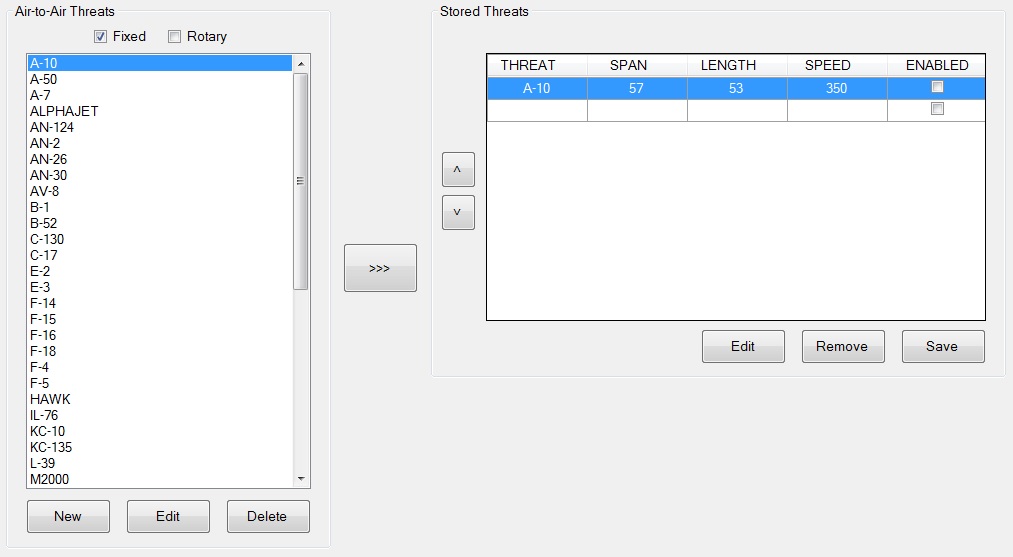
The left pane is read directly from the master table; the right pane is pulled from the secondary table. I manually populated a single row in the secondary table using Access to illustrate what it should look like. I want to select an airplane in the listbox, pull its entire datarow from the master table, and copy it to the secondary table when I press the ">>>" button. I also need to limit the secondary table to a maximum of 10 rows.
Once the values are transferred to the second table, I want the user to be able to edit them as needed. The changes need to be saved to the secondary table so that the settings are preserved the next time the program is run.
Like I said, I've been coding in vb.net for exactly three days, and I have no other previous coding experience. If there's a better way to do it, I certainly wouldn't mind knowing about it.
Thanks for your help.
Last edited by Kack911; May 6th, 2013 at 04:18 PM.
-
May 6th, 2013, 04:23 PM
#6
Re: Search for and move a DataRow between two tables in an Access database.
I'm not so sure that you really want to have multiple tables in the database. I can understand having multiple datatables in the dataset, each with different data, but it seems to me that the database should only have a single table with all necessary fields. That table would have the one additional checkbox column, and might have a second column with some value to indicate how the record would be used. Technically, there would only really need to be a single extra column of type Integer, as you could have 0, 1, and 2 in there. The first datatable would be filled by querying on all elements with type 0 (or possibly just ALL records, depending on whether you want to include the items that will end up in the second datatable, which you probably do), and the second datatable would be filled by querying on that field looking for records greater than 0. If the field was 1, the checkbox would be clear, and if the field was 2 then the checkbox would be checked.
By doing this, you have only one table and you no longer need to move data from one table to a different table. All you would need to do is to set a single field to 1, 2, or possibly 0, and the rest should work out. Doing the same with two tables is a lot more work and is not going to be very reliable.
My usual boring signature: Nothing
 
-
May 6th, 2013, 05:35 PM
#7
Thread Starter
New Member
Re: Search for and move a DataRow between two tables in an Access database.
Originally Posted by Shaggy Hiker
I'm not so sure that you really want to have multiple tables in the database.
Shaggy,
Thanks. I'll take some time to fully parse your post, and then see if I can get it working using a single table.
Edited because I misunderstood the first time.
-
May 6th, 2013, 05:59 PM
#8
Re: Search for and move a DataRow between two tables in an Access database.
As a general rule, you don't want to duplicate data in a database. That means that you don't want to have two tables holding slight variations on the same thing (it's ironic that I write this having just spent the last four hours doing exactly what I am saying you shouldn't do, but there are exceptions to every rule). You also don't want to be repeating data within a single record. Therefore, if every record has something like first name, last name, phone number, and pants size, and multiple records will have the exact same values for those fields, then you'd really want to separate those fields out into a separate table with a personID primary key, and have the same personID field in the first table (though it doesn't have to have the same field name).
Generally speaking, duplication causes maintenance headaches down the road.
My usual boring signature: Nothing
-
May 6th, 2013, 06:01 PM
#9
Re: Search for and move a DataRow between two tables in an Access database.
Yeah, what he said (and I also said but possibly with not enough explanation)!
As the 6-dimensional mathematics professor said to the brain surgeon, "It ain't Rocket Science!"
Reviews: "dunfiddlin likes his DataTables" - jmcilhinney
Please be aware that whilst I will read private messages (one day!) I am unlikely to reply to anything that does not contain offers of cash, fame or marriage!
-
May 10th, 2013, 09:11 PM
#10
Thread Starter
New Member
Re: Search for and move a DataRow between two tables in an Access database.
Thanks for the help. Ultimately, here's how I got it working:
Code:
    Private Sub btnTransferThreat_Click(sender As Object, e As EventArgs) Handles btnTransferThreat.Click

        'Define a var to hold the THREAT string of the selected row
        Dim SelectedThreat As String = listThreatMaster.SelectedValue

        'Create a connection to the database
        Dim conAAThreats As New OleDb.OleDbConnection
        conAAThreats.ConnectionString = "PROVIDER=Microsoft.jet.OLEDB.4.0;Data Source=C:\Users\NL\My Databases\AaThreats.mdb;"

        'Open the connection
        conAAThreats.Open()

        'Create the adapters
        Dim adapterAAThreatsFxd As New OleDb.OleDbDataAdapter("SELECT * FROM aaThreatMaster WHERE Threat = '" & SelectedThreat & "'", conAAThreats)
        Dim adapterAAThreatsRty As New OleDb.OleDbDataAdapter("SELECT * FROM aaThreatMaster WHERE Threat = '" & SelectedThreat & "'", conAAThreats)
        Dim adapterAAThreatStored As New OleDb.OleDbDataAdapter("SELECT * FROM aaThreatStored", conAAThreats)

        'Create the datasets
        Dim dataAAThreatsFxd As New DataSet
        Dim dataAAThreatsRty As New DataSet
        Dim dataAAThreatStored As New DataSet

        'Populate the datasets with database info
        adapterAAThreatsFxd.Fill(dataAAThreatsFxd, "AAThreats")
        adapterAAThreatsRty.Fill(dataAAThreatsRty, "AAThreats")

        'Define a var to hold the selected dataset
        Dim SelectedTable As DataTable = dataAAThreatsFxd.Tables("AAThreats")

        'Define a var to hold the selected row
        Dim SelectedRow As DataRow() = SelectedTable.Select("Threat = '" & SelectedThreat & "'")

        'Define vars to hold the column mapping
        Dim dcmID As New DataColumnMapping("ID", "ID")
        Dim dcmThreat As New DataColumnMapping("Threat", "Threat")
        Dim dcmType As New DataColumnMapping("Type", "Type")
        Dim dcmSpan As New DataColumnMapping("Span", "Span")
        Dim dcmLength As New DataColumnMapping("Length", "Length")
        Dim dcmEnabled As New DataColumnMapping("Enabled", "Enabled")
        Dim dcmSpeed As New DataColumnMapping("Speed", "Speed")

        'Define a var to hold the table mapping
        Dim dtmAAThreatStored As New DataTableMapping("AaThreatMaster", "AAThreats")

        'Add the column maps to the table map
        dtmAAThreatStored.ColumnMappings.Add(dcmID)
        dtmAAThreatStored.ColumnMappings.Add(dcmThreat)
        dtmAAThreatStored.ColumnMappings.Add(dcmType)
        dtmAAThreatStored.ColumnMappings.Add(dcmSpan)
        dtmAAThreatStored.ColumnMappings.Add(dcmLength)
        dtmAAThreatStored.ColumnMappings.Add(dcmEnabled)
        dtmAAThreatStored.ColumnMappings.Add(dcmSpeed)

        'Create a command builder to handle SQL operations
        Dim cb As New OleDbCommandBuilder(adapterAAThreatStored)

        'Activate the table map
        adapterAAThreatStored.TableMappings.Add(dtmAAThreatStored)

        'Populate the dataset
        adapterAAThreatStored.Fill(dataAAThreatStored, "AAThreats")

        'Create a var to hold the destination row values
        Dim newThreatRow As DataRow = dataAAThreatStored.Tables("AAThreats").NewRow()

        'Set the var equal to the source row values
        newThreatRow.ItemArray = SelectedRow(0).ItemArray

        'Add the new row to the dataset
        dataAAThreatStored.Tables("AAThreats").Rows.Add(newThreatRow)

        'Capture the changes made to the dataset since loadtime
        adapterAAThreatStored.Update(dataAAThreatStored, "AaThreats")

        'Commit the changes to the database
        dataAAThreatStored.AcceptChanges()

        'Refill the dataset with updated data
        adapterAAThreatStored.Fill(dataAAThreatStored, "AAThreatStored")

        'Reset the datagridview source
        gridThreatStored.DataSource = dataAAThreatStored.Tables("AaThreatStored")

        'close the connection
        conAAThreats.Close()

    End Sub
 Posting Permissions
- You may not post new threads
- You may not post replies
- You may not post attachments
- You may not edit your posts
-
Forum Rules
|
Click Here to Expand Forum to Full Width
|



 Reply With Quote

