|

-
Apr 26th, 2013, 04:25 PM
#1
 [RESOLVED] Automatic replacement of current workbook [RESOLVED] Automatic replacement of current workbook
I have an Excel workbook where there's a version check done on open against a master database and if the versions don't match the user is told to download the latest version of the workbook from the server. I've now been asked to automate that download and replace process. Does anyone have any ideas on how to do that?
-
Apr 26th, 2013, 04:50 PM
#2
Re: Automatic replacement of current workbook
Marty
"Version" is a little ambiguous ,, could you clarify.
Can you manually download the latest version?
What part of the automated process is giving you a problem?
Where is the automated bit to happen .. with VBA within the "to be updated" WB
(in the same macro that does the version check)?
One possible issue is that downloading may possibly cause the macro to be lost (at
least of the entire WB is copied en-mass).
A possible solution would be to have the macro copy the worksheets expect the one
containing the macro.
Spoo
-
Apr 26th, 2013, 06:08 PM
#3
Re: Automatic replacement of current workbook
Okay. Unlike VB6, Excel doesn't seem to have an application version number so I just added a constant in the workbook with a value of, say, 25. In the Access database there's a table that contains a field that in this case I set to 25. Now if I make changes to the workbook I want to be sure that the users all use the latest and greatest so I update the 25 to 26 in both places. Then if the user attempts to use the version 25 workbook he see's a message saying "This workbook is out of date, please download a new version from …". I'm being asked to change that process so that the message would be changed to something like "This workbook is out of date, please click OK to replace it" and then the current workbook would be replaced by a copy of the version 26 workbook which will be on a server. I envision something like
1. Message displayed
2. OK clicked
3. Version 25 workbook saved as something like "oldWB"
4. Version 25 workbook deleted
5. Version 26 workbook downloaded to the user's PC.
There's no chance that the macro will be lost (unless we want that to happen) because the new workbook will be the same as the old except for whatever improvements there are.
-
Apr 27th, 2013, 09:05 AM
#4
Re: Automatic replacement of current workbook
Marty
That helps, but ,,,
There's no chance that the macro will be lost (unless we want that to happen) because the new workbook will be the same as the old except for whatever improvements there are
,,, this gives me a little cause to wonder. I envision the following scenario
1. users have Version 25, which does NOT contain the new macro
2. they currently see the message "This workbook is out of date, please download a new version from …".
3. you "create" Version 26, which DOES contain the new macro
How will the users with Version 25 ever "get" the new macro and see
the new message "This workbook is out of date, please click OK to replace it"?
EDIT
I realize I'm not really addressing the mechanics of how the new macro will
work, but it seems that the above issue needs to first be addressed. Am I
missing something?
EDIT 2
D'oh !!
Of course, the first time they will see the old message and do the download
manually ,, which WILL contain the new macro.
Ok. THAT issue is resolved.
So, what are you currently having some difficulty with?
Spoo
Last edited by Spoo; Apr 27th, 2013 at 09:19 AM.
-
Apr 27th, 2013, 09:10 AM
#5
Re: Automatic replacement of current workbook
They'll get version 26 manually but from then on it will be automatic since version 26 and all future versions will contain the code you write for me
-
Apr 27th, 2013, 09:55 AM
#6
Re: Automatic replacement of current workbook
Marty
Well, I tried recording a macro ..
1. I have a WB named Book1.xls
2. I have an "empty" WB named CopyBook1.xls with the below macro
3. It produces a WB named Book3.xls
Code:
Sub CopyBook1()
'
' CopyBook1 Macro
' Macro recorded 4/27/2013 by spoo
'
'
    ChDir "D:\VB-Forums Images\Excel"
    ActiveWorkbook.SaveAs Filename:="D:\VB-Forums Images\Excel\Book3.xls", _
        FileFormat:=xlNormal, Password:="", WriteResPassword:="", _
        ReadOnlyRecommended:=False, CreateBackup:=False
End Sub
Is that any help?
Spoo
-
Apr 27th, 2013, 11:00 AM
#7
Re: Automatic replacement of current workbook
 Originally Posted by MartinLiss

5. Version 26 workbook downloaded to the user's PC.
Marty,
Understood point 1-4. Regarding Point 5, Where does it need to be downloaded from?
A good exercise for the Heart is to bend down and help another up...
Please Mark your Thread " Resolved", if the query is solved
MyGear: Resolved", if the query is solved
MyGear:
★ CPU ★ Ryzen 5 5800X
★ GPU ★ NVIDIA GeForce RTX 3080 TI Founder Edition
★ RAM ★ G. Skill Trident Z RGB 32GB 3600MHz
★ MB ★ ASUS TUF GAMING X570 (WI-FI) ATX Gaming
★ Storage ★ SSD SB-ROCKET-1TB + SEAGATE 2TB Barracuda IHD
★ Cooling ★ NOCTUA NH-D15 CHROMAX BLACK 140mm + 10 of Noctua NF-F12 PWM
★ PSU ★ ANTEC HCG-1000-EXTREME 1000 Watt 80 Plus Gold Fully Modular PSU
★ Case ★ LIAN LI PC-O11 DYNAMIC XL ROG (BLACK) (G99.O11DXL-X)
★ Monitor ★ LG Ultragear 27" 240Hz Gaming Monitor
★ Keyboard ★ TVS Electronics Gold Keyboard
★ Mouse ★ Logitech G502 Hero
-
Apr 27th, 2013, 11:03 AM
#8
Re: Automatic replacement of current workbook
I don't think we are communicating too well. The situation is this. The user is using the current version of the workbook that I'll call wbOld and there's an existing workbook which I'll call wbNew on a server. I'd like there to be a process in wbOld that when executed will replace wbOld with wbNew.
-
Apr 27th, 2013, 11:05 AM
#9
Re: Automatic replacement of current workbook
Originally Posted by koolsid
Marty,
Understood point 1-4. Regarding Point 5, Where does it need to be downloaded from?
A server for which I have the path.
-
Apr 27th, 2013, 11:05 AM
#10
Re: Automatic replacement of current workbook
Ok gimme few moments. Will update the post with a code.
A good exercise for the Heart is to bend down and help another up...
Please Mark your Thread "Resolved", if the query is solved
MyGear:
★ CPU ★ Ryzen 5 5800X
★ GPU ★ NVIDIA GeForce RTX 3080 TI Founder Edition
★ RAM ★ G. Skill Trident Z RGB 32GB 3600MHz
★ MB ★ ASUS TUF GAMING X570 (WI-FI) ATX Gaming
★ Storage ★ SSD SB-ROCKET-1TB + SEAGATE 2TB Barracuda IHD
★ Cooling ★ NOCTUA NH-D15 CHROMAX BLACK 140mm + 10 of Noctua NF-F12 PWM
★ PSU ★ ANTEC HCG-1000-EXTREME 1000 Watt 80 Plus Gold Fully Modular PSU
★ Case ★ LIAN LI PC-O11 DYNAMIC XL ROG (BLACK) (G99.O11DXL-X)
★ Monitor ★ LG Ultragear 27" 240Hz Gaming Monitor
★ Keyboard ★ TVS Electronics Gold Keyboard
★ Mouse ★ Logitech G502 Hero
-
Apr 27th, 2013, 11:45 AM
#11
Re: Automatic replacement of current workbook
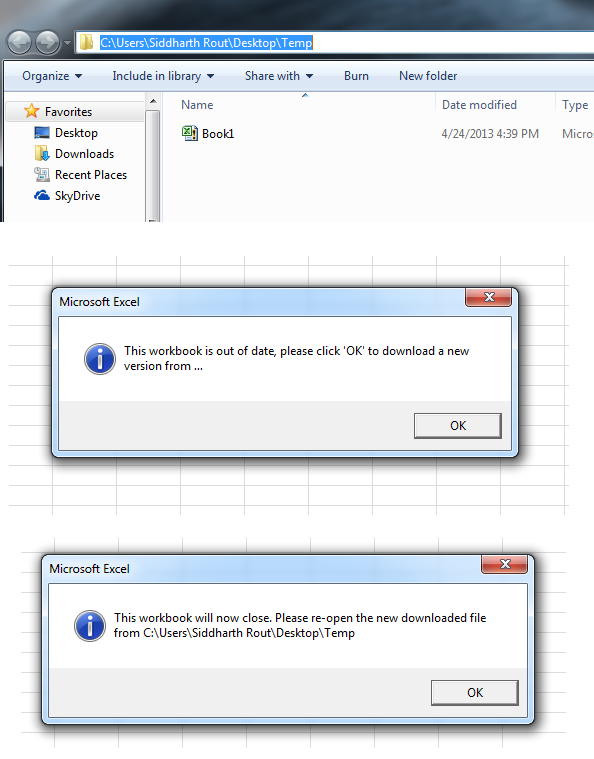
Ok see this code. This code goes in the Workbook_Open Event
Code:
Option Explicit

'~~> API to get user's temp directory. We will use this to save the newly created temp file
Private Declare Function GetTempPath Lib "kernel32" Alias "GetTempPathA" _
(ByVal nBufferLength As Long, ByVal lpBuffer As String) As Long

Private Const MAX_PATH As Long = 260

'~~> I am not sure from where you are getting the old version number
'~~> So I am taking a variable instead.
Const oldVerNo As Long = 25

'~~> I am not sure how are you getting the new version number
'~~> So I am taking a variable instead.
Const newVerNo As Long = 26

'~~> Assuming that this is the path to the file in the server
Const NewFile As String = "C:\Sample.xlsm"

'~~> Custome message to show
Const sMsg As String = "This workbook is out of date, please click 'OK' to download a new version from …"

Private Sub Workbook_Open()
    Dim oldFileName As String, FilePath As String, TempFileName As String
    Dim NewFileName As String

    If oldVerNo <> newVerNo Then
        MsgBox sMsg, vbInformation

        oldFileName = ThisWorkbook.FullName
        FilePath = ThisWorkbook.Path
        '~~> Create a unique tempfile
        TempFileName = "Temp" & Format(Date, "ddmmyyyyhhmmss") & ".xlsm"

        '~~> Deciding the name of the new file from the server
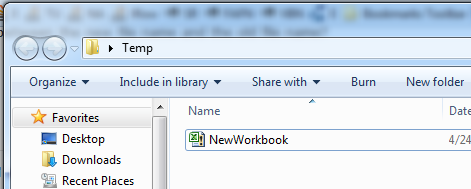
        NewFileName = FilePath & "\NewWorkbook.xlsm"
        '~~> You can use this if you want to keep the filename same
        'NewFileName = FilePath & "\" & GetFileName(oldFileName)

        '~~> Save current workbook in temp directory so that we can delete the old one
        ActiveWorkbook.SaveAs TempPath & TempFileName

        '~~> Kill Old File
        Kill oldFileName

        '~~> Copy from Server
        FileCopy NewFile, NewFileName

        DoEvents

        '~~> I am showing a messagebox. One can also automate this
        MsgBox "This workbook will now close. Please re-open the new downloaded file from " & FilePath, vbInformation

        'ActiveWorkbook.Close SaveChanges:=False
    End If
End Sub

Function GetFileName(ByVal strPath As String) As String
    If Right$(strPath, 1) <> "\" And Len(strPath) > 0 Then
        GetFileName = GetFileName(Left$(strPath, Len(strPath) - 1)) + Right$(strPath, 1)
    End If
End Function

Function TempPath() As String
    TempPath = String$(MAX_PATH, Chr$(0))
    GetTempPath MAX_PATH, TempPath
    TempPath = Replace(TempPath, Chr$(0), "")
End Function
ScreenShot (Before)
ScreenShot (After)
Last edited by Siddharth Rout; Apr 27th, 2013 at 11:48 AM.
A good exercise for the Heart is to bend down and help another up...
Please Mark your Thread "Resolved", if the query is solved
MyGear:
★ CPU ★ Ryzen 5 5800X
★ GPU ★ NVIDIA GeForce RTX 3080 TI Founder Edition
★ RAM ★ G. Skill Trident Z RGB 32GB 3600MHz
★ MB ★ ASUS TUF GAMING X570 (WI-FI) ATX Gaming
★ Storage ★ SSD SB-ROCKET-1TB + SEAGATE 2TB Barracuda IHD
★ Cooling ★ NOCTUA NH-D15 CHROMAX BLACK 140mm + 10 of Noctua NF-F12 PWM
★ PSU ★ ANTEC HCG-1000-EXTREME 1000 Watt 80 Plus Gold Fully Modular PSU
★ Case ★ LIAN LI PC-O11 DYNAMIC XL ROG (BLACK) (G99.O11DXL-X)
★ Monitor ★ LG Ultragear 27" 240Hz Gaming Monitor
★ Keyboard ★ TVS Electronics Gold Keyboard
★ Mouse ★ Logitech G502 Hero
-
Apr 27th, 2013, 11:49 AM
#12
Re: Automatic replacement of current workbook
Thanks Sid. I'm on my way out the door and I'll try that code when I get back later today.
-
Apr 27th, 2013, 06:44 PM
#13
Re: Automatic replacement of current workbook
Thanks Sid that works. You say that "One can also automate this". How would that be done.
BTW I don't know if it's better, the same, or worse but I get the temp path with this one-liner
TempFilePath = Environ$("temp") & "\"
-
Apr 28th, 2013, 03:27 AM
#14
Re: Automatic replacement of current workbook
Thanks Sid that works. You say that "One can also automate this". How would that be done.
This is what I meant
Code:
Private Sub Workbook_Open()
    Dim wbT As Workbook, wbN As Workbook
    Dim oldFileName As String, FilePath As String, TempFileName As String
    Dim NewFileName As String

    Set wbT = ThisWorkbook

    If oldVerNo <> newVerNo Then
        '
        '~~> Rest of the code
        '

        '~~> I am showing a messagebox. One can also automate this
        'MsgBox "This workbook will now close. Please re-open the new downloaded file from " & FilePath, vbInformation

        MsgBox "This workbook will now close. Please be patient while we re-open the new file"
        Set wbN = Workbooks.Open(NewFileName)
        wbT.Close SaveChanges:=False
    End If
End Sub
Note: If it is a heavy file that you are copying from the server then I recommend, using a progressbar to show the progress and checking if the file exists (has been copied) before showing the last Messagebox. Here is a LINK to one of my posts which shows how to create several progressbars (if you are interested)
You can use that one liner as well for getting the temp path. I don't see any harm in using that.
BTW, I am sure you know this but for future VBF visitors, I will paste the code for checking if a files exists or not...
Code:
Public Function FileFolderExists(strFullPath As String) As Boolean
    On Error GoTo EarlyExit
    If Not Dir(strFullPath, vbDirectory) = vbNullString Then FileFolderExists = True
EarlyExit:
    On Error GoTo 0
End Function
Last edited by Siddharth Rout; Apr 28th, 2013 at 03:35 AM.
A good exercise for the Heart is to bend down and help another up...
Please Mark your Thread "Resolved", if the query is solved
MyGear:
★ CPU ★ Ryzen 5 5800X
★ GPU ★ NVIDIA GeForce RTX 3080 TI Founder Edition
★ RAM ★ G. Skill Trident Z RGB 32GB 3600MHz
★ MB ★ ASUS TUF GAMING X570 (WI-FI) ATX Gaming
★ Storage ★ SSD SB-ROCKET-1TB + SEAGATE 2TB Barracuda IHD
★ Cooling ★ NOCTUA NH-D15 CHROMAX BLACK 140mm + 10 of Noctua NF-F12 PWM
★ PSU ★ ANTEC HCG-1000-EXTREME 1000 Watt 80 Plus Gold Fully Modular PSU
★ Case ★ LIAN LI PC-O11 DYNAMIC XL ROG (BLACK) (G99.O11DXL-X)
★ Monitor ★ LG Ultragear 27" 240Hz Gaming Monitor
★ Keyboard ★ TVS Electronics Gold Keyboard
★ Mouse ★ Logitech G502 Hero
-
Apr 28th, 2013, 09:28 AM
#15
Re: Automatic replacement of current workbook
 Posting Permissions
- You may not post new threads
- You may not post replies
- You may not post attachments
- You may not edit your posts
-
Forum Rules
|
Click Here to Expand Forum to Full Width
|



 2009 - 2016
 Reply With Quote
