|

-
Apr 26th, 2013, 11:18 AM
#1
Thread Starter
Junior Member

Database queries
This is the assignment:
The database Microland.accdb is maintained by the Microland Computer Warehouse, a mail-order computer-supply company. The tables below show data in the three tables in the database. The table Customers identifies each customer by an ID number and gives, in addition to the name and address, the total amount of purchases during the current year prior to today. The table Inventory identifies each product in stock by an ID number and gives, in addition to its description and price (per unit), the quantity in stock at the beginning of the day. The table Orders gives the orders received today. Assume that it is now the end of the day. Write a Visual Basic program that uses the three tables to do the following two tasks:
1. Display in a listbox the items that are out of stock and those that must be reordered to satisfy today’s orders.
2. Display in a listbox bills for all customers who ordered during the day. Each bill should show the customer’s name, address, items ordered (with costs), and total cost of the order.
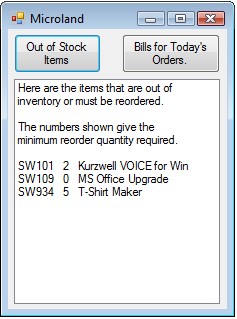 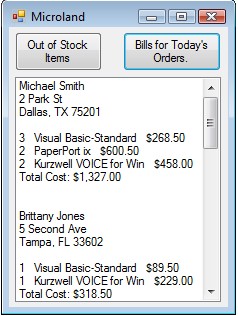
Now I'm confused how to do this. How do I query the results in the first place? I've tried (i'm pretty sure I'm doing this wrong in the first place):
Dim Query1 = From inventory In _MICROLAND_1_DataSet.Inventory
Where inventory.quantity <= 5
Select inventory.itemID, inventory.quantity, inventory.description
lstBox.DataSource = Query1.ToList
lstBox.SelectedItem = Nothing
But I get the error: reference to an non-shared member requires an object reference for the MICROLAND_1_DataSet line.
Secondly after I get the query results, how would get results for how many items we need to reorder? Would I do a equation? I'm lost...
-
Apr 26th, 2013, 04:37 PM
#2
Re: Database queries
I'm guessing you haven't paid attention much in class and are now hoping someone will give you the code so you don't have to figure it out on your own?
Make an honest effort to complete the task and then show us the actual code you have written when you get stuck. Then we can point you in the right direction.
-
Apr 26th, 2013, 11:46 PM
#3
Thread Starter
Junior Member
Re: Database queries
Did you see me ask for the code? No. As I said, I got an error and asked how to fix that. As far from what I can tell, I need to declare it beforehand but when I read the book, it didn't say anything like that and just showed an example. So I followed the example but visual basic wouldn't accept that. The example was "Me.CitiesTableAdapter.Fill(Me.MegacitiesDataSet.Cities)" so I tried "Me.Iventoryadapter.fill...etc" but Visual basic wouldn't even accept that. Also, I asked if I would do an equation to show the results. No where in that sentence did I ask for code. Also, I specified where I was having trouble and didn't ask for the whole thing. If you're wondering about the videos, right now I am on a business trip in Canada and the internet connection is sketchy where I am at. The videos aren't loading before the internet drops so I haven't had a chance to read watch them. I am sorry that I am not as tech savy as other people in the class, come from and non-technology background, and have to resort to asking forum for help when no one responds to the questions I have asked on the discussion board. I gave up on getting help from there because the only people who have replied to me are people who didn't know the answer either. I am trying to make an honest effort but I got lost weeks back and as I stated earlier, no one on the discussion board's helped me. And I know I am not the only person in this class who has felt this way. So please do not judge my intentions when you do not know the whole story and I really am having trouble and am suffering in the class. I even considered getting a tutor online so they can walk me through because I really do want to learn how to do this as it is very interesting and I want to someday be able to work on websites but this class is leaving me in the dust without even looking behind to see if someone is struggling. I just want to sit down and talk with someone about this but I don't know anyone who knows how to do this.
-
Apr 27th, 2013, 12:54 AM
#4
Re: Database queries
Hi,
That plea deserves at least a good starting point so here are some comments for you:-
You are getting the error "reference to an non-shared member requires an object reference for the MICROLAND_1_DataSet" because you have forgotten to add the MICROLAND_1_DataSet object to your project so when you use the word Inventory after your From statement in your LINQ query, the query is interpreting that the statement "In _MICROLAND_1_DataSet.Inventory" should gets it DataSource from your declaration of the word Inventory.
To fix this then you need to do a few things. I am demonstrating here with the OrderDetails table from the Northwind database:-
1) Add your Strongly Typed DataSet object from the Toolbox to your form.
2) Add the Inventory TableAdapter object from the Toolbox to your form.
3) Next, Fill the Inventory DataTable in your DataSet with the information from the Database. i.e:-
Code:
Order_DetailsTableAdapter1.Fill(NorthwindDataSet1.Order_Details)
4) Finally, write your LINQ query to use the DataSet object which contains the Filled Inventory table and add to the ListBox. i.e:-
Code:
Dim myOrderDetails = (From OD As NORTHWINDDataSet.Order_DetailsRow In NorthwindDataSet1.Order_Details Where OD.Quantity <= 5 Select ProdID = OD.ProductID, Price = OD.UnitPrice, Quantity = OD.Quantity).ToList

ListBox1.DataSource = myOrderDetails
As a matter of good practice, notice that I do NOT use the same name in the From statement of the LINQ query as that of the name of the table in the DataSet.
Secondly after I get the query results, how would get results for how many items we need to reorder? Would I do a equation?
You will need to query the orders for the day and compare them against the Inventory to work out what needs to be reordered to cover the orders for the day.
Hope that helps.
Cheers,
Ian
-
Apr 27th, 2013, 08:08 AM
#5
Thread Starter
Junior Member
Re: Database queries
Ok, yeah that definitely helps. I didn't know where to add the dataset so I tried to do it from the toolbar, not the toolbox. Definitely makes a difference. Just one more question. My results are showing up in brackets with the category = value such as {quantity = 4,...} I deleted the parts equivalent to the ProdID in your statement "ProdID = OD.ProductID" but they're still there. How would I get rid of it?
-
Apr 27th, 2013, 08:24 AM
#6
Re: Database queries
Hi,
I deliberately left the population of the ListBox as you had already shown it in your first post. So, the first thing for you to understand and learn is "What is being returned from the LINQ Query"
You will find that what is being created by the LINQ query is a List Of an Anonymous Class Type that is made up from the elements being returned by the LINQ Query. How you display this information is then for you to decide.
Currently, you have the DataSource of the ListBox being set to this List Of Anonymous Type so it is displaying the default ToString method of the Class that has been created. If you want to change what is displayed in the ListBox then you will need to manipulate the List that has been returned from the query as you see fit.
Good Luck.
Cheers,
Ian
Tags for this Thread
 Posting Permissions
- You may not post new threads
- You may not post replies
- You may not post attachments
- You may not edit your posts
-
Forum Rules
|
Click Here to Expand Forum to Full Width
|



 Reply With Quote


