|

-
Apr 23rd, 2013, 04:44 PM
#1
Thread Starter
New Member

MSDN Directory.GetFiles Method
Trying to use the sample code from MSDN Directory.GetFiles Method http://msdn.microsoft.com/en-us/library/07wt70x2.aspx
When you start the program I call Main() but what is the args() that needs to get passed. I thought it was the path to where the files are located but when I use the path "C:\" I get the error Value of type "String' cannot be convered to a '1-dimensional array of string' Can someone let me know what the args is in this code and if it is not the path then where does the path get set?
' For Directory.GetFiles and Directory.GetDirectories
' For File.Exists, Directory.Exists
Public Overloads Shared Sub Main(ByVal args() As String)
Dim path As String
MessageBox.Show(path)
For Each path In args
If File.Exists(path) Then
' This path is a file.
ProcessFile(path)
Else
If Directory.Exists(path) Then
' This path is a directory.
ProcessDirectory(path)
Else
MessageBox.Show("{0} is not a valid file or directory.", path)
End If
End If
Next path
End Sub
-
Apr 23rd, 2013, 05:09 PM
#2
Re: MSDN Directory.GetFiles Method
Let's forget the code you posted for a minute...
What exactly are you trying to do?
-
Apr 23rd, 2013, 05:18 PM
#3
Thread Starter
New Member
Re: MSDN Directory.GetFiles Method
There is a list of excel files in a directory. I want to open each file and copy specific data to another sheet perform some calculations and save the excel spreadsheet with a new name.
-
Apr 23rd, 2013, 06:12 PM
#4
Re: MSDN Directory.GetFiles Method
Try something like this:
Code:
Imports Microsoft.Office.Interop

Public Class Form1

    'added reference to Microsoft Excel object library

    Private Sub btnFileList_Click(sender As System.Object, e As System.EventArgs) Handles btnFileList.Click
        Dim myDir As String
        Dim oldName As String
        Dim newName As String
        Dim xlApp As New Excel.Application
        Dim xlWB As Excel.Workbook
        Dim shortName As String
        Dim myExt As String
        Dim splits() As String

        myDir = "C:\Users\xyz123\Documents\testfolder\"
        xlApp.DisplayAlerts = False

        Try
            For Each foundfile As String In My.Computer.FileSystem.GetFiles(myDir)
                oldName = foundfile
                splits = Split(oldName, ".")
                shortName = splits(0)
                myExt = splits(1)
                xlWB = xlApp.Workbooks.Open(oldName)
                'workbook is open, do some stuff...
                newName = shortName & "NEW." & myExt
                xlWB.SaveAs(Filename:=newName)
                xlWB.Close()
                xlApp.DisplayAlerts = True
                xlApp.Quit()
            Next
        Catch ex As Exception
            MsgBox(ex.Message)
        End Try
    End Sub
End Class
-
Apr 23rd, 2013, 06:15 PM
#5
Thread Starter
New Member
Re: MSDN Directory.GetFiles Method
Trying this now. Thank you so much. I will let you know how it goes.
-
May 6th, 2013, 02:11 PM
#6
Thread Starter
New Member
Re: MSDN Directory.GetFiles Method
Ok I got your method to work but now I am getting a weird error.
If I put the MessageBox.Show("RF" & r) and 'MessageBox.Show("Snack" & r) in where I have interaction with the program it works but if I comment them out to allow it just to run I never get to the end of the loop and get the error message 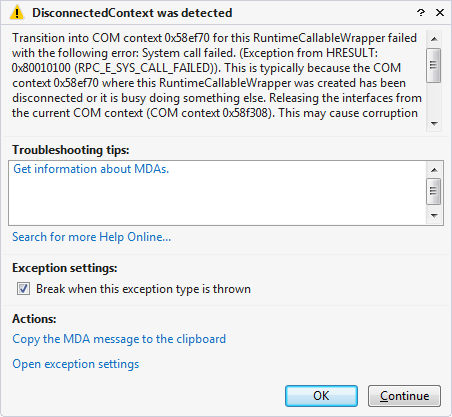
in the attached image.
Here is all of my code:
Imports System
Imports System.IO
Imports System.Collections
Imports Microsoft.Office.Interop
Public Class GetFiles
'added reference to Microsoft Excel object library
Public Shared Sub FileList()
Dim myDir As String
Dim oldName As String
Dim newName As String
Dim xlApp As New Excel.Application
Dim xlWB As Excel.Workbook
Dim xlWS As Excel.Worksheet
Dim newFDS As Excel.Worksheet
Dim newSDS As Excel.Worksheet
Dim shortName As String
Dim myExt As String
Dim splits() As String
Dim r As Integer = 2
Dim filename As String
Dim fullcellvalue As String
Dim cellvalue As String
Dim rowcount As Integer = 2
myDir = "C:\Users\pcovert\Documents\Open Order Reports"
xlApp.DisplayAlerts = False
Try
For Each foundfile As String In My.Computer.FileSystem.GetFiles(myDir)
oldName = foundfile
splits = Split(oldName, ".")
shortName = splits(0)
myExt = splits(1)
xlWB = xlApp.Workbooks.Open(oldName)
MessageBox.Show("workbook" & oldName & "is open.")
'workbook is open, do some stuff...
newFDS = CType(xlApp.Worksheets.Add(), Excel.Worksheet)
newFDS.Name = "Frozen Detail"
newSDS = CType(xlApp.Worksheets.Add(), Excel.Worksheet)
newSDS.Name = "Snack Detail"
filename = Mid(oldName, 47, 20)
xlWS = xlWB.Worksheets(filename)
MessageBox.Show(filename)
Do Until xlWS.Cells(r, 5).Value Is Nothing
fullcellvalue = xlWS.Cells(r, 5).Value.ToString
cellvalue = Mid(fullcellvalue, 1, 2)
If cellvalue = "RF" Then
'MessageBox.Show("RF" & r)
xlWS.Cells(r, 5).entirerow.copy()
newFDS.Select()
newFDS.Cells(rowcount, 1).Select()
newFDS.Paste()
xlWS.Select()
Else
'MessageBox.Show("Snack" & r)
xlWS.Cells(r, 5).entirerow.copy()
newSDS.Select()
newSDS.Cells(rowcount, 1).Select()
newSDS.Paste()
xlWS.Select()
End If
rowcount = rowcount + 1
r = r + 1
Loop
MessageBox.Show("End of Loop")
newName = shortName & "NEW." & myExt
xlWB.SaveAs(Filename:=newName)
MessageBox.Show("file has been saved")
xlWB.Close()
MessageBox.Show("workbook has been closed")
xlApp.DisplayAlerts = True
xlApp.Quit()
Next
MessageBox.Show("next")
Catch ex As Exception
MsgBox(ex.Message)
End Try
End Sub
End Class
-
May 6th, 2013, 02:58 PM
#7
Re: MSDN Directory.GetFiles Method
The one thing that the message boxes do is provide time! Without them you are simply going too fast around the loop and objects have not finished doing their stuff on one loop when they're needed for the new one.
As the 6-dimensional mathematics professor said to the brain surgeon, "It ain't Rocket Science!"
Reviews: "dunfiddlin likes his DataTables" - jmcilhinney
Please be aware that whilst I will read private messages (one day!) I am unlikely to reply to anything that does not contain offers of cash, fame or marriage!
-
May 6th, 2013, 04:21 PM
#8
Thread Starter
New Member
Re: MSDN Directory.GetFiles Method
Makes total sense how do you slow it down so I don't have to have the messagebox in there?
-
May 6th, 2013, 06:36 PM
#9
Thread Starter
New Member
Re: MSDN Directory.GetFiles Method
Ok never mind the last question it can be slowed down with a timer or using sleep. Thanks, I really appreciate all the help.
 Posting Permissions
- You may not post new threads
- You may not post replies
- You may not post attachments
- You may not edit your posts
-
Forum Rules
|
Click Here to Expand Forum to Full Width
|



 Reply With Quote
