|

-
Apr 20th, 2013, 05:49 PM
#1
Thread Starter
New Member

Sequential Access file
Hi Everybody,
I have been working on this assignment for quite a long time and now seeking help. I need to create a visual basic application where an organization needs to save each respondent's information (political party and age) to a sequential access file. The application also should calculate and display the number of voters in each political party (Democratic, Republican, and Independent).
Please see below code. When I tried to run, I'm getting the "System.Windows.Forms.ListBox+ObjectCollection" in my text file. Can you please provide me guidance what I'm doing wrong? Many thanks for your help!!!!
vb.net Code:
[HIGHLIGHT]Public Class frmMain
     Private Sub btnExit_Click(ByVal sender As System.Object, ByVal e As System.EventArgs) Handles btnExit.Click
        Me.Close()
    End Sub
    Private Sub frmMain_Load(ByVal sender As Object, ByVal e As System.EventArgs) Handles Me.Load
        ' fill the list box with values
         lstParty.Items.Add("Democrats")
        lstParty.Items.Add("Republicans")
        lstParty.Items.Add("Independents")
    End Sub
    Private Sub txtAge_KeyPress(ByVal sender As Object, ByVal e As System.Windows.Forms.KeyPressEventArgs) Handles txtAge.KeyPress
        ' allows the text box to accept only numbers, the period, and the Backspace key
         If (e.KeyChar < "0" OrElse e.KeyChar > "9") AndAlso
            e.KeyChar <> ControlChars.Back Then
            ' cancel the key
            e.Handled = True
        End If
    End Sub
    Private Sub btnWrite_Click(ByVal sender As System.Object, ByVal e As System.EventArgs) Handles btnWrite.Click
         ' writes a political party to a sequential access file
        ' declare a StreamWriter variable
        Dim outFile As IO.StreamWriter
        Dim intnum As Integer
         ' open the file for append
        outFile = IO.File.AppendText("Party.txt")
         ' write the name on a separate line in the file
        outFile.WriteLine(lstParty.Items)
         ' Loop through the items in the listbox
        For intnum = 0 To lstParty.Items.Count - 1
            ' write the name on a separate line in the file
            outFile.WriteLine(lstParty.Items)
         Next
         ' close the file
        outFile.Close()
         ' set focus
        txtAge.Focus()
    End Sub
     Private Sub btnDisplay_Click(ByVal sender As System.Object, ByVal e As System.EventArgs) Handles btnDisplay.Click
        ' reads political party from a sequential access file
        ' and displays them in the interface
         ' declare variables
        Dim inFile As IO.StreamReader
         ' determine whether the file exists
        If IO.File.Exists("party.txt") Then
            'open the file for input
            inFile = IO.File.OpenText("party.txt")
            inFile.Close()
        Else
            MessageBox.Show("Can't find the file", "Political Party", MessageBoxButtons.OK, MessageBoxIcon.Information)
        End If
    End Sub
    Private Sub txtAge_Enter(ByVal sender As Object, ByVal e As System.EventArgs) Handles txtAge.Enter
        txtAge.SelectAll()
    End Sub
End Class
[/HIGHLIGHT]
Last edited by amarlv07; Apr 20th, 2013 at 06:01 PM.
-
Apr 20th, 2013, 05:55 PM
#2
Re: Sequential Access file
Edit your post. Highlight all of the code, click the VB button and then type vb.net when it asks you for a highlight tag. This will make the code easier for us to read.
-
Apr 20th, 2013, 06:03 PM
#3
Thread Starter
New Member
Re: Sequential Access file
Sorry!!! Thank you for the tip!!!
-
Apr 20th, 2013, 06:06 PM
#4
Re: Sequential Access file
outFile.WriteLine(lstParty.Items)
Think about what this line does (ie. what lstParty.Items is!)
As the 6-dimensional mathematics professor said to the brain surgeon, "It ain't Rocket Science!"
Reviews: "dunfiddlin likes his DataTables" - jmcilhinney
Please be aware that whilst I will read private messages (one day!) I am unlikely to reply to anything that does not contain offers of cash, fame or marriage!
-
Apr 20th, 2013, 06:27 PM
#5
Thread Starter
New Member
Re: Sequential Access file
Ok. I have updated it to:
' Loop through the items in the listbox
For intnum = 0 To lstParty.Items.Count - 1
' write the name on a separate line in the file
outFile.WriteLine(intnum)
Next
Still not working...please provide some more guidance, please....
-
Apr 20th, 2013, 06:36 PM
#6
Re: Sequential Access file
What is it that you actually want to write to each line of the file? It certainly isn't the value of intnum, nor is it the whole collection of lstParty.Items. What do you reckon the happy medium might be? I am of course assuming that you made some effort to understand how a Listbox works before you decided to use it.
As the 6-dimensional mathematics professor said to the brain surgeon, "It ain't Rocket Science!"
Reviews: "dunfiddlin likes his DataTables" - jmcilhinney
Please be aware that whilst I will read private messages (one day!) I am unlikely to reply to anything that does not contain offers of cash, fame or marriage!
-
Apr 20th, 2013, 07:02 PM
#7
Thread Starter
New Member
Re: Sequential Access file
The party box list should contain three items: Democratic, Republican and Independent. The application should calculate and display the number of voters in each political party. Currently in my text file, it's listing all of the political party:
Democrats
Republicans
Independents
Democrats
Republicans
Independents
Democrats
Republicans
Independents
Democrats
Republicans
Independents
How do I get the application to write to only what the user selects in the party list box? Please... Thanks in advance for your help.
-
Apr 21st, 2013, 12:05 PM
#8
Thread Starter
New Member
Re: Sequential Access file
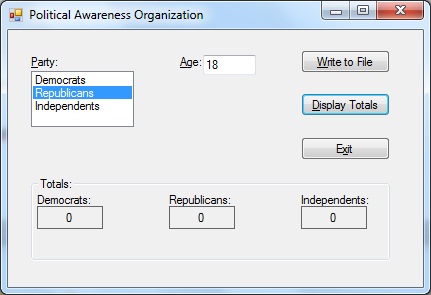
Can someone please review my streamreader code and please let me know what I need to do in order to tabulate the selected political party? I keep having "zero" in all of the labels. Please help. Thank you very much in advance!!!
vb.net Code:
Public Class frmMain
     Private Sub btnExit_Click(ByVal sender As System.Object, ByVal e As System.EventArgs) Handles btnExit.Click
        Me.Close()
    End Sub
    Private Sub frmMain_Load(ByVal sender As Object, ByVal e As System.EventArgs) Handles Me.Load
        ' fill the list box with values
         lstParty.Items.Add("Democrats")
        lstParty.Items.Add("Republicans")
        lstParty.Items.Add("Independents")
    End Sub
    Private Sub txtAge_KeyPress(ByVal sender As Object, ByVal e As System.Windows.Forms.KeyPressEventArgs) Handles txtAge.KeyPress
        ' allows the text box to accept only numbers, the period, and the Backspace key
         If (e.KeyChar < "0" OrElse e.KeyChar > "9") AndAlso
            e.KeyChar <> ControlChars.Back Then
            ' cancel the key
            e.Handled = True
        End If
    End Sub
    Private Sub btnWrite_Click(ByVal sender As System.Object, ByVal e As System.EventArgs) Handles btnWrite.Click
         ' writes a political party to a sequential access file
        ' declare a StreamWriter variable
        Dim outFile As IO.StreamWriter
         ' open the file for append
        outFile = IO.File.AppendText("Party.txt")
         ' write the name on a separate line in the file
        outFile.Write(lstParty.Text)
        outFile.Write(",")
        outFile.Write(txtAge.Text)
        outFile.WriteLine()
         ' close the file
        outFile.Close()
         ' set focus
        txtAge.Focus()
    End Sub
     Private Sub btnDisplay_Click(ByVal sender As System.Object, ByVal e As System.EventArgs) Handles btnDisplay.Click
        ' reads political party from a sequential access file
        ' and displays them in the interface
         ' declare variables
        Dim inFile As IO.StreamReader
        Dim strParty As String
        Dim intDem As Integer
        Dim intRep As Integer
        Dim intInd As Integer
         If IO.File.Exists("Party.txt") Then
            'open the file for input
            inFile = IO.File.OpenText("Party.txt")
            ' process loop instructions until the end of file
            Do Until inFile.Peek = -1
                ' read a name
                strParty = inFile.ReadLine
                Select Case strParty
                    Case "Democrats"
                        intDem += 1
                        'lblDemocrats.Text = intDem.ToString
                    Case "Republicans"
                        intRep += 1
                        'lblRepublicans.Text = intRep.ToString
                    Case "Independents"
                        intInd += 1
                        'lblIndependents.Text = intInd.ToString
                End Select
                ' add name to list box
                lblDemocrats.Text = intDem.ToString
                lblRepublicans.Text = intRep.ToString
                lblIndependents.Text = intInd.ToString
            Loop
            ' close the file
            inFile.Close()
        Else
            MessageBox.Show("Can't find the file", "Political Party", MessageBoxButtons.OK, MessageBoxIcon.Information)
        End If
    End Sub
    Private Sub txtAge_Enter(ByVal sender As Object, ByVal e As System.EventArgs) Handles txtAge.Enter
        txtAge.SelectAll()
    End Sub
End Class
-
Apr 21st, 2013, 12:39 PM
#9
Re: Sequential Access file
outFile.Write(lstParty.Text)
Oh, come on. If you're not prepared to read the documentation why should anybody want to help you? Here is as good a tutorial on Listboxes as there is.
As the 6-dimensional mathematics professor said to the brain surgeon, "It ain't Rocket Science!"
Reviews: "dunfiddlin likes his DataTables" - jmcilhinney
Please be aware that whilst I will read private messages (one day!) I am unlikely to reply to anything that does not contain offers of cash, fame or marriage!
Tags for this Thread
 Posting Permissions
- You may not post new threads
- You may not post replies
- You may not post attachments
- You may not edit your posts
-
Forum Rules
|
Click Here to Expand Forum to Full Width
|



 Reply With Quote


