|

-
Apr 19th, 2013, 05:00 AM
#1
Thread Starter
New Member

how to draw thousands of lines quickly to a picturebox
Hi all,
I have a project to draw thousands of cells of a cellular network to a picturebox. These cells are basically represented by a line.
My program is looking like this :
Code:
    Private Sub ReDraw()
        Dim Pi As Double
        Pi = 3.141592654
        Me.PictureBox1.Refresh()
        Dim sectorsize As Integer
        sectorsize = 40
        Dim myGraphics As Graphics = PictureBox1.CreateGraphics
        Dim myFont As Font
        Dim myBrush As Brush
        myBrush = New Drawing.SolidBrush(Color.DarkCyan)
        myFont = New System.Drawing.Font("Verdana", 6)
        Dim myPen As Pen
        myPen = New Pen(Brushes.DarkMagenta, 10)
        For Each row In CellData.CellsTable.Rows
            Dim Temp As String, sector As String, Band As Integer
            Dim X1, Y1, X2, Y2, X5, Y5 As Integer
            X1 = row("X")
            Y1 = row("Y")
            X2 = row("X") + sectorsize * Math.Sin(row("Azimuth") * Pi / 180)
            Y2 = row("Y") - sectorsize * Math.Cos(row("Azimuth") * Pi / 180)
            myGraphics.DrawLine(myPen, X1, Y1, X2, Y2)
        Next row
    End Sub
The problem that I have is that it takes some time to draw all these lines and I wand to add some more functionality to it and it becomes really slow.
So how can I make it faster ?
Here are the possibilities I can think of :
1) Put screen updating on hold at the beginning of the Sub and resume it at the end. How to do it ?
2) I know that processing is way faster that print to screen so is there a way of preparing a collection or a buffer and draw it ?
3) Is it possible to save all these lines as a bitmap and then print bitmap on the screen?
Thank you
Fabrice
Last edited by si_the_geek; Apr 19th, 2013 at 10:07 AM.
Reason: added Code tags
-
Apr 19th, 2013, 10:16 AM
#2
Re: how to draw thousands of lines quickly to a picturebox
Welcome to VBForums 
There are a few obvious things in there that can be made faster, as you are doing things inside the loop that you don't need to.
First of all, the value of Pi / 180 does not change while the loop is running, but you calculate it two times for each row. Instead you should calculate it in advance and store it to a variable, which you then use inside the loop.
Next, reading values like row("X") is relatively slow (because there is a lookup involved, etc), so don't do it more than needed... you are currently reading X/Y/Azimuth twice for each row, when there is no need (the calculations for X2/Y2 can use X1/Y1, and you can create another variable for Azimuth).
The effects of changing these wont be huge, but should help a bit... hopefully somebody else will chime in with other things that can give a speed boost.
-
Apr 19th, 2013, 12:05 PM
#3
Re: how to draw thousands of lines quickly to a picturebox
Another thing to speed it up is to not use the extremely slow DrawLine routine. There are much much faster ways of drawing out there, such as the use of Direct Memory Addressing with the StretchDIBits API. Its so fast you can flood an entire picturebox with pixels and it will never slow down. And I was gonna recommend DirectX but its not really a game you are working with. Just drawing lines. DirectX utilizes your video card for all your graphic capabilities. So just stick with StretchDIBits. My Nintendo Emulator I wrote in VB6 (in my signature) uses both and gives you the option of either or, whether itll be software rendering (StretchDIBits), or hardware rendering (DirectX).
-
Apr 19th, 2013, 03:28 PM
#4
Lively Member
Re: how to draw thousands of lines quickly to a picturebox
I guess ill ask the obvious, what is the point of this application?
-
Apr 22nd, 2013, 07:32 AM
#5
Thread Starter
New Member
Re: how to draw thousands of lines quickly to a picturebox
Dear si_the_geek,
I take good note of your remarks and will modify accordingly.
Dear Jacob Roman,
I don't know StretchDIBits and I will take some time to read about it. If you have a simple example that could help me. Anyway I will look at it.
On another side, over the weekend I found some info about drawing directly to image buffer and print image.
It helps a bit :
Private Sub FromImageImage2(ByVal e As PaintEventArgs)
' Create image.
Dim imageFile As Image = Image.FromFile("SampImag.jpg")
' Create graphics object for alteration.
Dim newGraphics As Graphics = Graphics.FromImage(imageFile)
' Alter image.
newGraphics.FillRectangle(New SolidBrush(Color.Black), _
100, 50, 100, 100)
' Draw image to screen.
e.Graphics.DrawImage(imageFile, New PointF(0.0F, 0.0F))
' Dispose of graphics object.
newGraphics.Dispose()
End Sub
So my program is looking like this :
Dim CellMapImage As Image = New Bitmap(1366, 768)
Dim CellMapGraphics As Graphics
Private Sub ReDraw()
Dim Pi As Double
Pi = 3.141592654
Dim sectorsize As Integer
sectorsize = 40
Dim myGraphics As Graphics = PictureBox1.CreateGraphics
Dim myFont As Font
Dim myBrush As Brush
CellMapGraphics = Graphics.FromImage(CellMapImage)
CellMapGraphics.Clear(Color.White)
myBrush = New Drawing.SolidBrush(Color.DarkCyan)
myFont = New System.Drawing.Font("Verdana", 6)
Dim myPen As Pen
myPen = New Pen(Brushes.DarkMagenta, 10)
For Each row In CellData.CellsTable.Rows
Dim Temp As String, sector As String, Band As Integer
Dim X1, Y1, X2, Y2, X5, Y5 As Integer
X1 = row("X")
Y1 = row("Y")
X2 = row("X") + sectorsize * Math.Sin(row("Azimuth") * Pi / 180)
Y2 = row("Y") - sectorsize * Math.Cos(row("Azimuth") * Pi / 180)
CellMapGraphics.DrawLine(myPen, X1, Y1, X2, Y2)
Next row
End Sub
Dear mholmes_3038,
The point of this app is to print a map of GSM cells (cellular network) based on GPS coordinate, change color depending on cell performances...
Usually, we use Mapinfo to do this but I prefer to do it with my own program so that I don't have to worry about license and also I can add some functionalities which might be impossible with Mapinfo as per my knowledge.
Thank you for your remarks and don't hesitate if you have some more ideas.
Regards,
Fabrice
-
Apr 26th, 2013, 06:25 AM
#6
Thread Starter
New Member
Re: how to draw thousands of lines quickly to a picturebox
Hi,
I found a tutorial for VB Graphics Programming :
http://www.tannerhelland.com/39/vb-g...programming-0/
I haven't used it yet it looks promissing.
I also found another thing which was slowing down my App a lot. This is the AutosizeColumns feature which is activated as default on DataGrid.
So I use now following code :
Form1.CellDataGridView.AutoSizeColumnsMode = DataGridViewAutoSizeColumnsMode.None
Form1.CellDataGridView.DataSource = CellsView
Here is a picture to see what my App looks like :
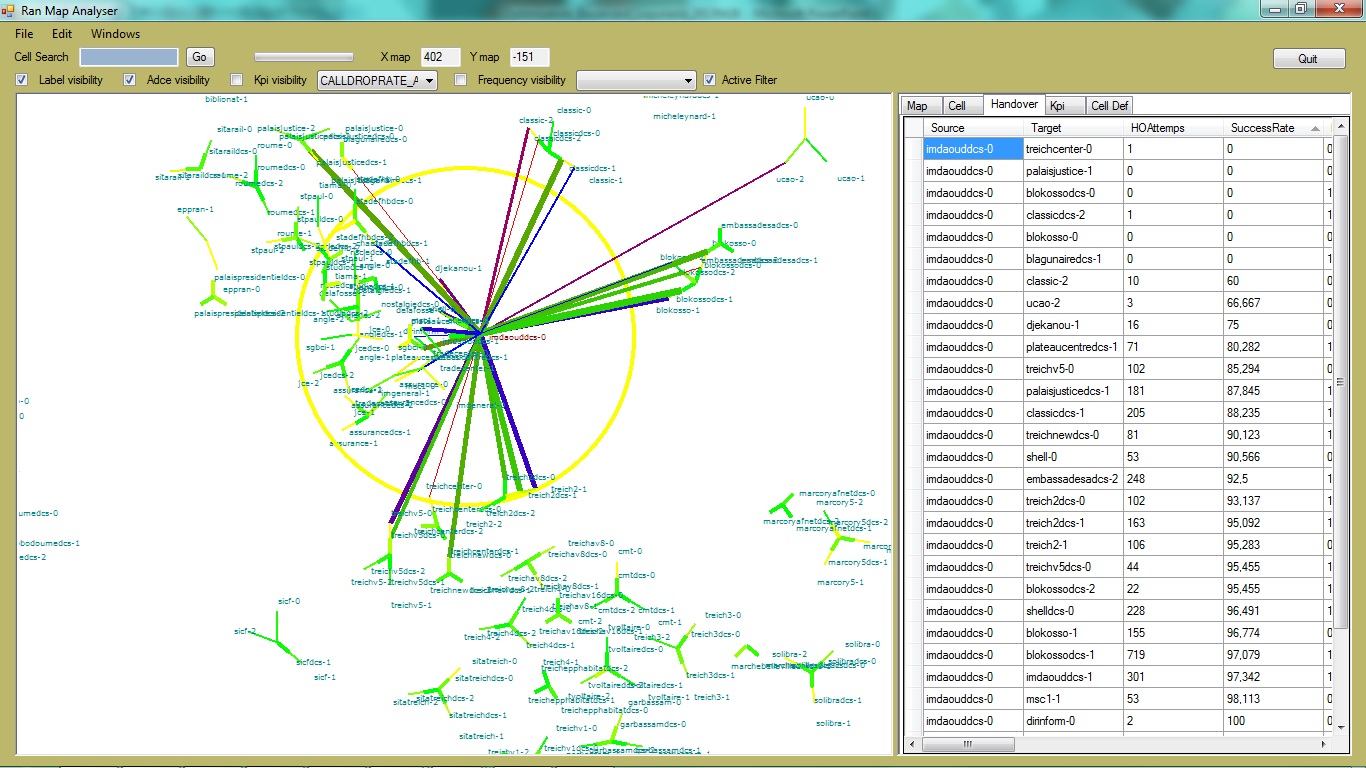
Fabrice
-
Apr 26th, 2013, 07:39 AM
#7
Re: how to draw thousands of lines quickly to a picturebox
Ignore that tutorial... it is for VB6, so even the parts that can be used in VB.Net will not necessarily be good.
-
Apr 26th, 2013, 12:53 PM
#8
Re: how to draw thousands of lines quickly to a picturebox
 Originally Posted by si_the_geek

First of all, the value of Pi / 180 does not change while the loop is running, but you calculate it two times for each row. Instead you should calculate it in advance and store it to a variable, which you then use inside the loop.
I'll go a step further... Pi isn't going to change either, and there's even a built-in field for it:
http://msdn.microsoft.com/en-us/libr...m.math.pi.aspx
which means you can get away with using a constant for it (neither Pi nor 180 are going to change, right?)
Code:
Private Const SomeValue= Math.PI / 180
And I see by your latest code, you're still doing the calc twice per each loop... define it as a constant, then use the constant in the loop... you'll get some more performance out of it... not sure how much... but it could add up over the iterations...
-tg
-
May 2nd, 2013, 03:17 PM
#9
Re: how to draw thousands of lines quickly to a picturebox
I'd suggest you use all suggestion about speeding up your code AND store the coordinates of all lines in an point-array. Having that you would need only onme graphic-call (which is probably the slowest in your code) .DrawPolygon
You're welcome to rate this post!
If your problem is solved, please use the Mark thread as resolved button
 Wait, I'm too old to hurry!
-
May 2nd, 2013, 04:55 PM
#10
Re: how to draw thousands of lines quickly to a picturebox
Even that might not be enough for drawing thousands of lines. If you are using GDI then you are using the CPU to do all your drawing. Your alternatives are limitted, but over in the CodeBank I posted the code I'm using to use XNA for drawing control surfaces. In my experience, this boosts speed by some fantastic number (possibly over 1000x on a modest graphics card).
My usual boring signature: Nothing

-
May 2nd, 2013, 11:34 PM
#11
Re: how to draw thousands of lines quickly to a picturebox
Originally Posted by Shaggy Hiker
Even that might not be enough for drawing thousands of lines. If you are using GDI then you are using the CPU to do all your drawing. ...
No offense, but I was trying to hint fde_edf a solution within the scope of his knowledge (changing .DrawLine to .DrawPolygon and using the already suggested code cosmetics). Of course that way the graphic speed is limited, but actual systems are able to draw "thousands of" lines without blinking (IMHO).
You're welcome to rate this post!
If your problem is solved, please use the Mark thread as resolved button
Wait, I'm too old to hurry!
-
May 3rd, 2013, 12:15 PM
#12
Re: how to draw thousands of lines quickly to a picturebox
I have a hammer, it all looks like nails to me.
As a general rule, I'd agree with you. My major point was that there eventually are limitations on GDI. Fortunately, there are alternatives, and XNA isn't a horrible alternative because what I posted in the CodeBank will work, so lots of the horribleness of it goes away. As a general rule, I'd want to wring the last bit of performance out of GDI before I reached for XNA, but in my experience, you can exceed all that GDI can perform. For those situations, there are alternatives.
My usual boring signature: Nothing
-
May 5th, 2013, 12:25 AM
#13
Re: how to draw thousands of lines quickly to a picturebox
Such as DirectX. 
I had to say that. If you need a DirectX way of doing it, I could help. There are a couple of ways you can go about it. One way using the function built in to DirectX for line drawing. The other way being Direct Memory Addressing, so you can write directly into the video memory. Its blazing fast using this method too. I did the same thing in my Nintendo Emulator using Direct Memory Addressing, and I still get 60 FPS.
-
May 5th, 2013, 04:57 AM
#14
Re: how to draw thousands of lines quickly to a picturebox
Although there is a lot to be said for using hardware-accelerated rendering systems like XNA or DirectX, I wonder whether these approaches may be tackling the wrong problem. Whatever people say, old-fashioned Graphics.DrawLine isn't all that slow. I just did a test (code below) drawing 2,000 lines to connect random points in a PictureBox of 800 * 600 pixels. The average result was about 60 milliseconds per refresh. This was on a fairly slow computer. Less than half of that time was for drawing the lines, and the rest was for repainting the PictureBox. That would be borderline speed for an animation, but it should be fine for updating a data display such as described in Post #5.
So fde_edf, is your updating time much longer than results like mine? If so it's probably due to to the way your code is designed and not the relative slowness of GDI+. I would suspect accessing the data table in the loop, which Si mentioned, to be the main slowdown factor. If it is, it will slow things down just as much if you were to use XNA, DirectX or WPF instead of GDI+. Using a constant for 1/2*pi as Techgnome recommends is good practice but it won't make a significant difference here.
As to a better design, I suggest something like the following.
1. define a Structure to hold the data of each line, e.g.
Code:
Private Structure Line
    X1 As Integer
    Y1 As Integer
    X2 As Integer
    Y2 As Integer
    pen As Pen
End Structure
2. Define a List(Of Line) to hold all the lines.
3. Use a BackgroundWorker to build the list of lines from your data.
4. In the RunWorkerCompleted sub, update the PictureBox using the list of lines, for example:
Code:
Dim bmp As New Bitmap(PictureBox1.ClientSize.Width, PictureBox1.ClientSize.Height)
Using g As Graphics = Graphics.FromImage(bmp)
     For Each ln As Line in Lines
         g.DrawLine(ln.pen, ln.X1, ln.Y1, ln.X2, ln.Y2)
     Next
End Using
PictureBox1.Image = bmp
Here's my timing test code:
Code:
	Private penset() As Pen = {pens.Red, pens.Black, pens.Blue, pens.Green, pens.Orange, pens.Purple, pens.HotPink, pens.Gray}
	Private rng As New Random

	Private Sub Button1_Click(sender As System.Object, e As System.EventArgs) Handles Button1.Click
		Dim sw As Stopwatch = Stopwatch.StartNew
		Dim w As Integer = picturebox1.ClientSize.Width
		Dim h As Integer = picturebox1.ClientSize.Height

		Dim bmp As New Bitmap(w, h)
		Using g As Graphics = Graphics.FromImage(bmp)

			'uncomment these line for anti-aliased line drawings
			'g.SmoothingMode = Drawing2D.SmoothingMode.AntiAlias
			'g.Clear(PictureBox1.BackColor)

			For i As Integer = 0 To 1999
				'generate random coordinates:
				Dim x1 As Integer = rng.Next(w)
				Dim x2 As Integer = rng.Next(w)
				Dim y1 As Integer = rng.Next(h)
				Dim y2 As Integer = rng.Next(h)
				'pick a random pen
				Dim pn As Pen = penset(rng.Next(8))

				'draw the line
				g.DrawLine(pn, x1, y1, x2, y2)
			Next
		End Using

		PictureBox1.Image = bmp
		PictureBox1.Refresh() 'for timing purposes only
		Console.WriteLine(sw.ElapsedMilliseconds.ToString)
	End Sub
Notes: In my test, the line were drawn with random pens selected from an array of 8. The timings included randomizing the pen and points for each line (probably negligible time). The timing block included a Refresh statement to count the time to render the PictureBox (just setting the Image property takes practically zero time). With SmoothingMode.AntiAlias instead of the default smoothing mode, the average refresh time was about 240 milliseconds. Even that may be acceptable for intermittently updating a data display. To test drawing lines only, comment out the Refresh line.
Last edited by boops boops; May 5th, 2013 at 03:32 PM.
-
May 6th, 2013, 02:25 PM
#15
Re: how to draw thousands of lines quickly to a picturebox
There's no good alternative to testing. Over in the .NET CodeBank I have a lightweight profiler class that you can use to time your code. You'd add the class, then sprinkle calls to Track into the code at places you want to count from, then look at the results. It's a pretty simple class, but has proved useful for this type of thing.
My usual boring signature: Nothing
-
May 7th, 2013, 01:49 PM
#16
Re: how to draw thousands of lines quickly to a picturebox
Although I'm interested in this thread, I think we lost the starter of this thread!
You're welcome to rate this post!
If your problem is solved, please use the Mark thread as resolved button
Wait, I'm too old to hurry!
-
May 8th, 2013, 11:42 PM
#17
Thread Starter
New Member
Re: how to draw thousands of lines quickly to a picturebox
Hi guys,
Sorry for this late reply. I was very busy with some other stuff and no time for developing anymore.
First thank you all for sharing your ideas and knowledge. You all bring pieces to the castle and it helps me a lot.
I have to admit that I haven't been able to test any advanced display feature, on one hand because of time and on the other hand because of my lack of knowledge.
I would like to test the suggested StretchDIBits, XNA or DirectX but at the moment my knowledge is blocking me. As already requested, if you have some small examples or links that could show me how it works that would help a lot. You are writing about codebank but I have no idea on what and where it is so please explain.
Now that it is said, I thing I still have a long way to go into my code to make it faster rather than these display considerations. I am convinced that if it takes something like 4 seconds to draw all my lines, I could speed it up by some milliseconds using the appropriate display solution but I should first save 2 to 3 seconds by looking into my code and take away of the loop what is potentialy slowing down my app.
For example, I might try to :
- place my data into an array instead of a datatable before I enter the redraw sub
- calculate my point (x, y) out of my redraw sub because if I simply click on my map without moving or zooming I don't need to recalculate all x and y
- take pi out of the sub
- make an array of points and draw polygon as suggested
- as I can zoom and move my map, I should probably only draw what is visible and not all lines
- ...
Please tell me if you think this make sense or not.
As already said, there is no best way than try each solution and compare execution time...
Then, I also want to draw the coverage of one cell (one line) represented for example by a parabolic form but I am still struggling to place it at the right place and rotate it properly so I will probably first start with a thick line...
I would also like to calculate some coverage prediction but this is still out of reach for now.
Thanks a lot
-
May 9th, 2013, 08:43 AM
#18
Re: how to draw thousands of lines quickly to a picturebox
The CodeBank is a group of forums we have, which contain example code for lots of things: http://www.vbforums.com/forumdisplay...orums-CodeBank
(there are sub-forums for "VB.Net" and "Games", you will probably want to check them both out)
Your intention to deal with optimising your current code before moving on to new concepts is definitely a good idea. It is certainly possible that you can make your code fast enough just by doing that, and that not doing it would make implementing the new concepts almost pointless.
 Posting Permissions
- You may not post new threads
- You may not post replies
- You may not post attachments
- You may not edit your posts
-
Forum Rules
|
Click Here to Expand Forum to Full Width
|



 Reply With Quote


 Mark Thread Resolved


