|

-
Apr 16th, 2013, 04:26 PM
#1
Thread Starter
Hyperactive Member


 [RESOLVED] VS 2012 Express: Add Existing Items to New Project [RESOLVED] VS 2012 Express: Add Existing Items to New Project
I found this on a thread at another forum:
I tried this in Visual Basic 2008 Express, and I didn't even need to manually copy any files. I started with Add Existing Item, navigated to the other project (which was in a different solution), highlighted the full set of files for the form I wanted to copy (multiple select using SHFT), clicked on the Add dropdown, and selected "Add" rather than Add as Link". The files were copied from the old to the new project, and the form was fully functional right away.
But when I tried this I got a message saying:
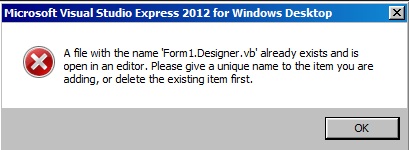
This looks like a neat method of copying existing work but I don't see where they mentioned renaming files, etc... Is there some way to make this actually work?
-
Apr 16th, 2013, 04:51 PM
#2
Re: VS 2012 Express: Add Existing Items to New Project
If you already have a Form1 in your project... you can't add a second Form1... so the solution is to the rename the first (existing) Form1 first to something else... THEN you can add the second one...
-tg
-
Apr 16th, 2013, 05:03 PM
#3
Thread Starter
Hyperactive Member
Re: VS 2012 Express: Add Existing Items to New Project
Thanks. I did find that by opening the Form1.designer.vb from an existing project as a file in a new project and then copying and pasting it's contents into the real Form1.designer.vb it worked well. The new form took on the design of the other one and that is a good thing. Now if I can just figure out why MySQL code won't work....but that's a different post I will annoy everyone with tomorrow.
 Posting Permissions
- You may not post new threads
- You may not post replies
- You may not post attachments
- You may not edit your posts
-
Forum Rules
|
Click Here to Expand Forum to Full Width
|



 Reply With Quote
