|

-
Apr 12th, 2013, 12:18 PM
#1
Thread Starter
Frenzied Member


Setting Windows 8 account picture with .NET/WinRT hybrid
Basically I'm trying to set a Windows 8 account picture from a "Console Application". The only API to set the picture that I found is in the WinRT API. So after blood, sweat, and tears I finally managed to get a hybrid .NET/WinRT somewhat working, but the clue being that it doesn't actually work.
Anyway, this is the code so far:
Code:
private static async Task SetAccountPicture(string employeeId)
{
    // Download image
    string imagePath = DownloadImage(employeeId);

    // Set account picture
    Stream fileStream = File.Open(imagePath, FileMode.Open);
    IRandomAccessStream winRTStream = await DotNetToWinRTStream(fileStream);
    SetAccountPictureResult result = await UserInformation.SetAccountPicturesFromStreamsAsync(null, winRTStream, null);

    // Clean up download file
    File.Delete(imagePath);
}

public static async Task<IRandomAccessStream> DotNetToWinRTStream(Stream dotNetStream)
{
    IBuffer buffer;
    var inputStream = dotNetStream.AsInputStream();
    using (var reader = new DataReader(inputStream))
    {
        await reader.LoadAsync((uint)dotNetStream.Length);
        buffer = reader.DetachBuffer();
    }

    var memoryStream = new InMemoryRandomAccessStream();
    await memoryStream.WriteAsync(buffer);
    return memoryStream;
}
The SetAccountPictureResult says 'failure' without any other information. What could be happening here?
Delete it. They just clutter threads anyway.
-
Apr 15th, 2013, 02:14 AM
#2
Re: Setting Windows 8 account picture with .NET/WinRT hybrid
Not sure if you have seen this but I cannot check it anyway since I don't have Windows 8.
-
Apr 15th, 2013, 04:37 AM
#3
Thread Starter
Frenzied Member
Re: Setting Windows 8 account picture with .NET/WinRT hybrid
Yes, I have seen that. That's actually where I got the WinRT code from, but when used in a regular .NET application it doesn't seem to work.
Delete it. They just clutter threads anyway.
-
Sep 30th, 2013, 09:26 PM
#4
Re: Setting Windows 8 account picture with .NET/WinRT hybrid
I'm having the exact same problem. Everything about using "Windows Runtime" methods from regular .NET apps has been incredibly frustrating and troublesome so far. I'm doing it slightly differently to you but still getting the same problem (i.e. no exception thrown but the returned value is just "Failure"). I've also verified that the Windows.System.UserProfile.UserInformation.AccountPictureChangeEnabled property is True - it was initially False but then I went into control panel or whatever the hell it is called on Windows 8 now and set the "Let apps use my name and account picture" option to On (stupid how that setting implies apps will only be able to view it not change it, but the AccountPictureChangedEnabled property implies apps are now allowed to change it as well).
Here's how I'm doing it, in case anyone can spot any problems:
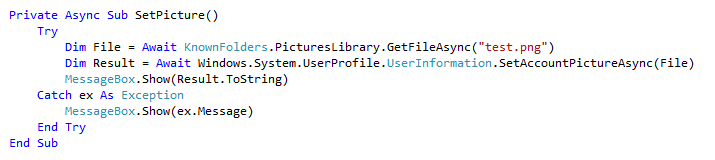
Did you ever find a solution?
Last edited by chris128; Sep 30th, 2013 at 09:29 PM.
 Posting Permissions
- You may not post new threads
- You may not post replies
- You may not post attachments
- You may not edit your posts
-
Forum Rules
|
Click Here to Expand Forum to Full Width
|



 Reply With Quote

 ™
™
