|

-
Apr 3rd, 2013, 04:55 AM
#1
Member

Re: screen capture
Hello,
Thanks for the source, its awesome!
But I need to know one thing.
If you click prnt screen when you have capture selected rectangle on, you have to click prnt screen again to actually save the image.
Is there a way to not have to press prnt screen again, so it just saves it whenever you drawn your first rectangle?
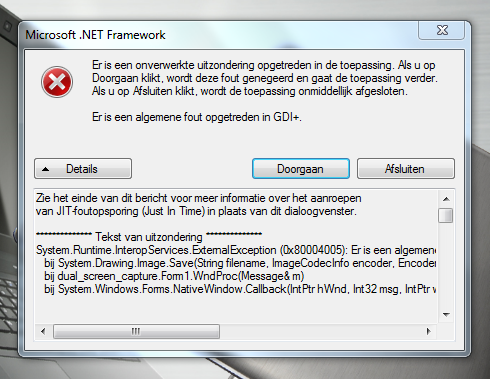
Also when im building the project and I try to run the application it gives me this error, whats wrong?
Thanks,
Jordy
Last edited by jordy12345; Apr 3rd, 2013 at 07:15 AM.
-
Apr 3rd, 2013, 07:36 AM
#2
Re: screen capture
 Originally Posted by jordy12345

Hello,
Thanks for the source, its awesome!
But I need to know one thing.
If you click prnt screen when you have capture selected rectangle on, you have to click prnt screen again to actually save the image.
Is there a way to not have to press prnt screen again, so it just saves it whenever you drawn your first rectangle?
Also when im building the project and I try to run the application it gives me this error, whats wrong?
Thanks,
Jordy
you could use the mouseup event instead of a 2nd PRTSCR
as for the error msg, can you translate that into english?
- Coding Examples:
- Features:
- Online Games:
- Compiled Games:
-
Apr 3rd, 2013, 09:35 AM
#3
Member
 Re: screen capture Re: screen capture
Originally Posted by .paul.
you could use the mouseup event instead of a 2nd PRTSCR
as for the error msg, can you translate that into english?
If you wanna see the error yourself, then download the zip here
screen capture_1_0_0_0.zip
If you dont want to do that, here is the code translated in google translator.
Code:
There is an unhandled exception occurred in the application. If you click Continue, this error is ignored and the application. If you click Quit, the application is immediately closed.

There is a general error occurred in GDI +.
Code:
See the end of this message for details on invoking
JIT (Just In Time) debugging instead of this dialog box.

************** Exception Text **************
System.Runtime.InteropServices.ExternalException (0x80004005): There is a general error occurred in GDI +.
***at System.Drawing.Image.Save (String filename, Image Codec encoder, Encoder Parameters encoderParams)
***screen_capture.Form1.WndProc (Message & m)
***at System.Windows.Forms.NativeWindow.Callback (IntPtr hWnd, Int32 msg, IntPtr wParam, IntPtr lParam)


************** Loaded Assemblies **************
mscorlib
****Assembly Version: 4.0.0.0
****Win32 Version: 4.0.30319.18034 built by: FX45RTMGDR
****Codebase: file :/ / / C :/ Windows/Microsoft.NET/Framework64/v4.0.30319/mscorlib.dll
----------------------------------------
screen capture
****Assembly Version: 1.0.0.0
****Win32 version: 1.0.0.0
****Codebase:
----------------------------------------
Microsoft.VisualBasic
****Assembly Version: 10.0.0.0
****Win32 version: 11.0.50709.17929 built by FX45RTMREL
****Codebase:
----------------------------------------
System
****Assembly Version: 4.0.0.0
****Win32 Version: 4.0.30319.18034 built by: FX45RTMGDR
****Codebase: file :/ / / C :/ WINDOWS/Microsoft.Net/assembly/GAC_MSIL/System/v4.0_4.0.0.0__b77a5c561934e089/System.dll
----------------------------------------
System.Core
****Assembly Version: 4.0.0.0
****Win32 Version: 4.0.30319.17929 built by: FX45RTMREL
****Codebase:
----------------------------------------
System.Windows.Forms
****Assembly Version: 4.0.0.0
****Win32 Version: 4.0.30319.18036 built by: FX45RTMGDR
****Codebase:
----------------------------------------
System.Drawing
****Assembly Version: 4.0.0.0
****Win32 Version: 4.0.30319.18021 built by: FX45RTMGDR
****Codebase:
----------------------------------------
System.Runtime.Remoting
****Assembly Version: 4.0.0.0
****Win32 Version: 4.0.30319.17929 built by: FX45RTMREL
****Codebase:
----------------------------------------
System.Configuration
****Assembly Version: 4.0.0.0
****Win32 Version: 4.0.30319.17929 built by: FX45RTMREL
****Codebase:
----------------------------------------
System.Xml
****Assembly Version: 4.0.0.0
****Win32 Version: 4.0.30319.18034 built by: FX45RTMGDR
****Codebase:
----------------------------------------
Accessibility
****Assembly Version: 4.0.0.0
****Win32 Version: 4.0.30319.17929 built by: FX45RTMREL
****Codebase:
----------------------------------------
System.Drawing.resources
****Assembly Version: 4.0.0.0
****Win32 Version: 4.0.30319.1 built by: RTMRel
****Codebase:
----------------------------------------
System.Windows.Forms.resources
****Assembly Version: 4.0.0.0
****Win32 Version: 4.0.30319.1 built by: RTMRel
****Codebase:
----------------------------------------
mscorlib.resources
****Assembly Version: 4.0.0.0
****Win32 Version: 4.0.30319.1 (RTMRel.030319 0100)
****Codebase:
----------------------------------------

************** JIT Debugging **************
If you want to enable JIT debugging in the configuration file for this
application or computer (machine.config) the value
jitDebugging are set in the system.windows.forms section.
The application must also be compiled with debugging
was enabled.

For example:

<configuration>
****<system.windows.forms jitDebugging="true" Deal
</ Configuration>

When JIT debugging is enabled, any unhandled exception
sent to the JIT debugger registered on the computer
and are not handled by this dialog.
 Posting Permissions
- You may not post new threads
- You may not post replies
- You may not post attachments
- You may not edit your posts
-
Forum Rules
|
Click Here to Expand Forum to Full Width
|



 Reply With Quote
