|

-
Mar 20th, 2013, 09:34 AM
#1
Thread Starter
Junior Member

Putting mutliple scroll bars in the middle of the sheet.
I'm working on a COM add in, but I would be happy to have this solved in VB or VBA. I have user reports that are generated based off selections from a database, then the sheet is added into an existing sheet. I've been told I need to keep the same basic format and leave it in Excel. The problem is that these lists within the form could be of a much longer length than there is space for.
Here is what the current form looks like:
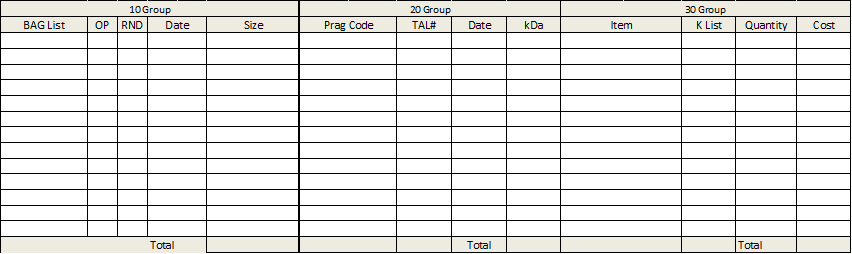
My thought on a solution was to drop the total to the theoretical end of the Worksheet (these are the bottom of the form), and then have the middle scroll with a scroll bar.
Is there a way to have 3 separate scroll bars that only scrolls each table (again there is stuff above these that wouldn't scroll)? I've only seen scroll bars that scroll the whole sheet.
Is there a better approach?
-
Mar 20th, 2013, 10:56 AM
#2
Thread Starter
Junior Member
Re: Putting mutliple scroll bars in the middle of the sheet.
I've thought of trying to use the Index function, but I would want the end user to be able and edit the information as they scroll (and an index would be written over in this case).
-
Mar 21st, 2013, 05:29 AM
#3
Re: Putting mutliple scroll bars in the middle of the sheet.
in excel you could use split (multiple) windows side by side
this could be automated from VB
i do my best to test code works before i post it, but sometimes am unable to do so for some reason, and usually say so if this is the case.
Note code snippets posted are just that and do not include error handling that is required in real world applications, but avoid On Error Resume Next
dim all variables as required as often i have done so elsewhere in my code but only posted the relevant part
come back and mark your original post as resolved if your problem is fixed 
pete
Tags for this Thread
 Posting Permissions
- You may not post new threads
- You may not post replies
- You may not post attachments
- You may not edit your posts
-
Forum Rules
|
Click Here to Expand Forum to Full Width
|



 Reply With Quote
