|

-
Feb 21st, 2013, 04:01 PM
#1
Thread Starter
Lively Member

-
Feb 21st, 2013, 04:52 PM
#2
Re: Noob need help retrieving info from website (youtube)
In this case, you just need ...
td.NextSibling.InnerText
... to get "1 - 10 of 1151"
As the 6-dimensional mathematics professor said to the brain surgeon, "It ain't Rocket Science!"
Reviews: "dunfiddlin likes his DataTables" - jmcilhinney
Please be aware that whilst I will read private messages (one day!) I am unlikely to reply to anything that does not contain offers of cash, fame or marriage!
-
Feb 22nd, 2013, 01:12 AM
#3
Thread Starter
Lively Member
Re: Noob need help retrieving info from website (youtube)
 Originally Posted by dunfiddlin

In this case, you just need ...
td.NextSibling.InnerText
... to get "1 - 10 of 1151"
Ok  Thanks! Thanks!
Don't have the opportunity to test it for a little while, but im sure it will work.
-
Feb 22nd, 2013, 06:19 AM
#4
Thread Starter
Lively Member
Re: Noob need help retrieving info from website (youtube)
Originally Posted by dunfiddlin
In this case, you just need ...
td.NextSibling.InnerText
... to get "1 - 10 of 1151"
Well... tried the code... didn't work.
Here's a picture of my code, when i get the error (Error is in Norwegian).
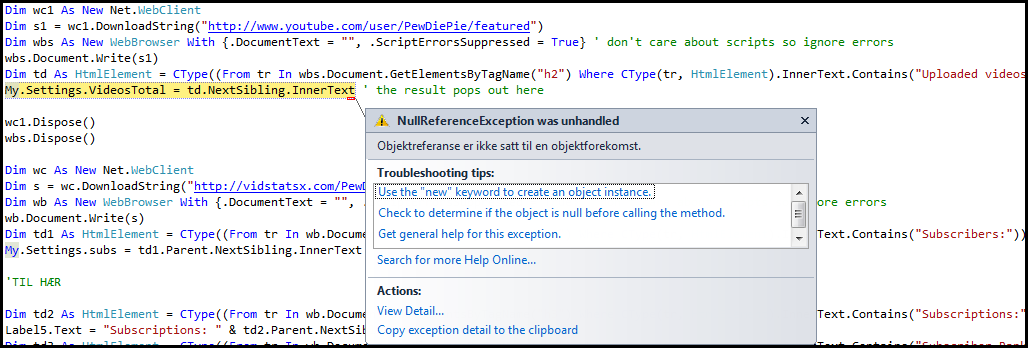
Here is also the code i have:
Code:
'Part 1
Dim wc1 As New Net.WebClient
        Dim s1 = wc1.DownloadString("http://www.youtube.com/user/PewDiePie/featured")
        Dim wbs As New WebBrowser With {.DocumentText = "", .ScriptErrorsSuppressed = True} ' don't care about scripts so ignore errors
        wbs.Document.Write(s1)
        Dim td As HtmlElement = CType((From tr In wbs.Document.GetElementsByTagName("h2") Where CType(tr, HtmlElement).InnerText.Contains("Uploaded videos")).FirstOrDefault, HtmlElement)
        My.Settings.VideosTotal = td.NextSibling.InnerText ' the result pops out here

        wc1.Dispose()
        wbs.Dispose()

'Part 2
        Dim wc As New Net.WebClient
        Dim s = wc.DownloadString("http://vidstatsx.com/PewDiePie/videos-most-recent")
        Dim wb As New WebBrowser With {.DocumentText = "", .ScriptErrorsSuppressed = True} ' don't care about scripts so ignore errors
        wb.Document.Write(s)
        Dim td1 As HtmlElement = CType((From tr In wb.Document.GetElementsByTagName("h2") Where CType(tr, HtmlElement).InnerText.Contains("Subscribers:")).FirstOrDefault, HtmlElement)
        My.Settings.subs = td1.Parent.NextSibling.InnerText


'Part 3
        Dim td2 As HtmlElement = CType((From tr In wb.Document.GetElementsByTagName("h3") Where CType(tr, HtmlElement).InnerText.Contains("Subscriptions:")).FirstOrDefault, HtmlElement)
        Label5.Text = "Subscriptions: " & td2.Parent.NextSibling.InnerText
        Dim td3 As HtmlElement = CType((From tr In wb.Document.GetElementsByTagName("h2") Where CType(tr, HtmlElement).InnerText.Contains("Subscriber Rank:")).FirstOrDefault, HtmlElement)
        LabelSubRank.Text = "Subscribers: " & td3.Parent.NextSibling.InnerText
        Dim td4 As HtmlElement = CType((From tr In wb.Document.GetElementsByTagName("h2") Where CType(tr, HtmlElement).InnerText.Contains("Video View Rank:")).FirstOrDefault, HtmlElement)
        LabelVidViewRank.Text = "Video views: " & td4.Parent.NextSibling.InnerText
        Dim td5 As HtmlElement = CType((From tr In wb.Document.GetElementsByTagName("h3") Where CType(tr, HtmlElement).InnerText.Contains("Channel View Rank:")).FirstOrDefault, HtmlElement)
        LabelChannelViews.Text = "Channel views: " & td5.Parent.NextSibling.InnerText
My question is kind of hard to explain, but will the fact that the codes that i've named "part 1" and "part 2" are so similar that "Part 3" might use "Part 1" as reference?
or will the "wc1.Dispose()" and "wbs.Dispose()" from the end of "part 1" prevent this?
Main question: How do i get rid of the error? 
-
Feb 22nd, 2013, 01:19 PM
#5
Re: Noob need help retrieving info from website (youtube)
A Null Reference exception means that something in the line has a value of Nothing. Now since I know that it isn't td.NextSibling.InnerText because the code works fine for me, that only leaves My.Settings.VideosTotal about which I obviously know nothing. Are you sure that exists, is a string, and isn't null? I note that there's no settings Save in your code, by the way.
As the 6-dimensional mathematics professor said to the brain surgeon, "It ain't Rocket Science!"
Reviews: "dunfiddlin likes his DataTables" - jmcilhinney
Please be aware that whilst I will read private messages (one day!) I am unlikely to reply to anything that does not contain offers of cash, fame or marriage!
-
Feb 22nd, 2013, 01:31 PM
#6
Thread Starter
Lively Member
Re: Noob need help retrieving info from website (youtube)
Originally Posted by dunfiddlin
A Null Reference exception means that something in the line has a value of Nothing. Now since I know that it isn't td.NextSibling.InnerText because the code works fine for me, that only leaves My.Settings.VideosTotal about which I obviously know nothing. Are you sure that exists, is a string, and isn't null? I note that there's no settings Save in your code, by the way.
Not quite sure what you ment, but my "previous" code was this:
Code:
        Dim wc As New Net.WebClient
        Dim s = wc.DownloadString("http://vidstatsx.com/PewDiePie/videos-most-recent")
        Dim wb As New WebBrowser With {.DocumentText = "", .ScriptErrorsSuppressed = True}
        wb.Document.Write(s)
        Dim td As HtmlElement = CType((From tr In wb.Document.GetElementsByTagName("h3") Where CType(tr, HtmlElement).InnerText.Contains("Uploads")).FirstOrDefault, HtmlElement)
        My.Settings.VideosTotal = td.Parent.NextSibling.InnerText
Why would there be a porblem with "My.Settings.VideosTotal" with the new code?
(Could you please tell me what i am suppost to check for? Instructions would help me out alot. Not that i'm to dumb to figure out on my own, but i don't always understand what you mean...)
Btw (not sure if it helps) but here is a picture of the setting in the settings tab:

Last edited by TeachMeVB; Feb 22nd, 2013 at 01:35 PM.
-
Feb 22nd, 2013, 02:16 PM
#7
Thread Starter
Lively Member
Re: Noob need help retrieving info from website (youtube)
So... just to try if the error was connected with the my.settings.totalvideos setting, i made a new "VB project".
I added a label to the form (that was the only thing i added. No other controls, no settings...). Then i added this code (This is the ENTIRE code for the program.)
Code:
Public Class Form1
    Private Sub Form1_Load(ByVal sender As System.Object, ByVal e As System.EventArgs) Handles MyBase.Load

        Dim wc1 As New Net.WebClient
        Dim s1 = wc1.DownloadString("http://www.youtube.com/user/PewDiePie/featured")
        Dim wbs As New WebBrowser With {.DocumentText = "", .ScriptErrorsSuppressed = True} ' don't care about scripts so ignore errors
        wbs.Document.Write(s1)
        Dim td As HtmlElement = CType((From tr In wbs.Document.GetElementsByTagName("h2") Where CType(tr, HtmlElement).InnerText.Contains("Uploaded videos")).FirstOrDefault, HtmlElement)
        Label1.Text = td.NextSibling.InnerText ' the result pops out here

    End Sub
End Class
I still get the error.
-
Feb 22nd, 2013, 05:34 PM
#8
Re: Noob need help retrieving info from website (youtube)
And I don't ....
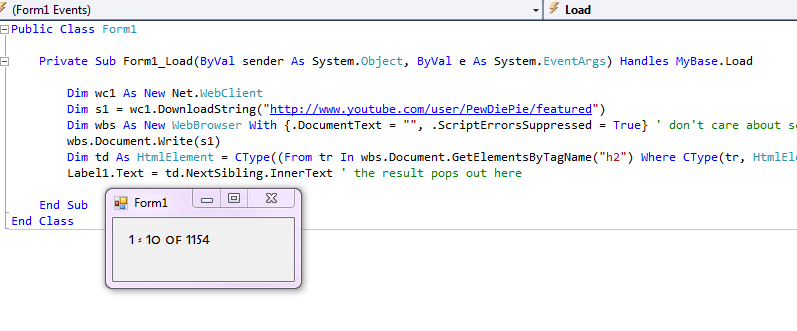
Your code in its entirety. So I can only think that it's your VS that's screwy and it's not initialising controls/settings/forms properly. Try a completely unrelated project with just a label with text set from within the form load.
As the 6-dimensional mathematics professor said to the brain surgeon, "It ain't Rocket Science!"
Reviews: "dunfiddlin likes his DataTables" - jmcilhinney
Please be aware that whilst I will read private messages (one day!) I am unlikely to reply to anything that does not contain offers of cash, fame or marriage!
-
Feb 23rd, 2013, 06:51 AM
#9
Thread Starter
Lively Member
Re: Noob need help retrieving info from website (youtube)
Originally Posted by dunfiddlin
And I don't ....
Your code in its entirety. So I can only think that it's your VS that's screwy and it's not initialising controls/settings/forms properly. Try a completely unrelated project with just a label with text set from within the form load.
I already did! Look at reply number 7.
And on the program that has the VideosTotal setting, there are alot of other settings, and these all work perfectly. Infact, VideosTotal worked perfectly before, until i chose to change the webaddress it gets its info from. So I really doubt that it is the settings fault.
Could you please post your code? (The entire code of the project.) I'll copy it into the project i made with just a label and see if it works then.
Thanks
-
Feb 23rd, 2013, 05:17 PM
#10
Re: Noob need help retrieving info from website (youtube)
That is my entire project. One form, one label and your code. Compiled for x86 if that makes any difference.
As the 6-dimensional mathematics professor said to the brain surgeon, "It ain't Rocket Science!"
Reviews: "dunfiddlin likes his DataTables" - jmcilhinney
Please be aware that whilst I will read private messages (one day!) I am unlikely to reply to anything that does not contain offers of cash, fame or marriage!
-
Feb 23rd, 2013, 05:31 PM
#11
Thread Starter
Lively Member
Re: Noob need help retrieving info from website (youtube)
Originally Posted by dunfiddlin
That is my entire project. One form, one label and your code. Compiled for x86 if that makes any difference.
Well *** then....
Is there another code that will do the same job? One that i may get to work?
-
Feb 23rd, 2013, 06:52 PM
#12
Re: Noob need help retrieving info from website (youtube)
You really do need to determine exactly what the problem is. As I've said with that error there are only two possibilities. One side or the other of the equals has a value of Nothing. You need to know which one it is.
As the 6-dimensional mathematics professor said to the brain surgeon, "It ain't Rocket Science!"
Reviews: "dunfiddlin likes his DataTables" - jmcilhinney
Please be aware that whilst I will read private messages (one day!) I am unlikely to reply to anything that does not contain offers of cash, fame or marriage!
-
Feb 23rd, 2013, 07:49 PM
#13
Thread Starter
Lively Member
Re: Noob need help retrieving info from website (youtube)
Originally Posted by dunfiddlin
You really do need to determine exactly what the problem is. As I've said with that error there are only two possibilities. One side or the other of the equals has a value of Nothing. You need to know which one it is.
Yeah, well the problem must be with td.NextSibling.InnerText, cause it doesn't really make any sence that it would be a problem with the label. But if the value of td.NextSibling.InnerText is null (zero). That would be the equal to: label1.text = ""
And label1.text = "" isn't normaly a line of code causing an error. So maybe it is a problem with the label...
I guess that if it doesn't work with: MsgBox(td.NextSibling.InnerText), then it's the td.Next... that causes the problem. I'll try tomorrow.
-
Feb 24th, 2013, 08:52 AM
#14
Thread Starter
Lively Member
Re: Noob need help retrieving info from website (youtube)
Well... ehm... the problem is clearly with td.NextSibling.InnerText.
As you can see here, the line MsgBox(td.NextSibling.InnerText) did not work...

So i guess the problem is with td.NextSibling.InnerText... But to me that doesn't really make sence as it probably would be the same as MsgBox("")
I also tried this line of code: MsgBox("A: " & td.NextSibling.InnerText)
So incase MsgBox(td.NextSibling.InnerText) equaled the same as MsgBox(),
atleast MsgBox("A: " & td.NextSibling.InnerText) would equal MsgBox("A: ") if the value of td.NextSibling.InnerText was returned as "null".
I'm confused xD
-
Feb 24th, 2013, 09:18 AM
#15
Re: Noob need help retrieving info from website (youtube)
If td is Nothing, then trying to access its NextSibling Property will throw a NullReference Exception as "Nothing" has no Properties to access. Similarly if NextSibling is Nothing then trying to access its InnerText Property will throw the NullReference Exception (I suspect, not tested).
Are you sure you can access the website?
Try your test Form adding just a Label and a Button to it, with the following code.
Do you see the page you expect to see?
Code:
Private Sub Button1_Click(ByVal sender As System.Object, ByVal e As System.EventArgs) Handles Button1.Click

    Dim wc1 As New Net.WebClient
    Dim s1 = wc1.DownloadString("http://www.youtube.com/user/PewDiePie/featured")
    Dim wbs As New WebBrowser With {.DocumentText = "", .ScriptErrorsSuppressed = True} ' don't care about scripts so ignore errors
    wbs.Document.Write(s1)

    ' Dim td As HtmlElement = CType((From tr In wbs.Document.GetElementsByTagName("h2") Where CType(tr, HtmlElement).InnerText.Contains("Uploaded videos")).FirstOrDefault, HtmlElement)
    ' Label1.Text = td.NextSibling.InnerText ' the result pops out here

    wbs.Dock = DockStyle.Fill
    wbs.Parent = Me

End Sub
Last edited by Inferrd; Feb 24th, 2013 at 10:07 AM.
Reason: forgot to comment out the offending code
-
Feb 24th, 2013, 12:05 PM
#16
Thread Starter
Lively Member
Re: Noob need help retrieving info from website (youtube)
Originally Posted by Inferrd
If td is Nothing, then trying to access its NextSibling Property will throw a NullReference Exception as "Nothing" has no Properties to access. Similarly if NextSibling is Nothing then trying to access its InnerText Property will throw the NullReference Exception (I suspect, not tested).
Are you sure you can access the website?
Try your test Form adding just a Label and a Button to it, with the following code.
Do you see the page you expect to see?
Code:
Private Sub Button1_Click(ByVal sender As System.Object, ByVal e As System.EventArgs) Handles Button1.Click

    Dim wc1 As New Net.WebClient
    Dim s1 = wc1.DownloadString("http://www.youtube.com/user/PewDiePie/featured")
    Dim wbs As New WebBrowser With {.DocumentText = "", .ScriptErrorsSuppressed = True} ' don't care about scripts so ignore errors
    wbs.Document.Write(s1)

    ' Dim td As HtmlElement = CType((From tr In wbs.Document.GetElementsByTagName("h2") Where CType(tr, HtmlElement).InnerText.Contains("Uploaded videos")).FirstOrDefault, HtmlElement)
    ' Label1.Text = td.NextSibling.InnerText ' the result pops out here

    wbs.Dock = DockStyle.Fill
    wbs.Parent = Me

End Sub
Well,,, yeah... kinda

As you can see, the correct website was shown, but the page had some errors (error images, the unusual message saying "Vi har angitt spr...")
But i'm guessing this is the result of the page being rendered (or whatever it's called) in such an unsual way.
So what do i do?
-
Feb 24th, 2013, 12:22 PM
#17
Re: Noob need help retrieving info from website (youtube)
Well at least there's hope still. I was half expecting you to get a 404 error page or something similar.
Another question, though: When you scoll down to just below the video box, do you see Opplastede videoer 1–10 av 1154 or Uploaded videos 1 - 10 of 1154 ?
-
Feb 24th, 2013, 12:30 PM
#18
Thread Starter
Lively Member
Re: Noob need help retrieving info from website (youtube)
Originally Posted by Inferrd
Well at least there's hope still. I was half expecting you to get a 404 error page or something similar.
Another question, though: When you scoll down to just below the video box, do you see Opplastede videoer 1–10 av 1154 or Uploaded videos 1 - 10 of 1154 ?
Don't really get why that matters, but anyway. Here's what it shows :
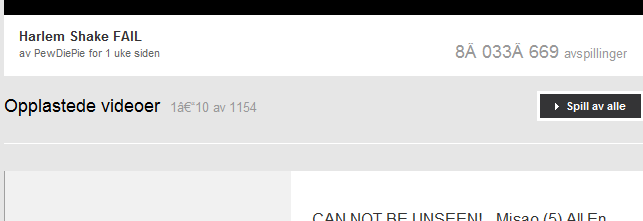
As you can see there are some errors. The text is messed up some places. For example where it shows how many people have watched the video.
-
Feb 24th, 2013, 12:37 PM
#19
Re: Noob need help retrieving info from website (youtube)
The errors don't matter (it's as you said: the unusual way the browser is loaded with HTML code). However the text there does make a difference.
The code you are using is searching for the text "Uploaded videos" but your version of YouTube is in Norwegian? and the text is "Opplastede videoer" so obviously the code never finds "Uploaded videos" and Nothing is returned.
Try using "Opplastede videoer" instead.
-
Feb 24th, 2013, 12:42 PM
#20
Thread Starter
Lively Member
Re: Noob need help retrieving info from website (youtube)
Originally Posted by Inferrd
The errors don't matter (it's as you said: the unusual way the browser is loaded with HTML code). However the text there does make a difference.
The code you are using is searching for the text "Uploaded videos" but your version of YouTube is in Norwegian? and the text is "Opplastede videoer" so obviously the code never finds "Uploaded videos" and Nothing is returned.
Try using "Opplastede videoer" instead.
*Facepalm*...
Can't belive i didn't think of that. I'll test it right away...
-
Feb 24th, 2013, 01:28 PM
#21
Thread Starter
Lively Member
Re: Noob need help retrieving info from website (youtube)
Welll... My wifi broke down :S (writing this from iphone via 3G network)
Will test it when my wifi is back...
But im sure it'll work. Can't believe i didnt think of it.
-
Feb 24th, 2013, 01:41 PM
#22
Thread Starter
Lively Member
Re: Noob need help retrieving info from website (youtube)
Fixed my wifi, and the error is gone :P
How it looks now:
Code:
        Dim wc1 As New Net.WebClient
        Dim s1 = wc1.DownloadString("http://www.youtube.com/user/PewDiePie/featured")
        Dim wbs As New WebBrowser With {.DocumentText = "", .ScriptErrorsSuppressed = True} ' don't care about scripts so ignore errors
        wbs.Document.Write(s1)
        Dim td As HtmlElement = CType((From tr In wbs.Document.GetElementsByTagName("h2") Where CType(tr, HtmlElement).InnerText.Contains("Opplastede videoer")).FirstOrDefault, HtmlElement)
        My.Settings.VideosTotal = td.NextSibling.InnerText
        My.Settings.VideosTotal = My.Settings.VideosTotal.Remove(0, 10)

        wc1.Dispose()
        wbs.Dispose()
-
Feb 24th, 2013, 01:42 PM
#23
Re: Noob need help retrieving info from website (youtube)
And I thought I had bad luck.....
Well, oddly enough, it doesn't work for me. However, the following does; although with me being in the UK, and you being in Norway, then YMMV as they say. (for the first time ever, that 'acronym' almost makes sense!)
Give this a try if your first attempt fails:
Code:
Dim td As HtmlElement = CType((From tr In wbs.Document.GetElementsByTagName("h2") Where CType(tr, HtmlElement).InnerText.Contains("Opplastede videoer")).FirstOrDefault, HtmlElement)
Label1.Text = td.Parent.InnerText
-
Feb 24th, 2013, 01:43 PM
#24
Re: Noob need help retrieving info from website (youtube)
Originally Posted by TeachMeVB
Fixed my wifi, and the error is gone :P
Ah, good. Ignore my last post then :P
-
Feb 24th, 2013, 02:32 PM
#25
Thread Starter
Lively Member
Re: Noob need help retrieving info from website (youtube)
Originally Posted by Inferrd
Ah, good. Ignore my last post then :P
:P lol.
Well thanks for the help
I appreciate the help. I don't assume many people are going to download and use my program, but i will however mention you in the credits. (This counts for dunfiddlin aswell.)
-
Feb 24th, 2013, 04:20 PM
#26
Re: Noob need help retrieving info from website (youtube)
Oh, right. You drive me to drink thinking I've gone nuts and all I get is a piddling little credit! Oh, the humanity!!!! 
As the 6-dimensional mathematics professor said to the brain surgeon, "It ain't Rocket Science!"
Reviews: "dunfiddlin likes his DataTables" - jmcilhinney
Please be aware that whilst I will read private messages (one day!) I am unlikely to reply to anything that does not contain offers of cash, fame or marriage!
-
Feb 24th, 2013, 06:25 PM
#27
Thread Starter
Lively Member
Re: Noob need help retrieving info from website (youtube)
Originally Posted by dunfiddlin
Oh, right. You drive me to drink thinking I've gone nuts and all I get is a piddling little credit! Oh, the humanity!!!!
Haha :P
What more could you possibly want?
That the first thing the user sees when he opens the program, is "dunfiddlin is aweome" written in capital letters? :P
My program is gonna be a freeware so don't expect any money...
-
Feb 25th, 2013, 03:25 PM
#28
Thread Starter
Lively Member
Re: Noob need help retrieving info from website (youtube)
Originally Posted by Inferrd
Ah, good. Ignore my last post then :P
Well... ehm... new question (If noone replies to the question via this thread i'll make a new one.)
in this code, as we've already established earlier, i need to use "Opplastede videoer" to get the result i want.
Code:
        Dim wc1 As New Net.WebClient
        Dim s1 = wc1.DownloadString("http://www.youtube.com/user/PewDiePie/featured")
        Dim wbs As New WebBrowser With {.DocumentText = "", .ScriptErrorsSuppressed = True} ' don't care about scripts so ignore errors
        wbs.Document.Write(s1)
        Dim td As HtmlElement = CType((From tr In wbs.Document.GetElementsByTagName("h2") Where CType(tr, HtmlElement).InnerText.Contains("Opplastede videoer")).FirstOrDefault, HtmlElement)
        My.Settings.VideosTotal = td.NextSibling.InnerText
But not all the people who may use this program will get the norwegian version of this site. Is there anyway i can make a code that would be the same as
Code:
Dim td As HtmlElement = CType((From tr In wbs.Document.GetElementsByTagName("h2") Where CType(tr, HtmlElement).InnerText.Contains("Opplastede videoer")).FirstOrDefault, HtmlElement)
        If td.NextSibling.InnerText = null then
im td As HtmlElement = CType((From tr In wbs.Document.GetElementsByTagName("h2") Where CType(tr, HtmlElement).InnerText.Contains("Uploaded videos")).FirstOrDefault, HtmlElement)
So that if td.NextSibling.InnerText equals null/nothing, the program wont stop because of it but rather try another version.
-
Feb 25th, 2013, 04:00 PM
#29
Re: [RESOLVED] Noob need help retrieving info from website (youtube)
You'll have to use a Try/Catch to override the error. With that you can send it round to check as many different strings as you like.
As the 6-dimensional mathematics professor said to the brain surgeon, "It ain't Rocket Science!"
Reviews: "dunfiddlin likes his DataTables" - jmcilhinney
Please be aware that whilst I will read private messages (one day!) I am unlikely to reply to anything that does not contain offers of cash, fame or marriage!
-
Feb 25th, 2013, 04:17 PM
#30
Thread Starter
Lively Member
Re: [RESOLVED] Noob need help retrieving info from website (youtube)
Originally Posted by dunfiddlin
You'll have to use a Try/Catch to override the error. With that you can send it round to check as many different strings as you like.
so... (never used try or catch before... i know,,, i am a noob. But i only started coding half a year ago and i don't even do it to often).
What would the code be?
(thanks for the reply btw)
-
Feb 25th, 2013, 04:36 PM
#31
Re: [RESOLVED] Noob need help retrieving info from website (youtube)
vb.net Code:
Dim wc1 As New Net.WebClient
        Dim s1 = wc1.DownloadString("http://www.youtube.com/user/PewDiePie/featured")
        Dim wbs As New WebBrowser With {.DocumentText = "", .ScriptErrorsSuppressed = True} ' don't care about scripts so ignore errors
        wbs.Document.Write(s1)
         Dim checks() As String = {"Opplastede videoer", "Uploaded videos", "Swahili", "Venusian"} 'etc ' what to search for
        Dim Found As Boolean = False ' success or failure
        Dim i As Integer = 0 ' counter
         While Not Found AndAlso i < checks.Length - 1 ' loops until either finds match or exhausts search terms
             Try ' do the next line if you can
                Dim td As HtmlElement = CType((From tr In wbs.Document.GetElementsByTagName("h2") Where CType(tr, HtmlElement).InnerText.Contains(checks(i))).FirstOrDefault, HtmlElement)
                My.Settings.VideosTotal = td.NextSibling.InnerText ' if successful then change value and ....
                Found = True   ' ... stop the loop
            Catch
                i += 1 ' if failed (ie. error) increment counter and loop with next search term
            End Try
         End While
         If Not Found Then MsgBox("Whatyoutalkingabout, Willis?") ' warning in event of complete failure
As the 6-dimensional mathematics professor said to the brain surgeon, "It ain't Rocket Science!"
Reviews: "dunfiddlin likes his DataTables" - jmcilhinney
Please be aware that whilst I will read private messages (one day!) I am unlikely to reply to anything that does not contain offers of cash, fame or marriage!
 Posting Permissions
- You may not post new threads
- You may not post replies
- You may not post attachments
- You may not edit your posts
-
Forum Rules
|
Click Here to Expand Forum to Full Width
|



 [RESOLVED] Noob need help retrieving info from website (youtube)

 Reply With Quote
