|

-
Feb 21st, 2013, 02:51 PM
#1
Thread Starter
Frenzied Member


 [RESOLVED] VS2012 - Add Depth to Form Background [RESOLVED] VS2012 - Add Depth to Form Background
I have an MDI application with controls situated on the outer edges of the Parent. Only one MdiChild is opened at a time and is set to DockStyle.Fill in the center of the Parent.
I understand how gradients work when painting backgrounds, but the resulting display always appears to be flat and without character. I want to add depth to the Child forms so that their controls appear to be actual objects. I hope that is a clear description of my intent.
How can I paint the background of a Child form to add depth without taking longer to paint than a standard gradient would?
Thanks in advance for any comments or suggestions.
-
Feb 22nd, 2013, 05:50 AM
#2
Re: VS2012 - Add Depth to Form Background
Hi Circuits,
Here's an example to illustrate a few possibilities in GDI+. Is it the kind of thing you have in mind? If not, an example or a sketch from you would help. I admit I've gone to town a bit especially with those radial lines . .
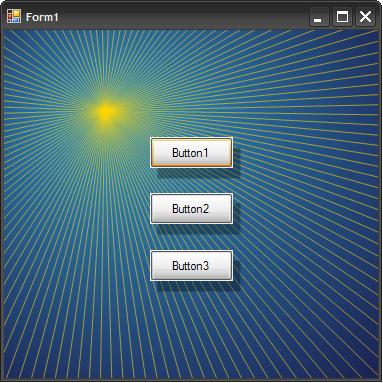
Here's the code I used to generate it:
Code:
Public Class Form1

	Private Sub Form1_Load(sender As System.Object, e As System.EventArgs) Handles MyBase.Load
		Me.DoubleBuffered = True
	End Sub

	Private Sub Form1_Resize(sender As Object, e As System.EventArgs) Handles Me.Resize
		Me.Invalidate()
	End Sub

	Private Sub Form1_Paint(sender As Object, e As System.Windows.Forms.PaintEventArgs) Handles Me.Paint
		Dim gradientFocus As New PointF(100, 80)

		Using gp As New Drawing2D.GraphicsPath

			'Draw radial gradient
			Dim r As Rectangle = Me.ClientRectangle
			r.Inflate(r.Width \ 2, r.Height \ 2)
			gp.AddEllipse(r)
			gp.Flatten(Nothing, 0.25)
			Dim clrs As New List(Of Color)
			For Each pp In gp.PathPoints
				clrs.Add(Color.FromArgb(20, 0, 50))
			Next
			Using pgb As New Drawing2D.PathGradientBrush(gp)
				pgb.CenterPoint = gradientFocus
				pgb.CenterColor = Color.FromArgb(50, 150, 200)
				pgb.SurroundColors = clrs.ToArray
				e.Graphics.FillRectangle(pgb, Me.ClientRectangle)
			End Using

			'Draw radial lines
			e.Graphics.SmoothingMode = Drawing2D.SmoothingMode.HighQuality
			For i As Integer = 0 To gp.PointCount - 2
				Using pn As New Pen(Color.FromArgb(150, Color.Gold), 1)
					e.Graphics.DrawLine(pn, gradientFocus, gp.PathPoints(i))
				End Using
			Next

		End Using

		'Draw drop shadows for all controls:
		For Each ctrl As Control In Me.Controls
			Dim r As Rectangle = ctrl.Bounds
			r.Offset(7, 10)
			Using sbr As New SolidBrush(Color.FromArgb(80, Color.Black))
				e.Graphics.FillRectangle(sbr, r)
			End Using
		Next

	End Sub

End Class
More complicated code doesn't necessarily translate directly into slower paint times. Drawing those radial lines takes a little time but double buffering the form helps; try drag-resizing the form to see. The drop shadows are easy to code and quick to paint.
BB
Last edited by boops boops; Feb 22nd, 2013 at 07:01 PM.
-
Feb 22nd, 2013, 06:05 PM
#3
Re: VS2012 - Add Depth to Form Background
Ooh, pretty! Those shadows are really effective and so simple! Why didn't I think of that? Just grab that for the code snippets then! 
As the 6-dimensional mathematics professor said to the brain surgeon, "It ain't Rocket Science!"
Reviews: "dunfiddlin likes his DataTables" - jmcilhinney
Please be aware that whilst I will read private messages (one day!) I am unlikely to reply to anything that does not contain offers of cash, fame or marriage!
-
Feb 22nd, 2013, 07:14 PM
#4
Thread Starter
Frenzied Member
Re: VS2012 - Add Depth to Form Background
That's exactly what I was looking for boops! Radials and drop shadows give me the depth I wanted. Thank you!
-
Feb 22nd, 2013, 09:13 PM
#5
Addicted Member

 Re: VS2012 - Add Depth to Form Background Re: VS2012 - Add Depth to Form Background
 Originally Posted by boops boops

Hi Circuits,
Here's an example to illustrate a few possibilities in GDI+. Is it the kind of thing you have in mind? If not, an example or a sketch from you would help. I admit I've gone to town a bit especially with those radial lines .
Here's the code I used to generate it:
Code:
Public Class Form1

	Private Sub Form1_Load(sender As System.Object, e As System.EventArgs) Handles MyBase.Load
		Me.DoubleBuffered = True
	End Sub

	Private Sub Form1_Resize(sender As Object, e As System.EventArgs) Handles Me.Resize
		Me.Invalidate()
	End Sub

	Private Sub Form1_Paint(sender As Object, e As System.Windows.Forms.PaintEventArgs) Handles Me.Paint
		Dim gradientFocus As New PointF(100, 80)

		Using gp As New Drawing2D.GraphicsPath

			'Draw radial gradient
			Dim r As Rectangle = Me.ClientRectangle
			r.Inflate(r.Width \ 2, r.Height \ 2)
			gp.AddEllipse(r)
			gp.Flatten(Nothing, 0.25)
			Dim clrs As New List(Of Color)
			For Each pp In gp.PathPoints
				clrs.Add(Color.FromArgb(20, 0, 50))
			Next
			Using pgb As New Drawing2D.PathGradientBrush(gp)
				pgb.CenterPoint = gradientFocus
				pgb.CenterColor = Color.FromArgb(50, 150, 200)
				pgb.SurroundColors = clrs.ToArray
				e.Graphics.FillRectangle(pgb, Me.ClientRectangle)
			End Using

			'Draw radial lines
			e.Graphics.SmoothingMode = Drawing2D.SmoothingMode.HighQuality
			For i As Integer = 0 To gp.PointCount - 2
				Using pn As New Pen(Color.FromArgb(150, Color.Gold), 1)
					e.Graphics.DrawLine(pn, gradientFocus, gp.PathPoints(i))
				End Using
			Next

		End Using

		'Draw drop shadows for all controls:
		For Each ctrl As Control In Me.Controls
			Dim r As Rectangle = ctrl.Bounds
			r.Offset(7, 10)
			Using sbr As New SolidBrush(Color.FromArgb(80, Color.Black))
				e.Graphics.FillRectangle(sbr, r)
			End Using
		Next

	End Sub

End Class
More complicated code doesn't necessarily translate directly into slower paint times. Drawing those radial lines takes a little time but double buffering the form helps; try drag-resizing the form to see. The drop shadows are easy to code and quick to paint.
BB
Well, this is really cool! I'll be spending a couple of hours having fun tweaking your code.
Kudos boops! 
 Posting Permissions
- You may not post new threads
- You may not post replies
- You may not post attachments
- You may not edit your posts
-
Forum Rules
|
Click Here to Expand Forum to Full Width
|



 Reply With Quote

