|

-
Feb 7th, 2013, 08:51 AM
#1
Thread Starter
Lively Member

 [RESOLVED] Needed help regaring an Error [RESOLVED] Needed help regaring an Error
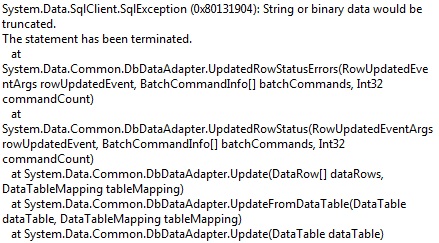
I'm getting this error while executing this code .
Code:
 Private Sub UpdateData_adapter()
        Dim fstream As FileStream
        Dim imgdata As Byte()
        Dim data As Byte()
        Dim finfo As FileInfo
        finfo = New FileInfo(Txtfilepath1.Text)
        Dim numbyte As Long
        Dim br As BinaryReader
        numbyte = finfo.Length
        fstream = New FileStream(Txtfilepath1.Text, FileMode.Open, FileAccess.Read)
        br = New BinaryReader(fstream)
        data = br.ReadBytes(numbyte)
        imgdata = data
        Dim img2 As Double
        img2 = calculate_size(finfo)
        If img2 <= 35 Then
            MessageBox.Show("This is a correct file size")
            Dim con = New SqlConnection("Data Source=.\SQLEXPRESS;AttachDbFilename=C:\Users\Danial\documents\visual studio 2010\Projects\ESI_PF_Payroll_V1\ESI_PF_Payroll_V1\Pay.mdf;Integrated Security=True;Connect Timeout=30;User Instance=True")
            con.Open()

            Dim da As New SqlDataAdapter(New SqlCommand("SELECT * FROM Employee WHERE EmployerID=1", con))
            Dim ds As New DataSet
            Try

                da.Fill(ds, "Employee")
                If IsNothing(ds.Tables("Employee")) = False Then

                    Dim dr As DataRow = ds.Tables("Employee").Rows.Add
                    With dr

                        dr("Firstname") = TextBox1.Text
                        dr("Lastname") = TextBox2.Text
                        dr("Fathername") = TextBox3.Text
                        dr("Nominename") = TextBox4.Text
                        dr("Gender") = TextBox5.Text
                        dr("Address") = TextBox6.Text
                        dr("Pincode") = TextBox7.Text
                        dr("Contactnumber") = TextBox8.Text
                        dr("DOB") = DateTimePicker1.Text
                        dr("City") = TextBox9.Text
                        dr("Bankdetails") = TextBox10.Text
                        dr("Companyname") = TextBox11.Text
                        dr("Designation") = TextBox12.Text
                        dr("ESINO") = TextBox13.Text
                        dr("PFNO") = TextBox14.Text
                        dr("Basicsalary") = TextBox15.Text
                        dr("DOJ") = DateTimePicker2.Text
                        dr("DOL") = DateTimePicker3.Text
                        dr("HRA") = TextBox16.Text
                        dr("BasicofPF") = TextBox17.Text
                        dr("Conv") = TextBox18.Text
                        dr("Loanamount") = TextBox19.Text
                        dr("Bonus") = Txtbonus.Text
                        dr("Otherded") = TextBox21.Text
                        dr("Imagedata") = imgdata
                        dr("Imagepath") = Txtfilepath1.Text
                        dr("Imagename") = Txtfilename.Text
                        dr("Grosssalary") = TxtGross.Text
                        dr("Remark") = RTB1.Text
                    End With
                    'If Update
                    da.UpdateCommand = New SqlClient.SqlCommandBuilder(da).GetUpdateCommand

                    da.Update(ds.Tables("Employee"))
                Else
                    MsgBox("Could not retreive table data!" & vbCrLf & "Process aborted!")
                    Exit Sub
                End If

            Catch ex As Exception
                MsgBox(ex.ToString())
            Finally

                con.Close()
                da.Dispose()
                ds.Dispose()
            End Try
        End If
    End Sub
And here is the screenshot of the error.
-
Feb 7th, 2013, 09:07 AM
#2
Re: Needed help regaring an Error
You would get that error because you're trying to update or insert a value that is to long. So one of your text boxes contains more characters than what the database field is defined for. Unfortunately there is no way to get information on which field this is, you have to manually check which one it is.
-
Feb 7th, 2013, 09:15 AM
#3
Thread Starter
Lively Member
Re: Needed help regaring an Error
hummm...but Those values which I'm trying to update is as long as it's already been in the database,so I don't think I have a such a long value in the textboxes...I'm just replacing firstname 'Danial' to Ddanial....to see if my update statement works or not,and in the database it is nvarchar(50).
-
Feb 7th, 2013, 09:22 AM
#4
Re: Needed help regaring an Error
The code you posted doesn't do an update, it inserts a new row. The error message still tells you that one string is to long. It's impossible for us to tell you where the error is since we have no idea what text you have in the various text boxes or how your database table is designed.
-
Feb 7th, 2013, 09:24 AM
#5
Re: Needed help regaring an Error
Are you sure your first name field doesn't contain Danial followed by 44 spaces? In which case changing it to Ddanial would results in a 51 length string. Joacim is dead right about the cause of the error so it's going to be something like that.
The best argument against democracy is a five minute conversation with the average voter - Winston Churchill
Hadoop actually sounds more like the way they greet each other in Yorkshire - Inferrd
-
Feb 7th, 2013, 09:28 AM
#6
Thread Starter
Lively Member
Re: Needed help regaring an Error
Yes I'm dead sure about not having firstname field does not contain Danial followed by 44 or more spaces...and I know he is right about what he says,and I also know what my text fields contains.
-
Feb 7th, 2013, 11:34 AM
#7
Re: Needed help regaring an Error
Try comment out each line one at the time until you find the line that causes the error.
I still don't understand though that you say that it's your update code that causes the error while the code you posted does not do an update, it does an insert.
-
Feb 7th, 2013, 11:43 AM
#8
Re: Needed help regaring an Error
Why are you focusing on First Name? There are other fields that seem more likely. After all, you are using the .Text property of a datetimepicker. That may be totally wrong for a date field depending on how you have the DTP set up.. Another likely issue is if you have any Boolean fields in there. You are also blindly accepting some obvious numeric fields as strings. That probably won't cause you too much trouble, but it could in some cases. The final location that looks like it could be an issue is the imagedata field. As long as that's a BLOB field, all should be well, but it's also an easy one to screw up.
My usual boring signature: Nothing
 
-
Feb 8th, 2013, 06:59 AM
#9
Thread Starter
Lively Member
Re: Needed help regaring an Error
I have done implementing breakpoints at almost all the lines,but this line
Code:
da.Update(ds.Tables("Employee"))
is the one which gives me that error(provided in Screenshot).
Isn't that the update command?
Code:
da.UpdateCommand = New SqlClient.SqlCommandBuilder(da).GetUpdateCommand
-
Feb 8th, 2013, 07:03 AM
#10
Thread Starter
Lively Member
Re: Needed help regaring an Error
 Originally Posted by Shaggy Hiker

Why are you focusing on First Name? There are other fields that seem more likely. After all, you are using the .Text property of a datetimepicker. That may be totally wrong for a date field depending on how you have the DTP set up.. Another likely issue is if you have any Boolean fields in there. You are also blindly accepting some obvious numeric fields as strings. That probably won't cause you too much trouble, but it could in some cases. The final location that looks like it could be an issue is the imagedata field. As long as that's a BLOB field, all should be well, but it's also an easy one to screw up.
I'm not focusing on Firstname Field ,but any other field in the form ,I have checked and it does not contain any more numbers,spaces,or characters in the text fields,and if that was the case it would never been stored in the database in the first place,but as you said DTP and Imagedata field,they can be trouble for sure.
-
Feb 8th, 2013, 07:29 AM
#11
Thread Starter
Lively Member
Re: Needed help regaring an Error
I have made and Text box(hidden)in my form and assigned my PK (Field)value to it and based on that,I have edited my where clause (Not the code I posted above with parameterized SQL statemen).Now it works fine.
-
Feb 8th, 2013, 01:14 PM
#12
Re: [RESOLVED] Needed help regaring an Error
All errors will occur on that Update line, which makes it totally useless for diagnosing anything. The actual problem happened well before that.
Also, that is not the Update Command. When you call Update on a datatable or dataset, it gets all the rows that are set to Modified, Added, or Deleted, and runs either an Update, Insert, or Delete command for those lines. You could do this your self if you wanted to, by iterating through the rows in the datatable, checking the RowState property, and calling the command you wanted for each one. The datatable isn't doing more or less than what you would be doing yourself, it is just packaging all those actions into a single, simple, statement.
Also, you don't have to explicitly set the Dataadapter commands from the CommandBuilder. That is all done for you. Thus, you only need these two lines (assuming you are using SQL, but it wouldn't be much different for the others):
Dim cb As New SqlCommandBuilder = New SqlClient.SqlCommandBuilder(da)
da.Update(ds, "Employee")
I don't think it hurts anything to take the more involved approach that you are doing. One interesting thing to note is that if you do it the way I showed, then put a breakpoint on the da.Update line, you would find the Update, Insert, and Delete command properties for the da are all Nothing, but it won't matter, as the da will use the commands from the CommandBuilder.
My usual boring signature: Nothing
-
Feb 8th, 2013, 01:28 PM
#13
Re: Needed help regaring an Error
Originally Posted by chdboy
I have done implementing breakpoints at almost all the lines,but this line
Did I say breakpoint? I said try to comment out one line after the other until you can run it without an error, then you'll know which line is causing the Update call to fail.
It's one of these line that causes the error (even if the error itself is raised when you call Update).
Code:
                        dr("Firstname") = TextBox1.Text
                        dr("Lastname") = TextBox2.Text
                        dr("Fathername") = TextBox3.Text
                        dr("Nominename") = TextBox4.Text
                        dr("Gender") = TextBox5.Text
                        dr("Address") = TextBox6.Text
                        dr("Pincode") = TextBox7.Text
                        dr("Contactnumber") = TextBox8.Text
                        dr("DOB") = DateTimePicker1.Text
                        dr("City") = TextBox9.Text
                        dr("Bankdetails") = TextBox10.Text
                        dr("Companyname") = TextBox11.Text
                        dr("Designation") = TextBox12.Text
                        dr("ESINO") = TextBox13.Text
                        dr("PFNO") = TextBox14.Text
                        dr("Basicsalary") = TextBox15.Text
                        dr("DOJ") = DateTimePicker2.Text
                        dr("DOL") = DateTimePicker3.Text
                        dr("HRA") = TextBox16.Text
                        dr("BasicofPF") = TextBox17.Text
                        dr("Conv") = TextBox18.Text
                        dr("Loanamount") = TextBox19.Text
                        dr("Bonus") = Txtbonus.Text
                        dr("Otherded") = TextBox21.Text
                        dr("Imagedata") = imgdata
                        dr("Imagepath") = Txtfilepath1.Text
                        dr("Imagename") = Txtfilename.Text
                        dr("Grosssalary") = TxtGross.Text
                        dr("Remark") = RTB1.Text
-
Feb 8th, 2013, 03:13 PM
#14
Re: [RESOLVED] Needed help regaring an Error
I like the commenting out idea. It's really the only way to totally solve this. However, it won't work as such for fields that can't be Null, because if you comment those lines out, the datatable field will be Null, and the update will fail for that reason, possibly even before it fails for the other reason.
Still the approach is pretty much the only one you can use, so I would modify it a bit: Try commenting out each line for a field that can be Null. For the lines that can't be Null, try substituting in a known value rather than the value taken from a control.
My usual boring signature: Nothing
-
Feb 9th, 2013, 12:33 AM
#15
Thread Starter
Lively Member
Re: [RESOLVED] Needed help regaring an Error
You were right ' Joacim Andersson' I comment out each line one by one and I found out that this line
Code:
dr("Imagepath") = Txtfilepath1.Text
which does not give any error and add a new row rather then updating the existing one.
And Data type of this Column is nchar(10)
-
Feb 9th, 2013, 02:45 AM
#16
Re: [RESOLVED] Needed help regaring an Error
A path to a file can be up to 260 characters long.
 Posting Permissions
- You may not post new threads
- You may not post replies
- You may not post attachments
- You may not edit your posts
-
Forum Rules
|
Click Here to Expand Forum to Full Width
|



 Reply With Quote


