|

-
Feb 6th, 2013, 02:02 PM
#1
Thread Starter
PowerPoster


AJAX Advice?
I've never written a web page that's used AJAX  . .
Now that I've confessed that, can you give me some advice on how to get started?
Right now, I have a windows program that I use to load a database from an Excel spreadsheet. I wrote it for myself. Now I want to put it in the hands of the user (so when they want to do a load on 12/31 at 5:00 p.m. I don't have to feel bad when I say no). Obviously, it will need to be more sophisticated (for example, i will want to load the spreadsheet into a datagridview so the user can review the data before submitting to the database. Right now I display no data, I just navigate to the Excel file location and click a submit button).
I pretty much have free reign on how to implement this, so I am creating an opportunit for myself to learn AJAX.
I am starting here, is this a good place?
I don't understand this (from the link above):
The Ajax Control Toolkit contains controls that you can use to build highly responsive and interactive Ajax-enabled Web applications. These controls do not require knowledge of JavaScript or Ajax. I think that is the point - to acquire knowledge about javascript and AJAX.
And what about this - If you want to create Ajax client-side interactivity without using server controls... Is there an advantage? I'd have to give up my dgv and use something else instead? Maybe that is too much to learn all at once.
And just to give you some background about the company where I work, I have been here two years and I feel kind of stuck. I have not really learned anything new. One project was in MVC, but I wasn't on it, except to write the web service, which was still a good ole aspx web service. So I am still working with the same technology I have always worked with. This project I am asking about, I pretty much suggested it to the user and they liked it, so it seems like a good springboard to get started. Thanks for any suggestions and tutorials that will help me.
There are 10 kinds of people in this world. Those who understand binary, and those who don't.
-
Feb 7th, 2013, 02:36 AM
#2
Re: AJAX Advice?
Hello,
Depending on where you look, you will find lots of different information about AJAX. AJAX, to define it correctly, is Asynchronous JavaScript and XML. However, when Microsoft decided that they were going to create some controls to help with this, i.e. the UpdatePanel etc, they called their control suite the AJAX Control ToolKit. However, you can quite easily create an AJAX WebSite, without the need to use the AJAX Control Toolkit, that is just one way to go about it. There is nothing to stop you using jQuery, and all the add-ins that come with that.
Things tend to be moving away from using the AJAX Control Toolkit (although there is nothign to stop you using it). And this really ties into the other question that you were asking about, with Web API. The new "norm" seems to be create something on the back end, i.e. Web API (other REST based frameworks are available  ) and then use jQuery, Knockout, Angular, on the client to consume and interact with the API from the client. Thus creating an "AJAX" site. I put AJAX in quotes, because if you go down this route, you are more likely to be using JSON, rather than XML, but the concept is really the same, partial postbacks to the server to get data, and then display that content on the page. ) and then use jQuery, Knockout, Angular, on the client to consume and interact with the API from the client. Thus creating an "AJAX" site. I put AJAX in quotes, because if you go down this route, you are more likely to be using JSON, rather than XML, but the concept is really the same, partial postbacks to the server to get data, and then display that content on the page.
Gary
-
Feb 7th, 2013, 08:31 AM
#3
Re: AJAX Advice?
When I first started working with AJAX... I got a book "Web 2.0" from Wrox Press... it was a few years old when I got it (found it in the computers section of my local Half-Priced Books store) so it would be even older now, but by reading through the first part of it how AJAX works, and some of the nitty gritty details... gave me a foundation upon which allowed me to understand how JQuery works, that it's nothing magical other than a collection of Javascript libraries that react to events in the browser, and allowed me to get going pretty quickly. I'd offer to ship it to you, but I've moved three times since then and have no idea where it is. It's helpful to understand events, functional programming, callbacks and how delegates work.
One of the nice things I like about most libraries is that you only need to load just the libraries that you need. If you don't need it, don't load it. It helps keep the pages lightweight.
-tg
-
Feb 7th, 2013, 11:12 AM
#4
Re: AJAX Advice?
 Originally Posted by techgnome

One of the nice things I like about most libraries is that you only need to load just the libraries that you need. If you don't need it, don't load it. It helps keep the pages lightweight.
This was always the major criticism of the AJAX Control Toolkit, is was very bloated, and added a lot of the page load times.
Gary
-
Feb 7th, 2013, 11:12 AM
#5
Re: AJAX Advice?
Originally Posted by techgnome
One of the nice things I like about most libraries is that you only need to load just the libraries that you need. If you don't need it, don't load it. It helps keep the pages lightweight.
This was always the major criticism of the AJAX Control Toolkit, is was very bloated, and added a lot of the page load times.
Gary
-
Feb 13th, 2013, 09:30 AM
#6
Thread Starter
PowerPoster
Re: AJAX Advice?
Can I do this in AJAX - show or hide gridview columns?
If I've already run code on the server to populate the grid, can I toggle between showing all the columns in the gv versus a subset?
There are 10 kinds of people in this world. Those who understand binary, and those who don't.
-
Feb 13th, 2013, 09:40 AM
#7
Thread Starter
PowerPoster
Re: AJAX Advice?
Maybe I don't mean AJAX, maybe I just need javascript.
This is really nice, but where's the code for how to do it?
There are 10 kinds of people in this world. Those who understand binary, and those who don't.
-
Feb 14th, 2013, 10:52 AM
#8
Thread Starter
PowerPoster
Re: AJAX Advice?
If I google javascript and the gridview control, it's pretty easy to find examples but they are not always current and I don't know if there's better ways since 2008. I am using VS 2010.
Is this antiquated or does it look good to you? http://www.dotnetspider.com/forum/17...avascript.aspx
There are 10 kinds of people in this world. Those who understand binary, and those who don't.
-
Feb 14th, 2013, 11:48 AM
#9
Thread Starter
PowerPoster
Re: AJAX Advice?
I decided to at least play around with that code as a start.
I am not having any trouble hiding columns but when I want to show them again it looks like crap. I think that is because of the style I am using. If I try inline or block, they don't look good. I don't know what my other options are.
When it toggles to show, it is stacking my two columns instead of displaying them side-by-side.
Code:
    function hideColumn() {

        var gvw = document.getElementById("<%= gvSamples.ClientID %>");

        for (var i = 0; i < gvw.rows.length; i++) {
            if (gvw.rows[i].cells[1].style.display == 'none') {
                gvw.rows[i].cells[1].style.display = 'block';
                gvw.rows[i].cells[2].style.display = 'block';
            }
            else {
                gvw.rows[i].cells[1].style.display = 'none';
                gvw.rows[i].cells[2].style.display = 'none';
            };

        }
    }
There are 10 kinds of people in this world. Those who understand binary, and those who don't.
-
Feb 15th, 2013, 05:38 PM
#10
Re: AJAX Advice?
Hello,
Although I haven't used it myself, I have heard really good things about SlickGrid, which you can find here:
https://github.com/mleibman/SlickGrid/wiki
Gary
-
Feb 15th, 2013, 06:07 PM
#11
Re: AJAX Advice?
SlickGrid is all I use now - very good grid - easy to manipulate and work with using Javascript.
@mock - you need to be using a good DOM debugger like FireBug so you can look at the HTML - see what the element styles are - prior to change them. Then when you restore it you can see exactly what you are trying to accomplish.
-
Feb 15th, 2013, 07:02 PM
#12
Thread Starter
PowerPoster
Re: AJAX Advice?
Ah, thanks Steve. I have used Firebug many times for other things, it sure it a fine debugger!
There are 10 kinds of people in this world. Those who understand binary, and those who don't.
-
Feb 15th, 2013, 08:17 PM
#13
Re: AJAX Advice?
Originally Posted by MMock
I decided to at least play around with that code as a start.
I am not having any trouble hiding columns but when I want to show them again it looks like crap. I think that is because of the style I am using. If I try inline or block, they don't look good. I don't know what my other options are.
When it toggles to show, it is stacking my two columns instead of displaying them side-by-side.
Are those CELL's DIV's in the HTML of the PAGE?
Is there a surrounding DIV that could be made DISPLAY = NONE instead?
Show a screen shot of the actual rendered HTML from whatever debugger you have - they all seem to show the same stuff...
-
Feb 20th, 2013, 04:55 PM
#14
Fanatic Member
Re: AJAX Advice?
If you are still evaluating jQuery based grids, give kendo UI a shot too.
http://demos.kendoui.com/web/grid/index.html
I've found them to be very useful. Their documentation initially sucked, but they have vastly improved on it over the past 6-7 months. The only problem is this year they locked down their forum to only paid members and open source users have to go to Stack Overflow (which lacks in responses).
I would say don't even consider AJAX ControlToolkit in 2013. At this point that's a step backwards, in my opinion.
-
Feb 20th, 2013, 05:45 PM
#15
Thread Starter
PowerPoster
Re: AJAX Advice?
Originally Posted by rjv_rnjn
...don't even consider AJAX ControlToolkit in 2013. At this point that's a step backwards, in my opinion.
Great. That's the kind of advice I was looking for - use this, don't use this, etc. Thanks.
There are 10 kinds of people in this world. Those who understand binary, and those who don't.
-
Feb 20th, 2013, 06:13 PM
#16
Re: AJAX Advice?
The AJAX is used to get the data to do something like fill your grid - this is a Javascript function - using the jQuery library (that's the $. namespace)
Code:
        function submitAjax(strService, objWebParam, sender, fncFinished) {
            var objSubmit = {};
            mergeObjects(objSubmit, objWebParam);
            var strWebParam = $.toJSON(objSubmit);
            $.ajax({
                type: "POST",
                url: "WebService.asmx/" + strService,
                dataType: "json",
                data: strWebParam,
                contentType: "application/json; charset=utf-8",
                success: function(msg) {
                    fncFinished(msg, sender, objWebParam);
                },
                failure: function(msg) {
                    fncFinished(msg, "failure", objWebParam);
                },
                error: function(msg) {
                    fncFinished(msg, "error", objWebParam);
                }
            });
        }
This function is called in Javascript like this...
Code:
submitAjax("EditService", objWebParam, "#" + strPanel, ajaxEditFinished);
This code calls the EditService web method - and uses the ajaxEditFinished function as a callback when the AJAX finished with it's async call to the server...
So those callback functions look something like this
Code:
        function ajaxEditFinished(msg, sender, objWebParam) {
            if (sender == "error") {
                errorMessage("ajaxEditFinished", msg.responseText);
            } else if (sender == "failure") {
                errorMessage("ajaxEditFinished", msg.responseText);
            } else {
                var objReturn = $.parseJSON(msg.d);
                if (!(typeof objReturn["%%dalerror%%"] == "undefined")) {
                    errorMessage("ajaxEditFinished", objReturn["%%dalerror%%"]);
                } else {
                    objWebParam.objReturn = objReturn[1];
                    makeEditPanel(objReturn, sender, objWebParam.fromddtype + objWebParam.toddtype, objWebParam, false);
                }
            }
        }
So far this is a lot of Javascript to develop yourself - but in the long run if you are writing interactive web pages you need to know JS to at least debug whatever libraries you are using to work the DOM.
That is the whole point - working the DOM in regard to the return of data from the server.
Not re-loading the page - that's how those DGV's work - the server makes HTML pre-formatted to include your data.
With AJAX you need to make the DOM yourself using JS (or libraries) - and do it in the browser...
So after all this back and forth - the SLICKGRID makes a grid like this
Code:
              g_objGrid[intGO] = new Slick.Grid($(strPanel)
                                         , objGrid.source
                                         , objGrid.columns
                                         , objGrid.options);
The $(strPanel) is the HTML ELEMENT to put the GRID into - the objGrid.source is a JSON string of your data (from the ajax call) - the columns and options are how you want the grid to appear (I happen to return that metadata from the web method at the same time the data is returned).
So - long story short - user clicks some button on a web page - it make an AJAX request for some data - and that data is put into a grid on the page upon receipt of said data.
No re-load of HTML from the server - all very fast and smooth and interactive.
One of the key points of jQuery IMO is how it addresses the STATELESS nature of a web page. You can drop data of any kind you want onto any DOM element you want - so if you are putting some rows of records you can also put some "hidden" data like the KEY of the records right in the DOM along with the visual elements you are showing. Now when you go to update a row, for instance, you go right into the DOM to get the KEY along with the DATA of the update you are going to push with AJAX.
All of a sudden the page has STATE - knows of what it contains and can react to the user manipulating it.
I've spent the past year or so developing a single web page that all my customers can use - basically 5000+ line of JAVASCRIPT code to react to button-clicks and AJAX returns of data.
-
Feb 20th, 2013, 06:18 PM
#17
Re: AJAX Advice?
I've used the DataTables plugin for jQuery many times with great success. It has great support for paging/updating from an Ajax data source.
It might not be so relevant for you, but I noticed a speed increase of ~90% when converting an ASP.NET WebForms page to MVC4+WebApi equivalent using jQuery Ajax. The lower page request/response overheads make it so much faster on each page load. Loading the DataTables table from WebForms+Ajax would take ~10 seconds where it now takes <1 second with WebApi+Ajax.
-
Feb 27th, 2013, 06:16 PM
#18
Thread Starter
PowerPoster
Re: AJAX Advice?
Originally Posted by szlamany
Are those CELL's DIV's in the HTML of the PAGE?
Is there a surrounding DIV that could be made DISPLAY = NONE instead?
Show a screen shot of the actual rendered HTML from whatever debugger you have - they all seem to show the same stuff...
I am running the grid now and I have firebug running too, and I don't know what I should be looking at.
In the HTML tab, there's this:
<table id="gvSamples" class="grid-style" cellspacing="0" border="0" style="border-collapse:collapse;">
<tbody>
<tr class="header-style">
<tr class="row-style">
<td>1</td>
<td>xx</td>
<td>sdf</td>
<td>1182</td>
etc, but I don't see anything anywhere about styles of cells.
I'm sorry I am just not getting this.
There are 10 kinds of people in this world. Those who understand binary, and those who don't.
-
Feb 27th, 2013, 08:07 PM
#19
Re: AJAX Advice?
Well - what does a ROW look like prior to changing the "display" to none? And what does it look like afterwards???
Also - do you have jQuery library available for use??
-
Feb 28th, 2013, 05:42 AM
#20
Thread Starter
PowerPoster
Re: AJAX Advice?
That's my problem, I am not sure how to look at the row.
What I think I might do is have two grids, one will be the full one and one will be the relevant columns. They will each be in a panel. When the user clicks a check box to "show all columns" I will toggle each panel's visibility to hide/show accordingly. Does that sound like too much of a cop-out? I tried this quickly last night, with the one panel I have, and it was easy to turn its visibility on and off.
I don't know if we have jQuery, but I would say probably. I will look. Thanks.
There are 10 kinds of people in this world. Those who understand binary, and those who don't.
-
Feb 28th, 2013, 06:25 AM
#21
Re: AJAX Advice?
You only showed the heading row - I was curious about the data rows and how they might be named. I see there is an ID for the overall GRID itself - id="gvSamples"
So you could - using jQuery - refer to that DOM area and if the rows had some class or something naming them you could easily get to those and change them to HIDE or SHOW
Code:
        function makeEditPanel(objPanel, strPanel, strFromTo, objWebParam, blnDoAdd) {
            var wesEP = [];
.
.
.
                wesEP = $("#SomeIDName");
.
.
.
                switch (intVP) {
                    case 1:
                        wesEP.find(".acs-edit-view-2").hide().find(".acs-input-field").addClass("acs-edit-view-hidden");
                        wesEP.find(".acs-edit-view-3").hide().find(".acs-input-field").addClass("acs-edit-view-hidden");
                        wesEP.find(".acs-edit-view-1").show().find(".acs-input-field").removeClass("acs-edit-view-hidden");
                        break;
                    case 2:
                        wesEP.find(".acs-edit-view-1").hide().find(".acs-input-field").addClass("acs-edit-view-hidden");
                        wesEP.find(".acs-edit-view-3").hide().find(".acs-input-field").addClass("acs-edit-view-hidden");
                        wesEP.find(".acs-edit-view-2").show().find(".acs-input-field").removeClass("acs-edit-view-hidden");
                        break;
                    case 3:
                        wesEP.find(".acs-edit-view-1").hide().find(".acs-input-field").addClass("acs-edit-view-hidden");
                        wesEP.find(".acs-edit-view-2").hide().find(".acs-input-field").addClass("acs-edit-view-hidden");
                        wesEP.find(".acs-edit-view-3").show().find(".acs-input-field").removeClass("acs-edit-view-hidden");
                        break;
                }
That code was some JS that used jQuery library (which is cross-browser safe) to find an ID in the DOM - and then find some further children in the DOM (based on class names like .acs-edit-view-1) and then hide or show them and then even add or remove some CSS classes (which can effect visual styling - which is nice).
-
Feb 28th, 2013, 03:17 PM
#22
Frenzied Member
Re: AJAX Advice?
Originally Posted by MMock
I've never written a web page that's used AJAX .
Now that I've confessed that, can you give me some advice on how to get started?
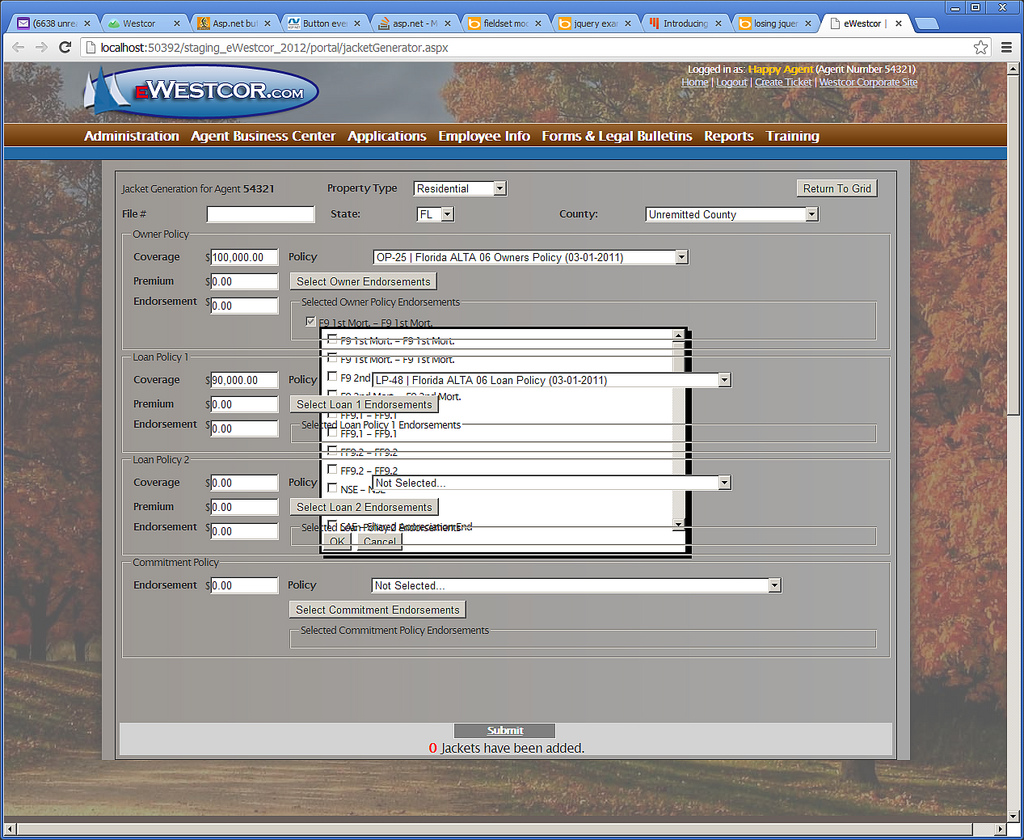
Don't? I'm beginning to despise it myself. Tired of using the toolkit and ending up with output that looks like this. It is just too flaky, especially when you nest controls.
Sean
Some days when I think about the next 30 years or so of my life I am going to spend writing code, I happily contemplate stepping off a curb in front of a fast moving bus.
-
Feb 28th, 2013, 04:00 PM
#23
Re: AJAX Advice?
Use jQuery so you own the page fully - working the DOM is not that hard - it's actually repetative.
That's why MS can make a product like asp.net with control toolkit's (that no one seems to like ?)...
At any rate - the SlickGrid is a totally powerful grid that is loaded with a simply json string from a web method - and then totally web-side so you can react to all the events you want yourself and use ajax calls to your own web methods.
 Posting Permissions
- You may not post new threads
- You may not post replies
- You may not post attachments
- You may not edit your posts
-
Forum Rules
|
Click Here to Expand Forum to Full Width
|



 Reply With Quote


