|

-
Dec 20th, 2012, 11:53 AM
#1
Thread Starter
New Member

Vba - find next empty column, insert column, copy paste values & copy paste formulas
WINDOWS 7
EXCEL 2010
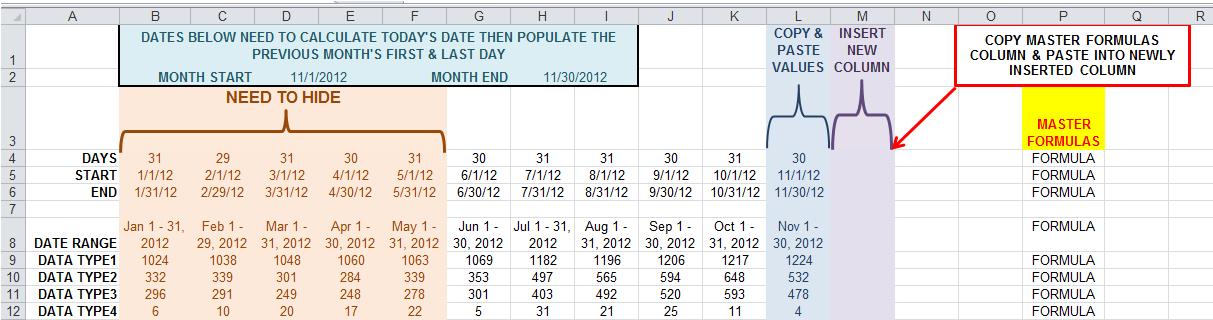
I am creating a report that will be updated monthly then create charts with the newly pulled data. I need to create code that will:
• Calculate current date, determine previous month's 1st and last dates
• find last column that contains data
• copy & paste values of that column (within that same column)
• find the next available blank column and insert a new column
• copy the master formula column
• paste formulas in the newly inserted column
• calculate
• Hide any columns older than 6 months.
-
Dec 21st, 2012, 03:44 AM
#2
Re: Vba - find next empty column, insert column, copy paste values & copy paste formu
you want someone to do this for you? or you have a question?
i do my best to test code works before i post it, but sometimes am unable to do so for some reason, and usually say so if this is the case.
Note code snippets posted are just that and do not include error handling that is required in real world applications, but avoid On Error Resume Next
dim all variables as required as often i have done so elsewhere in my code but only posted the relevant part
come back and mark your original post as resolved if your problem is fixed 
pete
-
Dec 21st, 2012, 11:29 AM
#3
Thread Starter
New Member
Re: Vba - find next empty column, insert column, copy paste values & copy paste formu
I'm a novice at VBA and know most of the coding, but putting it together seems to not work. I'm getting stumped.
-
Dec 22nd, 2012, 08:26 PM
#4
Re: Vba - find next empty column, insert column, copy paste values & copy paste formu
post what you have so far, with details as to what does not work, error, wrong result, nothing
alternatively post a sample workbook with the code, and details of what the correct results should be
as i only have an early version of excel i can only open .xls, so saveAs early version, then zip to post
i do my best to test code works before i post it, but sometimes am unable to do so for some reason, and usually say so if this is the case.
Note code snippets posted are just that and do not include error handling that is required in real world applications, but avoid On Error Resume Next
dim all variables as required as often i have done so elsewhere in my code but only posted the relevant part
come back and mark your original post as resolved if your problem is fixed
pete
Tags for this Thread
 Posting Permissions
- You may not post new threads
- You may not post replies
- You may not post attachments
- You may not edit your posts
-
Forum Rules
|
Click Here to Expand Forum to Full Width
|



 Reply With Quote
