|

-
Dec 14th, 2012, 08:56 AM
#1
Thread Starter
Addicted Member

Row level locking using OLEDB
Below code is to update a value of one row in MS-ACCESS db.
If i use the same code(sqldb) to update sql table , keeping break point on '.commit' then no other connection(user) can read or update the same row (a = 1), but can update other rows of same table
But for ms-access, keeping break point on '.commit', the entire table is locked for update(err:"could not update; currently locked") !?
Is there a way to lock single row using "oledb" ?
thank u.
Code:
Dim sConn As OleDbConnection
        sConn = New OleDbConnection("Provider=Microsoft.Jet.OLEDB.4.0;Data Source=\\Pc99\d\db\Accounts.mdb;")

        Dim sTransaction As OleDbTransaction
        Dim OleCmd As OleDbCommand
        Try
	    sConn.Open()
            OleCmd = New OleDbCommand("update tableA set b = b + 1 where a = 1", sConn)

            sTransaction = sConn.BeginTransaction()

            OleCmd.Transaction = sTransaction

            call OleCmd.ExecuteNonQuery()

	    sTransaction.Commit() 'commit transation

        Catch ex As Exception
            sTransaction.Rollback() 'rollback transaction
        End Try
-
Dec 14th, 2012, 09:12 AM
#2
Re: Row level locking using OLEDB
Locking is controlled via options in MS-Access not via OleDb
Attachment 94245
-
Dec 14th, 2012, 09:47 AM
#3
Thread Starter
Addicted Member
Re: Row level locking using OLEDB
default settings as below:
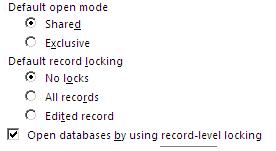
But still 'record level' locking is not working.
-
Dec 14th, 2012, 09:53 AM
#4
Re: Row level locking using OLEDB
 Originally Posted by winman

default settings as below:
But still 'record level' locking is not working.
Sorry, but that would be an issue with MS-Access not honoring your request, not much can be done about this and yet one reason among many not to use MS-Access.
Tags for this Thread
 Posting Permissions
- You may not post new threads
- You may not post replies
- You may not post attachments
- You may not edit your posts
-
Forum Rules
|
Click Here to Expand Forum to Full Width
|



 Reply With Quote


