|

-
Dec 2nd, 2012, 05:55 PM
#1
Thread Starter
Fanatic Member

 [RESOLVED] Chrome Only Autosuggest Issue [RESOLVED] Chrome Only Autosuggest Issue
I used php to create a CMS.
I made an autosuggest text box that queries my db using ajax. The autosuggestions have been popping up perfectly for almost a year. And then suddenly something strange started to happen in Google Chrome browser only.
Once the ajax query is called to fill the box with suggestions, to the left of the textbox it displays text as to how many results are available. This never showed up before. What can I do to stop it from happening?
Here's a pic of what I'm talking about:
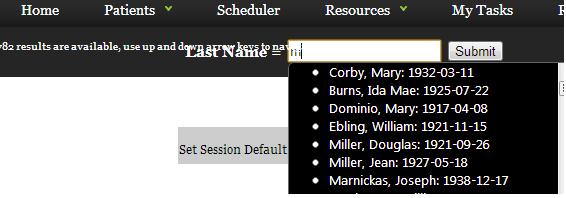
On my page here's the css and some of the script that governs the autosuggest box:
HTML Code:
<script src="http://ajax.googleapis.com/ajax/libs/jquery/1/jquery.min.js"></script>
<script src="http://ajax.googleapis.com/ajax/libs/jqueryui/1/jquery-ui.min.js"></script>
<style>
	.ui-autocomplete {
		max-height: 300px;
		width: 225px;
		overflow-y: auto;
		/* prevent horizontal scrollbar */
		overflow-x: hidden;
		/* add padding to account for vertical scrollbar */
		padding-right: 20px;
	}

</style>

<script type="text/javascript">

$(function() {


            $("#lookup").autocomplete({
                source: "admin_autosuggest.php?Company_ID=<?php echo $_SESSION['Company_ID']?>",
                minLength: 1,
                select: function(event, ui) {
                    $('#Patient_ID').val(ui.item.id);

                }
            });


        });
For my autosuggest box, here's the code:
HTML Code:
<td width="74%" align="left"><input name="lookup" type="text" id="lookup" /><input name="Patient_ID" type="hidden" id="Patient_ID" />
Not sure if I need to give any more code. So how do I get rid of the text that shows up when the autosuggest happens? Is it a CSS thing?
Thank you.
-
Dec 3rd, 2012, 05:39 PM
#2
Re: Chrome Only Autosuggest Issue
Did you forget to include the jQuery UI css file? I would also not recommend linking to the "latest" js on the Google CDN, and instead link directly to a specific version. That way, you don't get caught out by new releases that have breaking changes or unintended bugs.
HTML Code:
<link rel="stylesheet" href="//ajax.googleapis.com/ajax/libs/jqueryui/1.9.2/themes/smoothness/jquery-ui.css" />
If you use protocol relative URLs then the browser will fetch the resource via HTTPS or HTTP depending on what the current page is being viewed through.
Last edited by tr333; Dec 13th, 2012 at 08:28 AM.
-
Dec 3rd, 2012, 08:45 PM
#3
Thread Starter
Fanatic Member
Re: Chrome Only Autosuggest Issue
Thank you so so much. tr333, that solved my problem. I owe you.
I will read more about your suggestions also.
-
Dec 13th, 2012, 08:28 AM
#4
Re: Chrome Only Autosuggest Issue
Glad to hear you got it fixed 
I'm surprised that the Google CDN page doesn't list the CSS content resources for jQuery UI. It's a bit pointless to be just using the JS without CSS for most of it, unless you're just using the fx/resize/etc.
-
Dec 21st, 2012, 07:26 AM
#5
Registered User
Re: Chrome Only Autosuggest Issue
 Originally Posted by tr333

Did you forget to include the jQuery UI css file? I would also not recommend linking to the "latest" js on the Google CDN, and instead link directly to a specific version. That way, you don't get caught out by new releases that have breaking changes or unintended bugs.
HTML Code:
<link rel="stylesheet" href="//ajax.googleapis.com/ajax/libs/jqueryui/1.9.2/themes/smoothness/jquery-ui.css" />
If you use protocol relative URLs then the browser will fetch the resource via HTTPS or HTTP depending on what the current page is being viewed through.
thanks for your information nice
 Posting Permissions
- You may not post new threads
- You may not post replies
- You may not post attachments
- You may not edit your posts
-
Forum Rules
|
Click Here to Expand Forum to Full Width
|



 Reply With Quote