|

-
Nov 24th, 2012, 05:53 AM
#1
Thread Starter
Member

 Program destruction, then downloads a new version. Program destruction, then downloads a new version.
Hello, I need help with something. I need a way of updating that involves destroying the current .exe and then downloading the most recent version. I read about this and I think possibly a BAT would do what I need. I already have a check for updates code that gets read when form1 loads. the reason I need this is because I dont want to have to wait a long time for each update to download when if I do this it will be a 5-10 second proccess. i know its possible to do this as I have seen it done before. Here is my code so far:
Code:
        Dim request As System.Net.HttpWebRequest = System.Net.HttpWebRequest.Create("https://dl.dropbox.com/u/48466223/Updater Test/Update.txt")


        Dim response As System.Net.HttpWebResponse = request.GetResponse()


        Dim sr As System.IO.StreamReader = New System.IO.StreamReader(response.GetResponseStream())
        Dim newestversion As String = sr.ReadToEnd()
        Dim currentversion As String = Application.ProductVersion
        If newestversion.Contains(currentversion) Then


        Else


            If MessageBox.Show("Do you want to Update?", "There is a new version.", MessageBoxButtons.YesNo, MessageBoxIcon.Question) = DialogResult.Yes Then
                System.Diagnostics.Process.Start("https://dl.dropbox.com/u/48466223/Updater Test/Advanced Updater.exe")
            End If
        End If
        Label1.Text = System.AppDomain.CurrentDomain.BaseDirectory
    End Sub
-
Nov 24th, 2012, 06:47 AM
#2
Re: Program destruction, then downloads a new version.
You could just use ClickOnce deployment, which has automatic updates built in.
-
Nov 24th, 2012, 03:14 PM
#3
Thread Starter
Member
Re: Program destruction, then downloads a new version.
 Originally Posted by jmcilhinney

You could just use ClickOnce deployment, which has automatic updates built in.
Hi, if I use clickonce could I import it for my current project, or do I have to make a whole new project? If I could import it into my current project could you explain In detail how to do it? Thanks!
-
Nov 24th, 2012, 06:26 PM
#4
Re: Program destruction, then downloads a new version.
You simply use the Publish feature built into VS and VB Express to create a ClickOnce installer. In theory, you don't have to make any changes to your application project at all. You can configure ClickOnce using the Publish page of the project properties and then simply select Publish from the Build menu thereafter. ClickOnce does have some limitations and caveats though, so you should definitely do a bit of reading on the subject at MSDN and elsewhere to make sure that it suits.
-
Nov 24th, 2012, 10:36 PM
#5
Thread Starter
Member
Re: Program destruction, then downloads a new version.
Originally Posted by jmcilhinney
You simply use the Publish feature built into VS and VB Express to create a ClickOnce installer. In theory, you don't have to make any changes to your application project at all. You can configure ClickOnce using the Publish page of the project properties and then simply select Publish from the Build menu thereafter. ClickOnce does have some limitations and caveats though, so you should definitely do a bit of reading on the subject at MSDN and elsewhere to make sure that it suits.
I need a new way of doing this as this isnt EXACTLY what i was looking for, I know there is a solution that is PERFECT for me, but I have no idea on how to make it. I want something where when you open the program it automatically checks for updates and if there are any it ask if you want to update then it closes and a .BAT opens, deletes the .exe and downloads a new one in the exact location. FAST. EASY. SIMPLE. Do you have any clue how this could be done?
-
Nov 24th, 2012, 10:44 PM
#6
Re: Program destruction, then downloads a new version.
As mentioned... ClickOnce... that's what it does... you publish it to a location (it can be local or to a web server, or a server, doesn't matter) ... the user clicks on the link, it downloads and installs... the next time they run the app, it checks to see if there is a new version, if so, it is downloaded, installed and then runs... what does it not do that you want it to do?
The alternative is to use a bootstrap app that checks & downloads and installs updates for you, then starts up the app when it's done... which is what ClickOnce does.
-tg
-
Nov 24th, 2012, 10:45 PM
#7
Re: Program destruction, then downloads a new version.
Well, what you just described would have the same end result as using ClickOnce except that ClickOnce is easier. It will automatically check for updates at startup and optionally prompt the user to download the update if you want. It will then download the update and replace the old installation. Exactly what you want except no need for a batch file or any code at all. What exactly is it about ClickOnce that you think is not suited to your situation?
-
Nov 24th, 2012, 11:14 PM
#8
Thread Starter
Member
Re: Program destruction, then downloads a new version.
Originally Posted by jmcilhinney
Well, what you just described would have the same end result as using ClickOnce except that ClickOnce is easier. It will automatically check for updates at startup and optionally prompt the user to download the update if you want. It will then download the update and replace the old installation. Exactly what you want except no need for a batch file or any code at all. What exactly is it about ClickOnce that you think is not suited to your situation?
Here is the thing, when i tried to use clickonce I couldnt figure out a Update path, can you explain to me exactly how to set it up correctly?
-
Nov 25th, 2012, 03:40 AM
#9
Re: Program destruction, then downloads a new version.
What exactly do you mean by an update path? It sounds to me like you're trying to make this hard when it's very, very simple. Have you actually done any reading about ClickOnce, as I suggested in post #4?
-
Nov 25th, 2012, 02:23 PM
#10
Thread Starter
Member
Re: Program destruction, then downloads a new version.
Originally Posted by jmcilhinney
What exactly do you mean by an update path? It sounds to me like you're trying to make this hard when it's very, very simple. Have you actually done any reading about ClickOnce, as I suggested in post #4?
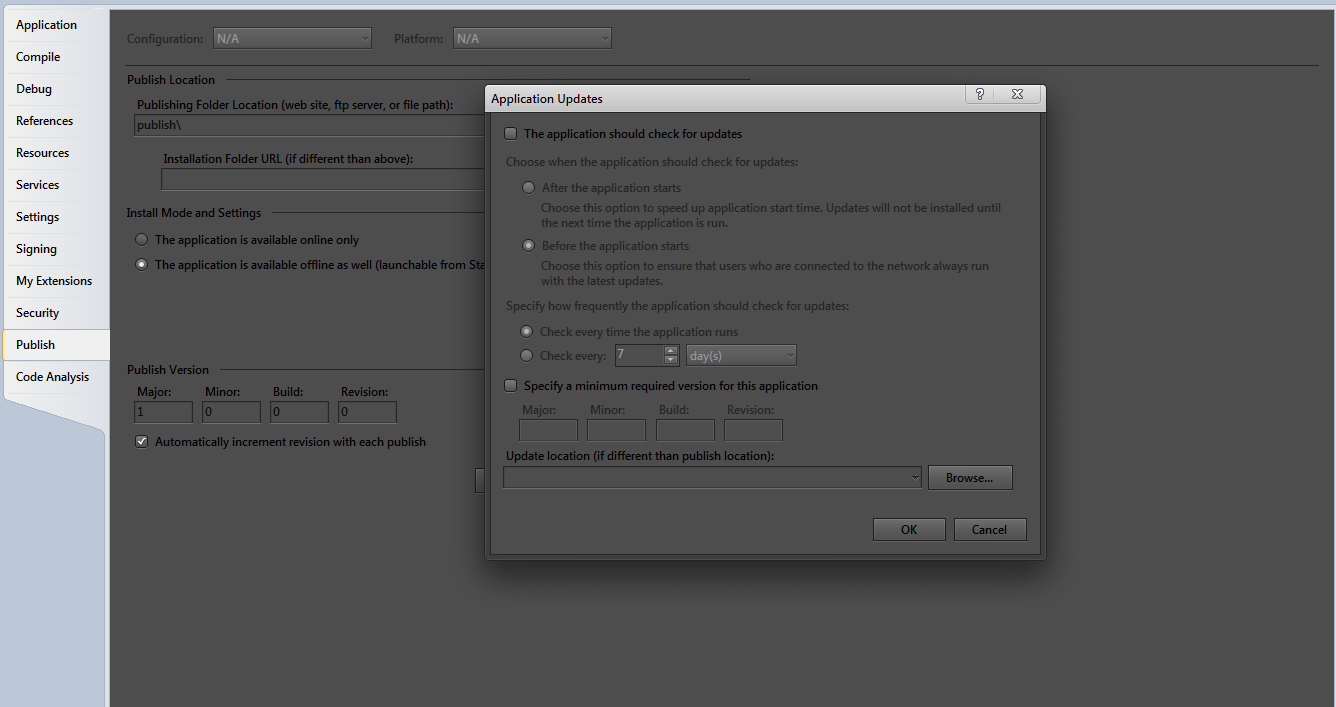
I have done ALOT of reading about this, I just dont understand how to setup the update location, is the location on my computer or on a share site such as dropbox? (If it is on dropbox then that would be great). I have attached a screenshot of what I'm talking about. All i want to know is if it is on my computer or dropbox. Thanks!
-
Nov 25th, 2012, 08:48 PM
#11
Re: Program destruction, then downloads a new version.
That is the location that the application should look for updates. If you click the ? on the title bar of that dialogue it will open the relevant documentation and, for that field, it says:
Specify the location of the application updates. This must be an HTTP or UNC location.
Basically that is a single server location, on your LAN, intranet or the internet, where you will place the updates and all clients will then retrieve them from that one location. While I've never tried it, presumably Dropbox would be suitable.
-
Nov 26th, 2012, 05:40 PM
#12
Thread Starter
Member
Re: Program destruction, then downloads a new version.
Originally Posted by jmcilhinney
That is the location that the application should look for updates. If you click the ? on the title bar of that dialogue it will open the relevant documentation and, for that field, it says:Basically that is a single server location, on your LAN, intranet or the internet, where you will place the updates and all clients will then retrieve them from that one location. While I've never tried it, presumably Dropbox would be suitable.
Last question, If i use dropbox or something similar do you I point the path to the folder of which all of the needed application files are located? like say they are in mydrop\publicfile\APPNAME\ Would I just put that path or do i put where the .exe is located?
-
Nov 26th, 2012, 05:45 PM
#13
Hyperactive Member
Re: Program destruction, then downloads a new version.
You only point it to the folder, not the EXE itself. The IDE will then create an installer and other necessary files for ClickOnce to work.
-
Nov 26th, 2012, 06:06 PM
#14
Thread Starter
Member
Re: Program destruction, then downloads a new version.
Originally Posted by samuelk
You only point it to the folder, not the EXE itself. The IDE will then create an installer and other necessary files for ClickOnce to work.
When I go to publish it shows this:

Can you give me example paths for an update location and what you use to do the feature. Eg: Dropbox
-
Nov 26th, 2012, 06:11 PM
#15
Re: Program destruction, then downloads a new version.
Also, to answer your original question.....Windows allows running EXEs to be renamed so if you are using your own auto update infrastructure, what you do is rename the EXE, copy in the new EXE, run it and exit the current instance, the new instance should check for the renamed older version and delete it.
I wrote my own auto update components a few years back and this is how I achieved it.
-
Nov 26th, 2012, 07:40 PM
#16
Thread Starter
Member
Re: Program destruction, then downloads a new version.
I'm aware of that way of updating, but thanks for sharing your knowledge!
-
Nov 27th, 2012, 09:11 AM
#17
Hyperactive Member
Re: Program destruction, then downloads a new version.
Originally Posted by pancakesplatter
Can you give me example paths for an update location and what you use to do the feature. Eg: Dropbox
Between \\localhost and \Users, try putting C$ (with C being the drive on which the path exists.
-
Nov 27th, 2012, 09:21 AM
#18
Re: Program destruction, then downloads a new version.
It's still not a valid (proper) update URL... because that's where any client is going to look... which means each client WILL LOOK TO ITSELF for the update... you can't publish to your desktop and expect everyone else to be able to access it...
Dropbox should work... IF you use the PUBLIC address for the dropbox... in one statement you're saying "I want to use X" ... but then in your next post, you're doing "L" ...
-tg
-
Nov 27th, 2012, 09:41 PM
#19
Thread Starter
Member
Re: Program destruction, then downloads a new version.
Originally Posted by techgnome
It's still not a valid (proper) update URL... because that's where any client is going to look... which means each client WILL LOOK TO ITSELF for the update... you can't publish to your desktop and expect everyone else to be able to access it...
Dropbox should work... IF you use the PUBLIC address for the dropbox... in one statement you're saying "I want to use X" ... but then in your next post, you're doing "L" ...
-tg
I checked, dropbox dosnt support links for just a folder, only links to things within the folders, so dropbox will not work, what do you recomment?
Tags for this Thread
 Posting Permissions
- You may not post new threads
- You may not post replies
- You may not post attachments
- You may not edit your posts
-
Forum Rules
|
Click Here to Expand Forum to Full Width
|



 Reply With Quote


