|

-
Nov 15th, 2012, 12:35 AM
#1
Thread Starter
Junior Member

 [RESOLVED] Compile Error [RESOLVED] Compile Error
I have an error when I try to run the program after inserting some code.
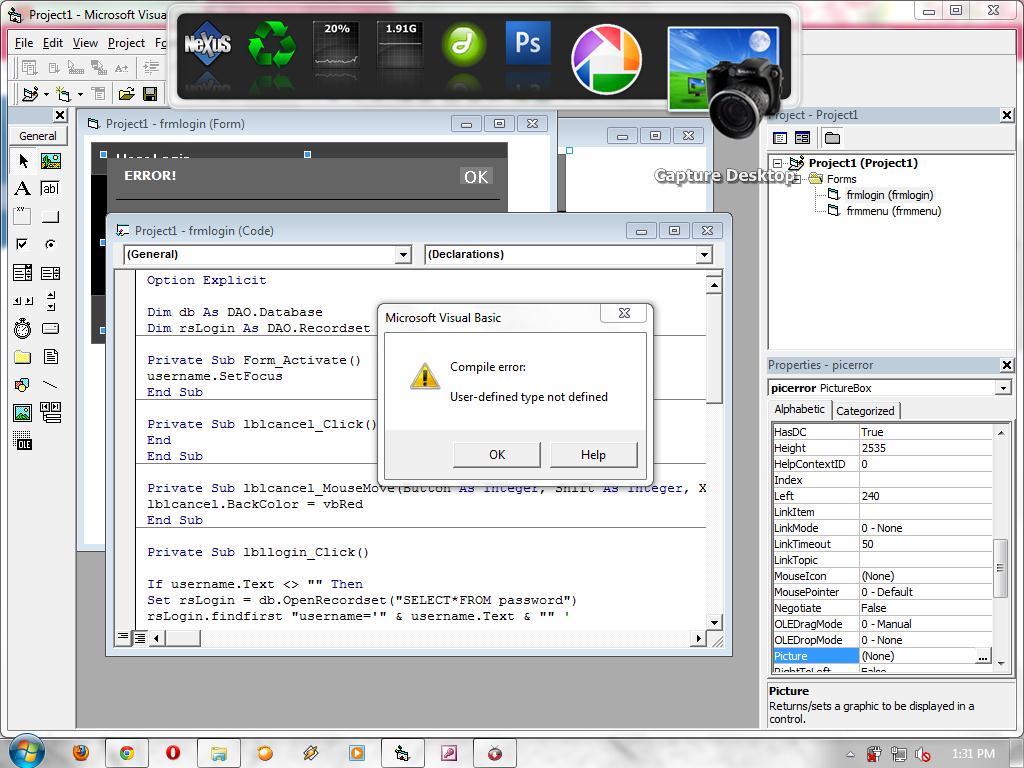
VB6 Code
Code:
Option Explicit

Dim db As DAO.Database
Dim rsLogin As DAO.Recordset

Private Sub Form_Activate()
username.SetFocus
End Sub

Private Sub lblcancel_Click()
End
End Sub

Private Sub lblcancel_MouseMove(Button As Integer, Shift As Integer, X As Single, Y As Single)
lblcancel.BackColor = vbRed
End Sub

Private Sub lbllogin_Click()

If username.Text <> "" Then
Set rsLogin = db.OpenRecordset("SELECT*FROM password")
rsLogin.findfirst "username='" & username.Text & "" '
If Not rsLogin.NoMatch Then
If password.Text <> "" Then
If rsLogin.feilds!password = password.Text Then
frmmenu.Show
Unload Me
Else
picerror.Visible = True
username = ""
password = ""

End If
End Sub

Private Sub lbllogin_MouseMove(Button As Integer, Shift As Integer, X As Single, Y As Single)
lbllogin.BackColor = vbRed
End Sub

Private Sub lblok_Click()
picerror.Visible = False
End Sub

Private Sub password_GotFocus()
password.BackColor = &H808080
End Sub

Private Sub password_LostFocus()
password.BackColor = &H404040
End Sub

Private Sub picbottom_MouseMove(Button As Integer, Shift As Integer, X As Single, Y As Single)
lbllogin.BackColor = &H808080
lblcancel.BackColor = &H808080
End Sub

Private Sub username_GotFocus()
username.BackColor = &H808080
End Sub

Private Sub username_LostFocus()
username.BackColor = &H404040
End Sub
-
Nov 15th, 2012, 06:04 AM
#2
New Member
Re: Compile Error
Suspect = If rsLogin.feilds!password = password.Text Then
-
Nov 15th, 2012, 09:18 AM
#3
Re: Compile Error
yep
Code:
If rsLogin.feilds!password = password.Text Then
Also you really should not be using DAO, ADO is the preferred method for working with data in VB6 DAO is way outdated.
-
Nov 15th, 2012, 09:26 AM
#4
Thread Starter
Junior Member
Re: Compile Error
I'll try it ^^
I dont rly sure how ADO works.
-
Nov 15th, 2012, 10:20 AM
#5
-
Nov 15th, 2012, 11:38 AM
#6
Thread Starter
Junior Member
Re: Compile Error
I tried to understand the tutorial but theres some art that I cant understand.
And the code, I still have error after changing the words.
-
Nov 15th, 2012, 11:42 AM
#7
Re: Compile Error
Regardless of whether you are doing to use ADO or DAO, you MUST set a reference to it before using it.
Your error message is "User defined type not defined" I suspect that is because it doesn't know what "As DAO.Database" is
-
Nov 15th, 2012, 12:22 PM
#8
Thread Starter
Junior Member
Re: Compile Error
How can I fix that? I tried to change it and getting more error
-
Nov 15th, 2012, 03:19 PM
#9
Re: Compile Error
Did you add Microsoft's DAO Object Library as a Reference to your project? (Reference Hack's post)
-
Nov 15th, 2012, 07:05 PM
#10
Thread Starter
Junior Member
Re: Compile Error
I dont really know how to set it. i'll search online for it.
-
Nov 15th, 2012, 08:06 PM
#11
Thread Starter
Junior Member
Re: Compile Error
i found a link to aet the reference. I'm still trying to understand it.
http://support.microsoft.com/kb/825796
-
Nov 16th, 2012, 11:47 AM
#12
Re: Compile Error
Click project on the top menu bar
Click on references
scroll down to locate Microsoft DAO 3.6
Put a check mark in the box
Click OK
-
Nov 16th, 2012, 09:39 PM
#13
Thread Starter
Junior Member
Re: Compile Error
I already check that checkbox.
Here what I got ticked
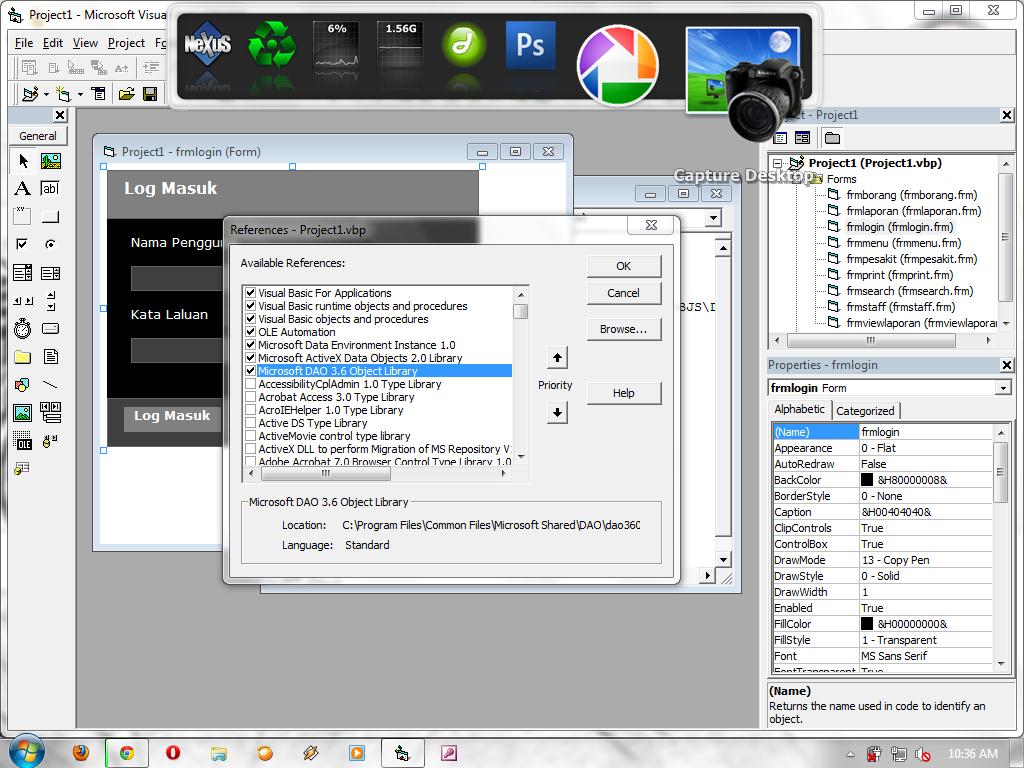
Is there anything I shouldnt mark?
-
Nov 17th, 2012, 05:55 AM
#14
Lively Member
Re: Compile Error
There may be the mistake in typing name of an object in your code. Actual name and typed name in code may be different. Post your zip file to check it.
-
Nov 17th, 2012, 08:41 AM
#15
Thread Starter
Junior Member
Re: Compile Error
I insert the database from desktop into this file.2nd.zip
-
Nov 17th, 2012, 08:48 AM
#16
Re: Compile Error
Which line gives you the error?
Did you change the line pointed out in posts #2 and #3?
Are you still getting the same error message?
-
Nov 18th, 2012, 02:13 AM
#17
Re: Compile Error
Just attempting to compile your code gives:
1. In frmlogin: Sub or Function Not Defined - 'opendb' - You dont have a SubRoutine named 'opendb' anywhere
2. In frmmenu: Sub or Function Not Defined - 'unloadme' - I suspect that's a typo and should be 'Unload Me'
3. In frmstaff: Method or Data Member not Found - 'With db.Recordset' - The Database Object, 'db' does not have a 'RecordSet' property (it has RecordSets(n) property but I doubt if you mean to use it)
I suspect that once you've resolved those issues the next one will be:
In frmstaff: Set patient = cerrentdb.OpenDatabase("C:\Users\BJS\Desktop\db.mdb")
as neither 'patient' or 'cerrentdb' are defined anywhere and 'patient' is never referenced again. Even if you meant 'currentdb' there's no such Object defined anywhere.
(there's no 'Option Explicit' statement in that Form so it will 'explode' at run-time. In fact the only place you have Option Explicit is in frmlogin - I strongly suggest you put it into all your Forms)
closley followed by this one:
In frmlogin: rsLogin.FindFirst "username='" & namapengguna.Text & "" '
(look at where the second single quotation mark is)
Also, you shouldn't use the 'End' statement (see frmlogin) to end your program as it just terminates the Application without gracefully releasing resources in an orderly manner. A 'standard' method of closing properly is to use the 'Unload' statement to unload all your Forms, in a loop, in order to terminate the Program properly.
As you're not using ADODB I suggest you remove it from the Project References since, as it's 'higher up the food chain', i.e. ADO appears in the References before the reference to DAO, if you forget to fully qualify a RecordSet definition (i.e. you use: 'Dim rs As RecordSet') 'rs' will be defined as an ADODB RecordSet not a DAO RecordSet. Better still, as has been suggested earlier, use ADO in place of DAO; there's lots of tutorials around, the migration is not difficult and there's loads of people here that can advise and help you.
Last edited by Doogle; Nov 18th, 2012 at 03:21 AM.
Reason: Spelling - how can you spell ADO incorrectly?! !
-
Nov 18th, 2012, 06:20 AM
#18
Thread Starter
Junior Member
Re: Compile Error
@DataMiser
Its a different error
@Doogle
I will try what you just said.
-
Nov 19th, 2012, 10:23 PM
#19
Thread Starter
Junior Member
Re: Compile Error
I change the code completely with all the help i get.
Here r the codes
Code:
Private Sub admin_Click()
'For Admin Login
    db.Open
    Set rs = db.Execute("SELECT * FROM Login where l_nm='" & usernametxt.Text & "'")
    If (passwordtxt = "" And usernametxt = "") Then
       MsgBox "Login not possible"
    Else
    If Not rs.EOF() Then
    'rs = recordset
    'EOF = End Of File
    'EOF recordsets used them to allow you to determine if you were at the end of the recordset or not
        If (rs(1) = passwordtxt.Text) Then

            frmmenu.Show
            Unload Me
        Else
            MsgBox "Login not success"
        End If
    Else
        MsgBox "EOF Reached"
    End If
End If
    db.Close
End Sub

Private Sub exit_Click()
Unload Me
End Sub

Private Sub Form_Load()
connectdb
End Sub

Private Sub staff_Click()
' For Staffs Login
    db.Open
    Set rs = db.Execute("SELECT * FROM staff where l_nm='" & usernametxt.Text & "'")
    If Not rs.EOF() Then
        If (rs(1) = passwordtxt.Text) Then

            frmmenu1.Show
            Unload Me
        Else
            MsgBox "Login not success"
        End If
    Else
        MsgBox "Invalid Username or Password"
    End If
    db.Close
End Sub
 Posting Permissions
- You may not post new threads
- You may not post replies
- You may not post attachments
- You may not edit your posts
-
Forum Rules
|
Click Here to Expand Forum to Full Width
|



 Reply With Quote

