|

-
Aug 31st, 2012, 01:31 PM
#1
 [RESOLVED] Parsing RoboCopy Log With Strings [RESOLVED] Parsing RoboCopy Log With Strings
I'm trying to parse a RoboCopy log to get the possible failures. An example of the end of the log is here:
Code:
     Total    Copied   Skipped  Mismatch    FAILED    Extras
    Dirs :         1         1
0         0         0         0
   Files :       106       106         0         0         0         0
   Bytes :  481.53 m  481.53 m 0         0         0         0
   Times :   0:00:11   0:00:10                       0:00:00   0:00:00
I've managed to pull the lines of data I need:
VB.NET Code:
Dim file_lines As String() = File.ReadAllLines("C:\log.txt") For Each line As String In file_lines If line.Length >= 10 Then Select Case True Case line.Substring(0, 10).ToLower.Contains("files :") Dim new_line As String = line.ToLower.Replace("files :", "") Me.txtFiles.Text = new_line.Trim Case line.Substring(0, 10).ToLower.Contains("dirs :") Dim new_line As String = line.ToLower.Replace("dirs :", "") Me.txtDirectories.Text = new_line.Trim Case line.Substring(0, 10).ToLower.Contains("bytes :") Dim new_line As String = line.ToLower.Replace("bytes :", "") Me.txtBytes.Text = new_line.Trim End Select End If Next
Which returns the data like this:
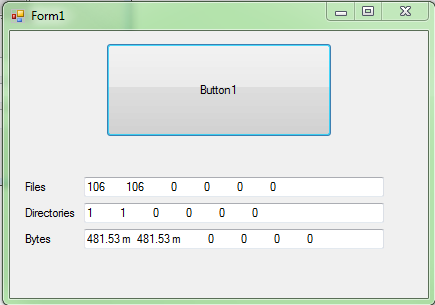
Which looks good. I know the index of columns I need to grab, but I don't how to pull that data from this string. Any ideas on how to get each column as needed? For example, if I only needed to grab column index 4, what would be the best way of doing it?
Thanks
CodeBank contributions: Process Manager, Temp File Cleaner
 Originally Posted by SJWhiteley
"game trainer" is the same as calling the act of robbing a bank "wealth redistribution"....
-
Aug 31st, 2012, 01:51 PM
#2
Re: Parsing RoboCopy Log With Strings
Dim files() As String = Split(Me.txtFiles.Text, " ")
This assigns the values individually to an array, so the 4th column value would be ... files(3)
-
Aug 31st, 2012, 02:18 PM
#3
Re: Parsing RoboCopy Log With Strings
Originally Posted by dunfiddlin

Dim files() As String = Split(Me.txtFiles.Text, " ")
This assigns the values individually to an array, so the 4th column value would be ... files(3)
Just to clarify, I want the 5th item, not 4th. Which is why I said the index 4. But that's mostly irrelevant.
I had to play around with this a bit more, but was able to get the desired results. Thanks
CodeBank contributions: Process Manager, Temp File Cleaner
Originally Posted by SJWhiteley
"game trainer" is the same as calling the act of robbing a bank "wealth redistribution"....
 Posting Permissions
- You may not post new threads
- You may not post replies
- You may not post attachments
- You may not edit your posts
-
Forum Rules
|
Click Here to Expand Forum to Full Width
|



 Reply With Quote
