|

-
Aug 28th, 2012, 04:50 AM
#1
Thread Starter
Fanatic Member

How can I get this to work?
Hi guys, I have my application which will allow users to build a sql filter. Now in the database it will store the filter like this
so the field is "Filter" now the filter I've created it db.OpenRecordset("SELECT * FROM `Databases` WHERE `Agent` = " & "'" & Form1.Text1.Text & "'")
When a user clicks command 1 text2.text becomes "db.OpenRecordset("SELECT * FROM `Databases` WHERE `Agent` = " & "'" & Form1.Text1.Text & "'")"
and then when command 2 is clicked it connects to the database and Set rs = text2.text
but that don't work it comes up an error.
any ideas?
Thanks
-
Aug 28th, 2012, 05:12 AM
#2
Re: How can I get this to work?
Send yourself this post in an email and read it. What would be the first thought you would have? It should be what does "but that don't work it comes up an error." mean?
Post some code and the issue you are having. Are there errors, just no data, what part "doesn't work".
Once you do that I'll try and help and I'm guessing others will too.
-
Aug 28th, 2012, 05:53 AM
#3
Re: How can I get this to work?
I'd lay odds on that it's a 'Type Mismatch' error.
You can't assign String Type data to a RecordSet Object. What you'll need is something like:
Code:
Text2.Text = "SELECT * FROM Databases WHERE Agent = '" & Text1.Text & "'"
to set-up the SQL statement.
and
Code:
Set rs = db.OpenRecordSet(Text2.Text)
to execute the query
EDIT: I think you'd be better off reading up on Stored Procedures and also consider using ADODB rather that DAO.
Last edited by Doogle; Aug 28th, 2012 at 06:05 AM.
-
Aug 28th, 2012, 09:06 AM
#4
Thread Starter
Fanatic Member
Re: How can I get this to work?
Hi mate, Thanks for your reply. I tried your code above and for some reason I get the following error. Any ideas on how I can fix it?
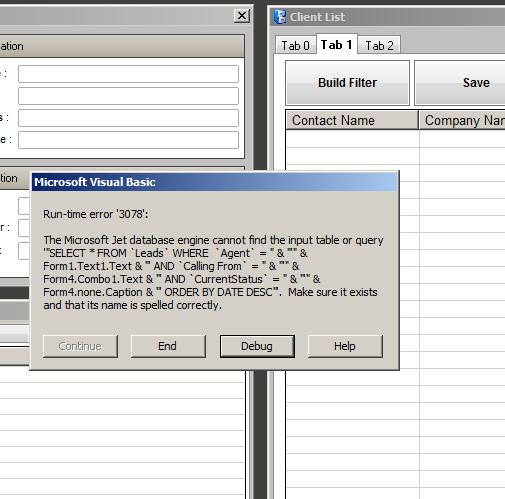
-
Aug 28th, 2012, 09:11 AM
#5
Re: How can I get this to work?
Show your code, sounds like you are trying to open in table mode which will not work with a query.
-
Aug 28th, 2012, 09:19 AM
#6
Thread Starter
Fanatic Member
Re: How can I get this to work?
Dim db As Database
Dim rs As Recordset
Dim ds As Recordset
Dim WS As Workspace
Dim dbfile As Variant
Dim pwdstring As Variant
Set WS = DBEngine.Workspaces(0)
dbfile = ("\\server\Data\maindb.mdb")
pwdstring = "pass123"
Set db = DBEngine.OpenDatabase(dbfile, False, False, ";PWD=" & pwdstring)
Set rs = db.OpenRecordset(Text2.Text)
ListView1.ListItems.Clear
Do While Not rs.EOF
Dim lvwItem1 As ListItem
Set lvwItem1 = Form4.ListView1.ListItems.Add(, , "" & rs.Fields("Contact Name").value)
lvwItem1.SubItems(1) = "" & rs("Company Name")
lvwItem1.SubItems(2) = "" & rs("Date")
lvwItem1.SubItems(3) = "" & rs("Time")
lvwItem1.SubItems(4) = "" & rs("leadid")
lvwItem1.SubItems(5) = "" & rs("CurrentStatus")
lvwItem1.SubItems(6) = "" & rs("Phone Number")
lvwItem1.SubItems(7) = "" & rs("Contact Number2")
lvwItem1.SubItems(8) = "" & rs("Mobile")
lvwItem1.SubItems(9) = "" & rs("Email Address")
lvwItem1.SubItems(10) = "" & rs("Job Title")
lvwItem1.SubItems(11) = "" & rs("Website")
lvwItem1.SubItems(12) = "" & rs("linkedin")
lvwItem1.SubItems(13) = "" & rs("registrationnumber")
lvwItem1.SubItems(14) = "" & rs("companyof")
lvwItem1.SubItems(15) = "" & rs("businesstype")
rs.MoveNext
Loop
rs.Close
-
Aug 28th, 2012, 12:56 PM
#7
Re: How can I get this to work?
Ok So what exactly is the value of text2.Text when it gets to the line to open the recordset?
If it is like what shows in your error message then there are several issues msotly resulting from the fact that you can not put code into a text box and expect it to execute. Whatever ends up in the text box has to be a valid SQL query it needs to have the value of the textbox not the works textbox and the & signs and quotes all of that is a problem if it is in the textbox when the rs.open is called.
Last edited by DataMiser; Aug 28th, 2012 at 01:00 PM.
 Posting Permissions
- You may not post new threads
- You may not post replies
- You may not post attachments
- You may not edit your posts
-
Forum Rules
|
Click Here to Expand Forum to Full Width
|



 Reply With Quote
