|

-
Aug 25th, 2012, 03:38 AM
#1
Thread Starter
Lively Member

XNA Corrupted memory
Hello,
I've found this content class on the internet. I'm trying to use it for 2 pictureboxes so I can draw a map and a tileset (for a tilemap editor).
Code:
Public Class clsContent

    Public Class GameContent

        Public Content As ContentManager
        Private ServiceHelper As New ServiceHelper

        Public Sub New(GraphicsDevice As GraphicsDevice)
            ServiceHelper.GraphicsDeviceService(GraphicsDevice)
            Me.Content = New Content.ContentManager(ServiceHelper)
            Me.Content.RootDirectory = "Content"
        End Sub

    End Class

    Public Class ServiceHelper
        Implements IServiceProvider
        Implements IGraphicsDeviceService

        Public Function GetService(ByVal serviceType As System.Type) As Object Implements System.IServiceProvider.GetService
            Return Me
        End Function

        Public Event DeviceCreated(ByVal sender As Object, ByVal e As System.EventArgs) Implements Microsoft.Xna.Framework.Graphics.IGraphicsDeviceService.DeviceCreated
        Public Event DeviceDisposing(ByVal sender As Object, ByVal e As System.EventArgs) Implements Microsoft.Xna.Framework.Graphics.IGraphicsDeviceService.DeviceDisposing
        Public Event DeviceReset(ByVal sender As Object, ByVal e As System.EventArgs) Implements Microsoft.Xna.Framework.Graphics.IGraphicsDeviceService.DeviceReset
        Public Event DeviceResetting(ByVal sender As Object, ByVal e As System.EventArgs) Implements Microsoft.Xna.Framework.Graphics.IGraphicsDeviceService.DeviceResetting

        Private _gd As GraphicsDevice

        Public Sub GraphicsDeviceService(ByVal gd As GraphicsDevice)
            _gd = gd
        End Sub

        Public ReadOnly Property GraphicsDevice() As Microsoft.Xna.Framework.Graphics.GraphicsDevice Implements Microsoft.Xna.Framework.Graphics.IGraphicsDeviceService.GraphicsDevice
            Get
                Return _gd
            End Get
        End Property
    End Class

End Class
this is the code where it initializes the spritebatch
Code:
Module modPublics

    Public GDevice_MAP As GraphicsDevice
    Public SBatch_MAP As SpriteBatch

    Public GDevice_TILESET As GraphicsDevice
    Public SBatch_TILESET As SpriteBatch

    Public OurContent As clsContent.GameContent

    Public Tileset As Texture2D = Nothing
    Public Mapset As Texture2D = Nothing

    Public Function InitalizeGraphics_MAP(ByRef Surface As PictureBox) As Boolean

        Dim retValue As Boolean

        Try
            Dim PParam As New PresentationParameters
            PParam.PresentationInterval = PresentInterval.Immediate
            PParam.DeviceWindowHandle = Surface.Handle
            PParam.IsFullScreen = False

            Dim GAdapter As GraphicsAdapter = GraphicsAdapter.Adapters.Item(0)
            GDevice_MAP = New GraphicsDevice(GAdapter, GraphicsProfile.HiDef, PParam)

            OurContent = New clsContent.GameContent(GDevice_MAP)
            OurContent.Content.RootDirectory = "Content"

            SBatch_MAP = New SpriteBatch(GDevice_MAP)

            '//LOAD GRAPHICS
            LoadGraphics()

            retValue = True

        Catch ex As Exception

            retValue = False
            MsgBox(ex.Message)

        End Try

        Return retValue

    End Function

    Public Function InitalizeGraphics_TILESET(ByRef Surface As PictureBox) As Boolean

        Dim retValue As Boolean

        Try
            Dim PParam As New PresentationParameters
            PParam.PresentationInterval = PresentInterval.Immediate
            PParam.DeviceWindowHandle = Surface.Handle
            PParam.IsFullScreen = False

            Dim GAdapter As GraphicsAdapter = GraphicsAdapter.Adapters.Item(0)
            GDevice_TILESET = New GraphicsDevice(GAdapter, GraphicsProfile.HiDef, PParam)

            OurContent = New clsContent.GameContent(GDevice_TILESET)
            OurContent.Content.RootDirectory = "Content"

            SBatch_TILESET = New SpriteBatch(GDevice_TILESET)

            '//LOAD GRAPHICS
            LoadGraphics()

            retValue = True

        Catch ex As Exception

            retValue = False
            MsgBox(ex.Message)

        End Try

        Return retValue

    End Function

    Private Sub LoadGraphics()

        Try

            '//TILES
            Tileset = OurContent.Content.Load(Of Texture2D)("Content/Graphics/Tilesets/0")
            ' Mapset = OurContent.Content.Load(Of Texture2D)("Content/Graphics/Tilesets/0")

        Catch ex As Exception

            MessageBox.Show(ex.Message & " - LoadGraphics")

        End Try

    End Sub

End Module
Code:
    Private Sub frmMain_Load(sender As System.Object, e As System.EventArgs) Handles MyBase.Load

        InitalizeGraphics_TILESET(picTILESET)
        InitalizeGraphics_MAP(picMAP)

    End Sub
But the problem is that when I start drawing my application says:
"Attempted to read or write protected memory. This is often an indication that other memory is corrupt."
I'm using a diffrent spritebatch for the map and for the tileset as you can see above.
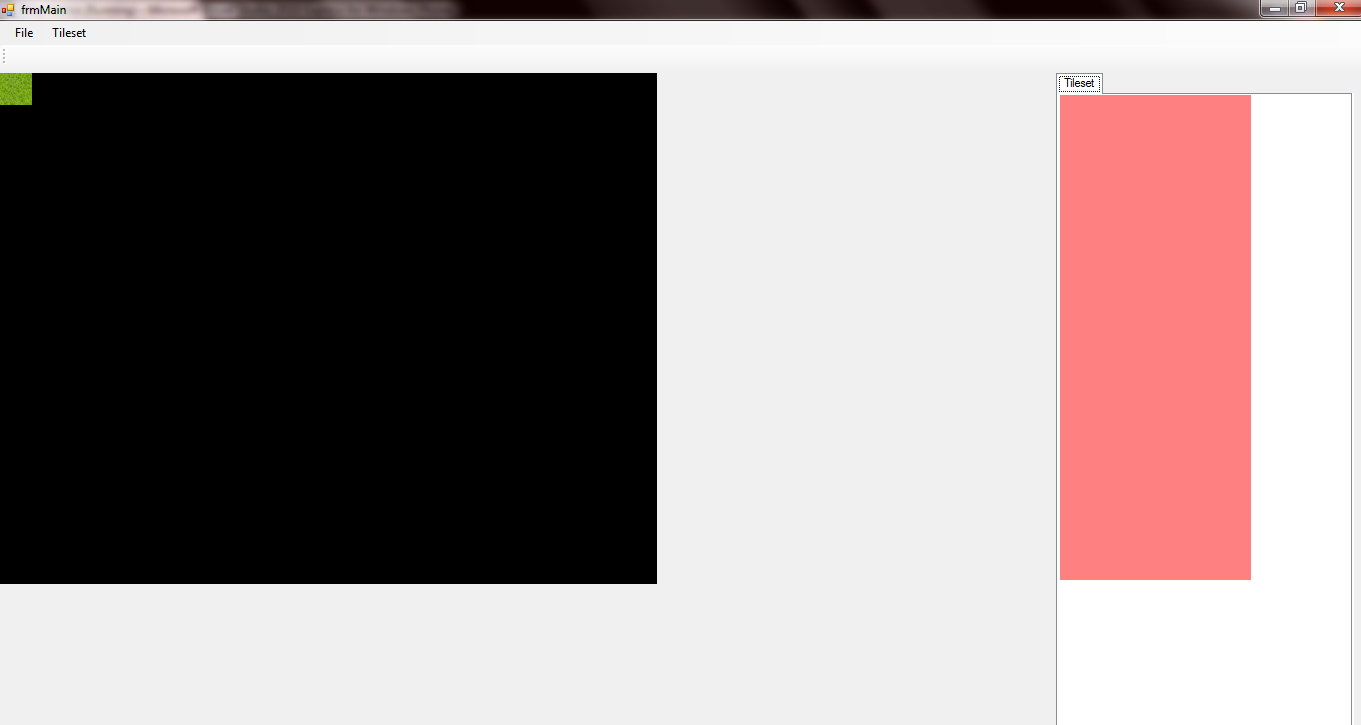
but it's only drawing for one spritebatch. How can I fix this so it draws both the pictureboxes?
the draw sub:
Code:
    Public Sub NewMap()

        GDevice_TILESET.Clear(Color.Black)
        SBatch_TILESET.Begin()
        SBatch_TILESET.Draw(Tileset, New Rectangle(0, 0, 32, 32), New Rectangle(0, 0, 32, 32), Color.White)
        SBatch_TILESET.End()
        GDevice_TILESET.Present()

        GDevice_MAP.Clear(Color.Black)
        SBatch_MAP.Begin()
        SBatch_MAP.Draw(Tileset, New Rectangle(0, 0, 32, 32), New Rectangle(0, 0, 32, 32), Color.White)
        SBatch_MAP.End()
        GDevice_MAP.Present()

    End Sub
this is how it looks like
-
Aug 25th, 2012, 12:45 PM
#2
Re: XNA Corrupted memory
You might be using a different spritebatch for the map box and for the tileset box, but you use the same Texture2D object (TileSet) for both. As that was created with a reference to the map box's GraphicsDevice, it is (presumably?) only renderable in the map box.
I would change the global scope of your OurContent variable to being declared locally within each InitalizeGraphics functions and then create any needed Texture2D objects within those functions.
vb.net Code:
Imports System.Windows.Forms
 Module modPublics
     Public GDevice_MAP As GraphicsDevice
    Public SBatch_MAP As SpriteBatch
     Public GDevice_TILESET As GraphicsDevice
    Public SBatch_TILESET As SpriteBatch
     Public Tileset As Texture2D = Nothing
    Public Mapset As Texture2D = Nothing
      Public Function InitalizeGraphics_TILESET(ByRef Surface As PictureBox) As Boolean
        Dim retValue As Boolean
         Try
            Dim PParam As New PresentationParameters
            PParam.PresentationInterval = PresentInterval.Immediate
            PParam.DeviceWindowHandle = Surface.Handle
            PParam.IsFullScreen = False
             Dim GAdapter As GraphicsAdapter = GraphicsAdapter.Adapters.Item(0)
            GDevice_TILESET = New GraphicsDevice(GAdapter, GraphicsProfile.HiDef, PParam)
             SBatch_TILESET = New SpriteBatch(GDevice_TILESET)
             Dim OurContent = New clsContent.GameContent(GDevice_TILESET)
            OurContent.Content.RootDirectory = "Content"
            '//LOAD GRAPHICS
            Tileset = OurContent.Content.Load(Of Texture2D)("Content/Graphics/Tilesets/0")
             retValue = True
         Catch ex As Exception
            retValue = False
              MessageBox.Show(ex.Message)
        End Try
         Return retValue
    End Function
      Public Function InitalizeGraphics_MAP(ByRef Surface As PictureBox) As Boolean
        Dim retValue As Boolean
         Try
            Dim PParam As New PresentationParameters
            PParam.PresentationInterval = PresentInterval.Immediate
            PParam.DeviceWindowHandle = Surface.Handle
            PParam.IsFullScreen = False
             Dim GAdapter As GraphicsAdapter = GraphicsAdapter.Adapters.Item(0)
            GDevice_MAP = New GraphicsDevice(GAdapter, GraphicsProfile.HiDef, PParam)
             SBatch_MAP = New SpriteBatch(GDevice_MAP)
             Dim OurContent = New clsContent.GameContent(GDevice_MAP)
            OurContent.Content.RootDirectory = "Content"
            '//LOAD GRAPHICS
            Mapset = OurContent.Content.Load(Of Texture2D)("Content/Graphics/Tilesets/0")
             retValue = True
         Catch ex As Exception
            retValue = False
              MessageBox.Show(ex.Message)
        End Try
         Return retValue
    End Function
  End Module
Use the apropriate Texture2D object for the SpriteBatch and GraphicsDevice that you are drawing to. (Tileset with SBatch_TILESET and Mapset with SBatch_MAP)
Code:
Public Sub NewMap()

    GDevice_TILESET.Clear(Color.Black)
    SBatch_TILESET.Begin()
    SBatch_TILESET.Draw(Tileset, New Rectangle(0, 0, 32, 32), New Rectangle(0, 0, 32, 32), Color.White)
    SBatch_TILESET.End()
    GDevice_TILESET.Present()

    GDevice_MAP.Clear(Color.Black)
    SBatch_MAP.Begin()
    SBatch_MAP.Draw(Mapset, New Rectangle(0, 0, 32, 32), New Rectangle(0, 0, 32, 32), Color.White)
    SBatch_MAP.End()
    GDevice_MAP.Present()

End Sub
-
Aug 26th, 2012, 09:24 AM
#3
Thread Starter
Lively Member
Re: XNA Corrupted memory
 Originally Posted by Inferrd

You might be using a different spritebatch for the map box and for the tileset box, but you use the same Texture2D object (TileSet) for both. As that was created with a reference to the map box's GraphicsDevice, it is (presumably?) only renderable in the map box.
I would change the global scope of your OurContent variable to being declared locally within each InitalizeGraphics functions and then create any needed Texture2D objects within those functions.
vb.net Code:
Imports System.Windows.Forms
 Module modPublics
     Public GDevice_MAP As GraphicsDevice
    Public SBatch_MAP As SpriteBatch
     Public GDevice_TILESET As GraphicsDevice
    Public SBatch_TILESET As SpriteBatch
     Public Tileset As Texture2D = Nothing
    Public Mapset As Texture2D = Nothing
      Public Function InitalizeGraphics_TILESET(ByRef Surface As PictureBox) As Boolean
        Dim retValue As Boolean
         Try
            Dim PParam As New PresentationParameters
            PParam.PresentationInterval = PresentInterval.Immediate
            PParam.DeviceWindowHandle = Surface.Handle
            PParam.IsFullScreen = False
             Dim GAdapter As GraphicsAdapter = GraphicsAdapter.Adapters.Item(0)
            GDevice_TILESET = New GraphicsDevice(GAdapter, GraphicsProfile.HiDef, PParam)
             SBatch_TILESET = New SpriteBatch(GDevice_TILESET)
             Dim OurContent = New clsContent.GameContent(GDevice_TILESET)
            OurContent.Content.RootDirectory = "Content"
            '//LOAD GRAPHICS
            Tileset = OurContent.Content.Load(Of Texture2D)("Content/Graphics/Tilesets/0")
             retValue = True
         Catch ex As Exception
            retValue = False
              MessageBox.Show(ex.Message)
        End Try
         Return retValue
    End Function
      Public Function InitalizeGraphics_MAP(ByRef Surface As PictureBox) As Boolean
        Dim retValue As Boolean
         Try
            Dim PParam As New PresentationParameters
            PParam.PresentationInterval = PresentInterval.Immediate
            PParam.DeviceWindowHandle = Surface.Handle
            PParam.IsFullScreen = False
             Dim GAdapter As GraphicsAdapter = GraphicsAdapter.Adapters.Item(0)
            GDevice_MAP = New GraphicsDevice(GAdapter, GraphicsProfile.HiDef, PParam)
             SBatch_MAP = New SpriteBatch(GDevice_MAP)
             Dim OurContent = New clsContent.GameContent(GDevice_MAP)
            OurContent.Content.RootDirectory = "Content"
            '//LOAD GRAPHICS
            Mapset = OurContent.Content.Load(Of Texture2D)("Content/Graphics/Tilesets/0")
             retValue = True
         Catch ex As Exception
            retValue = False
              MessageBox.Show(ex.Message)
        End Try
         Return retValue
    End Function
  End Module
Use the apropriate Texture2D object for the SpriteBatch and GraphicsDevice that you are drawing to. (Tileset with SBatch_TILESET and Mapset with SBatch_MAP)
Code:
Public Sub NewMap()

    GDevice_TILESET.Clear(Color.Black)
    SBatch_TILESET.Begin()
    SBatch_TILESET.Draw(Tileset, New Rectangle(0, 0, 32, 32), New Rectangle(0, 0, 32, 32), Color.White)
    SBatch_TILESET.End()
    GDevice_TILESET.Present()

    GDevice_MAP.Clear(Color.Black)
    SBatch_MAP.Begin()
    SBatch_MAP.Draw(Mapset, New Rectangle(0, 0, 32, 32), New Rectangle(0, 0, 32, 32), Color.White)
    SBatch_MAP.End()
    GDevice_MAP.Present()

End Sub
Thanks, guess it worked!
 Posting Permissions
- You may not post new threads
- You may not post replies
- You may not post attachments
- You may not edit your posts
-
Forum Rules
|
Click Here to Expand Forum to Full Width
|



 Reply With Quote