|

-
Aug 7th, 2012, 10:40 PM
#1
Thread Starter
Fanatic Member

 [RESOLVED] Visual Studio create installer for Wndows Service issue [RESOLVED] Visual Studio create installer for Wndows Service issue
Trying to get my Windows Service to be installable and create the service. By default it is not.
I found this article that appears to have directions, but I don't see the same thing as it does.
http://msdn.microsoft.com/en-us/library/zt39148a.aspx
Get to 'To create a setup project for your service' and #1 has you 'point to Add, and then click New Project.' I don't see 'New Project' listed in Microsoft Visual Studio 2010 Version 10.0.40219.1 SP1Rel
Any ideas on proper steps?
Thanks.
Last edited by lleemon; Aug 8th, 2012 at 10:47 AM.
Reason: RESOLVED
-
Aug 8th, 2012, 01:13 AM
#2
Re: Visual Studio create installer for Wndows Service issue
Did you actually follow the instructions?
In Solution Explorer, right-click your solution node (not the project node), point to Add, and then click New Project.
What exactly did you right-click and what exactly do you see?
-
Aug 8th, 2012, 06:29 AM
#3
Thread Starter
Fanatic Member
Re: Visual Studio create installer for Wndows Service issue
 Originally Posted by jmcilhinney

What exactly did you right-click and what exactly do you see?
Here is what I see:
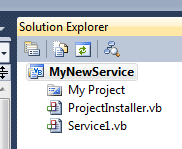
Right click on 'MyNewService'
Mouse over Add
-New Item...
-Existing Item ...
-New Folder
-Windows Form
-User Control
-Componente
-Module
-Class
-
Aug 8th, 2012, 06:49 AM
#4
Re: Visual Studio create installer for Wndows Service issue
Then you're not following the instructions. That is the project, not the solution. If you want VB to display the solution in the Solution Explorer when it contains only one project then you must enable the appropriate setting the IDE Options. Otherwise, you can use the File menu to add the new project and the solution will then be displayed.
-
Aug 8th, 2012, 10:46 AM
#5
Thread Starter
Fanatic Member
Re: Visual Studio create installer for Wndows Service issue
What I did in visual studio 2010:
Tools >> Options...
- Projects and Solutions > General
Check 'Always show solution'
Sure enough, in the Solution Explorer have a new option.
Thanks for the help.
 Posting Permissions
- You may not post new threads
- You may not post replies
- You may not post attachments
- You may not edit your posts
-
Forum Rules
|
Click Here to Expand Forum to Full Width
|



 Reply With Quote
