|

-
Mar 13th, 2012, 08:01 AM
#1
Thread Starter
Member

 [RESOLVED] [ASK]Read and Separate [RESOLVED] [ASK]Read and Separate
-
Mar 13th, 2012, 08:09 AM
#2
Re: [ASK]Read and Separate
1. Declare array variable
2. Use Split function to split entire string on "." into array
3. Loop through array (perhaps using For - Next) and check each element length Len function) and proceed accordingly.
-
Mar 13th, 2012, 08:31 AM
#3
Thread Starter
Member
Re: [ASK]Read and Separate
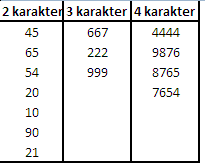
may I ask for examples source code??
thanks b4
-
Mar 13th, 2012, 08:35 AM
#4
Lively Member
Re: [ASK]Read and Separate
Hope this helps
Code:
Dim longNumber As String
Dim twoDigits, threeDigits, fourDigits As String
Dim cnt As Integer
longNumber = "45.65.667.54.222.4444.9876.20.999.8765.7654.10.90.21"

'first seperate the numbers
Dim splitLongNo() As String
splitLongNo = Split(longNumber, ".")

cnt = 1

Do Until cnt >= UBound(splitLongNo)
    Select Case Len(splitLongNo(cnt))
        Case 2
            If twoDigits <> "" Then twoDigits = twoDigits & "." & splitLongNo(cnt) Else twoDigits = splitLongNo(cnt)
        Case 3
            If threeDigits <> "" Then threeDigits = threeDigits & "." & splitLongNo(cnt) Else threeDigits = splitLongNo(cnt)
        Case 4
            If fourDigits <> "" Then fourDigits = fourDigits & "." & splitLongNo(cnt) Else fourDigits = splitLongNo(cnt)
    End Select
cnt = cnt + 1
Loop
'now  split the numbers from each
    Dim twoDigitArray() As String
    twoDigitArray = Split(twoDigits, ".")

    Dim threeDigitArray() As String
    threeDigitArray = Split(threeDigits, ".")

    Dim fourDigitArrays() As String
    fourDigitArrays = Split(fourDigits, ".")


'now read the each block
'read 2 digit numbers
 For x = 0 To UBound(twoDigitArray)
    MsgBox "2 Digit Numbers : " & twoDigitArray(x)
 Next

 'read 3 digit numbers
 For y = 0 To UBound(threeDigitArray)
    MsgBox "3 Digit Numbers : " & threeDigitArray(y)
 Next

 'read 4 digit numbers
 For z = 0 To UBound(fourDigitArrays)
    MsgBox "4 Digit Numbers : " & fourDigitArrays(z)
 Next
-
Mar 13th, 2012, 08:50 AM
#5
Thread Starter
Member
 Re: [ASK]Read and Separate Re: [ASK]Read and Separate
 Originally Posted by sam4help

Hope this helps
Code:
Dim longNumber As String
Dim twoDigits, threeDigits, fourDigits As String
Dim cnt As Integer
longNumber = "45.65.667.54.222.4444.9876.20.999.8765.7654.10.90.21"

'first seperate the numbers
Dim splitLongNo() As String
splitLongNo = Split(longNumber, ".")

cnt = 1

Do Until cnt >= UBound(splitLongNo)
    Select Case Len(splitLongNo(cnt))
        Case 2
            If twoDigits <> "" Then twoDigits = twoDigits & "." & splitLongNo(cnt) Else twoDigits = splitLongNo(cnt)
        Case 3
            If threeDigits <> "" Then threeDigits = threeDigits & "." & splitLongNo(cnt) Else threeDigits = splitLongNo(cnt)
        Case 4
            If fourDigits <> "" Then fourDigits = fourDigits & "." & splitLongNo(cnt) Else fourDigits = splitLongNo(cnt)
    End Select
cnt = cnt + 1
Loop
'now  split the numbers from each
    Dim twoDigitArray() As String
    twoDigitArray = Split(twoDigits, ".")

    Dim threeDigitArray() As String
    threeDigitArray = Split(threeDigits, ".")

    Dim fourDigitArrays() As String
    fourDigitArrays = Split(fourDigits, ".")


'now read the each block
'read 2 digit numbers
 For x = 0 To UBound(twoDigitArray)
    MsgBox "2 Digit Numbers : " & twoDigitArray(x)
 Next

 'read 3 digit numbers
 For y = 0 To UBound(threeDigitArray)
    MsgBox "3 Digit Numbers : " & threeDigitArray(y)
 Next

 'read 4 digit numbers
 For z = 0 To UBound(fourDigitArrays)
    MsgBox "4 Digit Numbers : " & fourDigitArrays(z)
 Next
wow....
very......
very....... helpful 
and I have 1 questions
how to sort(asc/desc) the output (2 digit,3 digit and 4 digit)??
once again thank you very much
-
Mar 13th, 2012, 09:04 AM
#6
Lively Member
Re: [ASK]Read and Separate
you are welcome, good know it helped you;
about sorting came across this code thought might help you;
Code:
Private Sub QuickSort(C() As String, ByVal First As Long, ByVal Last As Long)
    Dim Low As Long, High As Long
    Dim MidValue As String

    Low = First
    High = Last
    MidValue = C((First + Last) \ 2)

    Do
    While C(Low) < MidValue
    Low = Low + 1
    Wend

    While C(High) > MidValue
    High = High - 1
    Wend

    If Low <= High Then
        Swap C(Low), C(High)
        Low = Low + 1
        High = High - 1
    End If
Loop While Low <= High

If First < High Then QuickSort C, First, High
If Low < Last Then QuickSort C, Low, Last
End Sub

Private Sub Swap(ByRef A As String, ByRef B As String)
    Dim T As String

    T = A
    A = B
    B = T
End Sub
and you need to call this for each digit arrays one by one like this
Code:
Call QuickSort(splitArrayName(), 0, UBound(splitArrayName))
something like this in our case
Code:
'now read the each block
'read 2 digit numbers
Call QuickSort(twoDigitArray(), 0, UBound(twoDigitArray))
 For x = 0 To UBound(twoDigitArray)
    Debug.Print "2 Digit Numbers : " & twoDigitArray(x)
 Next

 'read 3 digit numbers
 Call QuickSort(threeDigitArray(), 0, UBound(threeDigitArray))
 For y = 0 To UBound(threeDigitArray)
    Debug.Print "3 Digit Numbers : " & threeDigitArray(y)
 Next

 'read 4 digit numbers
 Call QuickSort(fourDigitArrays(), 0, UBound(fourDigitArrays))
 For z = 0 To UBound(fourDigitArrays)
    Debug.Print "4 Digit Numbers : " & fourDigitArrays(z)
 Next
Last edited by sam4help; Mar 13th, 2012 at 09:08 AM.
-
Mar 13th, 2012, 09:16 AM
#7
Thread Starter
Member
Re: [ASK]Read and Separate
omg.....
many thanks master sam4help 
rep+ for you and RhinoBull
-
Mar 13th, 2012, 09:45 AM
#8
Lively Member
Re: [ASK]Read and Separate
you are welcome, happy to know it helped you.
All the very best,
Sam
-
Mar 14th, 2012, 11:59 AM
#9
Thread Starter
Member
 Re: [ASK]Read and Separate Re: [ASK]Read and Separate
-
Mar 14th, 2012, 12:45 PM
#10
Re: [ASK]Read and Separate
Afdoal
Perhaps something like these changes I made
to Sam's code ...
Code:
Dim longText As String
Dim numAfterX as String
Dim longNumber As String
Dim twoDigits, threeDigits, fourDigits As String
Dim cnt As Integer
'
longText = "45.65.667.54.222.4444.9876.20.999.8765.7654.10.90.21x72"
v1 = Instr(longText, "x")
numAfterX = Mid(longText, v1 + 1)      ' returns "72"
longNumber = Left(longText, v1 - 1)    ' returns "45.65.667.54.222.4444.9876.20.999.8765.7654.10.90.21"
'first seperate the numbers
Dim splitLongNo() As String
splitLongNo = Split(longNumber, ".")
... same as before
The concept is to extract the "x72" first.
Then, you can proceed per Sam's original code.
Spoo
-
Mar 14th, 2012, 03:07 PM
#11
Lively Member
Re: [ASK]Read and Separate
Try something like this,
Code:
Dim longNumber1, longNumber2 As String
Dim twoDigits, threeDigits, fourDigits As String
Dim cnt As Integer
longNumber1 = "45.65.667.54.222.4444.9876.20.999.8765.7654.10.21x72"
longNumber2 = Mid(longNumber1, 1, InStr(1, longNumber1, "x") - 1)

'first seperate the numbers
Dim splitLongNo() As String
Dim splitLongNoAfterX() As String


splitLongNo = Split(longNumber2, ".")
splitLongNoAfterX = Split(longNumber1, "x")

cnt = 1

Do Until cnt >= UBound(splitLongNo)
    Select Case Len(splitLongNo(cnt))
        Case 2
            If twoDigits <> "" Then twoDigits = twoDigits & "." & splitLongNo(cnt) Else twoDigits = splitLongNo(cnt)
        Case 3
            If threeDigits <> "" Then threeDigits = threeDigits & "." & splitLongNo(cnt) Else threeDigits = splitLongNo(cnt)
        Case 4
            If fourDigits <> "" Then fourDigits = fourDigits & "." & splitLongNo(cnt) Else fourDigits = splitLongNo(cnt)
    End Select
cnt = cnt + 1
Loop
'now  split the numbers from each
    Dim twoDigitArray() As String
    twoDigitArray = Split(twoDigits, ".")

    Dim threeDigitArray() As String
    threeDigitArray = Split(threeDigits, ".")

    Dim fourDigitArrays() As String
    fourDigitArrays = Split(fourDigits, ".")


'now read the each block
'read 2 digit numbers
 For x = 0 To UBound(twoDigitArray)
    Debug.Print "2 Digit Numbers : " & twoDigitArray(x)
 Next

 'read 3 digit numbers
 For y = 0 To UBound(threeDigitArray)
    Debug.Print "3 Digit Numbers : " & threeDigitArray(y)
 Next

 'read 4 digit numbers
 For z = 0 To UBound(fourDigitArrays)
    Debug.Print "4 Digit Numbers : " & fourDigitArrays(z)
 Next

 'read number after x
    Debug.Print "Number After X is : " & splitLongNoAfterX(1)
-
Mar 19th, 2012, 01:23 PM
#12
Thread Starter
Member
-
Mar 19th, 2012, 04:32 PM
#13
Re: [ASK]Read and Separate
Afdoal
Well, what do you think the solution might be?
I would say that you have the basics, especially from Sam ..
Code:
splitLongNo = Split(longNumber2, ".")
splitLongNoAfterX = Split(longNumber1, "x")
Instead of telling you what to do (you won't learn anything
that way), it's time for you to put your thinking cap on ..
- What is different with the text string you now are showing?
- How might you use Sam's code to deal with it.
Spoo
-
Mar 20th, 2012, 01:42 AM
#14
Thread Starter
Member
 Re: [ASK]Read and Separate Re: [ASK]Read and Separate
thanks Spoo for your respon's 
before getting this case
Code:
958.30.65.667.54.222.4444.9876x10.20.999.8765.7654.10.90.21x125
, I have a case like this:
Code:
958.30.65.667.54.222.4444.9876x10,20.999.8765.7654.10.90.21x125
where the number of Digit After x (before the new dot(".")) is
min=1
max=4
and i used this code for fro get the "X" location
Code:
'Spilit the text
Private Function SplitTextNew(ByVal text As String, ByVal digit As Integer, Optional ByVal isDigitAfterX As Boolean = False) As String
    Dim arrText1()  As String
    Dim arrText2()  As String

    Dim tmpText     As String
    Dim i           As Integer

    arrText1 = Split(text, "x", , vbTextCompare)
    If isDigitAfterX Then
        SplitTextNew = arrText1(UBound(arrText1))
    Else
        arrText2 = Split(arrText1(0), ".")
        For i = 0 To UBound(arrText2)
            If Len(arrText2(i)) = digit Then
                tmpText = tmpText & arrText2(i) & "."
            End If
        Next i
        If Len(tmpText) > 0 Then tmpText = Left(tmpText, Len(tmpText) - 1)

        SplitTextNew = tmpText
    End If
End Function

Private Sub Command7_Click()
    Dim strText As String
    Dim arrKoma() As String
    Dim arrX() As String
    Dim i As Integer
    strText = Text1.text
    If InStr(strText, ",") Then
        arrKoma = Split(strText, ",")
            For i = 0 To UBound(arrKoma)
                arrX = Split(arrKoma(i), "x")
                'save 2 digit
                Set lstV = ListView1.ListItems.Add(, , SplitTextNew(arrX(0), 2))
                    lstV.SubItems(1) = SplitTextNew(arrX(1), 2, True)

                'save 3 digit
                Set lstV = ListView2.ListItems.Add(, , SplitTextNew(arrX(0), 3))
                    lstV.SubItems(1) = SplitTextNew(arrX(1), 3, True)

                'save 4 digit
                Set lstV = ListView3.ListItems.Add(, , SplitTextNew(arrX(0), 4))
                    lstV.SubItems(1) = SplitTextNew(arrX(1), 4, True)
                DoEvents
            Next i
    End If
End Sub
and now, on the new case, the coma(",") symbol have been change with dot (".") symbol
Code:
958.30.65.667.54.222.4444.9876x10.20.999.8765.7654.10.90.21x125
iam confused, how to get the "." after Digit After "x" (in the previous case get the "," after Digit After "x")
-
Mar 20th, 2012, 02:23 AM
#15
Lively Member
Re: [ASK]Read and Separate
try something like this
Code:
longNumber1 = "958.30.65.667.54.222.4444.9876x10.20.999.8765.7654.10.90.21x125"

splitLongNoAfterX = Split(longNumber1, "x")


'read number after x after dot
 For d = 0 To UBound(splitLongNoAfterX)
    Debug.Print "number after x till dot : " & IIf(InStr(splitLongNoAfterX(d), ".") = 0, splitLongNoAfterX(d), Replace(Mid(splitLongNoAfterX(d), 1, InStr(splitLongNoAfterX(d), ".")), ".", ""))
Next
-
Mar 20th, 2012, 11:18 PM
#16
Thread Starter
Member
 Re: [ASK]Read and Separate Re: [ASK]Read and Separate
Originally Posted by sam4help
try something like this
Code:
longNumber1 = "958.30.65.667.54.222.4444.9876x10.20.999.8765.7654.10.90.21x125"

splitLongNoAfterX = Split(longNumber1, "x")


'read number after x after dot
 For d = 0 To UBound(splitLongNoAfterX)
    Debug.Print "number after x till dot : " & IIf(InStr(splitLongNoAfterX(d), ".") = 0, splitLongNoAfterX(d), Replace(Mid(splitLongNoAfterX(d), 1, InStr(splitLongNoAfterX(d), ".")), ".", ""))
Next
thanks sams
but this is still not solve the problem. because they still show the other digits (958)
number after x till dot : 958
number after x till dot : 10
number after x till dot : 125
-
Mar 20th, 2012, 11:46 PM
#17
Lively Member
Re: [ASK]Read and Separate
sorry you should start from 1
Code:
'read number after x after dot
 For d = 1 To UBound(splitLongNoAfterX)
    Debug.Print "number after x till dot : " & IIf(InStr(splitLongNoAfterX(d), ".") = 0, splitLongNoAfterX(d), Replace(Mid(splitLongNoAfterX(d), 1, InStr(splitLongNoAfterX(d), ".")), ".", ""))
Next
-
Mar 30th, 2012, 08:13 PM
#18
Thread Starter
Member
Tags for this Thread
 Posting Permissions
- You may not post new threads
- You may not post replies
- You may not post attachments
- You may not edit your posts
-
Forum Rules
|
Click Here to Expand Forum to Full Width
|




 Reply With Quote


 Re: [ASK]Read and Separate

